> For the complete documentation index, see [llms.txt](https://docs.coda.co/llms.txt). Markdown versions of documentation pages are available by appending `.md` to page URLs; this page is available as [Markdown](https://docs.coda.co/changelog/2024-codapay-changelog/new-channel-announcement-google-pay-apple-pay.md).

# New Channel Announcement: Google Pay / Apple Pay

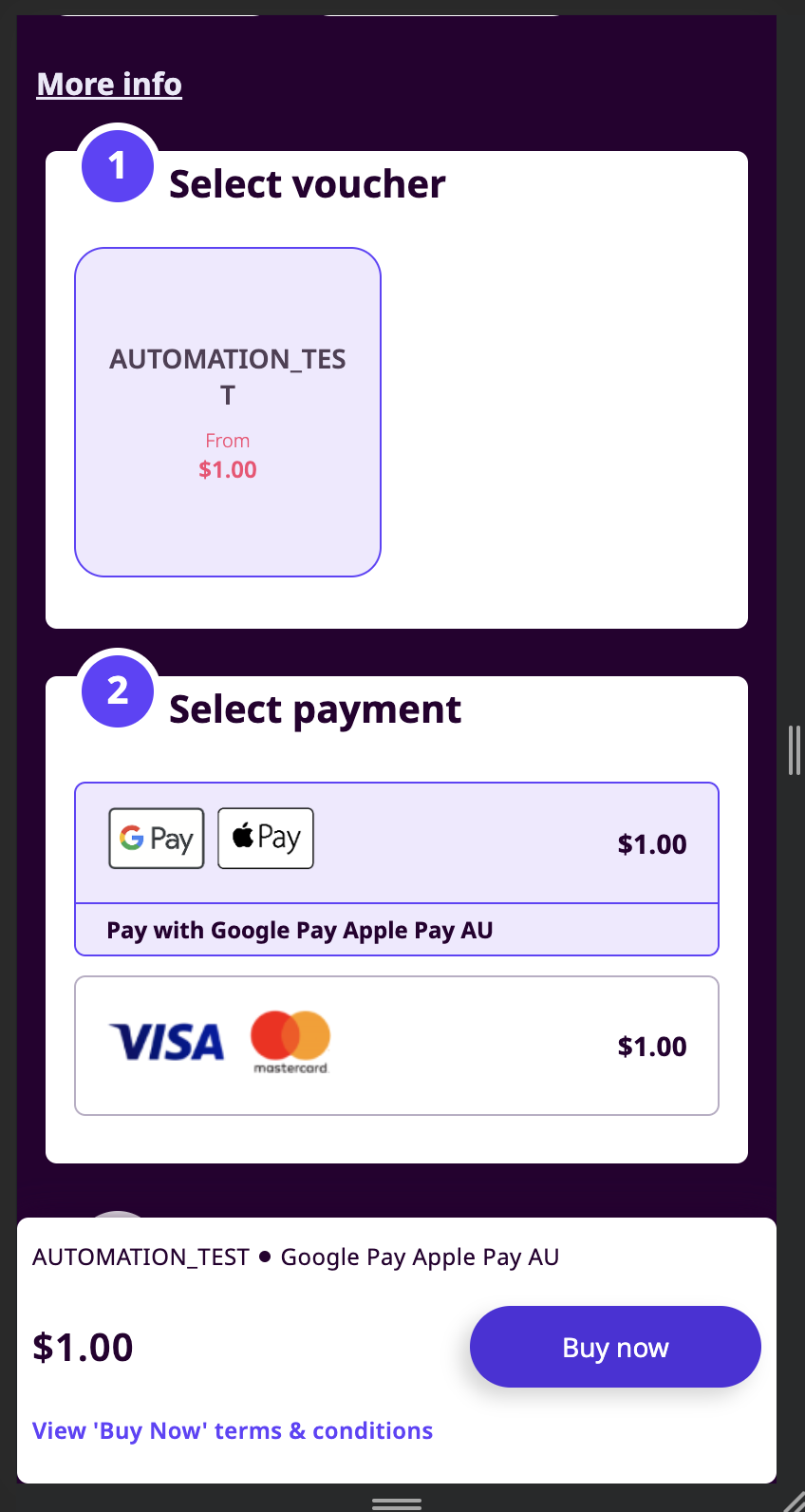
❗We are excited to introduce "Google Pay/Apple Pay," our newest payment channel designed exclusively for Codapay users. With the inclusion of "Google Pay/Apple Pay," we are proud to offer a seamless and convenient payment option with E-wallet support.

Here are some key details about this new payment option:\
📱 E-wallet Channel: Google Pay/Apple Pay is an e-wallet platform allowing users to purchase their desired items with their familiar e-wallet channel.

💲 Price Point Limit: Refer [here](https://coda-payments.gitbook.io/coda-private-technical-documentation/wVhQbDbPyotRr4wm96SR/references/price-point). CONTACT Business Development Team for further details.

🔒 Authentication: When proceeding with payment in Google Pay/Apple Pay, it redirects users to the Pay checkout page, click "Pay with Link" to proceed with your payment.

⏰ Transaction Expiry: Please note that transactions made through Google Pay/Apple Pay have a validity period of 15 minutes. Users may complete payment within this timeframe to ensure a successful transaction.

💻 Integration Details: For merchants and developers, please be aware that Google Pay/Apple Pay integration supports the payment page API. Unfortunately, the Backend API integration is currently not available. We appreciate your understanding and cooperation in this matter.

We encourage all our users to take advantage of this new payment channel, leveraging E-wallet for a hassle-free and efficient payment experience. By incorporating "Google Pay/Apple Pay" into our platform, we aim to provide a tailored and reliable payment solution that meets the specific needs of our users.

### Flow Description

<table data-header-hidden><thead><tr><th width="316"></th><th></th></tr></thead><tbody><tr><td><img src="https://files.readme.io/c071a2d-image.png" alt=""></td><td><p></p><ol><li>The user selects Google / Apple Pay as a payment channel. Coda displays the payment button Google / Apple / Link depending on the customer browser and other parameters)</li></ol></td></tr><tr><td><img src="/files/8Wogqd5Fx8irTqnQXCAO" alt="" data-size="original"></td><td>2. The user clicks on the payment button and proceeds with the payment</td></tr><tr><td><img src="/files/F1ie3r0tr0Cq4yKQ7oQf" alt="" data-size="original"></td><td>3. Coda displays pending page</td></tr><tr><td><img src="/files/mWEXtSt02uu2Dw281qeW" alt="" data-size="original"></td><td>4. Payment completed</td></tr></tbody></table>

### List of countries

<table><thead><tr><th>Country</th><th width="322.3333333333333">Payment Channel Name</th><th>Payment Channel ID</th></tr></thead><tbody><tr><td>Kuwait</td><td>Google Pay Apple Pay Kuwait</td><td>860</td></tr><tr><td>Hong Kong</td><td>Google Pay Apple Pay Hong Kong</td><td>861</td></tr><tr><td>Malaysia</td><td>Google Pay Apple Pay Malaysia</td><td>862</td></tr><tr><td>Philippines</td><td>Google Pay Apple Pay Philippines</td><td>864</td></tr><tr><td>Great Britain (UK, Scotland, Wales)</td><td>Google Pay Apple Pay United Kingdom</td><td>865</td></tr><tr><td>Switzerland</td><td>Google Pay Apple Pay Switzerland</td><td>867</td></tr><tr><td>Austria</td><td>Google Pay Apple Pay Austria</td><td>868</td></tr><tr><td>Sweden</td><td>Google Pay Apple Pay Sweden</td><td>869</td></tr><tr><td>Mexico</td><td>Google Pay Apple Pay Mexico</td><td>870</td></tr><tr><td>Belgium</td><td>Google Pay Apple Pay Belgium</td><td>871</td></tr><tr><td>Czech Republic</td><td>Google Pay Apple Pay Czech Republic</td><td>872</td></tr><tr><td>Denmark</td><td>Google Pay Apple Pay Denmark</td><td>873</td></tr><tr><td>Germany</td><td>Google Pay Apple Pay Germany</td><td>874</td></tr><tr><td>Hungary</td><td>Google Pay Apple Pay Hungary</td><td>875</td></tr><tr><td>Italy</td><td>Google Pay Apple Pay Italy</td><td>876</td></tr><tr><td>Netherlands</td><td>Google Pay Apple Pay Netherlands</td><td>877</td></tr><tr><td>Norway</td><td>Google Pay Apple Pay Norway</td><td>878</td></tr><tr><td>Poland</td><td>Google Pay Apple Pay Poland</td><td>879</td></tr><tr><td>Portugal</td><td>Google Pay Apple Pay Portugal</td><td>880</td></tr><tr><td>Romania</td><td>Google Pay Apple Pay Romania</td><td>881</td></tr><tr><td>Spain</td><td>Google Pay Apple Pay Spain</td><td>882</td></tr><tr><td>New Zealand</td><td>Google Pay Apple Pay New Zealand</td><td>883</td></tr></tbody></table>


---

# Agent Instructions
This documentation is published with GitBook. GitBook is the documentation platform designed so that both humans and AI agents can read, navigate, and reason over technical content effectively. Learn more at gitbook.com.

## Querying This Documentation
If you need additional information that is not directly available in this page, you can query the documentation dynamically by asking a question.

Perform an HTTP GET request on the current page URL with the `ask` query parameter, and the optional `goal` query parameter:

```
GET https://docs.coda.co/changelog/2024-codapay-changelog/new-channel-announcement-google-pay-apple-pay.md?ask=<question>&goal=<endgoal>
```

`ask` is the immediate question: it should be specific, self-contained, and written in natural language.
`goal` is optional and describes the broader end goal you are ultimately trying to accomplish on behalf of the user. GitBook uses it to tailor the answer towards what is most useful for that goal.

The response will contain a direct answer to the question and relevant excerpts and sources from the documentation.

Use this mechanism when the answer is not explicitly present in the current page, you need clarification or additional context, or you want to retrieve related documentation sections.