> For the complete documentation index, see [llms.txt](https://docs.coda.co/llms.txt). Markdown versions of documentation pages are available by appending `.md` to page URLs; this page is available as [Markdown](https://docs.coda.co/changelog/legacy-changelog/codapay-payment-page-new-design.md).
# Codapay Payment Page New Design
We're excited to introduce the latest version of Codapay's Payment Page with a fresh and user-friendly design. This update brings a host of enhancements to improve the payment experience for both businesses and customers.
## Here's what's new 🔖
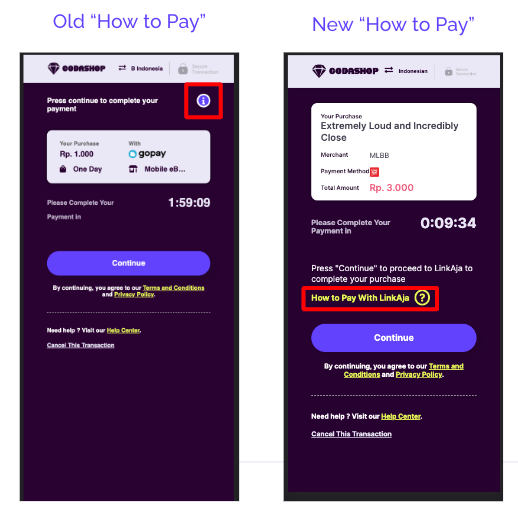
### How to Pay revamp
By converting the "?" icon to a text link, we will provide users with a clearer signal if they require help with payment instructions. This will in turn reduce payment error and abandon rate, leading to higher purchase success.
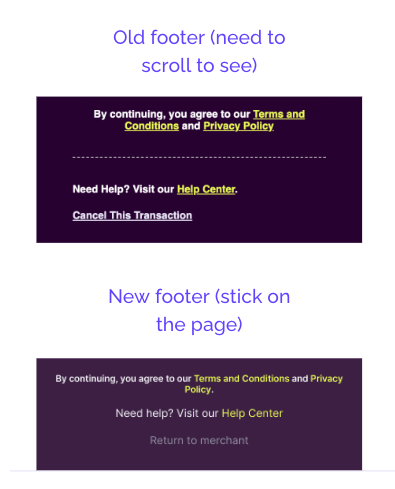
### Footer revamp
By having a sticky footer that contains the important shared links across the different checkout pages, we will provide better guidance to the users. This will result in higher purchase success.
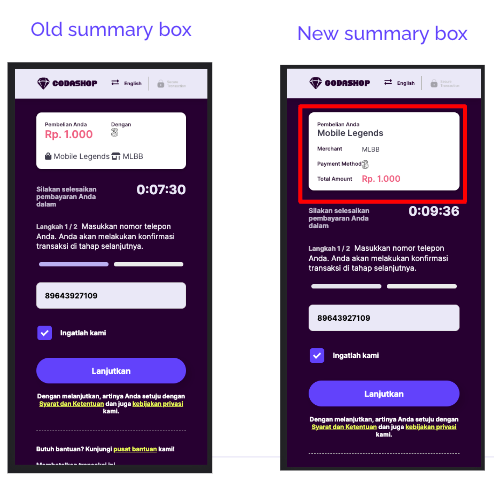
### Summary Box Revamp
By displaying the item name in full, we give users higher confidence in transacting through Codapay as they are able to review their purchases. This will result in high purchase success.
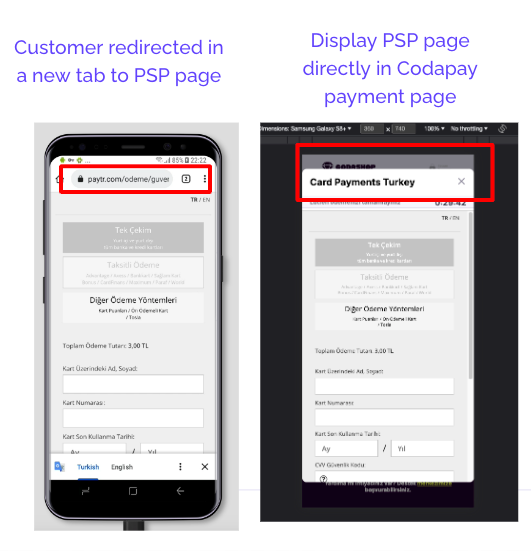
### Redirection Revamp
By keeping customers on Codapay payment page instead of redirecting them to the provider URL in a new tab, we’ll decrease the purchase friction and increase conversion.
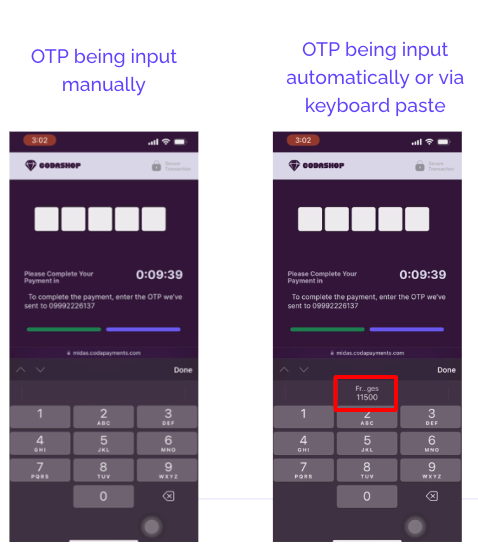
### OTP Autofill / Autopaste
By offering the possibility for users to paste OTP code from their push notification or auto-filling OTP form, they can avoid switching from the payment page and their text application, resulting in better UX and conversion.
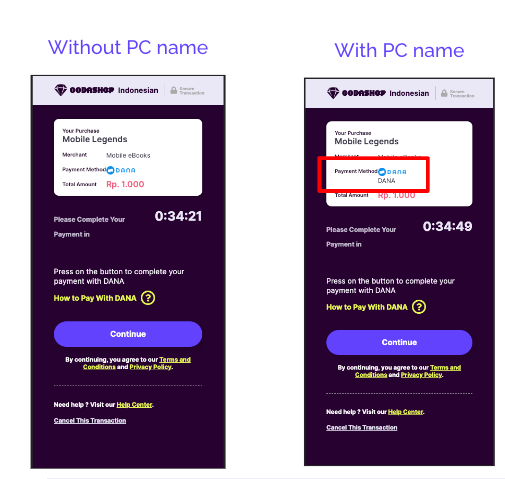
### Checkout - Display Payment Method name
By displaying the payment method name in full, we give users higher confidence in transacting through Codapay as they are able to review the payment method they chose in the previous step. This will result in high purchase success.
## Payment Channel Selection Page Redesigned for Added Appeal

---
# Agent Instructions
This documentation is published with GitBook. GitBook is the documentation platform designed so that both humans and AI agents can read, navigate, and reason over technical content effectively. Learn more at gitbook.com.
## Querying This Documentation
If you need additional information that is not directly available in this page, you can query the documentation dynamically by asking a question.
Perform an HTTP GET request on the current page URL with the `ask` query parameter, and the optional `goal` query parameter:
```
GET https://docs.coda.co/changelog/legacy-changelog/codapay-payment-page-new-design.md?ask=&goal=
```
`ask` is the immediate question: it should be specific, self-contained, and written in natural language.
`goal` is optional and describes the broader end goal you are ultimately trying to accomplish on behalf of the user. GitBook uses it to tailor the answer towards what is most useful for that goal.
The response will contain a direct answer to the question and relevant excerpts and sources from the documentation.
Use this mechanism when the answer is not explicitly present in the current page, you need clarification or additional context, or you want to retrieve related documentation sections.