> For the complete documentation index, see [llms.txt](https://docs.coda.co/llms.txt). Markdown versions of documentation pages are available by appending `.md` to page URLs; this page is available as [Markdown](https://docs.coda.co/changelog/legacy-changelog/thailand-card-payment-price-point-and-flow-update.md).
# Thailand Card Payment price point and flow update
The minimum Price Point decreased and the changing flow redirected to the 3DS page where customers need to input the OTP for payment verification.
## Price Point update
| Title | Previous | Updated |
| ------------------- | -------- | ------- |
| Minimum Price Point | THB 12 | THB 1 |
***
## New Flow Description
* User selects Card Payment Thailand as the preferred payment method
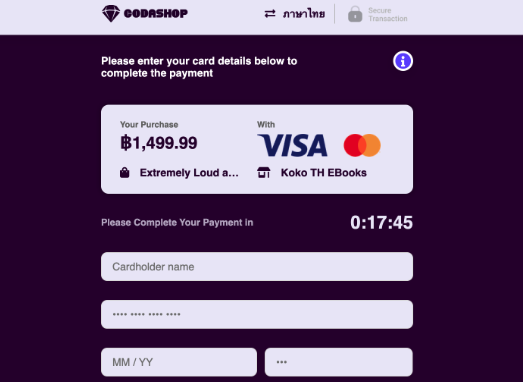
* User needs to input the Card details (Card number, Cardholder name, Expiry month & year, and 3 digits of CVV)
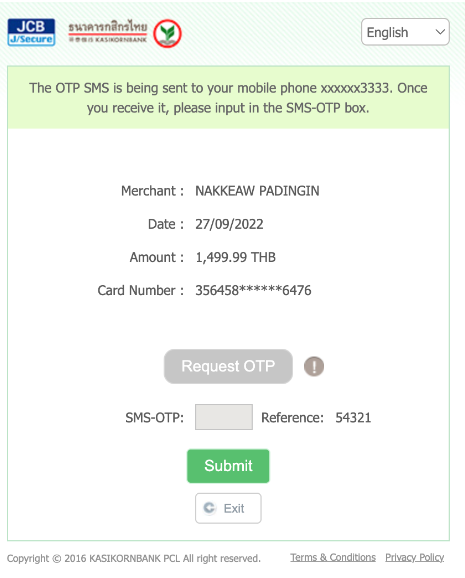
* User will be redirected to the 3DS page where they need to enter the OTP
* Coda will process the payment with KBANK as the provider and will charge the customer
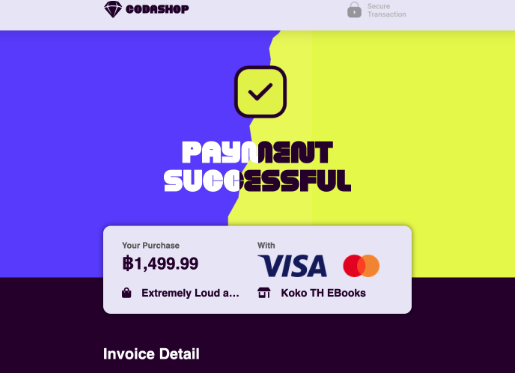
* After the payment is confirmed, Coda will display the success page
***
## Screen Flow (How it works)
1. Coda\
User select Card Payments Thailand as the preferred payment channel. User will be prompt to fill the Cardholder name, Card number, Expiry date, and 3 Digits of CVV
2. Coda\
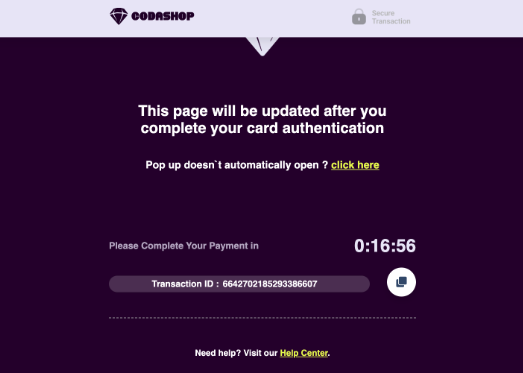
Coda will show the pending page
3. KBANK\
User will be redirected to the 3DS page where they need to input the OTP for the payment verification.
4. Coda\
Once the payment is confirmed, Coda will show the success page
{% hint style="success" %}
👍 For any inquiries, please contact .
{% endhint %}
---
# Agent Instructions
This documentation is published with GitBook. GitBook is the documentation platform designed so that both humans and AI agents can read, navigate, and reason over technical content effectively. Learn more at gitbook.com.
## Querying This Documentation
If you need additional information that is not directly available in this page, you can query the documentation dynamically by asking a question.
Perform an HTTP GET request on the current page URL with the `ask` query parameter, and the optional `goal` query parameter:
```
GET https://docs.coda.co/changelog/legacy-changelog/thailand-card-payment-price-point-and-flow-update.md?ask=&goal=
```
`ask` is the immediate question: it should be specific, self-contained, and written in natural language.
`goal` is optional and describes the broader end goal you are ultimately trying to accomplish on behalf of the user. GitBook uses it to tailor the answer towards what is most useful for that goal.
The response will contain a direct answer to the question and relevant excerpts and sources from the documentation.
Use this mechanism when the answer is not explicitly present in the current page, you need clarification or additional context, or you want to retrieve related documentation sections.