> For the complete documentation index, see [llms.txt](https://docs.coda.co/llms.txt). Markdown versions of documentation pages are available by appending `.md` to page URLs; this page is available as [Markdown](https://docs.coda.co/codapay/integration-guides/testing-guide/sandbox-configuration-and-production-configuration.md).
# Sandbox Configuration and Production Configuration
To configure please proceed to [Publisher Portal](https://portal.coda.co/) -> Products -> Codapay -> Sandbox/Production Configuration
## Merchant & URL Configuration
1. Proceed to Publisher Portal > Products > Codapay > Sandbox/Production Configuration
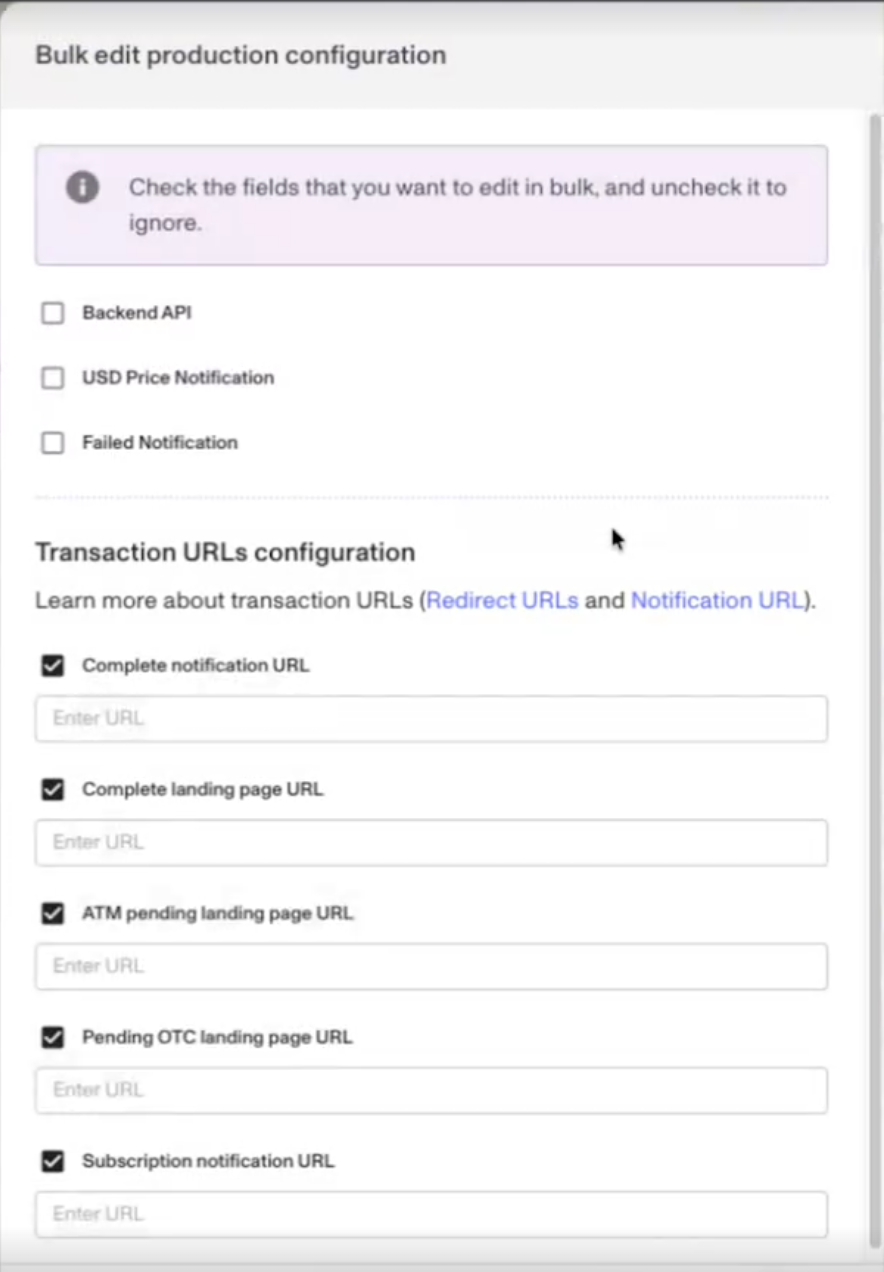
2. Select "Edit" > "Merchant & URLs configuration. Or select the countries > "Bulk edit configuration"
***
**Backend API**: This is required if you're integrating with [Backend API](/codapay/integration-guides/payment-channel-info/backend-api.md)
**USD Price Notification**: By activating, you will receive the init USD Price appended to the end of the callback parameter (Only applicable for "currency": 840)
{% tabs %}
{% tab title="Sample response" %}
\
PaymentType=23\&ResultCode=0\&Checksum=bbb4828b8d2a1bafb123a12b55d666f5&USDPrice=100.00
{% endtab %}
{% endtabs %}
**Failed Notification:** The notification URL would receive failed transaction notification as well, including expired transaction.
**Complete notification URL**: When a transaction has been completed with Success status, Codapay notifies the partner's application using the "Complete notification URL", also known as "Callback URL"
**Complete landing page URL**: **(Supports HTTP/HTTPS/Deeplink)**
This URL defines which page the customers are being redirected to after completing the transaction in Coda's payment interface.
Please reuse the same redirect address if there's no categorized redirect page:
* ATM pending landing page URL
* Pending OTC landing page URL
\*No configuration required - Subscription notification URL
***
## Payment Page Configuration
1. Proceed to Publisher Portal > Products > Codapay > Sandbox/Production Configuration
2. Select "Edit" > "Coda payment page configuration"
**Payment page configuration (Only applicable for "payType": 0)**
Calling `"payType": 0` allows the user to choose the preferred payment without the merchant designing the payment channel selection page (PCSP) and continuing payment.
#### Note:
* PCSP does not display fixed price point channel and Voucher (cash card) channel
* Only the amount supported by the payment channel will be shown
* Payment channel displayed as "Not Init" status means it's not activated; please contact Codapay support team for further assistance.
***
## **Bulk edit configuration**
**To use the "Bulk edit configuration", you'd need to select the titles.**
Filtering options:
* Title name
* Country name
---
# Agent Instructions
This documentation is published with GitBook. GitBook is the documentation platform designed so that both humans and AI agents can read, navigate, and reason over technical content effectively. Learn more at gitbook.com.
## Querying This Documentation
If you need additional information that is not directly available in this page, you can query the documentation dynamically by asking a question.
Perform an HTTP GET request on the current page URL with the `ask` query parameter, and the optional `goal` query parameter:
```
GET https://docs.coda.co/codapay/integration-guides/testing-guide/sandbox-configuration-and-production-configuration.md?ask=&goal=
```
`ask` is the immediate question: it should be specific, self-contained, and written in natural language.
`goal` is optional and describes the broader end goal you are ultimately trying to accomplish on behalf of the user. GitBook uses it to tailor the answer towards what is most useful for that goal.
The response will contain a direct answer to the question and relevant excerpts and sources from the documentation.
Use this mechanism when the answer is not explicitly present in the current page, you need clarification or additional context, or you want to retrieve related documentation sections.