# Explore our Products & Services

Welcome to the Coda Docs, your primary resource for exploring our cutting-edge solutions that drive safe, successful, and seamless digital content monetization worldwide!

## <mark style="color:purple;">Solutions</mark>

Coda offers a full range of solutions that together form the Operating System for monetizing digital goods. Our solutions are dedicated to maximizing the impact of out-of-app monetization, helping Publishers drive D2C & channel commerce growth, expand payment acceptance, enhance conversion & loyalty, and grow their user base and market coverage.

{% @gitbook-payment-search/coda-growth-suite-diagram %}

Explore Coda’s solution guides, documentation, and examples, all crafted to help partners understand and integrate our best-in-class solutions. We also have dedicated teams to support every step of the way. Feel free to reach out to us at [Contact Us](/contact-us)

Thanks for dropping by!


# CODA PORTAL

Coda Portal is your single access point to onboard, test integrations, manage agreements, and run operations across payments, distribution, and D2C commerce – making it easy to stay in control and keep things moving.

Get started fast with guided onboarding – from setup to signing. Then manage products, promotions, and payments with confidence. Coda Portal puts everything in one secure, easy-to-use platform, so you stay in control from day one.

To get started, visit [Coda Portal here](https://portal.coda.co/signup).

### With Coda Portal, you can:

* **Complete onboarding seamlessly**, including reviewing agreements, signing contracts, and setting up your organization profile.
* **Access and manage agreements** at any time, with full visibility into contract terms, statuses, and renewal timelines.
* **Testing** Coda’s solutions using our sandbox tools for ensuring thorough testing&#x20;
* **Monitor performance in real-time**, including sales, transactions, and retention metrics — segmented by country, product, or partner.
* **Manage products and offers**, from creating SKUs to setting up promotions and localized pricing.
* **Oversee payments and payouts**, with clear reporting and reconciliation tools to stay compliant and organized.
* Gain **data-driven insights** with dashboards covering conversion funnels, payer behavior, and market performance.

### This document walks you through how to:

* **Navigate the Portal** and complete your organization’s onboarding steps.
* **Review and sign agreements digitally**, ensuring compliance and readiness to launch.
* **Manage SKUs and offers** to keep your product catalog current.
* **Track performance and analytics** to optimize monetization and user engagement.
* **Set up team roles and permissions** for secure collaboration across departments.

### Get started fast in 3 Steps

1. **Onboard and sign** – Review contracts, sign digitally, and set up your organization profile in minutes.
2. **Configure and connect** – Add products, localize offers, and fine-tune payments, reporting, and compliance with full settings access.
3. **Launch and grow** – Go live with Coda’s solutions, then track performance and scale with real-time insights.


# Activate Your Account

Below are all the guides that will assist you in getting started with Coda

## Guides

<table data-card-size="large" data-view="cards"><thead><tr><th align="center"></th><th data-hidden data-card-target data-type="content-ref"></th></tr></thead><tbody><tr><td align="center"><strong>Complete Contract Signing</strong></td><td><a href="/general-information/coda-portal/activate-your-account/complete-contract-signing">Complete Contract Signing</a></td></tr><tr><td align="center"><strong>Submit KYB and Content Details</strong></td><td><a href="/general-information/coda-portal/activate-your-account/complete-account-verification-to-go-live">Complete Account Verification to Go Live</a></td></tr><tr><td align="center"><strong>Submit Bank Ownership Proof</strong></td><td><a href="/general-information/coda-portal/activate-your-account/submit-bank-ownership-proof">Submit Bank Ownership Proof</a></td></tr><tr><td align="center"><strong>Self-Billing Option</strong></td><td><a href="/general-information/coda-portal/activate-your-account/self-billing">Self-billing</a></td></tr></tbody></table>


# Complete Contract Signing

Learn how to complete contract signing using the Coda Portal.

Dear Publisher,

Welcome! This document will guide you on how to access Coda’s Content monetization agreement and initiate e-signing on the Coda Portal. We’re thrilled to have you onboard!


# 1. Review Publisher Contract/Agreement

Click on the Verify Account button or Click on Profile icon and select the **Business Profile** tab.

<figure><img src="https://611292228-files.gitbook.io/~/files/v0/b/gitbook-x-prod.appspot.com/o/spaces%2Fl56STCN5yoV1K1MhVEvU%2Fuploads%2FHZCSXu9X7F60eli8J0P5%2FScreenshot%202025-12-24%20at%201.09.07%E2%80%AFAM.png?alt=media&amp;token=e6358b87-2f43-4c22-ad28-cf872d68c251" alt=""><figcaption></figcaption></figure>

Before sending the contract for e-signature, please carefully review the Contract/Agreement on this page on the Coda Portal.&#x20;

If you need to download the contract to share it internally, please click on the **Open in a new window** button to open the agreement in a new tab for downloading.

<figure><img src="https://611292228-files.gitbook.io/~/files/v0/b/gitbook-x-prod.appspot.com/o/spaces%2Fl56STCN5yoV1K1MhVEvU%2Fuploads%2FtA09cEvg1dlbWEUMsCzB%2FScreenshot%202025-12-24%20at%201.12.56%E2%80%AFAM.png?alt=media&amp;token=88bf98d1-6228-4b59-8eb7-dc75ab5138e6" alt=""><figcaption></figcaption></figure>


# 2. Send Contract and Initiate e-signing process

When ready, please enter the following details of the Signatory

1. Enter the Full Name of the Signatory
2. Enter the email address of the Signatory

When the above information is properly filled, click on the **Send Contract** button.

<figure><img src="https://611292228-files.gitbook.io/~/files/v0/b/gitbook-x-prod.appspot.com/o/spaces%2Fl56STCN5yoV1K1MhVEvU%2Fuploads%2FSjpqNA6WbeJEeaoMYYFs%2FScreenshot%202025-12-24%20at%201.14.07%E2%80%AFAM.png?alt=media&amp;token=2f5a43b2-516a-4ceb-8e4b-f9f711f79177" alt=""><figcaption></figcaption></figure>

Once you confirm and click on **Confirm**, the contract will be sent to the email of the signatory for e-signing.

<figure><img src="https://611292228-files.gitbook.io/~/files/v0/b/gitbook-x-prod.appspot.com/o/spaces%2Fl56STCN5yoV1K1MhVEvU%2Fuploads%2FJXYDJTxPQs0qdkPZXI7W%2FScreenshot%202025-12-24%20at%201.14.50%E2%80%AFAM.png?alt=media&amp;token=51ee75de-d397-4fd7-8e34-767ef26e93c7" alt=""><figcaption></figcaption></figure>


# 3. Completing the Contract e-signing Process

Once the contract is sent, the status of the agreement will change to **Waiting to Sign.** Make sure that the authorized signatory signs the contract.

<figure><img src="https://611292228-files.gitbook.io/~/files/v0/b/gitbook-x-prod.appspot.com/o/spaces%2Fl56STCN5yoV1K1MhVEvU%2Fuploads%2FlVIE3W2chAX56TBdJbxm%2FScreenshot%202025-12-24%20at%201.18.33%E2%80%AFAM.png?alt=media&amp;token=78418bc9-070e-44aa-92a8-4d32ffee51ec" alt=""><figcaption></figcaption></figure>

Once the authorized signatory signs the contract, the status will change to **Completed.**

<figure><img src="https://611292228-files.gitbook.io/~/files/v0/b/gitbook-x-prod.appspot.com/o/spaces%2Fl56STCN5yoV1K1MhVEvU%2Fuploads%2FYprBgzmEdHsygWSIMlml%2FScreenshot%202025-12-24%20at%201.21.27%E2%80%AFAM.png?alt=media&amp;token=f3cdfd61-cb88-4082-890c-acc7bbac5950" alt=""><figcaption></figcaption></figure>

That's it! Congratulations on e-signing your agreement with Coda.

If you have any questions about the agreement, don't hesitate to reach out to your account manager or raise a ticket from the Coda Portal support tab.


# Complete Account Verification to Go Live

Submit KYC information on Coda Portal to Verify Account

Dear Publisher,

Welcome! This document will guide you on how to share your KYB and Content details on the Coda Portal for verification. KYB process is required to use Coda's solutions and comply with regulatory requirements. Let’s proceed.

Note: In order to proceed with KYB verification process, you have to complete the Contract e-signing step first.

Also, in case you have any queries or need clarification, please reach out to our team by raising a support ticket on the Coda Portal in the **Support** tab.


# 1. Login on the Portal

## Logging into your Coda Portal account

1. Open Coda Portal here: [**https:/portal.coda.co**](https://portal.coda.co/)
2. Login using your email address\
   \
   If you are not sure if your email is registered, please contact your friendly Account Manager. S/he will be able to create a Coda Portal account for you.<br>

   <figure><img src="https://611292228-files.gitbook.io/~/files/v0/b/gitbook-x-prod.appspot.com/o/spaces%2Fl56STCN5yoV1K1MhVEvU%2Fuploads%2FlYkrONNhC3X6HEaBoMuJ%2FLog%20In.svg?alt=media&amp;token=23d7a360-4bb9-4956-80ce-b3c7ab3f60f0" alt=""><figcaption></figcaption></figure>

## Go to&#x20;

1. Click on your **Profile** icon at the bottom left, and select **Business Profile**.
2. Once you are on Business profile page, click on **Complete Verification** button on Account verification card

<figure><img src="https://611292228-files.gitbook.io/~/files/v0/b/gitbook-x-prod.appspot.com/o/spaces%2Fl56STCN5yoV1K1MhVEvU%2Fuploads%2FJrVDWTSvsl0CPk3yKmDR%2FScreenshot%202025-12-24%20at%201.25.52%E2%80%AFAM.png?alt=media&amp;token=79dcc485-b3f4-478b-97a3-e4d285d2efaf" alt=""><figcaption></figcaption></figure>

Next, onwards to providing us with more information about your Business details.


# 2. Adding Business Details

To start the KYB process, please submit the basic business details of your company.

Please ensure that the details provided are accurate because you won’t be able to edit any information once the details are submitted.

**Ensure that the legal business name and Business registration number exactly matches with the one provided on your incorporation certificate. In case the portal asks Business certificate, please provide any relevant proof that contains the names of all the Directors**

In case you face any issues, please raise the support ticket on the [**Coda Portal**](https://bit.ly/4aNqHRf) or reach out to your account manager.

<figure><img src="https://611292228-files.gitbook.io/~/files/v0/b/gitbook-x-prod.appspot.com/o/spaces%2Fl56STCN5yoV1K1MhVEvU%2Fuploads%2FEEhpNJWEkk08xfT4o2aQ%2FScreenshot%202025-12-24%20at%201.28.30%E2%80%AFAM.png?alt=media&amp;token=76ea831b-2863-482e-8062-2bdffee6ad9a" alt=""><figcaption></figcaption></figure>


# 3. Adding Company Ownership and Director Details

Once you submit the Business details, the next step is to share the Company Ownership and Director details of your company.

As we will be dealing with financial transactions, this information is required to abide by the rules and guidelines shared by financial regulatory authorities of various countries.

Please indicate information about all the **individuals or entities owning 25% or more equity** in the business. Ensure that you also **list down ALL the Directors**. You can click on the button at the bottom of the page to add multiple Owners/Directors information.

<figure><img src="https://611292228-files.gitbook.io/~/files/v0/b/gitbook-x-prod.appspot.com/o/spaces%2Fl56STCN5yoV1K1MhVEvU%2Fuploads%2FIwBr478spzlSXoHaYnY8%2FScreenshot%202025-12-24%20at%201.33.14%E2%80%AFAM.png?alt=media&amp;token=b7ebddfd-466f-4b26-8e2d-9bfecad56127" alt=""><figcaption></figcaption></figure>


# 4. Final Step: Bank and Content Details

**Bank Details**

Ensure that you submit the Bank details of your **Company** and not of an individual

<figure><img src="https://611292228-files.gitbook.io/~/files/v0/b/gitbook-x-prod.appspot.com/o/spaces%2Fl56STCN5yoV1K1MhVEvU%2Fuploads%2F1SOcXV06ft6F0puPQ98s%2FScreenshot%202025-12-24%20at%201.38.42%E2%80%AFAM.png?alt=media&amp;token=8a8c6d7e-fbf1-410c-b518-edb2ca285565" alt=""><figcaption></figcaption></figure>

**Digital Content Details**

<figure><img src="https://611292228-files.gitbook.io/~/files/v0/b/gitbook-x-prod.appspot.com/o/spaces%2Fl56STCN5yoV1K1MhVEvU%2Fuploads%2FtQFAyTn37tq9ge8iMXPG%2FScreenshot%202025-12-24%20at%201.40.26%E2%80%AFAM.png?alt=media&amp;token=d1fa6ff5-53b8-45aa-a930-cd8657a379b6" alt=""><figcaption></figcaption></figure>

**Anti-Money Laundering Declaration**

<figure><img src="https://611292228-files.gitbook.io/~/files/v0/b/gitbook-x-prod.appspot.com/o/spaces%2Fl56STCN5yoV1K1MhVEvU%2Fuploads%2FZFas4w7F2hPG0ulf1qVz%2FScreenshot%202025-12-24%20at%201.41.10%E2%80%AFAM.png?alt=media&amp;token=2de9e295-ad97-40b1-92f4-68c924e01634" alt=""><figcaption></figcaption></figure>

Once you complete all the Steps, your KYC application will show as **Under Review**

<figure><img src="https://611292228-files.gitbook.io/~/files/v0/b/gitbook-x-prod.appspot.com/o/spaces%2Fl56STCN5yoV1K1MhVEvU%2Fuploads%2F3Nd9cl8Mt1PzjiyCTSUu%2FScreenshot%202025-12-24%20at%201.44.26%E2%80%AFAM.png?alt=media&amp;token=3b131529-67f9-4230-862e-1f2ff8ea0471" alt=""><figcaption></figcaption></figure>

Our compliance team will verify all the KYB and Content information and might reach out for any clarification or additional requirements. Once the process is successfully completed the status will be changed to **Verified.**

<figure><img src="https://611292228-files.gitbook.io/~/files/v0/b/gitbook-x-prod.appspot.com/o/spaces%2Fl56STCN5yoV1K1MhVEvU%2Fuploads%2FgW6bM5CaUEemArjNZGYN%2FScreenshot%202025-12-24%20at%202.22.27%E2%80%AFAM.png?alt=media&amp;token=dafb400a-03f7-495e-a79b-5f468f23a126" alt=""><figcaption></figcaption></figure>

Congratulations! Your Coda Portal account is now verified!

If you face any difficulties getting your account verified, don't hesitate to raise a support ticket on the <mark style="color:purple;">**Coda Portal**</mark>


# Submit Bank Ownership Proof

Bank Ownership proof for smooth settlement process

In order to ensure that you receive your settlement amount on time and wihout any delays, please ensure that you upload your Bank ownership proof on Coda Portal and get it Verified

Bank Ownership Proof upload section is under Business Profile tab

<figure><img src="https://611292228-files.gitbook.io/~/files/v0/b/gitbook-x-prod.appspot.com/o/spaces%2Fl56STCN5yoV1K1MhVEvU%2Fuploads%2F5OYUED88x8uG147rQ7V0%2FScreenshot%202025-12-24%20at%201.46.34%E2%80%AFAM.png?alt=media&amp;token=bf4d6a2a-97ec-4796-80dd-41b965387856" alt=""><figcaption></figcaption></figure>

Upload the Ownership Proof document and our Compliance team will verify it.\
\
**PLEASE NOTE: Your Bank Account name should exactly match with your Legal entity name**

Once your Account is fully verified, you are now eligible to process and receive transactions using Coda's solutions without any restrictions or hassle.

<figure><img src="https://611292228-files.gitbook.io/~/files/v0/b/gitbook-x-prod.appspot.com/o/spaces%2Fl56STCN5yoV1K1MhVEvU%2Fuploads%2FiNDIVnuXCwvTTmuTBCop%2FScreenshot%202025-12-24%20at%202.30.17%E2%80%AFAM.png?alt=media&amp;token=2575897d-1a65-4327-9ace-d4e715932f00" alt=""><figcaption></figcaption></figure>


# Self-billing

Self-billing is an optional feature designed to simplify your administrative workflow. Instead of you creating and sending us an invoice every month, **Coda does the heavy lifting for you**. We generate the invoice on your behalf based on your final settlement figures.

#### How It Works

1. **Authorization**: By opting in, you authorize Coda to issue invoices for your content sales. You agree not to send separate invoices for these transactions
2. **Timeline**: Within 10 days after the end of each month, Coda will deliver your self-billed invoice covering the previous month's aggregate sales
3. **Review**: You have 7 business days to review the invoice and notify us of any discrepancies
4. **Payment**: Once the invoice is finalized, Coda will process payment according to the timeline specified

#### Benefits of Self-Billing

* **Reduced Administrative Burden:** No need to manually generate, format, or send monthly invoices.
* **Faster Reconciliation**: Because the invoice is based on final settlement data, it reduces the risk of calculation errors between our two systems.
* **Guaranteed Compliance**: Our invoices are designed to meet standard regulatory requirements, and we provide templates for your records.
* **Better Organization**: All your billing history is generated in a consistent format, making auditing and tax season much easier.

***

#### Your Responsibilities

To keep things running smoothly, we ask our partners to:

* **Review Records:** Regularly reconcile Coda’s invoices against your own internal records.
* **Keep Us Updated:** Please notify us immediately if there are changes to your:
  * Bank account details.
  * Tax registration status (e.g., GST registration or cancellations).
  * Tax treatment or compliance status.

> Important Note for Singapore (SG) GST-Registered Publishers: By using self-billing, you agree to remit the GST (in SGD) shown on the invoice as output tax to the Comptroller of GST and confirm you will not issue your own separate invoices for these sales.

#### A Note on Accuracy & Records

* **Precision**: Coda ensures the accuracy of all self-billed invoices. If an error is found, we will work with you to resolve it per our Agreement terms.
* **Record Keeping**: We retain copies of all invoices for auditing and verification.
* **Payment Security:** Please note that failure to comply with these obligations (such as updating bank details or tax status) may result in payment delays.

***


# Key Features

Coda Portal is a comprehensive platform designed to help publishers optimize their out-of-app growth strategy. This documentation provides an overview of key features, benefits, and capabilities that enable you to maximize your growth with Coda

## Guides

<table data-card-size="large" data-view="cards"><thead><tr><th align="center"></th><th data-hidden data-card-target data-type="content-ref"></th></tr></thead><tbody><tr><td align="center"><strong>Data Insights</strong></td><td><a href="/general-information/coda-portal/key-features/data-insights">Data Insights</a></td></tr><tr><td align="center"><strong>Finance Reporting</strong></td><td><a href="/general-information/coda-portal/key-features/finance-reporting">Finance Reporting</a></td></tr><tr><td align="center"><strong>Automate Price Optimization</strong> </td><td><a href="/general-information/coda-portal/key-features/automate-price-optimization">Automate Price Optimization</a></td></tr><tr><td align="center"><strong>Personalized Sales</strong></td><td><a href="/codashop-and-distribution/personalized-sales">Personalized Sales</a></td></tr></tbody></table>


# Data Insights

Get Deeper analytics on your title's performances using Publisher Portal!

Dear Publisher,

Welcome! This document will guide you through using various analytics dashboards on the Insights tab so that you get deeper analytics to improve your title performance and grow with Coda.

This is a new feature we are offering to enable your business teams to plan and strategize better. Thank you for joining us in this beta program.

Get ready to enter the world of DATA!


# 1. Navigating the Insights Tab

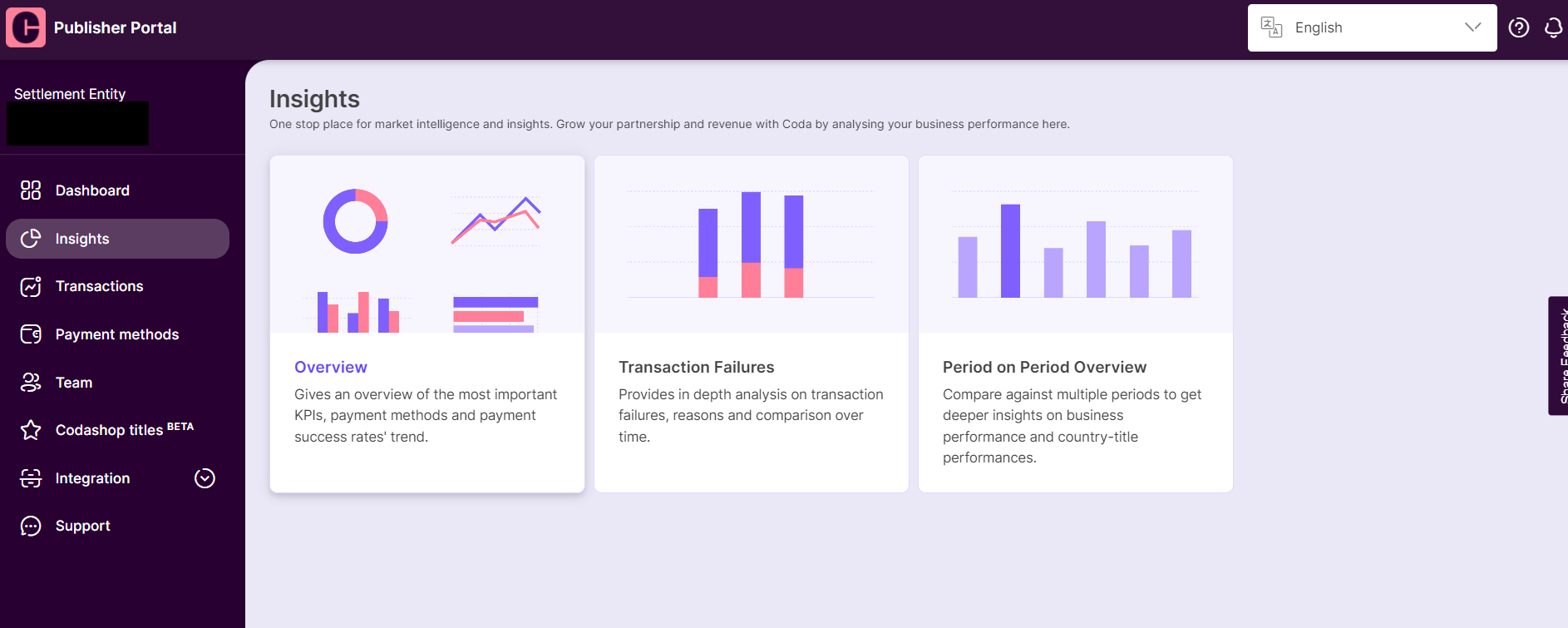
You can find the <mark style="color:purple;">**Insights**</mark> link on the left panel of your Publisher Portal main screen.

There are three different types of dashboards, let's start by looking at the <mark style="color:purple;">**Overview**</mark> dashboard.

<figure><img src="https://files.readme.io/d42c02d-image4.png" alt=""><figcaption></figcaption></figure>


# 2. Overview of the Dashboard Details Page

## <mark style="color:purple;">Overview</mark>

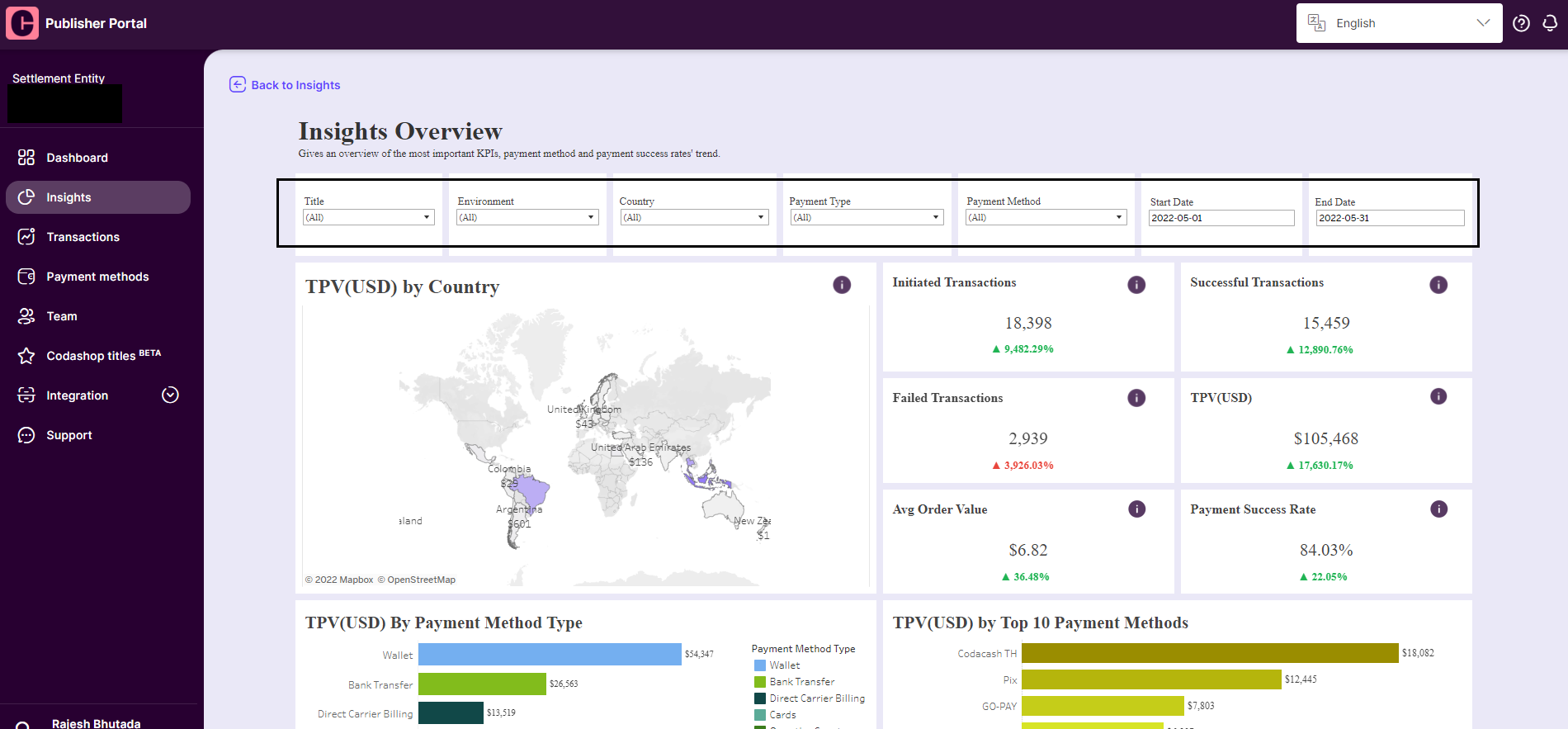
Once inside the <mark style="color:purple;">**Overview**</mark> dashboard, you will see a range of filters at the top.\
Select the start and end date to view your data within a specific time period.<br>

<figure><img src="https://files.readme.io/28e3b2b-image7.png" alt=""><figcaption></figcaption></figure>

## <mark style="color:purple;">Filters</mark>

There are many filters to assist you in slicing through the messy data and finding valuable insights.

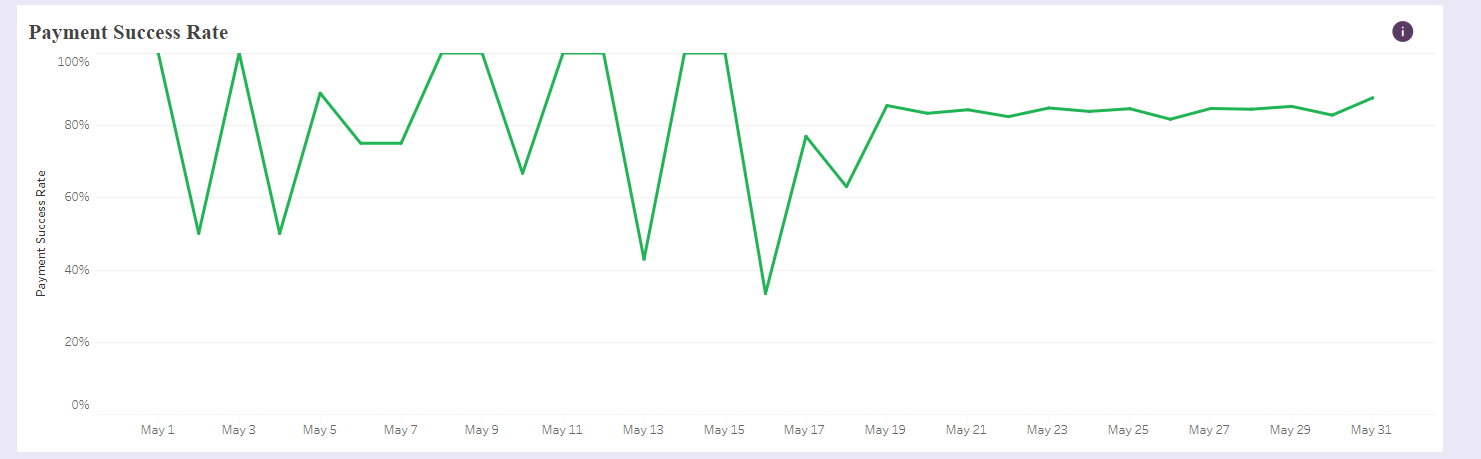
You can view the TPV by country, top-performing payment types, top-performing payment methods, and Payment Success rates over a time period.

By using the filters properly, you can discover insights about your customers such as being able to check how the new payment methods are performing from the date of launching!<br>

<figure><img src="https://files.readme.io/cfdf228-image6.png" alt=""><figcaption></figcaption></figure>

Happy exploring!


# 3. Transaction Failures Dashboard Details Page

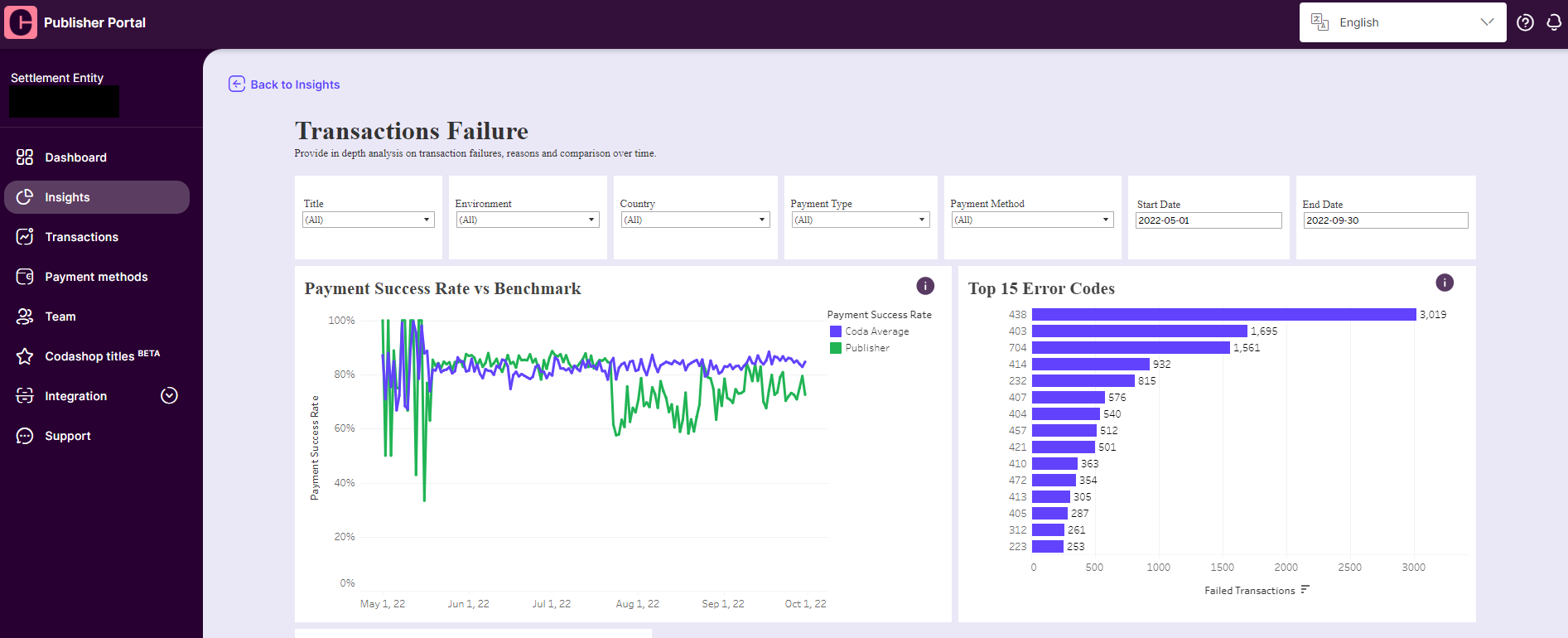
The Transaction failure dashboard gives an overview of payment success rates and error code analytics for your transactions.

You can easily identify the most frequent error codes that are encountered in a given period and dive deeper to analyze the reasons for the failed transactions.

We also provide Coda’s average payment success rate trendline as a benchmark for comparison.<br>

<figure><img src="https://files.readme.io/4e75272-image3.png" alt=""><figcaption></figcaption></figure>

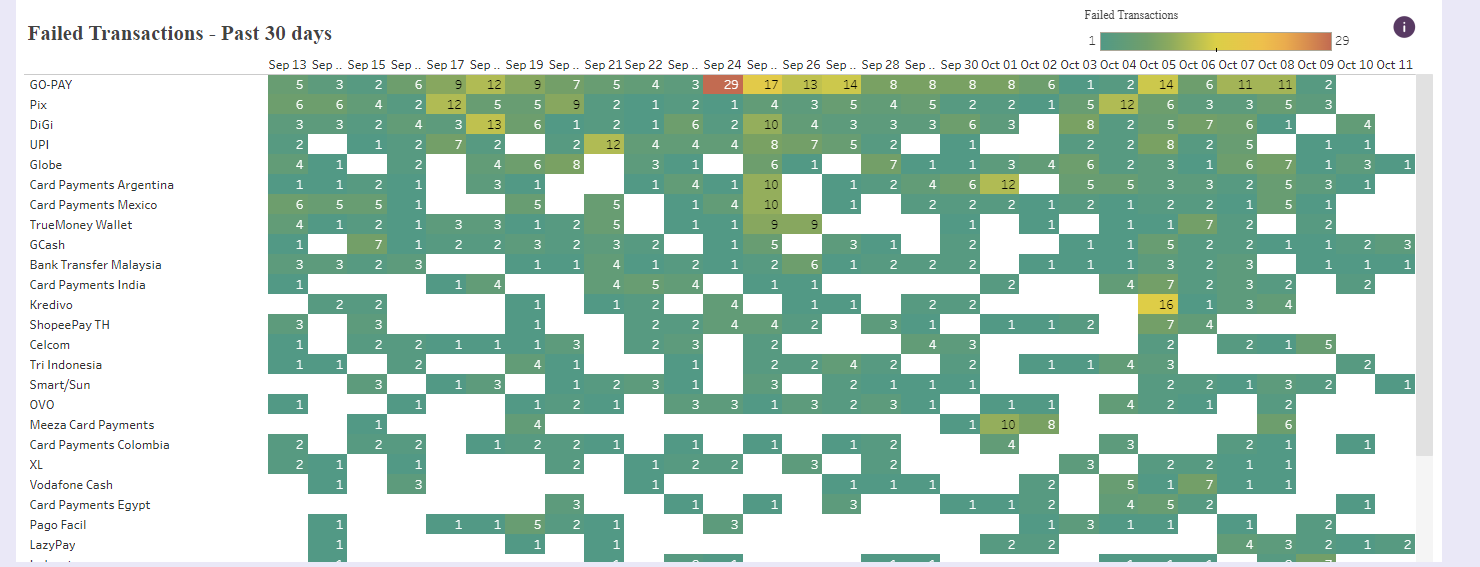
You can also check the daily error code analysis using the below chart and identify the days with the highest failures for a deeper analysis.\
\
*For example here, Sep 24th Go-Pay experienced the highest number of failed transactions.*

<figure><img src="https://files.readme.io/676998c-image1.png" alt=""><figcaption></figcaption></figure>


# 4. Period on Period Overview Dashboard Details Page

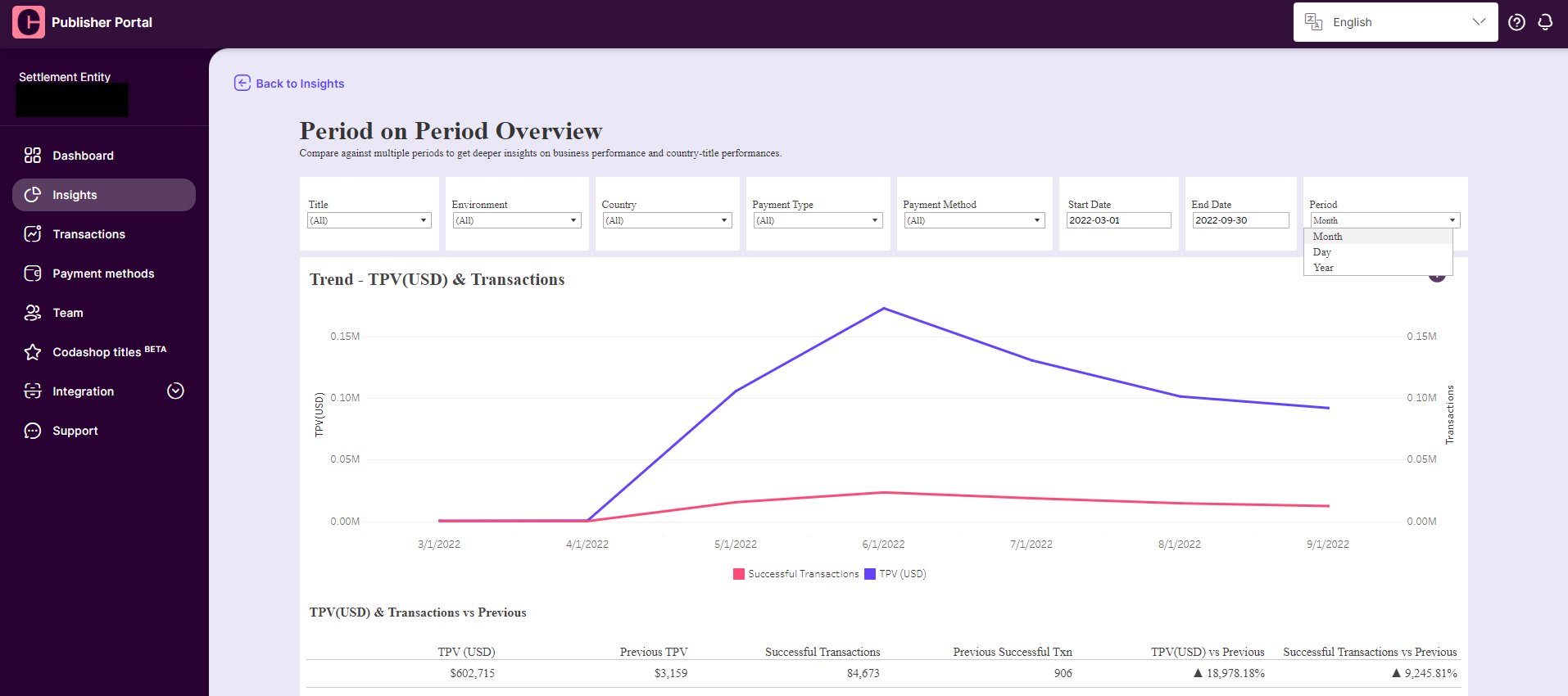
Period-on-period overview dashboard shows you the TPV revenue trends (daily, monthly, and annually.)

You can also slice the data using different filters to check the revenue trends across various time periods.

<figure><img src="https://files.readme.io/33387b9-image5.png" alt=""><figcaption></figcaption></figure>

That's it! You have now mastered the basics of the Insights tab! If you have other data points that you'd like to see on the dashboard but it's not available, do not hesitate to reach out to your account manager!


# Finance Reporting

Invoices, Purchase Orders, and Payment Notices using the Publisher Portal

Dear Publisher,

Welcome! This document will guide you on how to use the Finance tab in order to download monthly invoices, Purchase Orders, and Payment notices as well as access to Coda's Finance guide to understand settlement and reconciliation processes.

Note: Invoices, POs & Payment Notices tabs can be accessed by <mark style="color:purple;">**Admin Role**</mark> and <mark style="color:purple;">**Finance Role**</mark> users only.

If you have access to the Publisher Portal but cannot access the Finance tabs, please contact your assigned account manager or your finance team for access.


# 1. Navigating to the Finance Tab

Upon logging in, you can find the <mark style="color:purple;">**Finance**</mark> tab on the left side of your screen.

There are three sub-tabs: Invoices, Payment Notices, and Finance Guide.

<figure><img src="https://files.readme.io/db8381e-image2.png" alt=""><figcaption></figcaption></figure>

First, let's go through <mark style="color:purple;">**Invoices**</mark>**.**


# 2. Changing the Date Range

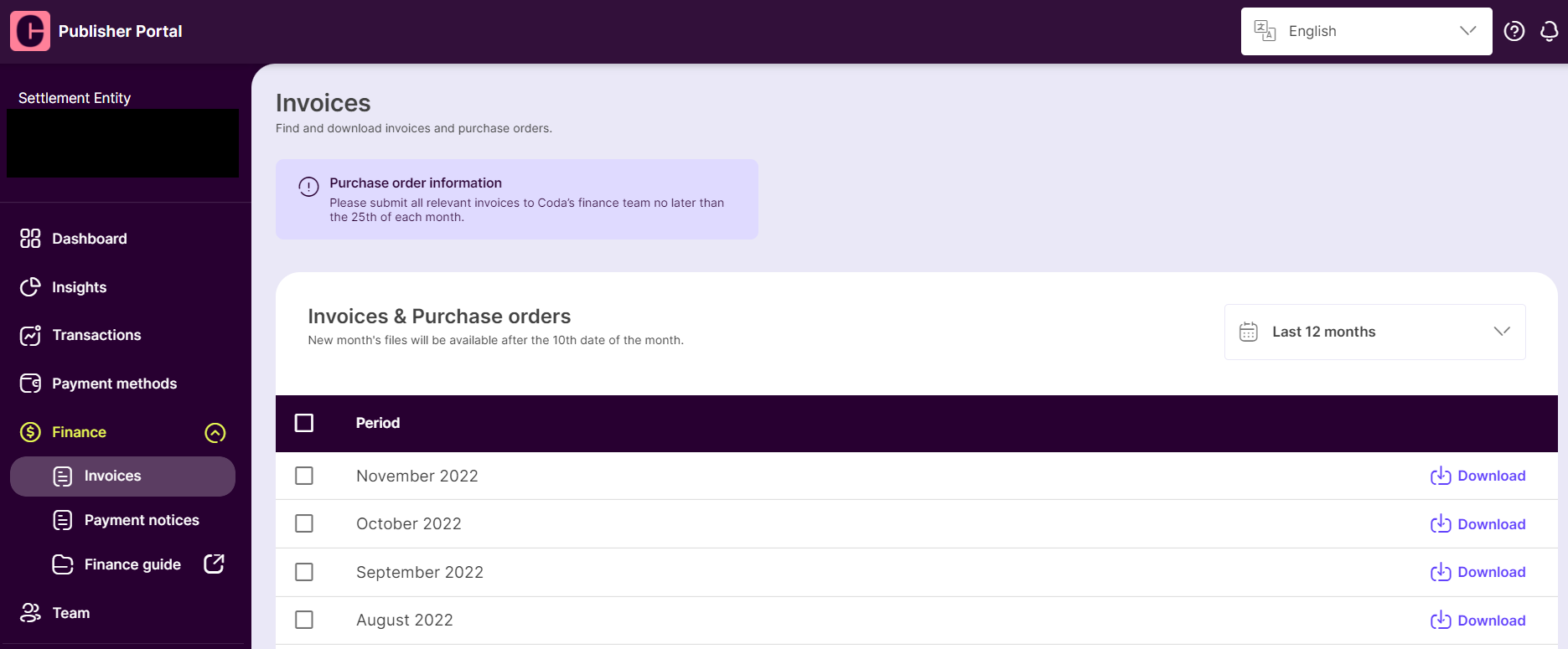
Once you are inside the Invoice section, you will see monthly invoices and purchase orders.

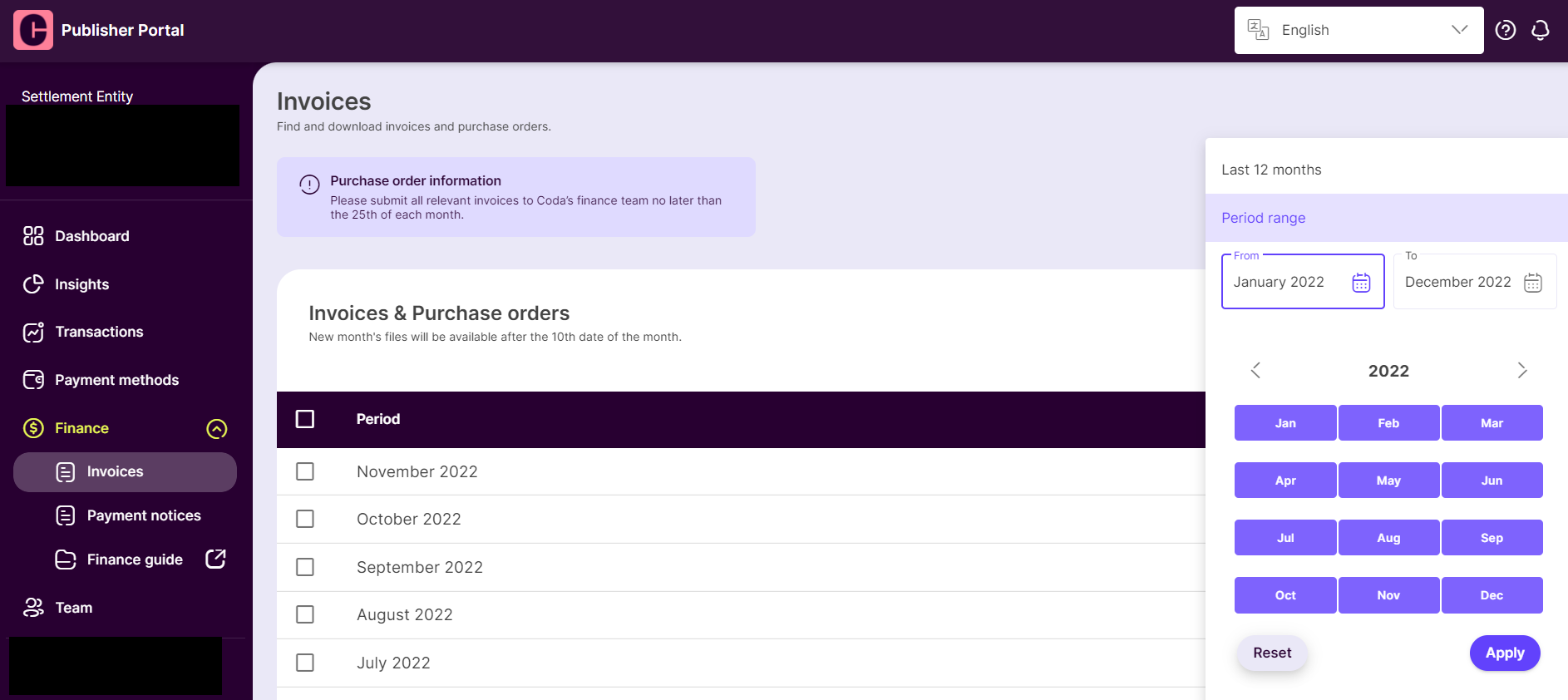
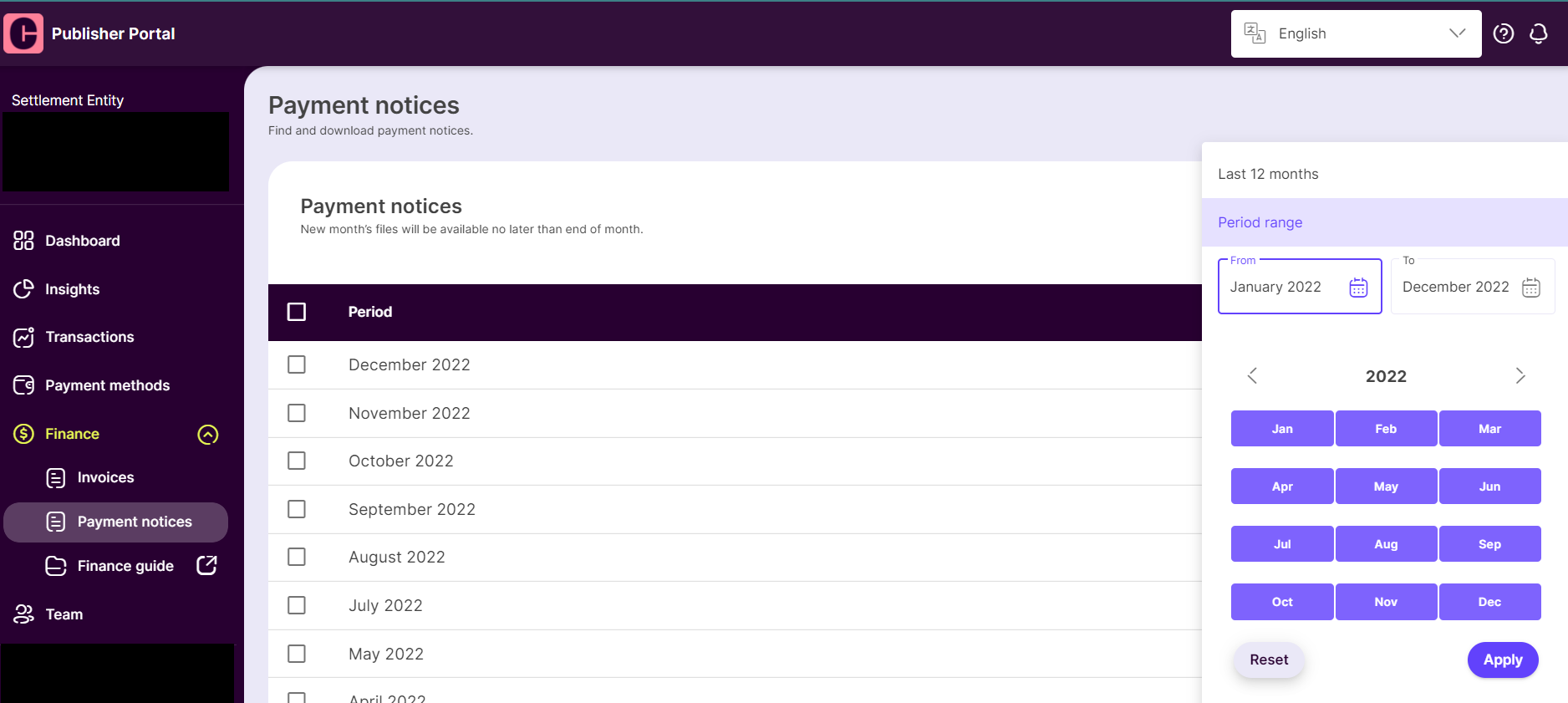
You can browse the data for specific months by using the date range options on the right side of the screen.

<figure><img src="https://files.readme.io/61e5f84-image7.png" alt=""><figcaption></figcaption></figure>


# 3. Downloading Invoices & Purchase Orders

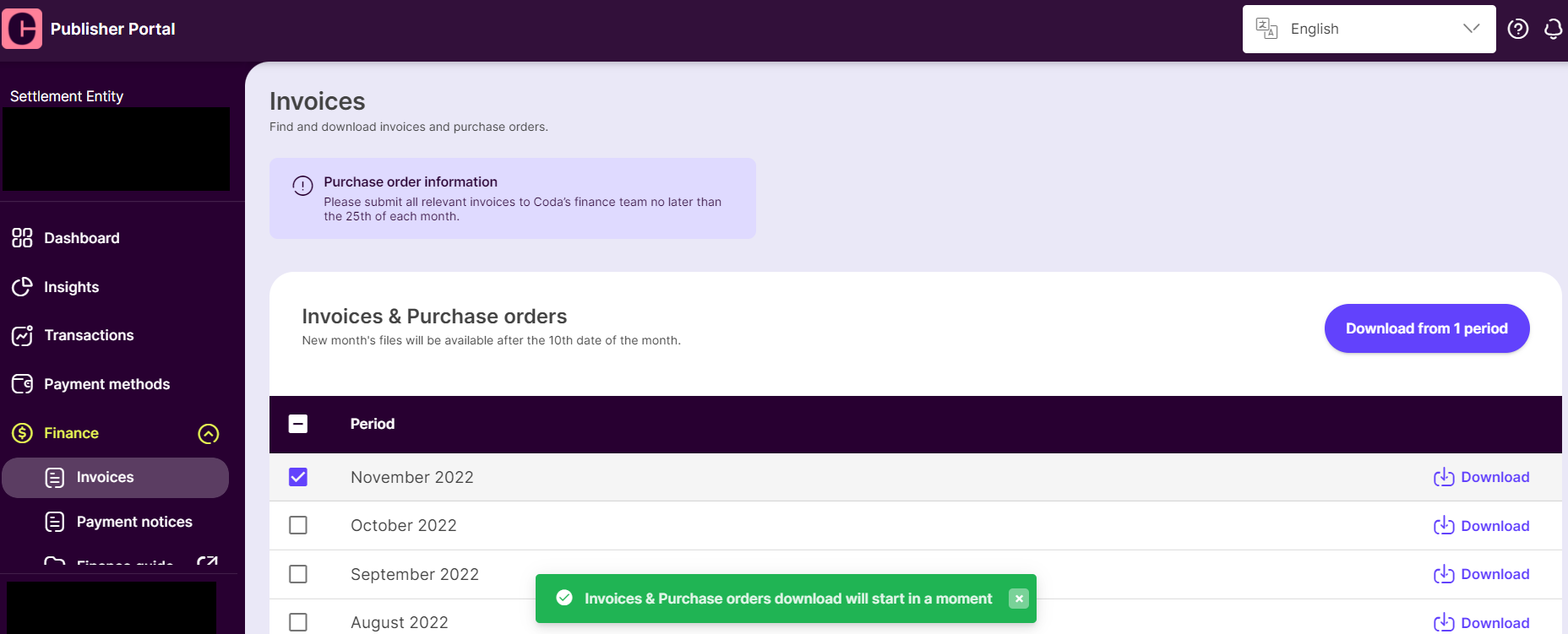
It is possible to download multiple invoices & purchase orders. You can do so by selecting the checkboxes for desired time periods, and then clicking on the <mark style="color:purple;">**Download from ... period**</mark> button.

All documents will be downloaded in a single zip format.

<figure><img src="https://files.readme.io/2f1ee82-image5.png" alt=""><figcaption></figcaption></figure>


# 4. Browsing Payment Notices

Once you are inside the Payment Notices section, you will see monthly payment notices. You can select the date range to browse data for a specific time period.

<figure><img src="https://files.readme.io/30d77ac-image3.png" alt=""><figcaption></figcaption></figure>


# 5. Downloading Payment Notices

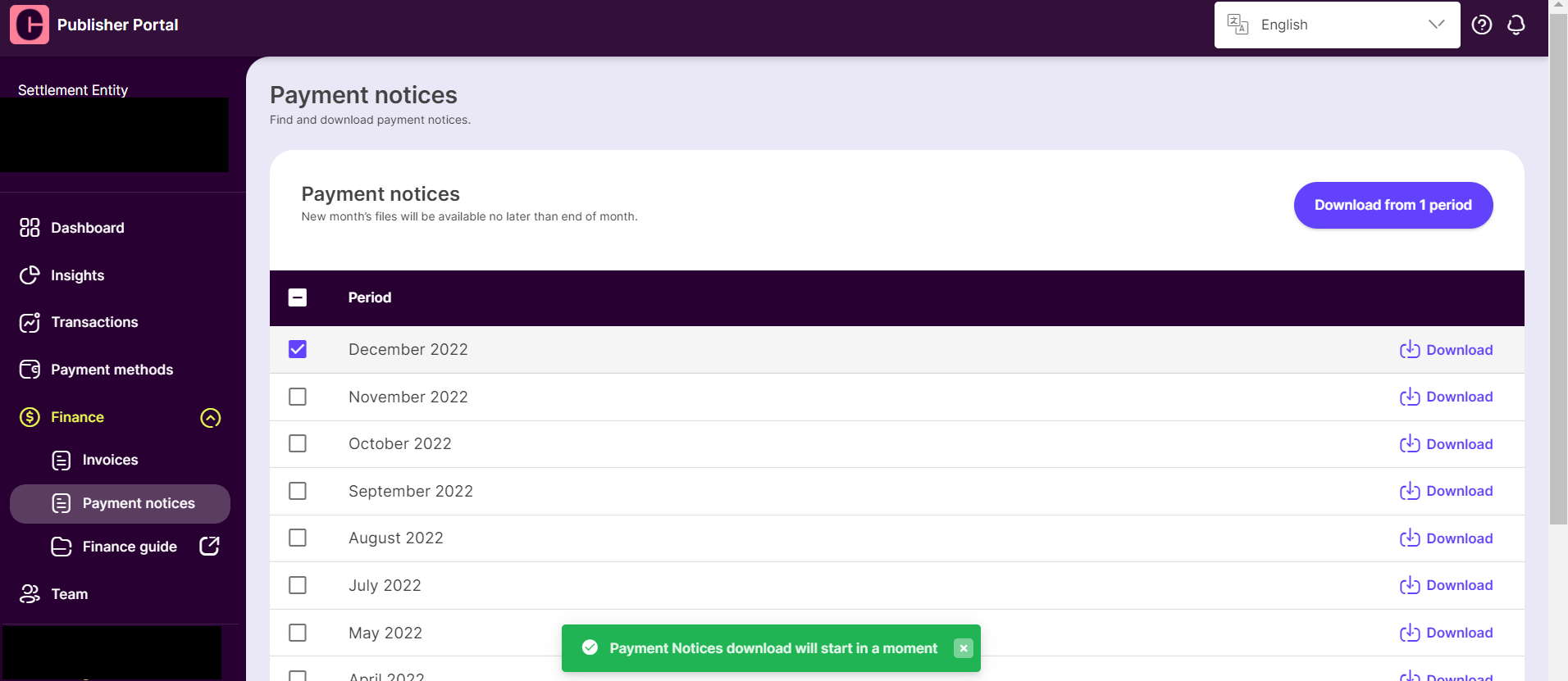
It is possible to download multiple Payment Notices at the same time. You can do so by selecting the checkboxes for desired time periods, and then clicking on the <mark style="color:purple;">**Download from ... period**</mark> button.

Each month will represent one Payment Notices file.

<figure><img src="https://files.readme.io/c751656-image4.png" alt=""><figcaption></figcaption></figure>


# 6. Referencing from the Finance Guide

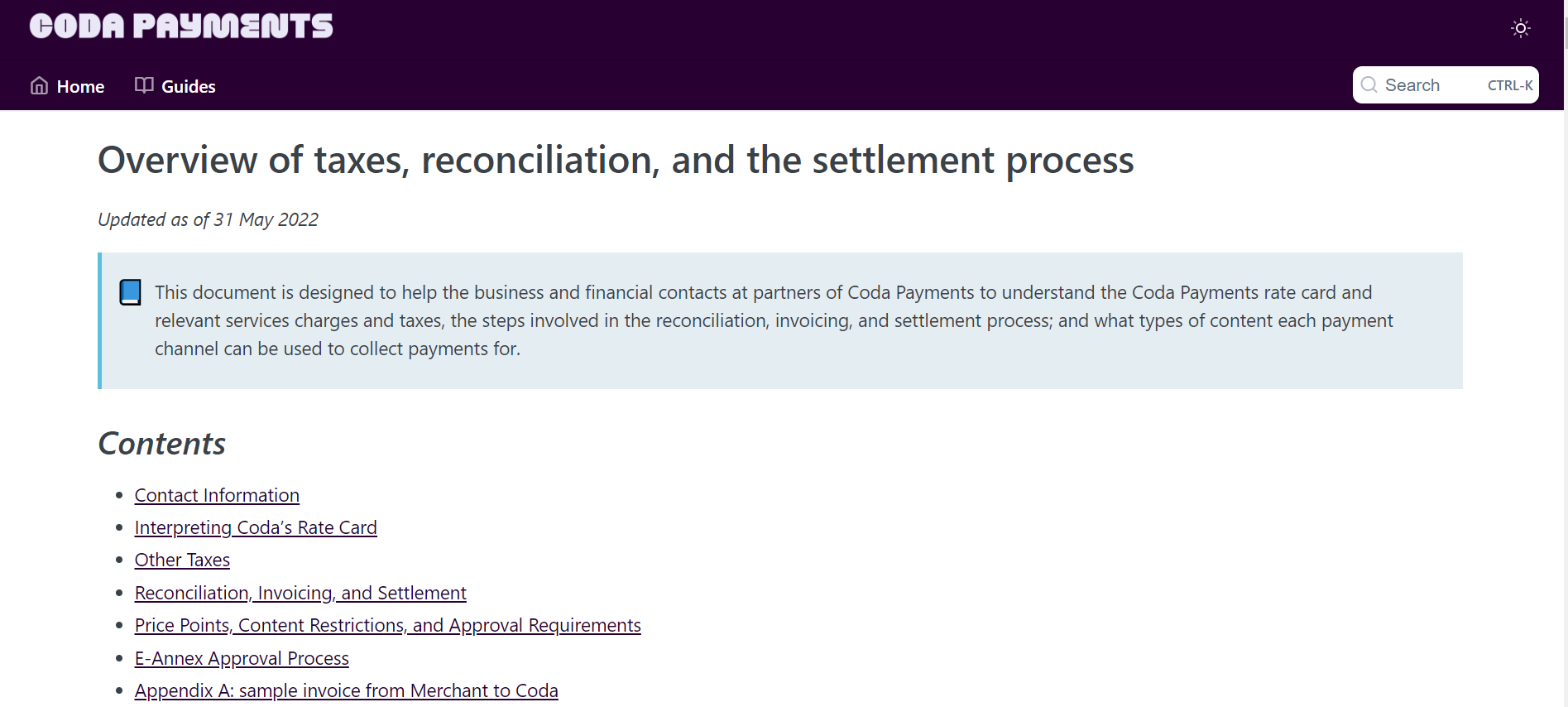
If you require more information about our taxes, reconciliations, and settlement processes. Please visit the <mark style="color:purple;">**Finance Guide**</mark> located on the left panel within the Publisher Portal.

It provides a complete overview of the above-mentioned information.

<figure><img src="https://files.readme.io/fc4ab40-image6.png" alt=""><figcaption></figcaption></figure>

That is all from this guide. If you have any questions about our Finance tab, don't hesitate to reach out to your account manager for a short discussion.


# Coda Transaction Report Delivery Options

## Introduction <a href="#w11xhfwyj91y" id="w11xhfwyj91y"></a>

This document provides publishers with an overview of Coda’s transaction reporting options and the specific steps required to access and set up the delivery of these reports. To help publishers stay up-to-date with transaction details, we offer reporting with flexible frequencies:

* **Daily**
* **Weekly**
* **Monthly**

## Sample of Report <a href="#ux08bk3ek5c3" id="ux08bk3ek5c3"></a>

The report will be sent through a CSV file. Please find the sample of the report below:

{% file src="/files/WcMdNu85NyyS1SsPp90I" %}

## Data Points & Types <a href="#report-data-points" id="report-data-points"></a>

The transaction report provides a comprehensive set of data points, offering publishers detailed insights into each transaction. **By default, the report is generated separately for each country**. For example, if transactions occur in four different countries, you will receive four separate report files.\
\
The following fields are returned in each report:

| Field Name                       | Description                                                                                                                                                                           |
| -------------------------------- | ------------------------------------------------------------------------------------------------------------------------------------------------------------------------------------- |
| Transaction Completed Time       | <p>The date and time when the transaction was successfully completed.<br></p><p>It is always based on the transaction’s local timezone.</p>                                           |
| Coda Transaction ID              | A unique identifier is assigned by Coda to each transaction for tracking and reference.                                                                                               |
| Merchant Order ID                | The identifier generated by the publisher or merchant for each order is used to match transactions in their system.                                                                   |
| Merchant ID                      | The unique identifier associated with the publisher or merchant account within the Coda system.                                                                                       |
| Payment Channel                  | The payment channel name used for the transaction.                                                                                                                                    |
| Processing Status                | <p>The status of the transaction.</p><p>It is always shown as ‘<strong>Successful’</strong>, as only successful transactions are returned.</p>                                        |
| Item Name                        | The name or description of the item (SKU) purchased in the transaction.                                                                                                               |
| Currency                         | The currency used for the transaction, represented by its three-letter ISO code (e.g., USD, SGD, IDR).                                                                                |
| Publisher Base Amount            | The base amount or item price provided by the publishers.                                                                                                                             |
| Publisher Used Reward Amount     | <p>The value of any rewards or discounts applied by the publisher to the transaction if they choose to co-fund a sponsorship with Coda.</p><p>By default, this should be 0.</p>       |
| Final Transaction Amount         | The total gross amount of the transaction after rewards deduction (excluding the Coda’s fee).                                                                                         |
| Publisher Applicable Tax         | The amount of tax applied to the transaction based on publisher's tax settings.                                                                                                       |
| End User Tax Surcharge (US / CA) | A surcharge amount applied specifically to end users in the United States or Canada to cover tax obligations.                                                                         |
| Fee Basis                        | <p>The basis or structure of the fee.</p><p>Values can be <strong>'Transaction value exclusive of any tax'</strong> or <strong>'Transaction value inclusive of any tax'.</strong></p> |
| Percentage-based fee             | The fee (in percentage) applied as a percentage of the transaction amount.                                                                                                            |
| Per-transaction fee              | A fixed fee amount charged per transaction, regardless of the transaction amount.                                                                                                     |
| Publisher Applicable WHT         | The amount (in percentage) of Withholding Tax (WHT) applicable to the publisher for this transaction.                                                                                 |
| Transaction Structure            | <p>The overall structure or type of the transaction.</p><p>Values can be <strong>'Sale of Digital Content'</strong> or <strong>''Payment Orchestration Service'.</strong></p>         |

## Report Schedule <a href="#ux08bk3ek5c3" id="ux08bk3ek5c3"></a>

Our system generates and delivers reports based on the selected frequency. Below is the schedule for report delivery:

* **Daily Report**: Sent on the next day at approximately **3 PM SGT**.
* **Weekly Report**: Sent on the **first day of the following week**.
* **Monthly Report**: Sent on the **2nd day of the following month**.

## Delivery Methods <a href="#ux08bk3ek5c3" id="ux08bk3ek5c3"></a>

There are three different methods for receiving Coda’s monthly transaction reports:

1. **Email** – Direct report delivery to your inbox.
2. **SFTP** – Secure File Transfer Protocol for automated retrieval.
3. **Webhook Notifications** – Notifications when a report is ready.

Each method has specific setup requirements, which this guide will walk you through in detail to ensure smooth and accurate delivery of transaction data. With this documentation, you’ll have all the information needed to configure your preferred reporting method, receive timely reports, and integrate them seamlessly into your workflows.

***

### 1. Delivery via Email <a href="#id-7zm9eqnbnmf" id="id-7zm9eqnbnmf"></a>

#### Overview <a href="#vdgtkoqhl6g6" id="vdgtkoqhl6g6"></a>

The daily/weekly/monthly transaction report can be sent directly to your email inbox. This is a simple and straightforward delivery method, suitable for those who prefer to receive and manage reports via their email system.

#### Steps to Set Up Email Delivery: <a href="#nvzmuj7vt844" id="nvzmuj7vt844"></a>

1. **Contact Information**: Provide us with the email address(es) where the monthly transaction report should be sent. You can specify multiple recipients if needed.
2. **Report Format**: The report will be delivered in a **CSV** format.
3. **Frequency**: The email will be sent on the 2nd day of each month and cover all transactions from the previous month.
4. **Subject Line**: The email subject will typically follow this format:
   * Subject: Codapay Transaction Report(s) for **\[Your Settlement Entity Name] - \[Month Year]**

#### Key Considerations <a href="#kinsicql57uu" id="kinsicql57uu"></a>

* Add our email domain to your safe sender list to avoid reports being sent to spam/junk folders.

***

### 2. Delivery via SFTP (Secure File Transfer Protocol) <a href="#pw46wd4vsq8q" id="pw46wd4vsq8q"></a>

#### Overview <a href="#q2slo9seqyp9" id="q2slo9seqyp9"></a>

SFTP is a secure method for transferring the monthly transaction report directly to your server. This option is ideal for organizations that want to automate the ingestion of data into internal systems or need higher security for sensitive data.

#### Steps to Set Up SFTP Delivery <a href="#ftfkpqcas8sy" id="ftfkpqcas8sy"></a>

1. **Server Setup**: You must have an active SFTP server where we can upload the monthly transaction report. This server should be configured to accept connections and allow file uploads.
2. **Provide Server Information**: Our Publisher Support team will ask for details regarding this information below
   * **IP Address**: Supply the IP address of your SFTP server & port number.
   * **Username**: Create and provide a username that will be used to access the server.
   * **Password or SSH Key**: You can either provide a password or set up an SSH key for authentication. We recommend SSH key authentication for higher security.
3. **Whitelist Coda’s IP Address:** Please whitelist these IP addresses to ensure we’re able to send the file to your system.\
   54.251.135.133

   52.76.92.206

   52.221.161.77

   52.221.30.252

   13.228.212.196
4. **Folder Path**: Indicate the specific directory path on your SFTP server where the file should be placed. Ensure that the directory has sufficient permissions to allow file uploads.
5. **Test Connection**: Before the first report is sent, a test connection will be established to verify that our system can securely connect to your SFTP server.
6. **File Naming Convention**: The file will be named using the following structure:
   * \[Settlement Entity Name]*(Settlement Id)*\[Merchant Group Id]*\[Country]Transaction\_Report\[Month]*\[Year].csv

#### Key Considerations <a href="#ellwe43klplq" id="ellwe43klplq"></a>

* Ensure your server has adequate storage for the monthly report files.
* Make sure to keep your server credentials updated, especially if password rotation policies are in place.
* If using SSH key authentication, ensure that you store and manage the key securely.

***

### 3. Delivery via Webhook Notification <a href="#k7xasgv2ptw2" id="k7xasgv2ptw2"></a>

#### Overview <a href="#id-2s39a9nncv14" id="id-2s39a9nncv14"></a>

Webhook notifications provide a method of alerting your system when the monthly transaction report is available. Instead of retrieving the report from email or SFTP, a webhook will notify your system, which can then download the report from a secure URL.

#### Steps to Set Up Webhook Delivery <a href="#n27slfkusfz" id="n27slfkusfz"></a>

1. **Webhook URL**: You need to provide a webhook endpoint (URL) where we will send a POST request once the monthly report is generated and ready for download.
2. Whitelist Coda’s IP Address. Please whitelist these IP addresses to ensure we’re able to send the file to your system\
   Production IPs: "52.221.161.77", "52.221.30.252", "13.228.212.196"
3. **Authentication**:
   * Optionally, the webhook can include an **authentication header** (such as a bearer token or API key) for security.
   * If you require this, provide the necessary credentials for the authentication process.

**Webhook Payload**: When the report is ready, we will send a POST request to your webhook URL with the following JSON payload:

**Sample payload for report notification:**

```json
{
   "notificationType": "report",
   "data": {
            "reportCycle": "daily"|"weekly"|"monthly",
            "reportUrl": "finance-files.codapayments.com/fileurl",
            "reportName": "[Settlement Entity Name]_(Settlement Id)_[Merchant Group Id]_[Country]_Transaction_Report_[Month]_[Year].csv ",
            "reportPeriodStart": "yyyymmdd",
            "reportPeriodEnd": "yyyymmdd",
            "reportEnvironment": "all"|"codapay"|"distribution"|"codashop"|"xshop"|"custom-commerce"
         }
}
```

**Report notification parameters:**

<table data-header-hidden><thead><tr><th>Parameter Name</th><th width="168">Type</th><th>Description</th></tr></thead><tbody><tr><td>notificationType</td><td>string</td><td>Type of notification. Will be “report”</td></tr><tr><td>data</td><td>object</td><td>Contains payload of the notification</td></tr><tr><td>data.reportCycle</td><td>string</td><td>Frequency of the report sent: daily / weekly / monthly</td></tr><tr><td>data.reportUrl</td><td>string</td><td>File address of the report</td></tr><tr><td>data.reportName</td><td>string</td><td>Name of the report</td></tr><tr><td>data.reportPeriodStart</td><td>string</td><td>starting transaction date in local country timezone</td></tr><tr><td>data.reportPeriodEnd</td><td>string</td><td>ending transaction date in local country timezone</td></tr><tr><td>data.reportEnvironment</td><td>string</td><td>Environment solution of the transaction</td></tr></tbody></table>

**Sample payload for invoice notification:**

<pre class="language-json"><code class="lang-json"><strong>{
</strong>    "notificationType": "invoice",
<strong>    "data": {
</strong>        "reportCycle": "monthly",
        "reportUrl": "finance-files.codapayments.com/fileurl",
        "reportName": "PublisherName_Invoice_date.csv",
        "reportPeriodStart": "yyyymmdd",
        "reportPeriodEnd": "yyyymmdd",
        "reportEnvironment": "all"
<strong>    }
</strong>}
</code></pre>

**Invoice notification parameters**<br>

<table data-header-hidden><thead><tr><th>Parameter Name</th><th width="220">Type</th><th>Description</th></tr></thead><tbody><tr><td>notificationType</td><td>string</td><td>Type of notification. Will be “invoice”</td></tr><tr><td>data</td><td>object</td><td>Contains payload of the notification</td></tr><tr><td>data.reportCycle</td><td>string</td><td>Frequency of the report sent: monthly</td></tr><tr><td>data.reportUrl</td><td>string</td><td>File address of the report</td></tr><tr><td>data.reportName</td><td>string</td><td>Name of the report</td></tr><tr><td>data.reportPeriodStart</td><td>string</td><td>Invoice date</td></tr><tr><td>data.reportPeriodEnd</td><td>string</td><td>Invoice due date</td></tr><tr><td>data.reportEnvironment</td><td>string</td><td>Environment solution of the transaction</td></tr></tbody></table>

**Responses**

No **Response** **body** is required for the response, the status code must be **200**.

| **Code** | **Description** |
| -------- | --------------- |
| 200      | OK              |

#### Key Considerations <a href="#y61xwaa5ar4" id="y61xwaa5ar4"></a>

* Ensure your webhook URL is accessible from external sources and secured with authentication to avoid unauthorized access.
* The URL provided for the report download will expire after a certain period (typically 30 days), so make sure to download the file in a timely manner.
* Implement logging in your system to track webhook notifications and any potential errors in the report retrieval process.

***

## Comparison of Delivery Methods <a href="#sl11morhtdl5" id="sl11morhtdl5"></a>

<table><thead><tr><th width="117">Method</th><th width="139">Delivery Time</th><th>Setup Complexity</th><th width="141">Security Level</th><th>Automation Potential</th></tr></thead><tbody><tr><td>Email</td><td>2nd day of each month</td><td>Low</td><td>Moderate (email security depends on the recipient)</td><td>Low</td></tr><tr><td>SFTP</td><td>2nd day of each month</td><td>Moderate</td><td>High (secure transfer)</td><td>High (automated file handling)</td></tr><tr><td>Webhook</td><td>2nd day of each month</td><td>Moderate</td><td>High (requires secure endpoint)</td><td>High (full automation of report retrieval)</td></tr></tbody></table>

## Conclusion <a href="#id-7147ttb80gcs" id="id-7147ttb80gcs"></a>

We offer three flexible methods to deliver your monthly transaction report, each tailored to different needs in terms of security, automation, and ease of use. Whether you prefer a simple email delivery, a secure file transfer via SFTP, or an automated system triggered by webhook notifications, we can accommodate your requirements.

If you have any questions or need assistance setting up any of the delivery methods, please contact our support team for guidance.<br>

### FAQ

This section provides answers to commonly asked questions about our reporting system, including report types, delivery schedules, file formats, and webhook handling. If you need further clarification, please refer to the FAQs below or reach out to our support team for assistance.

<details>

<summary><strong>What types of reports do you provide?</strong></summary>

We currently provide transaction reports on a daily, weekly, and monthly basis. You can choose the option that best suits your needs.

</details>

<details>

<summary><strong>What is the format of the transaction report?</strong></summary>

The report will be delivered in CSV format. By default, the file will be separated by country. If you have transactions from five countries, you will receive five separate files accordingly.

</details>

<details>

<summary><strong>What data points are included in the transaction report?</strong></summary>

The transaction report includes a comprehensive set of data points, such as Transaction Completion Time, Coda Transaction ID, Payment Channel, and more.

Refer [to this section](#report-data-points) to see the details.

</details>

<details>

<summary><strong>What is the estimated size of each report?</strong></summary>

Each report will follow the limit of a single CSV file, which can contain up to 900,000 records. If the total number of records exceeds this limit, multiple CSV files will be generated and bundled together in a single ZIP file for easy access.

</details>

<details>

<summary><strong>How can we automate the process of sending transaction reports to our system?</strong></summary>

You can use SFTP delivery or Webhook Notifications. SFTP delivery transfers transaction reports directly to your server while Webhook Notifications notify your system when a transaction report is available, allowing you to download it from a secure URL

</details>

<details>

<summary><strong>For webhook notification, how many webhook notifications can be sent in parallel?</strong></summary>

</details>

<details>

<summary><strong>Does the webhook always need to return a 200 OK status?</strong></summary>

Yes, currently only the 200 OK status is recognized and processed. We will update the status accordingly once we introduce more status

</details>

<details>

<summary><strong>How long is the report download URL valid?</strong></summary>

The report download URL is valid for 12 months before it expires.

</details>

<details>

<summary><strong>Are the reports processed in real-time?</strong></summary>

No, reports are not processed in real-time. The daily report is generated and sent the following day at around 3 PM SGT. The monthly report is sent on the 2nd day of the following month.

</details>

## Version History <a href="#id-7sqy8l3w2n" id="id-7sqy8l3w2n"></a>

| Version | Date        | Changelog               |
| ------- | ----------- | ----------------------- |
| 1.0.0   | 22 Oct 2024 | First Draft Version     |
| 1.0.1   | 03 Jan 2025 | Adding Data Points      |
| 1.0.2   | 18 Feb 2024 | Adding Sample of Report |
| 1.0.3   | 25 Feb 2024 | Adding FAQ Section      |


# Automate Price Optimization

## <mark style="color:purple;">What is 'Automate Price Optimization' in the Publisher Portal?</mark>

* An easy way for Publishers to set the price automation with Coda’s Publisher Portal
* Once the Publisher configures the Codashop price to be the same or less than legacy app stores, our system will monitor the prices regularly and ensure that they meet the configuration settings.

## <mark style="color:purple;">Why enable 'Automate Price Optimization' on Publisher Portal?</mark>

For all Publishers, automating Price Optimization provides the following benefits

* Maintain the price based on defined rules whenever there is a price disparity between Codashop vs legacy app stores
  * Allows you to always <mark style="color:purple;">**remain competitively priced**</mark> on Codashop which charges much lower fees than the legacy app stores.
* Receive more price optimization insights to maximize your TPV with Codashop.
  * <mark style="color:purple;">**Improve ARPU**</mark> and users’ <mark style="color:purple;">**stickiness**</mark> with the platform.
* Generate comprehensive price reports showcasing how you are growing revenues with Coda


# Step 1: Click on the Price Optimization Banner

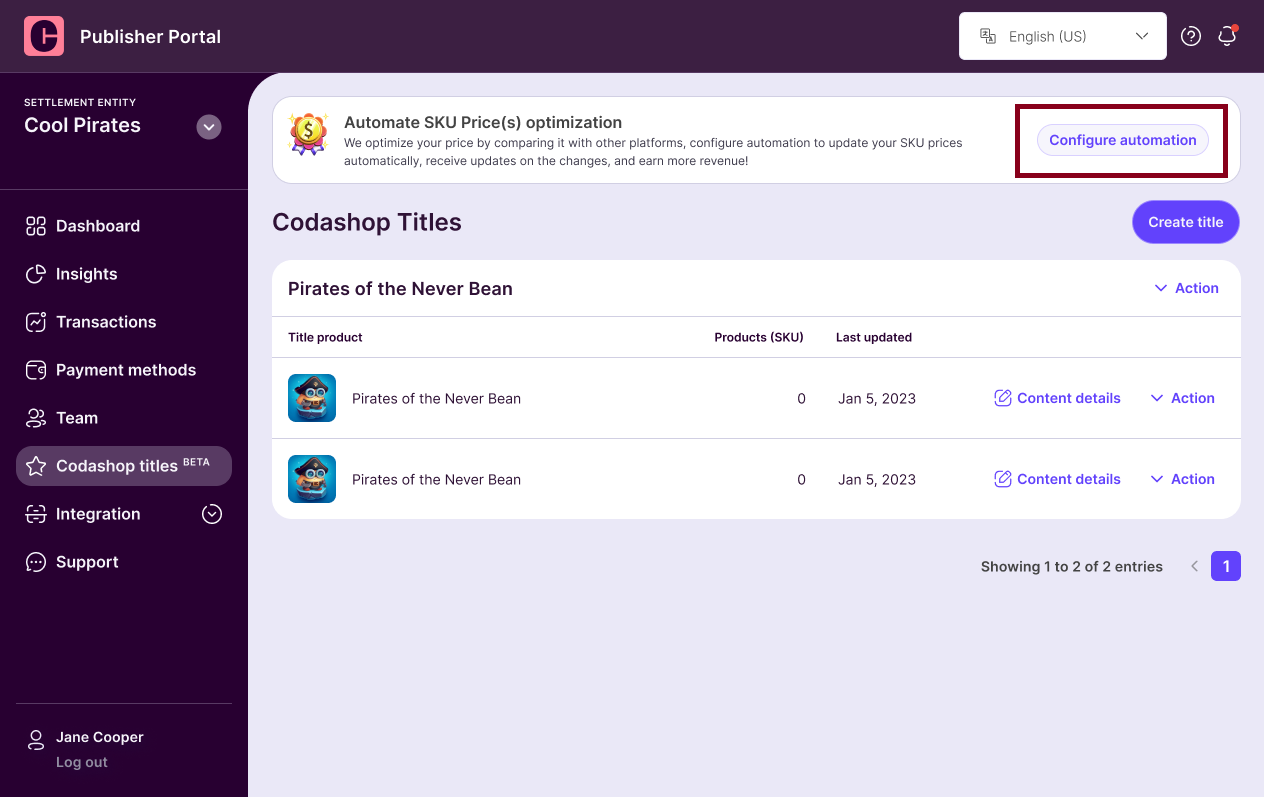
Select <mark style="color:purple;">**Codashop titles**</mark> on the left navigation menu and click on <mark style="color:purple;">**Configure automation**</mark> on the Price Optimization banner.

<figure><img src="https://files.readme.io/c5872d7-Not_automated.png" alt=""><figcaption></figcaption></figure>


# Step 2: Select Automation Option

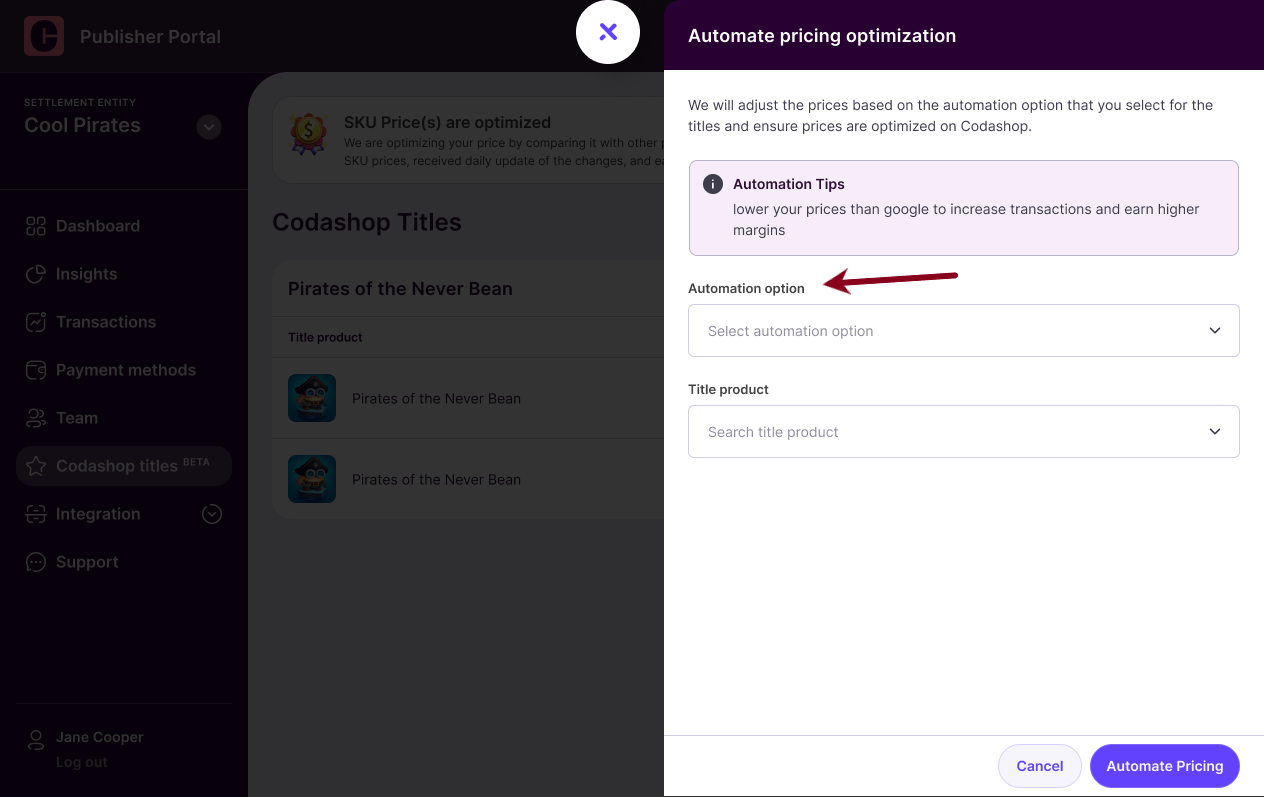
### Click on the <mark style="color:purple;">**Automation Option**</mark>

<figure><img src="https://files.readme.io/c60878f-Config.png" alt=""><figcaption></figcaption></figure>

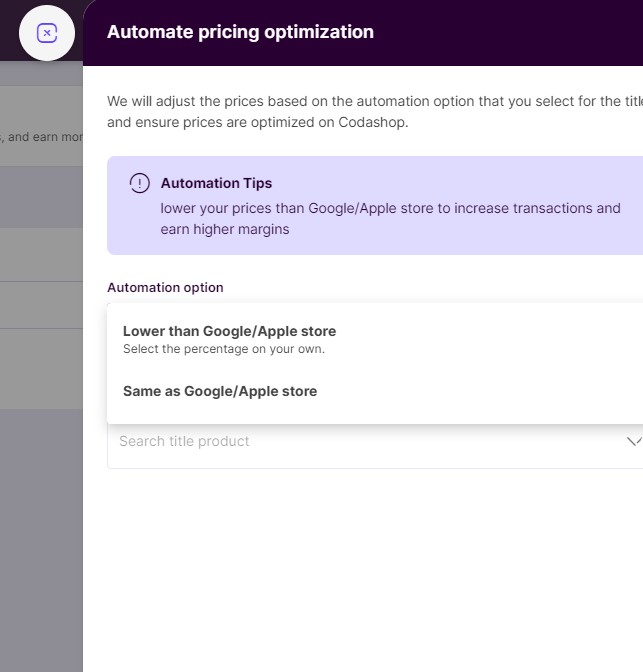
### Set the <mark style="color:purple;">**Automation Option**</mark> as:

* Lower than Google/Apple store (or)
* Same as the Google/Apple store

{% hint style="info" %}
Automation tip: Coda charges \~50% less than legacy app stores. Keeping the prices lower than Google/Apple stores will earn you higher margins!
{% endhint %}

<figure><img src="https://files.readme.io/9d62dd0-Screenshot_2023-10-25_192410.jpg" alt=""><figcaption></figcaption></figure>


# Step 3: Select the Titles

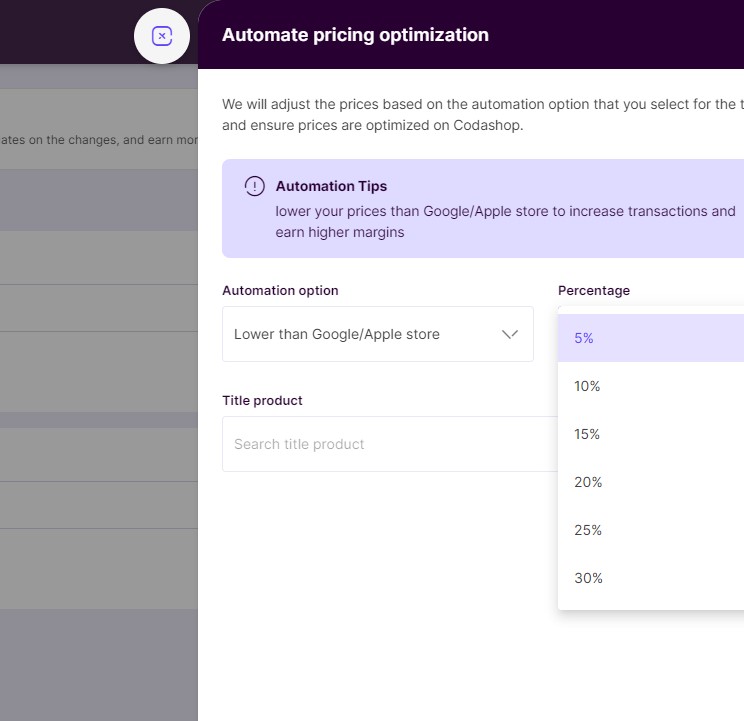
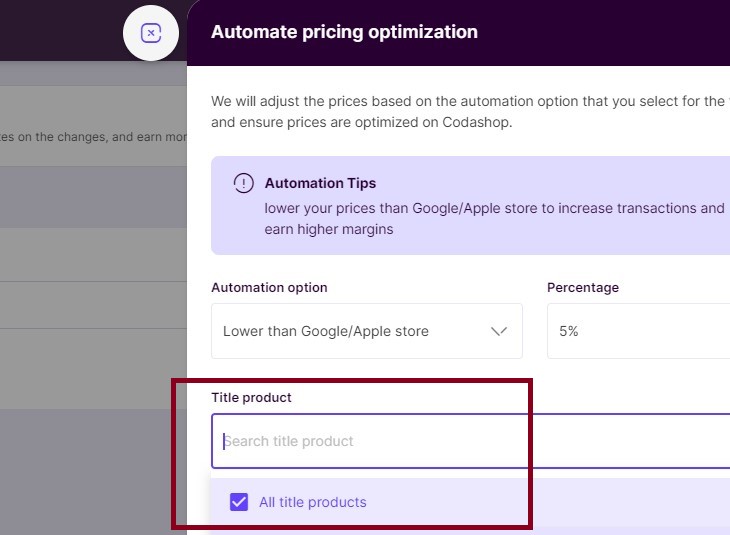
If you select the automation option - <mark style="color:purple;">**Lower than Google/Apple store,**</mark> specify the <mark style="color:purple;">**% percentage**</mark> by which you want to lower the prices.

<figure><img src="https://files.readme.io/dc18ff3-Screenshot_2023-10-26_002906.jpg" alt=""><figcaption></figcaption></figure>

Once you select the <mark style="color:purple;">**% percentage**</mark><mark style="color:purple;">,</mark> the next step is to <mark style="color:purple;">**Select the Title**</mark> for which you would like to make price changes.&#x20;

<figure><img src="https://files.readme.io/c9bf02a-Screenshot_2023-10-25_193727.jpg" alt=""><figcaption></figcaption></figure>


# Step 4: Price Optimization Automated

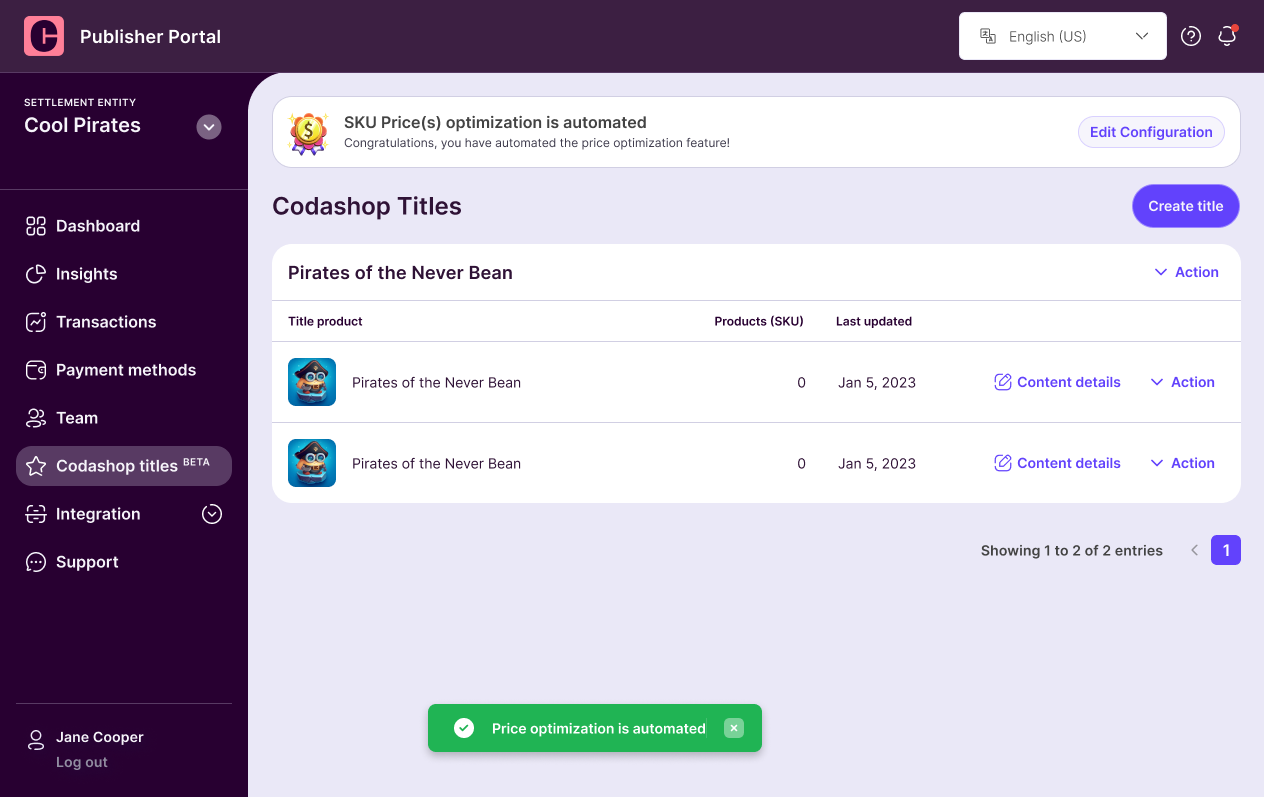
Once the configuration is activated, the prices are constantly monitored and changed accordingly to match the automation settings defined by you.

<figure><img src="https://files.readme.io/3a11d5d-Automated.png" alt=""><figcaption></figcaption></figure>

You can always automate the configuration by clicking on the <mark style="color:purple;">**Edit Configuration**</mark> button.

If you have any questions or require further clarification, please contact our [Partner Support team](/contact-us).&#x20;


# Coda Portal Appendix

<table data-card-size="large" data-view="cards"><thead><tr><th align="center"></th><th data-hidden data-card-target data-type="content-ref"></th></tr></thead><tbody><tr><td align="center"><mark style="color:purple;"><strong>Coda's Pricing Template</strong></mark></td><td><a href="/general-information/coda-portal/coda-portal-appendix/codas-pricing-template">Coda’s Pricing Template</a></td></tr><tr><td align="center"><p><mark style="color:purple;"><strong>Additional Info Template</strong></mark> </p><p><mark style="color:purple;"><strong>(Optional)</strong></mark></p></td><td><a href="/general-information/coda-portal/coda-portal-appendix/additional-info-template-optional">Additional Info Template (Optional)</a></td></tr><tr><td align="center"><mark style="color:purple;"><strong>Title Content Submission</strong></mark><br><mark style="color:purple;"><strong>Best Practices</strong></mark></td><td><a href="/general-information/coda-portal/coda-portal-appendix/title-content-submission-best-practices">Title Content Submission Best Practices</a></td></tr><tr><td align="center"><mark style="color:purple;"><strong>SKU/Product Images</strong></mark><br><mark style="color:purple;"><strong>Guidelines</strong></mark></td><td><a href="/general-information/coda-portal/coda-portal-appendix/sku-product-images-guidelines">SKU/Product Images Guidelines</a></td></tr></tbody></table>


# Coda’s Pricing Template

The Bulk SKU Upload template is a CSV file used to create and update multiple SKUs (in‑app purchase items) for a title in a single upload. You can export your title's current SKUs to this format, edit prices, availability, and localized text in a spreadsheet, then re‑upload the file to apply the changes in bulk.

Each **row** represents one SKU (product). Each **column** represents one attribute of that SKU. Column names are case‑sensitive and must match exactly.

> This reference describes the general template structure. Column availability may vary slightly by title configuration — if a column described here doesn't appear in your export, contact your Coda account manager.

A sample file, `sample_bulk_sku_upload_template.csv`, is included alongside this page. It uses placeholder SKUs and dummy translations to illustrate each pricing scheme and field combination described below — download it as a starting point for your own upload.

***

### 1. How the template works

1. **Export** — Download your title's current SKUs as a CSV from the portal. Every existing SKU appears as one row, pre‑filled with its current values.
2. **Edit** — Update values directly in the CSV (e.g. change a price, extend a sale window, add a new SKU as a new row).
3. **Re‑upload** — Upload the edited CSV back into the portal. Rows are matched to existing SKUs by `ProductID`; a `ProductID` not already in the system creates a new SKU.
4. **Review** — The portal validates the file and reports any row‑level errors before changes go live.

***

### 2. Core SKU fields

These columns appear once per row and control the SKU's identity, pricing model, availability window, and purchase limits.

| Column                      | Required | Type / Format                                                             | Description                                                                                                                                                                                                                                                                                             |
| --------------------------- | -------- | ------------------------------------------------------------------------- | ------------------------------------------------------------------------------------------------------------------------------------------------------------------------------------------------------------------------------------------------------------------------------------------------------- |
| `ProductID`                 | Yes      | String                                                                    | The unique identifier for the SKU. Used to match the row to an existing SKU on upload — **do not change this value for an existing SKU**, or the upload will create a duplicate instead of updating it.                                                                                                 |
| `Pricing_Scheme`            | Yes      | Enum: `Real Currency`, `Freebie`, `Loyalty Currency`, `Loyalty Milestone` | Determines how the SKU is "paid for." See Section 3 for how this affects the other pricing fields.                                                                                                                                                                                                      |
| `Price_US_Default`          | Yes      | Decimal (USD)                                                             | The SKU's base/list price in US dollars. Used as the reference price even for non‑cash schemes (set to `0.00` for `Freebie`, `Loyalty Currency`, and `Loyalty Milestone` rows). For `Real Currency` SKUs this should match the `Price_US` column.                                                       |
| `Price_<COUNTRY>`           | No       | Decimal, one column per country                                           | Per‑country override price in local currency. Only meaningful when `Pricing_Scheme = Real Currency`. See Section 5.                                                                                                                                                                                     |
| `Main_IconPath`             | Yes      | String (relative file path)                                               | Path/filename of the SKU's storefront icon image, matched against the image assets uploaded for the title (e.g. `festivefixtures/Loyalty_Offer.webp`).                                                                                                                                                  |
| `Start_Time`                | No       | ISO‑8601 datetime, `YYYY-MM-DDTHH:MM:SS`                                  | When the SKU becomes available for purchase. Leave blank for "available immediately."                                                                                                                                                                                                                   |
| `End_Time`                  | No       | ISO‑8601 datetime, `YYYY-MM-DDTHH:MM:SS`                                  | When the SKU stops being available. Leave blank, or use the sentinel value `2100-01-01T00:00:00`, for "no end date."                                                                                                                                                                                    |
| `Web_Store_Exclusive`       | Yes      | Enum: `Yes`, `No`                                                         | Whether the SKU is sold only through the web store, as opposed to also being purchasable in‑app.                                                                                                                                                                                                        |
| `Sku_Purchase_Limit`        | No       | Integer                                                                   | Maximum number of times a single player can purchase this SKU within one refresh window (see `Refresh_Rate`). Leave blank for no limit.                                                                                                                                                                 |
| `Refresh_Rate`              | No       | Integer (days)                                                            | Length, in days, of the purchase‑limit window. E.g. `1` = daily limit, `7` = weekly, `30` = monthly. Very large values (e.g. `100000` or more) are used as a "never refreshes" sentinel — i.e. the limit applies once, for the lifetime of the SKU. Only meaningful together with `Sku_Purchase_Limit`. |
| `Purchase_Limit_Start_Date` | No       | ISO‑8601 datetime                                                         | The anchor date the purchase‑limit window counts from. Typically set equal to `Start_Time`.                                                                                                                                                                                                             |
| `Loyalty_Currency_Earned`   | Yes      | Decimal                                                                   | Amount of loyalty currency the player earns from purchasing this SKU. For `Real Currency` SKUs this is typically **\~100× the USD price** (e.g. a $0.99 SKU earns ≈99 points); some promotional/bonus SKUs earn at a higher multiplier (e.g. 200×). Set to `0.00` when not applicable.                  |
| `Loyalty_Currency_Burned`   | Yes      | Decimal                                                                   | Amount of loyalty currency a player must redeem to acquire this SKU. Only meaningful when `Pricing_Scheme = Loyalty Currency`; set to `0.00` otherwise.                                                                                                                                                 |

***

### 3. Pricing Scheme and related fields

`Pricing_Scheme` determines which of the pricing columns actually apply to a given row:

| `Pricing_Scheme`    | What it means                                                                 | Fields that apply                                                                                                                                                                                      |
| ------------------- | ----------------------------------------------------------------------------- | ------------------------------------------------------------------------------------------------------------------------------------------------------------------------------------------------------ |
| `Real Currency`     | Standard paid purchase, charged in real money.                                | `Price_US_Default`, `Price_<COUNTRY>` columns. `Loyalty_Currency_Earned` is typically populated (points earned per purchase); `Loyalty_Currency_Burned` = `0.00`.                                      |
| `Freebie`           | Free item, no charge.                                                         | `Price_US_Default` = `0.00`, all `Price_<COUNTRY>` blank. `Loyalty_Currency_Earned`/`Burned` = `0.00`. Commonly paired with a `Sku_Purchase_Limit` of `1` and a large `Refresh_Rate` (one‑time claim). |
| `Loyalty Currency`  | Redeemed using the player's loyalty/points balance instead of cash.           | `Loyalty_Currency_Burned` is populated with the redemption cost. `Price_US_Default` = `0.00`.                                                                                                          |
| `Loyalty Milestone` | Reward automatically granted at a loyalty milestone (not directly purchased). | Pricing fields are typically all `0.00`; availability is controlled by `Sku_Purchase_Limit` / `Refresh_Rate` rather than price.                                                                        |

***

### 4. Localized text columns

Five text fields — **Title**, **Description**, **Category**, **Item\_Main\_Title**, and **Item\_Sub\_Title** — each repeat once per supported language, using the pattern:

```
<Field>_<language_code>
```

For example: `Title_en`, `Title_fr`, `Title_ja`, `Description_en`, `Category_en`, `Item_Main_Title_en`, `Item_Sub_Title_en`, etc.

| Field prefix             | Required                           | Description                                                                                                                    |
| ------------------------ | ---------------------------------- | ------------------------------------------------------------------------------------------------------------------------------ |
| `Title_<lang>`           | `_en` required; others recommended | The SKU's display name shown in storefront listings.                                                                           |
| `Description_<lang>`     | No                                 | Longer descriptive text for the SKU. Optional and frequently left blank — not all storefront surfaces display it.              |
| `Category_<lang>`        | Recommended                        | The category/grouping label the SKU is shown under in the storefront (e.g. "FC Point Offer Permanent").                        |
| `Item_Main_Title_<lang>` | `_en` required; others recommended | The primary title shown on the item itself (as opposed to the storefront listing) — commonly the same value as `Title_<lang>`. |
| `Item_Sub_Title_<lang>`  | No                                 | A secondary line of text shown under `Item_Main_Title_<lang>` on the item.                                                     |

Leave a language's column blank to fall back to the default/English text on that surface (behavior may vary by title configuration).

#### Supported language codes

| Code | Language  | Code | Language   |
| ---- | --------- | ---- | ---------- |
| `en` | English   | `ru` | Russian    |
| `zh` | Chinese   | `da` | Danish     |
| `ar` | Arabic    | `fi` | Finnish    |
| `ro` | Romanian  | `lo` | Lao        |
| `tr` | Turkish   | `pt` | Portuguese |
| `pl` | Polish    | `km` | Khmer      |
| `th` | Thai      | `es` | Spanish    |
| `sv` | Swedish   | `de` | German     |
| `nl` | Dutch     | `sk` | Slovak     |
| `ms` | Malay     | `el` | Greek      |
| `mn` | Mongolian | `id` | Indonesian |
| `ja` | Japanese  | `it` | Italian    |
| `my` | Burmese   | `cs` | Czech      |
| `no` | Norwegian | `hu` | Hungarian  |
| `fr` | French    |      |            |

***

### 5. Per‑country pricing columns

For SKUs using `Pricing_Scheme = Real Currency`, price can be overridden per country using columns named:

```
Price_<COUNTRY_CODE>
```

using the country's ISO 3166‑1 alpha‑2 code. If a country's column is left blank, the storefront falls back to a computed/default price derived from `Price_US_Default`.

<details>

<summary>Full list of supported country codes</summary>

| Code | Country       | Code | Country              | Code | Country        |
| ---- | ------------- | ---- | -------------------- | ---- | -------------- |
| `US` | United States | `IE` | Ireland              | `KZ` | Kazakhstan     |
| `DE` | Germany       | `EC` | Ecuador              | `TH` | Thailand       |
| `HK` | Hong Kong     | `MM` | Myanmar              | `LA` | Laos           |
| `TW` | Taiwan        | `MN` | Mongolia             | `PE` | Peru           |
| `PT` | Portugal      | `EG` | Egypt                | `CZ` | Czech Republic |
| `DK` | Denmark       | `AE` | United Arab Emirates | `PH` | Philippines    |
| `PY` | Paraguay      | `UY` | Uruguay              | `TL` | Timor‑Leste    |
| `HU` | Hungary       | `IN` | India                | `PK` | Pakistan       |
| `QA` | Qatar         | `ZA` | South Africa         | `PL` | Poland         |
| `MA` | Morocco       | `IQ` | Iraq                 | `TR` | Turkey         |
| `ID` | Indonesia     | `IT` | Italy                | `LK` | Sri Lanka      |
| `MX` | Mexico        | `MY` | Malaysia             |      |                |
| `ES` | Spain         | `AR` | Argentina            |      |                |
| `AT` | Austria       | `AU` | Australia            |      |                |
| `NG` | Nigeria       | `RO` | Romania              |      |                |
| `NL` | Netherlands   | `NO` | Norway               |      |                |
| `BD` | Bangladesh    | `NP` | Nepal                |      |                |
| `BE` | Belgium       | `FI` | Finland              |      |                |
| `BH` | Bahrain       | `JP` | Japan                |      |                |
| `FR` | France        | `NZ` | New Zealand          |      |                |
| `BO` | Bolivia       | `SA` | Saudi Arabia         |      |                |
| `BR` | Brazil        | `SE` | Sweden               |      |                |
| `SG` | Singapore     | `SK` | Slovakia             |      |                |
| `KE` | Kenya         | `GB` | United Kingdom       |      |                |
| `KH` | Cambodia      | `CA` | Canada               |      |                |
| `CH` | Switzerland   | `CL` | Chile                |      |                |
| `GR` | Greece        | `CO` | Colombia             |      |                |
| `KW` | Kuwait        | `GT` | Guatemala            |      |                |

</details>

***

### 6. Reserved / internal columns

The following columns may appear in your export but are reserved for specific configurations and are typically left blank:

| Column          | Notes                                                                                                                                                                                                                         |
| --------------- | ----------------------------------------------------------------------------------------------------------------------------------------------------------------------------------------------------------------------------- |
| `EventPackage`  | Links a SKU to a specific promotional event/package grouping. Only used for titles running event‑based bundles — leave blank unless your Coda account manager has instructed you to set a specific package ID for a campaign. |
| `Active_Cogs`   | Internal cost‑of‑goods‑sold tracking flag. Leave blank; contact your Coda account manager if you need COGS tracking enabled for a SKU.                                                                                        |
| `Cogs_Currency` | Currency code paired with `Active_Cogs`. Leave blank unless directed otherwise.                                                                                                                                               |

***

### 7. Sample rows

The included sample CSV covers the following illustrative SKUs:

| ProductID                | Pricing Scheme    | What it demonstrates                                                                             |
| ------------------------ | ----------------- | ------------------------------------------------------------------------------------------------ |
| `GEMPACK_100`            | Real Currency     | A basic, always-available currency pack with no purchase limit.                                  |
| `GEMPACK_2500_BONUS`     | Real Currency     | A limited-time promo with a bonus loyalty multiplier (earns 200× instead of the usual \~100×).   |
| `FOUNDERS_BUNDLE`        | Real Currency     | A web-store-exclusive, one-time-only bundle (`Sku_Purchase_Limit = 1`, sentinel `Refresh_Rate`). |
| `WELCOME_GIFT`           | Freebie           | A one-time free gift for new players, capped for the SKU's lifetime.                             |
| `DAILY_LOGIN_REWARD`     | Freebie           | A free reward that resets daily (`Refresh_Rate = 1`).                                            |
| `LOYALTY_SKIN_COMMON`    | Loyalty Currency  | A low-cost item redeemed with loyalty points, no purchase limit.                                 |
| `LOYALTY_SKIN_LEGENDARY` | Loyalty Currency  | A higher-cost redemption capped at 3 per month.                                                  |
| `MILESTONE_REWARD_TIER5` | Loyalty Milestone | A reward auto-granted at a loyalty milestone rather than purchased.                              |
| `SEASON_PASS_PREMIUM`    | Real Currency     | A seasonal pass limited to one purchase per season window.                                       |
| `GEMPACK_50`             | Real Currency     | A minimal row with only the required fields populated.                                           |

To keep the file readable, only `en`, `fr`, `es`, `de`, `ja`, and `zh` are filled in for the localized text columns, and only `US`, `GB`, `SG`, `JP`, `BR`, and `DE` are filled in for per‑country pricing — every other language/country column is present (per the full template) but left blank, exactly as most real exports leave the majority of these optional columns blank.

***

### 8. Tips and common errors

* **Don't change `ProductID`** for existing SKUs — this is the match key. Changing it creates a duplicate SKU rather than updating the original.
* **Keep the sentinel end date** (`2100-01-01T00:00:00`) or leave `End_Time` blank for SKUs that shouldn't expire.
* **Real Currency SKUs should always have `Price_US` populated** — it's used as the fallback reference price alongside `Price_US_Default`.
* **`Sku_Purchase_Limit` and `Refresh_Rate` work as a pair** — setting one without the other may produce unexpected results.
* Column headers are **case‑sensitive** — don't rename them when editing in Excel/Sheets.

Here’s the [Sample Google Sheet (Pricing template)](https://docs.google.com/spreadsheets/u/0/d/1QBehJqAGAtEnOdZcqrxkkFYWJnhQCSTkc8HOVoPYFtU/edit). Download and create a copy to submit the pricing information. Convert the Price & SKU info tab in the sheet in CSV format and upload it to the Coda Portal.

You can also download and view the sample or from the Coda Portal.

{% file src="/files/c32Iw4HSXmApDPfuN9Mf" %}
Coda Product (SKU) Price Template
{% endfile %}

The sample file contains an example product. Your import file probably contains many more products and variants. If you use the sample file to create your own import file, then make sure that you create a copy of the file and remove all the example products.


# Additional Info Template (Optional)

You can also download and view the sample from here or from the Coda Portal.

{% file src="/files/vLXUSwcTSQcDsQ9MU92X" %}

The sample file contains an example package. Your import file probably contains many more package items and variants. If you use the sample file to create your own import file, then make sure that you create a copy of the file and remove all the example packages.

<table><thead><tr><th width="267">Title</th><th>Description</th></tr></thead><tbody><tr><td><strong>ProductID</strong></td><td>- Product ID or SKU ID<br>- Product ID is <mark style="color:purple;"><strong>mandatory</strong></mark> (max 100 characters)</td></tr><tr><td><strong>EventPackage</strong></td><td>- Used as an identifier by the Publisher to deliver correct package items associated with a product. If the Publisher can identify the package items using Product ID then this field is not mandatory.<br>- Integer Value<br><strong>- </strong><mark style="color:purple;"><strong>Not mandatory</strong></mark></td></tr><tr><td><strong>Value</strong></td><td>- Number of reward items<br>- Integer Value</td></tr><tr><td><strong>Title_LanguageCode</strong></td><td>- Product package item Name. The default language code is en for English. Please add additional columns if you want to provide translations in other languages.<br>- The column header should be <mark style="color:purple;"><strong>Title_LanguageCode</strong></mark><br>- Refer to the table in the sample Google sheet for <mark style="color:purple;"><strong>Language Codes</strong>.</mark><br>- At least one language is required for every package item else it will be discarded</td></tr><tr><td><strong>Description_LanguageCode</strong></td><td>- Product package item description. The default is en for English. Please add additional columns if you want to provide translations in other languages.<br>- The column header should be <mark style="color:purple;"><strong>Description_LanguageCode</strong></mark><br>- Refer to the table in the sample Google sheet for <mark style="color:purple;"><strong>Language Codes</strong>.</mark><br><mark style="color:purple;"><strong>- Not mandatory</strong></mark></td></tr><tr><td><strong>IconPath</strong></td><td>- Image icon path or URL for identifying images of product package items from the zip folder<br><mark style="color:purple;">- <strong>Not mandatory</strong></mark></td></tr></tbody></table>


# Title Content Submission Best Practices

## <mark style="color:purple;">Best Practices Info</mark>

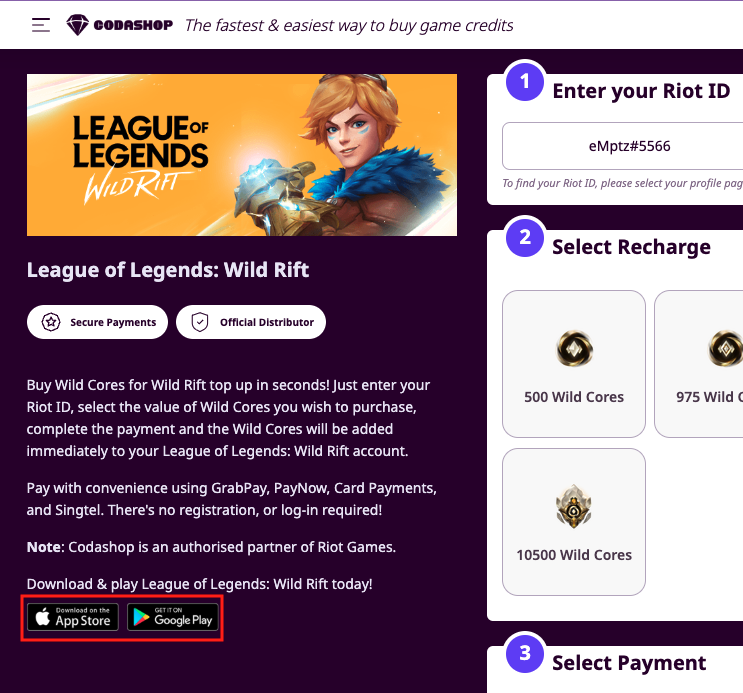
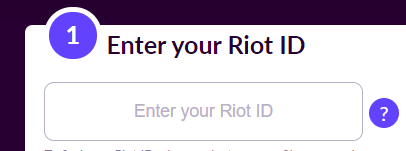
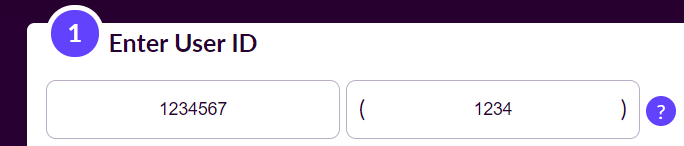
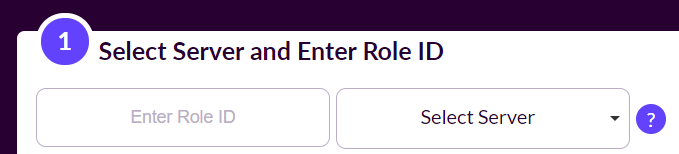
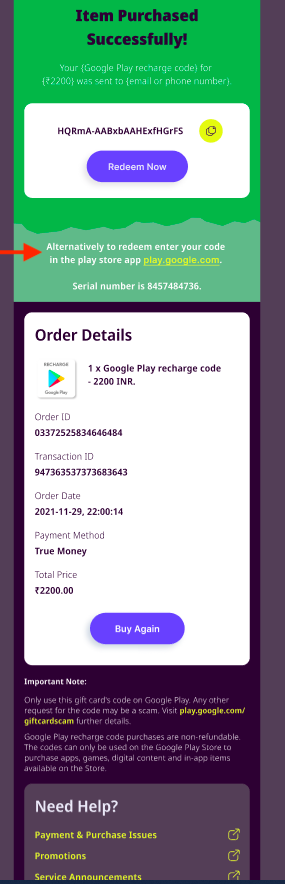
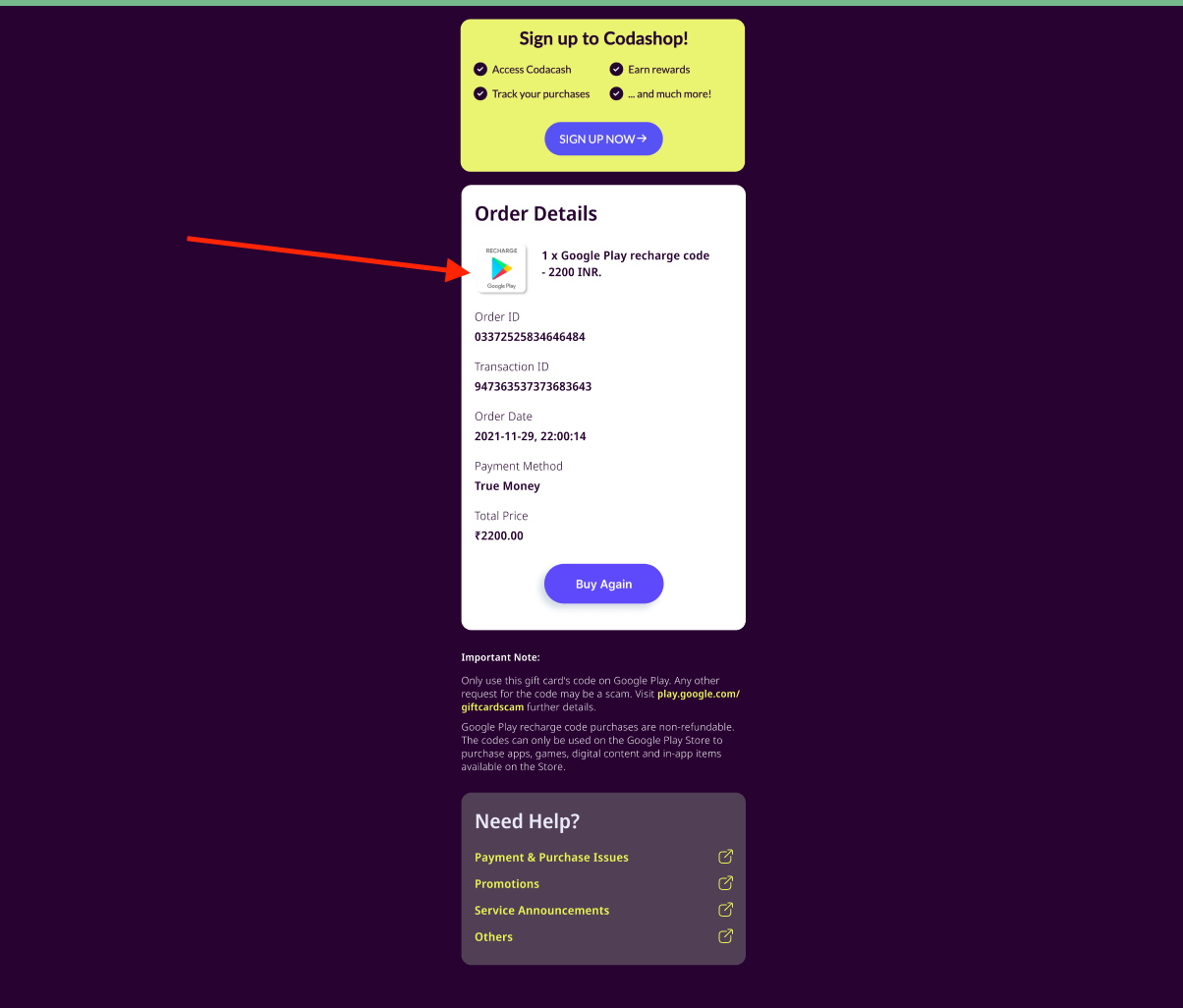
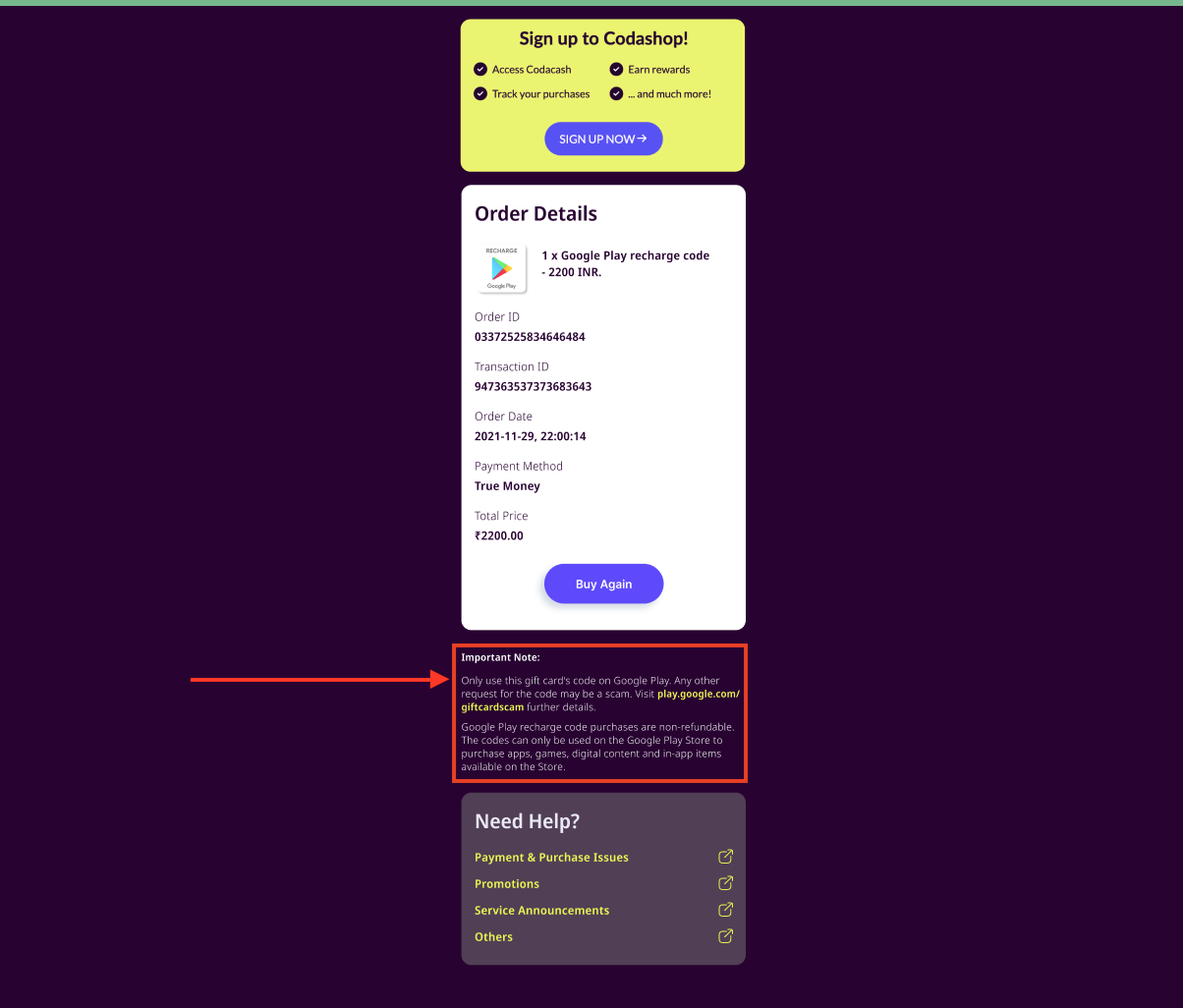
<table data-full-width="true"><thead><tr><th width="153.33333333333331">Field name</th><th>Description</th><th>Validation</th></tr></thead><tbody><tr><td>Tile Image</td><td>Icon for your title to be shown on <a href="https://www.codashop.com/en-sg/">Codashop country homepage</a></td><td>Dimensions: 178px (w) × 178px (h)<br><br>The file type should be JPG or PNG<br><br>The size must be less than 25kb<br><br>The image must not have rounded corners</td></tr><tr><td>Banner Image</td><td>Banner image for your title, to be shown on <a href="https://www.codashop.com/en-sg/league-of-legends-wild-rift">Codashop product page</a></td><td>Dimensions must be 640px (w) x 241px (h)<br><br>The file type should be JPG or PNG<br><br>The size must be less than 100kb</td></tr><tr><td>Links for your title</td><td>Types of links supported, to be shown on <a href="https://www.codashop.com/en-sg/league-of-legends-wild-rift">Codashop product page</a>:<br>- Apple App Store<br>- Google Play Store<br>- Direct Android Download<br>- PC Download<br>- Website URL</td><td>Any links provided must be in valid full URL format</td></tr><tr><td>User ID input</td><td>For Codashoppers to provide their in-game User IDs &#x26; do top-up. To be shown on <a href="https://www.codashop.com/en-sg/league-of-legends-wild-rift">Codashop product page</a><br><br>Our Integration team will set up these input fields based on your specifications.</td><td>Validation Type: select from options:<br>- User ID<br>- User ID + Server (Dropdown)<br>- User ID + Server (Input)<br>Others<br><br>User ID field name: free text input with a 1,000-character limit.<br><br>User ID validation: free text input with a 1,000-character limit.</td></tr><tr><td>Helper Image</td><td>Helper image to assist Codashoppers to find their in-game User IDs. To be shown on <a href="https://www.codashop.com/en-sg/league-of-legends-wild-rift">Codashop product page</a> as a tooltip next to the User ID input</td><td>The file type should be JPG, PNG, or GIF.<br><br>For static images, the file size must be less than 150kb.<br><br>For GIFs, the file size must be less than 1 MB.</td></tr><tr><td>Helper text</td><td>A quick note to guide on how users can obtain their in-game User ID and Server ID/Name if applicable. To be shown on <a href="https://www.codashop.com/en-sg/league-of-legends-wild-rift">Codashop product page </a>below User ID input</td><td>Latin characters only<br><br>We recommend one sentence only for your helper text.</td></tr><tr><td>Title Description</td><td>A description of your title. To be shown on <a href="https://www.codashop.com/en-sg/league-of-legends-wild-rift">Codashop product page</a> below the top-up form</td><td>Maximum 4,000 characters.</td></tr><tr><td>Voucher Redeem Button URL</td><td>If you are selling a voucher code, this is the link Codashoppers can click to open the website where they can redeem the voucher code they just bought. To be shown on Codashop Order Summary page (after a transaction is completed), embedded in the “Redeem Now” widget</td><td>Any links provided must be in valid full URL format.</td></tr><tr><td>Voucher Redemption instructions</td><td>Any additional instructions you would like to give Codashoppers about redeeming their voucher codes. To be shown on Codashop Order Summary page (after a transaction is completed), under the “Redeem Now” widget</td><td>We recommend using a maximum of 1,000 characters.</td></tr><tr><td>Order details product image</td><td>A specific image Codashop will show as part of the Order details section of the Order Summary page, next to the item name.</td><td>The file type should be in JPG or PNG</td></tr><tr><td>Important Note</td><td>Any important note or instruction you would like to give Codashoppers who have just purchased an item for your title. To be shown on Codashop Order Summary page (after a transaction is completed), it will be shown under “Order details.”</td><td>We recommend using a maximum of 1,000 characters.</td></tr></tbody></table>

## <mark style="color:purple;">Tile Image</mark>

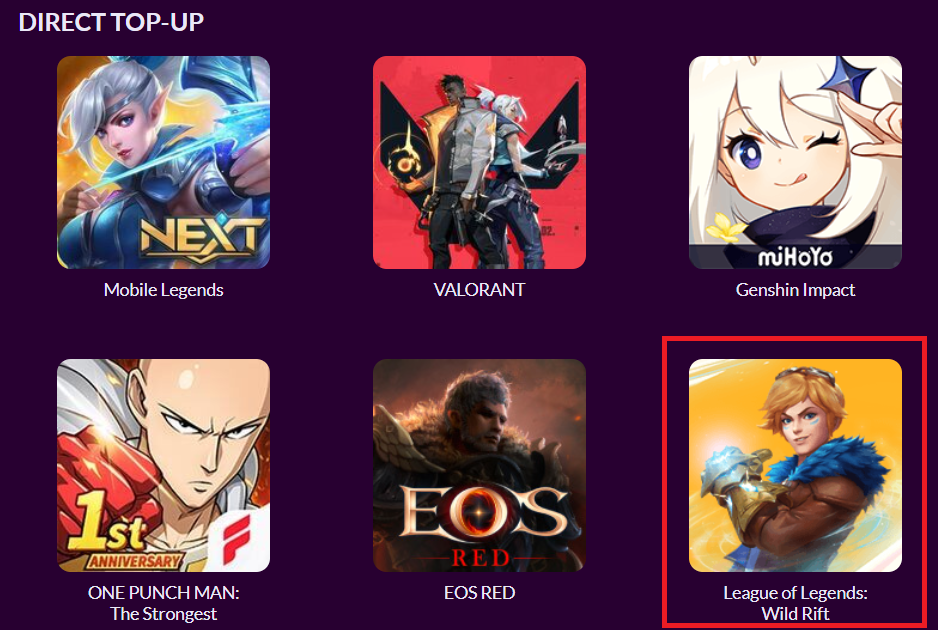
<figure><img src="https://files.readme.io/cd0f5d1-image1.png" alt=""><figcaption></figcaption></figure>

## <mark style="color:purple;">Banner Image</mark>

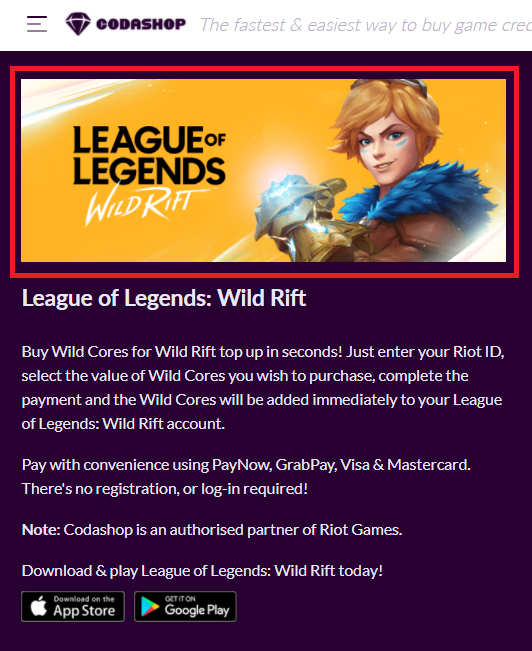
<figure><img src="https://files.readme.io/f1ec738-image18.png" alt=""><figcaption></figcaption></figure>

## <mark style="color:purple;">Links for your Title</mark>

<figure><img src="https://files.readme.io/ee6396e-image2.png" alt=""><figcaption></figcaption></figure>

## <mark style="color:purple;">User ID input field, dropdown, and server input field</mark>

<figure><img src="https://files.readme.io/4eecfea-image9.png" alt=""><figcaption></figcaption></figure>

<figure><img src="https://files.readme.io/3ad2d66-image23.png" alt=""><figcaption></figcaption></figure>

<figure><img src="https://files.readme.io/cd25a28-image16.png" alt=""><figcaption></figcaption></figure>

## <mark style="color:purple;">Helper Image</mark>

<figure><img src="https://files.readme.io/a6c73b2-image21.png" alt=""><figcaption></figcaption></figure>

## <mark style="color:purple;">Helper Text</mark>

<figure><img src="https://files.readme.io/789aa34-image4.png" alt=""><figcaption></figcaption></figure>

## <mark style="color:purple;">Title Description</mark>

<figure><img src="https://files.readme.io/646561c-image11.png" alt=""><figcaption></figcaption></figure>

## <mark style="color:purple;">Voucher Redeem Button URL</mark>

<figure><img src="https://files.readme.io/ea2d064-image8.png" alt=""><figcaption></figcaption></figure>

## <mark style="color:purple;">Redemption Instructions</mark>

<figure><img src="https://files.readme.io/448a843-image20.png" alt=""><figcaption></figcaption></figure>

## <mark style="color:purple;">Order Details Product Image</mark>

<figure><img src="https://files.readme.io/47ac9a4-image24.png" alt=""><figcaption></figcaption></figure>

## <mark style="color:purple;">Important Note</mark>

<figure><img src="https://files.readme.io/5cf255e-image19.png" alt=""><figcaption></figcaption></figure>


# SKU/Product Images Guidelines

## <mark style="color:purple;">SKU/Product Image Guideline</mark>

| Category         | Response                               |
| ---------------- | -------------------------------------- |
| Image format     | PNG                                    |
| Image dimension  | 150px by 150 px (aspect ratio 1:1)     |
| Image background | Image background has to be transparent |
| Resolution (PPI) | 72 PPI                                 |

## <mark style="color:purple;">Examples of Good Image Content</mark>

<figure><img src="https://files.readme.io/f9633a2-image15.png" alt="Image content should not exceed 150px by 150px"><figcaption><p>Image content should not exceed 150px by 150px</p></figcaption></figure>

<figure><img src="https://files.readme.io/750bbf3-image5.png" alt="Image content should cover at least 85% of one dimension (128px by 128px)"><figcaption><p>Image content should cover at least 85% of one dimension (128px by 128px)</p></figcaption></figure>

<figure><img src="https://files.readme.io/73a2b5c-image24.png" alt="Image content should follow an aspect ratio of at least 0.65"><figcaption><p>Image content should follow an aspect ratio of at least 0.65</p></figcaption></figure>

## <mark style="color:purple;">Examples of Poor Image Content</mark>

<figure><img src="https://files.readme.io/ca7b931-image9.png" alt="Image content should not be stretched horizontally or vertically"><figcaption><p>Image content should not be stretched horizontally or vertically</p></figcaption></figure>

<figure><img src="https://files.readme.io/30a1e95-image14.png" alt="Image background must be transparent"><figcaption><p>Image background must be transparent</p></figcaption></figure>

<figure><img src="https://files.readme.io/66ec276-image6.png" alt="Image content must adhere to the minimal dimensions provided or it will not be eligible to users"><figcaption><p>Image content must adhere to the minimal dimensions provided or it will not be eligible to users</p></figcaption></figure>


# Onboarding Compliance


# Security Overview

In this section, you will gain insights into how <mark style="color:purple;">**Coda consistently achieves a 99.99% security uptime through continuous 24/7 real-time monitoring**</mark>.&#x20;

Below, you'll find quick links to each relevant section:

<table data-view="cards"><thead><tr><th align="center"></th><th data-hidden></th><th data-hidden></th><th data-hidden data-card-target data-type="content-ref"></th></tr></thead><tbody><tr><td align="center"><mark style="color:purple;"><strong>Data Privacy</strong></mark></td><td></td><td></td><td><a href="broken://pages/MplLB1DKWsRmFxM2b9Fi">Broken link</a></td></tr><tr><td align="center"><mark style="color:purple;"><strong>Application Security</strong></mark></td><td></td><td></td><td><a href="broken://pages/8BrRyxVJgQnmr3YRLHzg">Broken link</a></td></tr><tr><td align="center"><mark style="color:purple;"><strong>Network Security</strong></mark></td><td></td><td></td><td><a href="broken://pages/0BvDxRpTuSJiTZzB3yQC">Broken link</a></td></tr><tr><td align="center"><mark style="color:purple;"><strong>Security Operations</strong></mark></td><td></td><td></td><td><a href="broken://pages/wjbmscGfAuoGwWi9diOm">Broken link</a></td></tr><tr><td align="center"><mark style="color:purple;"><strong>Access Control Management</strong></mark></td><td></td><td></td><td><a href="broken://pages/syPPeng1pBCsTbVp8DMx">Broken link</a></td></tr><tr><td align="center"><mark style="color:purple;"><strong>Human Resource Security</strong></mark></td><td></td><td></td><td><a href="broken://pages/x45xwZGzChYC4npmYjZ2">Broken link</a></td></tr></tbody></table>


# Data Privacy

<table><thead><tr><th width="215">Data Privacy</th><th>Context</th></tr></thead><tbody><tr><td><mark style="color:purple;"><strong>Personal Identifiable Information</strong></mark></td><td><p>Personal data points that Coda Payments collects from Codashop users in its capacity as an independent data controller<br></p><p>Personal and contact details of the players such as first name, last name, email address, and phone number (depending upon the product/service/use case);</p><p>Account details of the players such as in-app/in-game ID/publisher affiliation;</p><p>Device data such as IP address;</p><p>Correspondence data;</p><p>Order data such as transaction ID etc.</p><p>Cookies and/or statistical/analytical data;</p><p>Documentation that helps us verify the accuracy of the information provided by our users if it is required for fulfilling certain obligations or for providing certain services;</p><p>Social media links or public profiles of our users if they submit it; and User account passwords.<br></p><p>Personal data points that Coda Payments may share with the publishers (Depending upon the terms of the Data Processing Agreements and the relevant data privacy regulations as well as the purpose/requirement):</p><p></p><p>Personal and contact details of the players such as first name, last name, email address, and phone number;</p><p>Account details of the players such as in-app/in-game ID/publisher affiliation;</p><p>Device data such as IP address;</p><p>Correspondence data;</p><p>Order data such as transaction ID etc.<br></p><p>Personal data points that Coda Payments collects from publishers</p><p>1. Professional and contact details of the publisher’s authorized signatories and employees;</p><p>2. KYC and compliance information</p></td></tr><tr><td><mark style="color:purple;"><strong>Coda Payments's role as a Data Controller</strong></mark></td><td><p>1. Coda Payments's role in the data processing arrangement is that of an independent data controller, as such, our template reflects a controller-to-controller arrangement along with a provision for controller-to-processor transfers (Coda Payments as a processor) on the off chance that data is transferred to Coda Payments by the publisher in the capacity of a data controller and to safeguard the publisher interests therein.<br></p><p>2. This is owing to the hybrid nature of Coda Payments' business model, wherein Codapay is provided as a bundled service along with Codashop. In a normal payment service provider model, Coda Payments would have been a data processor.<br></p><p>3. Codashop is an independent e-commerce website/marketplace operated by Coda Payments through which Coda Payments provides content monetisation services to publishers. It has its own user base, these users visit Codashop to purchase content or top up their in-game accounts with in-game currencies (digital goods) which are posted for sale on the Codashop website.</p><p></p><p>4. While doing so, these end users accept Coda Payments' terms and conditions and privacy policies and become Codashop customers to avail the digital goods. In this user journey, user data is directly collected by Coda Payments for its own purposes mentioned in its privacy policy which is displayed on the Codashop website. The publishers of the game titles do not come into the picture from a data privacy/collection or transfer perspective in this user journey.<br></p><p>5. As such, both parties are independent controllers of the data they collect directly from the end users.</p></td></tr><tr><td><mark style="color:purple;"><strong>Data Security</strong></mark></td><td>Coda Payments adopts an insight-driven framework for the implementation of our data security program. A data dictionary/glossary is consolidated to record all types of sensitive data, which will cross-reference the policies and procedures required in the data classification. This is used in conjunction with a data loss prevention platform to detect and block leakage of sensitive data, followed by continuous assessment and updates of the underlying controls to ensure the relevancy and effectiveness of changing threats, business practices, and landscape.</td></tr><tr><td><mark style="color:purple;"><strong>Encryption</strong></mark></td><td>Coda Payments implements encryption standards based on industry best practices and to meet regulatory/compliance requirements such as AES-256 database encryption algorithms to protect the sensitive data at rest and where applicable, TLS1.2 and above, with reputed certificate authority signed certificates with 2048-bit RSA keys to secure the sensitive data in transit.</td></tr></tbody></table>


# Application Security

| Application Security                      | Context                                                                                                                                                                                                                                                            |
| ----------------------------------------- | ------------------------------------------------------------------------------------------------------------------------------------------------------------------------------------------------------------------------------------------------------------------ |
| **Penetration Testing**                   | Coda Payments performs both manual and automated penetration testing to identify any vulnerabilities in our Internet-facing and internal applications. This also includes API-specific testing of vulnerabilities to include business logic and transaction flows. |
| **Static Code Analysis**                  | Coda Payments performs static source code scanning at the development and deployment stage to identify any vulnerabilities at the code level.                                                                                                                      |
| **Secure Software Development Lifecycle** | Coda Payments implements a secure software development lifecycle and provides secure coding training to all engineers to enhance secure coding practices.                                                                                                          |


# Network Security

| Network Security                   | Context                                                                                                                                                                                            |
| ---------------------------------- | -------------------------------------------------------------------------------------------------------------------------------------------------------------------------------------------------- |
| **Network Monitoring**             | Coda Payments network is placed behind a zero-trust network, integrated with the use of security services to continuously monitor, audit, and analyze any suspicious or malicious network traffic. |
| **Network Vulnerability Scanning** | Coda Payments performs regular network vulnerability scanning to discover any vulnerable ports or unused services to reduce exposure to network exploits and attacks.                              |
| **Denial of Service Mitigation**   | Coda Payments employs DDoS mitigation to block external DDoS attacks with edge networks, reliable infrastructure, and a variety of mitigation systems.                                             |


# Security Operations

| Security Operations                                 | Context                                                                                                                                                                                                                                |
| --------------------------------------------------- | -------------------------------------------------------------------------------------------------------------------------------------------------------------------------------------------------------------------------------------- |
| **Website Phishing and Social Media Impersonation** | Coda Payments engages a dedicated security partner who specializes in website phishing and fake social media impersonation to perform continuous detection of these Internet threats and perform enforcement action to remove them.    |
| **Malware Protection**                              | Coda Payments implements a behavioral-based anti-malware system integrated with endpoint detection response capability to detect different types of malware attacks and perform incident response procedures.                          |
| **Infrastructure Monitoring**                       | Coda Payments implements infrastructure monitoring to detect different types of infrastructure threats ranging from network intrusion, unauthorized access, exfiltration, privilege escalation, and other types of anomalous activity. |


# Access Control Management

| Access Control Management   | Context                                                                                                                                                             |
| --------------------------- | ------------------------------------------------------------------------------------------------------------------------------------------------------------------- |
| **2-Factor Authentication** | Coda Payments implements multi-factor authentication via different channels across various systems and platforms.                                                   |
| **Access Controls**         | Coda Payments defines authorization role-based access controls to grant different roles with respective permissions according to the responsibilities of each user. |
| **Auditing and Logging**    | Coda Payments logs all user access and user management activities for proper accountability, audit, and investigation purposes.                                     |


# Human Resources Security

| Human Resources Security        | Context                                                                                                                                                                                                                                                                                                                                                                                                                          |
| ------------------------------- | -------------------------------------------------------------------------------------------------------------------------------------------------------------------------------------------------------------------------------------------------------------------------------------------------------------------------------------------------------------------------------------------------------------------------------- |
| **Security Awareness Training** | Coda Payments conducts continuous security awareness training for all staff to educate them on real-life scenarios and case studies. This ensures secure responses to various daily, security-related events.                                                                                                                                                                                                                    |
| **Data Privacy Training**       | Coda Payments conducts continuous data privacy training for all staff including contractors, consultants, and interns on an annual basis to educate and prepare them to handle personal data in different day-to-day situations that they could come across in their work. Besides, focused training is also provided to certain staff members from certain functions who are engaged in significant data processing activities. |
| **Phishing Exercises**          | Coda Payments conducts continuous internal email phishing exercises to increase awareness of the latest phishing attacks and methods to ensure the secure handling of these emails.                                                                                                                                                                                                                                              |


# Onboarding

Welcome to the Compliance Documentation provided by Coda Payments. This section is designed to provide you with comprehensive information regarding compliance requirements. Here, you will find all the relevant details to ensure a clear understanding of our compliance standards.

Should you have any inquiries, please feel free to contact your dedicated account manager. We are here to assist you.


# Compliance Certifications

<table><thead><tr><th width="275">Certification</th><th>Details</th></tr></thead><tbody><tr><td><mark style="color:purple;"><strong>PCI DSS</strong></mark></td><td>Coda Payments processes fewer than the threshold of 6 million credit and debit card transactions required for the PCI DSS Level 1 compliance level which constitutes a minority of the transactions processed by our Codashop users. Coda Payments self-assesses its PCI DSS compliance with the SAQ A-EP form and self-attests to that compliance annually. Hence Coda Payments do not have any independent PCI certification as we work with a number of major card payments PSPs that are PCI certified.</td></tr><tr><td><mark style="color:purple;"><strong>Data Privacy regulations - GDPR, CCPA, PDPA, LGPD, etc.</strong></mark></td><td>Coda Payments has the required technical and organizational measures as well as policies and procedures in place such as those to provide for data subject rights requests, personal data breach notification, etc. In line with the requirements of the various data privacy regulations including EU-GDPR, Singapore PDPA, and the US CCPA</td></tr><tr><td><mark style="color:purple;"><strong>ISO 27001, SOC 2 Type II</strong></mark></td><td>Coda Payments is currently not certified with ISO 27001 or SOC 2.</td></tr><tr><td><mark style="color:purple;"><strong>Monetary Authority of Singapore (MAS) Technology Risk Management (TRM)</strong></mark></td><td>Coda Payments is pursuing MAS technology risk management compliance certification for fintech companies based in Singapore.</td></tr></tbody></table>


# General Compliance

| General Compliance                                                                                                              | Context                                                                                                                                                                                                                                                                                                                                                                                                                                                                                                                                                                                                                                                                                                                                                                                                                                                                                                                                                                                                                                                                                                                                                                                                                                                                                                                                                                                                               |
| ------------------------------------------------------------------------------------------------------------------------------- | --------------------------------------------------------------------------------------------------------------------------------------------------------------------------------------------------------------------------------------------------------------------------------------------------------------------------------------------------------------------------------------------------------------------------------------------------------------------------------------------------------------------------------------------------------------------------------------------------------------------------------------------------------------------------------------------------------------------------------------------------------------------------------------------------------------------------------------------------------------------------------------------------------------------------------------------------------------------------------------------------------------------------------------------------------------------------------------------------------------------------------------------------------------------------------------------------------------------------------------------------------------------------------------------------------------------------------------------------------------------------------------------------------------------- |
| <mark style="color:purple;">**Codashop's business model is compliant with Google and Apple's 3rd party payment policy.**</mark> | <p>Apple’s guidelines state that if an app operates across multiple platforms, users can access content acquired in the app, including consumable items in multi-platform games, provided that those items are also available as in-app purchases within the iOS version. This means that publishers should just ensure that content available for sale through Codashop can also be available for purchase using Apple’s in-app purchases.</p><p><br></p><p>Google’s payments policy also recognizes that developers can use alternative payment methods outside of an app. Within an app, users cannot be led to alternative payment methods for in-app purchases of digital goods and services distributed on Google Play, but publishers are free to communicate with users about alternative payment options outside of an app.<br></p><p>These policies may become more permissive in the future as more jurisdictions expressly legislate in favor of clarifying that other in-app payment methods can be used. Some countries and regions have already done so; for example, South Korea, the Netherlands, and the European Union.</p><p><br></p><p>In short, publishers that monetize using Codashop and do not communicate with users about this option inside the versions of their apps distributed through the Apple App Store and Google Play Store are compliant with Google and Apple’s policies.</p> |


# Finance Guide

Welcome to the Finance Documentation provided by Coda Payments. This document is intended to assist our Partners in business and financial departments in gaining a clear understanding of Coda Payments’ rate card, associated service fees, and tax considerations. We will also walk you through the essential steps involved in the reconciliation, invoicing, and settlement process, as well as the various payment channels available for collecting payments.


# Taxes

**Singapore Withholding Tax:** Coda Payments is a Singapore company, and in accordance with the Inland Revenue Authority of Singapore, “Payments for software or digitized goods that do not involve the transfer of the copyright rights embedded in the goods will be considered as payments for copyrighted articles and are not subject to withholding tax.”As such, Coda does not apply any withholding tax on its payouts to partners, regardless of which country they are based in.


# Singapore GST

For Partners addressed in Singapore:

|                               | Transactions are processed by a payment channel for which Coda sends partner invoices for transaction processing                                                                                                                                                                                                                                                                                                                                                                                                                                         | Transactions are processed by a payment channel for which the partner sends Coda invoices for content                                             |
| ----------------------------- | -------------------------------------------------------------------------------------------------------------------------------------------------------------------------------------------------------------------------------------------------------------------------------------------------------------------------------------------------------------------------------------------------------------------------------------------------------------------------------------------------------------------------------------------------------- | ------------------------------------------------------------------------------------------------------------------------------------------------- |
| Partner is GST registered     | Coda will charge partners the specified percentage and per-transaction fee(s) for transaction processing, plus 9% GST on these fees, and will reduce its settlement payment to the partner accordingly. The partner will be able to claim back this GST from IRAS.Partners should charge 9% GST on sales to end users in Singapore and comply with [IRAS rules with respect to the display of pricing](https://www.iras.gov.sg/taxes/goods-services-tax-\(gst\)/basics-of-gst/invoicing-price-display-and-record-keeping/displaying-and-quoting-prices). | Publishers should include 9% GST on the value of their invoices to Coda and Coda will increase its settlement payment to the partner accordingly. |
| Partner is not GST registered | Coda will charge partners the specified percentage and per-transaction fee(s) for transaction processing, plus 9% GST on these fees, and will reduce its settlement payment to the partner accordingly. The partner will be unable to claim back this GST from IRAS, so should consider GST registration                                                                                                                                                                                                                                                 | GST does not apply                                                                                                                                |


# Sales Tax Charged to End Users

Coda Payments (Coda) is required to determine, charge, and remit 9% GST to the appropriate tax authority on transactions processed in Singapore. In this case, Coda will deduct the GST amount from the settlement payment and remit it to the appropriate tax authority. You don’t need to calculate and send GST separately for purchases made by customers in Singapore.

<mark style="color:purple;">**Sales Tax:**</mark> Depending on the local tax law, Partners may be required to include sales tax in the price offered to customers for digital content purchases in some countries. If you offer content in tax-inclusive countries, the amount that we charge to customers will include the applicable taxes (i.e. when a partner’s charge request is submitted to Coda via API for Rp. 100.000, we will charge the customer Rp. 100.000, of which Rp. 9.910 will be deducted as sales tax (in the case of Indonesia as an illustration)) to be remitted to the appropriate tax authority by either the payment channel, Coda, or Partner.

Currently, Coda supports the transmission of sales taxes to the responsible tax authority on the Partner’s behalf for selected channels. Please contact your corresponding Coda contact for more details.


# Reconciliation, Invoicing, and Settlement

There are four steps in the payment cycle that finance teams should understand when working with Coda: (1) transactions are processed during a particular month (the “Transaction Period”), and then (2) a sales report is generated by Coda (the “Sales Report” or “S.R.”) and sent by email to the partner, and then (3) an invoice (“the Invoice” or “Inv.”) is sent from Coda to the Partner or from the Partner to Coda, depending on the payment channel (as illustrated below), and then (4) Coda makes payment to the Partner (“Pay”).&#x20;

On the next page, you will find a table illustrating this flow and when each of these steps takes place.


# Payment Cycle Flow

| Transaction Structure      | Who sends the invoice? | Payment Term | Month-1              | Month-2                                      | Month-3       | Month-4       |
| -------------------------- | ---------------------- | ------------ | -------------------- | -------------------------------------------- | ------------- | ------------- |
| Partners sell to Coda      | Partner                | 30           | “Transaction Period” | <p>Week 3: “Invoice”</p><p>Week 4: “Pay”</p> |               |               |
|                            |                        | 60           | “Transaction Period” | Week 3: “Invoice”                            | Week 4: “Pay” |               |
|                            |                        | 90           | “Transaction Period” | Week 3: “Invoice”                            |               | Week 4: “Pay” |
| Partners sell to End Users | Coda                   | 30           | “Transaction Period” | <p>Week 3: “Invoice”</p><p>Week 4: “Pay”</p> |               |               |
|                            |                        | 60           | “Transaction Period” | Week 3: “Invoice”                            | Week 4: “Pay” |               |
|                            |                        | 90           | “Transaction Period” | Week 3: “Invoice”                            |               | Week 4: “Pay” |


# Finance FAQs

*<mark style="color:purple;">**Why are invoices sent from Coda to the Partner for certain payment channels and from Partner to Coda for others?**</mark>*

* When the Annex or E-annex for a payment channel indicates that sales made by Partners are to Coda, Partner agrees to sell to Coda content that is accessed by End Users at a discount. Partner will invoice Coda each settlement cycle for the Transaction Value of all Successful Transactions made during the month when transactions were processed less the agreed-upon discount.
* When the Annex or E-annex for a payment channel indicates that sales made by the Partner are to End Users, Coda shall provide transaction-processing services to the Partner and invoice the Partner each settlement cycle for the fees described in the Annex or E-annex.

*<mark style="color:purple;">**Here are two examples to illustrate how the invoicing flow works:**</mark>*

1. <mark style="color:purple;">**Scenario A: a payment channel where the Partner sends an invoice to Coda (i.e. where the Partner agrees to sell content to Coda at a discount).**</mark> Suppose a Partner processes transactions in the month of January. The Sales Report would be automatically generated by Coda and sent by email to the Partner on 1 February. For channels with a settlement period of 60 days, the Partner would then be responsible for sending an invoice to Coda’s finance team no later than the 25th of March. Provided the invoice is in order, the payment would then be sent by Coda to the Partner before 31 March.
2. <mark style="color:purple;">**Scenario B: a payment channel where Coda sends an invoice to Partner (i.e. where Coda agrees to provide transaction-processing services to Partner.)**</mark> Suppose a partner processes transactions in the month of January. The Sales Report would be automatically generated by Coda and sent by email to the Partner on 1 February. For channels with a settlement period of 60 days, Coda would then be responsible for sending an invoice to the Partner’s finance team no later than the 25th of March. The payment would then be sent by Coda to the Partner before 31 March.

*<mark style="color:purple;">**How is the settlement process handled?**</mark>* \
We send transaction reports to the partner on the **2nd** of each month. By the **10th**, we provide invoices, purchase orders, and self-billing PDFs to the Partner as a summary of the net settlement amount for the previous month.

The Partner is required to send us invoices for their content transactions by the 24th of each month. On the last working day of the month, we process the settlement and send a payment details notice summarizing the transactions.

*<mark style="color:purple;">**What’s the procedure for issuing an invoice?**</mark>*\
We issue invoices for transactions that fall under the transaction processing structure.&#x20;

When a Partner sells content to Coda (under the sale of content structure), we issue a purchase order (PO). The Partner can then use the PO amounts to send an invoice to Coda for the content sold.

*<mark style="color:purple;">**When will we receive our settlement?**</mark>*\
Settlements occur on the last working day of the month through telegraphic transfer/SWIFT. Depending on the processing times of the intermediary and beneficiary banks, it may take 1 to 5 working days for the funds to reach your bank account.

*<mark style="color:purple;">**Should tax be included in my invoice?**</mark>*\
Yes, if the Partner is a GST-registered entity in Singapore.

*<mark style="color:purple;">**How can I check if I need to issue an invoice? / How do I verify my payment structure?**</mark>*\
**Coda uses two transaction structures:**

* Coda sends an invoice: When the Partner sells directly to end-users. Coda provides transaction processing services for these purchases via the Coda platform.
* Coda sends a purchase order when the Partner sells content to Coda. Coda then resells this content to end-users or through affiliates or designated payment channel partners.

*<mark style="color:purple;">**Why wasn’t the settlement automatically credited to our account?**</mark>*\
There might be an issue with the recipient bank. If Coda confirms the funds have been sent, we suggest contacting your bank directly for further investigation

*<mark style="color:purple;">**Can the settlement be made in a different currency (e.g., X currency)?**</mark>* \
Currently, settlements are processed only in USD. For special requests, please contact our Treasury team.

*<mark style="color:purple;">**Why haven’t I received my settlement yet?**</mark>* \
Settlements are made on the last working day of the month via telegraphic transfer/SWIFT. It may take 1-5 working days to reach your bank account. If you haven’t received it after 5 working days, we will check with our bank for any bounce-back issues.

*<mark style="color:purple;">**Is it possible to settle at any time?**</mark>* \
Currently, settlements are processed in monthly and mid-week cycles (T+15 and bi-weekly). For specific requests, please contact the GPT team for discussion.

*<mark style="color:purple;">**Random settlement discrepancy issues:**</mark>*

1. Amount discrepancies
2. Missing transactions

Please report these to the Coda finance team at *<mark style="color:yellow;"><payables@codapayments.com></mark>*. Finance will investigate the discrepancies.

*<mark style="color:purple;">**How long does it take to receive a response from the Coda Finance Team via email?**</mark>*\
I’ve sent my invoice but haven’t received a reply. The Coda finance team will respond to invoice-related queries by the end of the month at the latest.

*<mark style="color:purple;">**Can I change the bank account where the settlement is made?**</mark>* \
For support regarding bank change requirements, please reach out to our customer success team at ***<customersuccess@codapayments.com>***

*<mark style="color:purple;">**Which of my accounts is being used for the settlement?**</mark>* \
Settlements are made to the bank account stated in the agreement. Any addendums or changes will refer to the latest information.

*<mark style="color:purple;">**What is my outstanding balance? / How do I check my balance?**</mark>* \
Please contact the Coda finance team at *<mark style="color:yellow;"><payables@codapayments.com></mark>* for all balance inquiries.

*<mark style="color:purple;">**Will Coda continue making monthly settlements before the Partner reaches their cap?**</mark>* \
No, settlements are processed only when the Partner reaches their cap. However, special requests from the Partner can be accommodated.

*<mark style="color:purple;">**Can the settlement report be sent to a new email address / Request email changes?**</mark>*\
Yes,  please reach out to our customer success team at ***<customersuccess@codapayments.com>***

*<mark style="color:purple;">**Random GST-related concerns:**</mark>*\
Example: If a Partner registers for GST on March 1, 2024, should the March invoice be reissued?

* If the invoice has already been settled, it cannot be reissued.
* If the invoice has not been settled, it can be reissued.

*<mark style="color:purple;">**How do settlement caps change?**</mark>* \
The default settlement cap is USD 100 after the remittance fee. Specific caps can be set upon the Partner's request.

*<mark style="color:purple;">**Concerns about the payment structure / Change payment structure request**</mark>*\
Changes are possible.  please reach out to our customer success team at ***<customersuccess@codapayments.com>***

*<mark style="color:purple;">**FX rate used for settlement: Is there any website for reference?**</mark>*\
Please contact the Coda finance team at *<mark style="color:yellow;">**<payables@codapayments.com>**</mark>* for FX source references.\ <br>

<br>


# Cut-off Dates

The table below illustrates the timeline for transactions that occurred in January depending on Payment Channel's settlement period:

| Payment channel's settlement period | Cut-off date for submitting invoice | Payment sent by Coda to Partner |
| ----------------------------------- | ----------------------------------- | ------------------------------- |
| 30 days                             | 24th February                       | End of February                 |
| 60 days                             | 24th March                          | End of March                    |
| 90 days                             | 24th April                          | End of April                    |

Invoices received after the 25th of each month will be included in the subsequent month's payment schedule.


# Preparing a Partner Invoice to Coda

Here are some tips to ensure the invoice that you send to Coda is correct (in cases where the Partner is obligated to send an invoice to Coda):

* The invoice should be prepared only after the Partner has reviewed the Sales Report sent by Coda and has verified that the data is correct.
* The amount specified on the invoice shall be for the value of transactions processed during the Transaction Period, net of Coda’s fees. Taking Indonesia carrier billing as an example, if Rp. 1.000.000 was processed in a transaction month (exclusive of VAT) and Coda’s fee is 30%, so the amount that should be specified on the invoice is Rp. 700.000.
* The Partner can use any format for the invoice desired, so long as it includes the following information: (1) the payment channel(s) for which the invoice applies, (2) the Transaction Period, and (3) the net amount.
* A sample invoice can be found in [Appendix A](broken://pages/pWEQ0pDRKLBt9YIDEs3O).


# Interpreting an Invoice from Coda to the Partner

Here's a tip to ensure that you correctly interpret the invoice from Coda to the Partner (in cases where Coda is obligated to send an invoice to the Partner):

* The amount specified on the invoice shall be for the value of Coda’s fees. Taking Indonesia bank transfers as an example, if Rp. 1.000.000 was processed in a transaction month and Coda’s fee is 10%, then the amount specified on the invoice will be Rp. 100.000.


# Other Important Notes

<mark style="color:purple;">**Settlement currency:**</mark> Transactions are always processed in the country’s local currency (i.e. Indonesian Rupiah, Singapore Dollars, Malaysian Ringgit, Thai Baht, Philippine Peso, or New Taiwan Dollars). Payouts to partners are always made in USD at the exchange rate used by the bank (or non-bank payment service provider where applicable) when the exchange from local currency to USD is made, less the international transfer fee specified in the Partner’s agreement with Coda.

<mark style="color:purple;">**Deferment of payment:**</mark> To minimize the remittance fees that partners bear, if a payment is less than US$100, Coda will, *unless the partner instructs Coda otherwise in writing*, defer making it until the current month’s payment and deferred payments from prior months total US$100 or more.

<mark style="color:purple;">**Settlement bank account:**</mark> The payee bank account must be a corporate account in the name of the partner. Personal bank accounts will not be accepted.

<mark style="color:purple;">**Accessing transaction data:**</mark> Finance contacts at Partners can access transaction records in two ways:

* <mark style="color:purple;">**Automatically via Email/SFTP/Webhook:**</mark> Coda will send the sales report (daily/weekly/monthly) basis and deliver this to one of the options available now. For more detailed information, please refer to this [Transaction Report Delivery Option](broken://spaces/SEdQy23klcHCaJcfBCmP) document.<br>
* <mark style="color:purple;">**Manually (i.e. “self-serve”):**</mark> Transaction data can be manually generated by any user that has Finance access in the [Publisher Portal](https://portal.codapayments.com/) anytime by visiting the <mark style="color:purple;">**Transactions**</mark> tab.

  * The user can select the filters such as payment channels and date range as desired
  * Then press “Show results”
  * Finally, the user can click “Export CSV” or “Email CSV” to extract the transaction data in CSV format. For the Email CSV function, if you don’t receive the CSV within a few minutes, please check your spam/junk folder.
  * This process is illustrated below:

  <div data-full-width="true"><figure><img src="broken://files/QqoYIyj6kIBdQhfwbYUG" alt=""><figcaption></figcaption></figure></div>

<div data-full-width="true"><figure><img src="broken://files/1iuvf87pVMA7uTdZ3lOJ" alt=""><figcaption></figcaption></figure></div>


# Appendix A: Sample Invoice from Partner to Coda

<figure><img src="https://611292228-files.gitbook.io/~/files/v0/b/gitbook-x-prod.appspot.com/o/spaces%2Fl56STCN5yoV1K1MhVEvU%2Fuploads%2F9xZoR60J0V604KO6LPh7%2Fimage%20-%202024-05-27T172707.787.png?alt=media&amp;token=c042062a-9c6d-43ca-a40d-a460597fbb9b" alt=""><figcaption></figcaption></figure>


# Payment Channel

Our supported payment channels include Carrier Billing, Bank Transfers, Debit/Credit Cards, Convenience Store Payments, Cash Cards/Vouchers, and E-Wallets. We support these payment methods based on regional & product availability.

## Payment Types <a href="#payment-types" id="payment-types"></a>

### <mark style="color:purple;">Carrier Billing</mark> <a href="#carrier-billing" id="carrier-billing"></a>

Carrier Billing allows customers to charge purchases to their mobile phone account. The payment is authenticated through an SMS sent to the customer's phone and is processed immediately.

### <mark style="color:purple;">Bank Transfer</mark> <a href="#bank-transfer" id="bank-transfer"></a>

Customers can pay by executing a bank transfer at an ATM, bank counter, or via online banking. Merchants receive a unique payment code, which the customer enters as part of the bank transfer details.

### <mark style="color:purple;">Card Payments</mark> <a href="#card-payments" id="card-payments"></a>

This method allows customers to complete payments using their credit or debit card. Customers are redirected to the partner's payment page to input their card details and complete the payment.

### <mark style="color:purple;">Convenience Store Payments</mark> <a href="#convenience-store-payments" id="convenience-store-payments"></a>

This method allows customers to complete payments at a convenience store. Customers receive a unique payment code from Codapay, which they present at the store.

### <mark style="color:purple;">Voucher (Cash Card)</mark> <a href="#voucher-cash-card" id="voucher-cash-card"></a>

Customers purchase a voucher from an issuer and enter it in Codapay's payment window to purchase digital content.

### <mark style="color:purple;">E-Wallet</mark> <a href="#e-wallet" id="e-wallet"></a>

E-wallets allow customers to have a digital payment account and top-up balance. Codapay supports many types of e-wallets for purchases.

## Payment Channel List <a href="#payment-types" id="payment-types"></a>

{% @gitbook-payment-search/gitbook-payment-search %}

## Payment List by Product <a href="#payment-types" id="payment-types"></a>

<table data-view="cards"><thead><tr><th align="center"></th><th></th><th data-hidden data-card-cover data-type="image">Cover image</th></tr></thead><tbody><tr><td align="center"><h2>CODAPAY</h2></td><td><a href="https://docs.coda.co/codapay/integration-guides/payment-channel-info">Payment Channel Detail</a></td><td><a href="https://611292228-files.gitbook.io/~/files/v0/b/gitbook-x-prod.appspot.com/o/spaces%2Fl56STCN5yoV1K1MhVEvU%2Fuploads%2F8KkC2UxQHJf30lmhJZ5o%2Fimage.png?alt=media&amp;token=225ed0a3-c991-448b-8e86-fb0a76e188a2">image.png</a></td></tr><tr><td align="center"><h2>CODASHOP</h2></td><td><a href="/codashop-and-distribution/codashop-appendix/codashop-payment-channel-list-v2">Payment Channel Detail</a></td><td><a href="https://611292228-files.gitbook.io/~/files/v0/b/gitbook-x-prod.appspot.com/o/spaces%2Fl56STCN5yoV1K1MhVEvU%2Fuploads%2FfO6upePqKdsZF6tF0LD4%2Fimage.png?alt=media&amp;token=c53536b8-b4fa-4199-a962-b653d9e81f32">image.png</a></td></tr><tr><td align="center"><h2>WEBSTORE</h2></td><td><a href="/coda-webstore/coda-webstore-appendix/web-store-payment-channel-list-v2">Payment Channel Detail</a></td><td><a href="https://611292228-files.gitbook.io/~/files/v0/b/gitbook-x-prod.appspot.com/o/spaces%2Fl56STCN5yoV1K1MhVEvU%2Fuploads%2FL8eREIN4kTsxXizcWPlh%2FUntitled%20design%20(34).png?alt=media&amp;token=0064eea5-9967-4b83-955f-8431a2b1cd5a">Untitled design (34).png</a></td></tr></tbody></table>


# Overview

Get ready to discover why Codapay is the absolute game-changer.

## Easily accept payments worldwide on their own websites through a simple and easy-to-use API

Built with over a decade of proven innovation and implementation, our user-friendly integration allows partners to process payments with best-in-class security and robust compliance practices. With seamless user experience, comprehensive data analytics, and global coverage, Codapay empowers businesses to expand their reach and optimize their payment processes.

[<mark style="color:blue;">**Get started now ->**</mark>](/codapay/getting-started)

***

### Codapay's Integration types

<table data-view="cards"><thead><tr><th></th><th data-hidden data-card-cover data-type="files"></th></tr></thead><tbody><tr><td><p><strong>Hosted Payment Page</strong><br><code>~10 mins</code>・<mark style="color:green;">Quickest</mark></p><p><br>Directs the customer to a secure, hosted payment page provided by Coda.</p><p></p><p><a href="/codapay/hosted-payment-page-integration"><mark style="color:blue;"><strong>Learn more -></strong></mark></a><br></p></td><td><a href="https://611292228-files.gitbook.io/~/files/v0/b/gitbook-x-prod.appspot.com/o/spaces%2Fl56STCN5yoV1K1MhVEvU%2Fuploads%2FbnjCUio9f8Ei7rLCPtUp%2FScreenshot%202024-05-30%20at%2012.18.53.png?alt=media&amp;token=77027ecc-b2f0-4245-b690-3b3e27d82662">Screenshot 2024-05-30 at 12.18.53.png</a></td></tr><tr><td><p><strong>Backend API</strong><br><code>~60 mins</code>・<mark style="color:purple;">Custom</mark></p><p><br>Integrate directly with Coda’s backend services, offering more control and customization over the payment process.<br><br><a href="/codapay/direct-api-integration"><mark style="color:blue;"><strong>Learn more -></strong></mark></a></p></td><td><a href="https://611292228-files.gitbook.io/~/files/v0/b/gitbook-x-prod.appspot.com/o/spaces%2Fl56STCN5yoV1K1MhVEvU%2Fuploads%2FTanUy5PwcpaYzrS3gPI4%2Fbackend-api%20%401x.png?alt=media&amp;token=84957191-68a2-4209-9523-2263666f65eb">backend-api @1x.png</a></td></tr></tbody></table>

{% hint style="info" %}
[**See all Codapay's Integration types here**](/codapay/integration-guides/choosing-the-right-type-of-integration#comparison-between-available-integrations)
{% endhint %}

***

### Why Codapay?

<table data-view="cards"><thead><tr><th></th><th></th><th></th><th data-hidden data-card-cover data-type="files"></th></tr></thead><tbody><tr><td>🌍 <strong>Global Reach</strong></td><td>We offer 300+ payment methods, available in 65 countries, supporting 60 currencies, and speaking 80 languages.</td><td></td><td></td></tr><tr><td>🏪 <strong>Convenience</strong></td><td>Experience unmatched customization and advanced features like tokenized charging and single-click payments.</td><td></td><td></td></tr><tr><td>✅ <strong>Stay Compliant</strong></td><td>Our team is experienced, and our systems robust, ensuring compliance with all laws and regulations in every market we serve.</td><td></td><td></td></tr><tr><td>📦 <strong>Complete Package</strong></td><td>Save on transaction costs and FX with Coda’s comprehensive end-to-end Payout solution.</td><td></td><td></td></tr><tr><td>🪨 <strong>Rock-solid Reliability</strong></td><td>We've got your back with 99.95%+ uptime with 24/7 monitoring and rapid response.</td><td></td><td></td></tr><tr><td>📈 <strong>Smart Insights</strong></td><td>Gain exclusive access to our always-on analysis through the <a href="https://bit.ly/4aNqHRf">Publisher Portal</a>.</td><td></td><td></td></tr></tbody></table>

***


# Getting started

Quickly begin testing a Codapay integration.

## What you'll find

This section will cover all the steps required to quickly begin testing with one of our popular integration types, which includes:

* [Set up payments](/codapay/getting-started/set-up-payments)
* [Test the Hosted Payment Page API](/codapay/getting-started/test-hosted-payment-page-api)

Alternatively, you can test the Hosted Payment Page flow directly on our Coda Portal by following the steps in the ["Sandbox Testing"](https://portal.codapayments.com/integration/codapay/sandbox-testing) section.

***

## Set up payments overview

Go to **Coda Portal** to complete these 3 steps:

<table data-view="cards"><thead><tr><th></th><th></th></tr></thead><tbody><tr><td><p><mark style="color:purple;">Step 1</mark></p><p><strong>Create Title</strong></p></td><td>Create a title that you will test an integration with.</td></tr><tr><td><p><mark style="color:purple;">Step 2</mark></p><p><strong>Set up your landing URL and the default callback URL</strong></p></td><td>Configure the URLs for your selected title.</td></tr><tr><td><p><mark style="color:purple;">Step 3</mark></p><p><strong>Retrieve your API Key</strong></p></td><td>Get your API Key to start testing.</td></tr></tbody></table>

***

## Test Hosted Payment Page API overview

<table data-view="cards"><thead><tr><th></th><th></th></tr></thead><tbody><tr><td><p><mark style="color:purple;">Step 1</mark></p><p><strong>Initiate the payment request</strong></p></td><td>Start a payment request to get a response.</td></tr><tr><td><p><mark style="color:purple;">Step 2</mark></p><p><strong>Redirect your user to the payment page to complete payment</strong></p></td><td>Complete the payment request.</td></tr><tr><td><p><mark style="color:purple;">Step 3</mark></p><p><strong>Receive the successful payment notification</strong></p></td><td>Receive then respond with a success message.</td></tr><tr><td><p><mark style="color:purple;">Step 4</mark></p><p><strong>Check the status of a successful payment using the InquiryPaymentResult API call</strong></p></td><td></td></tr></tbody></table>


# Set up payments

Activate a title, countries, and payment methods on Coda's Publisher Portal to start accepting payments.

{% hint style="info" %}
This quickstart assumes that a Publisher Portal account was created and set up with business details, e-agreement signing, and KYC verification completed. If you need assistance completing these steps, please contact your account manager or email <publisher_team@coda.co>
{% endhint %}

## What you'll learn

* How to activate title, countries, and payment methods
* Start accepting payments for a specific title, in specific countries, using specific payment methods

## Step 1: Create Title

1. Log in to your Publisher Portal account and navigate to “Titles”&#x20;

<figure><img src="https://611292228-files.gitbook.io/~/files/v0/b/gitbook-x-prod.appspot.com/o/spaces%2Fl56STCN5yoV1K1MhVEvU%2Fuploads%2FjaPxRIOiYWIqBHamNe6z%2Fimage.png?alt=media&amp;token=90c9504d-e6db-4f02-a014-7e78ea374632" alt=""><figcaption></figcaption></figure>

2. Click on “Create Title”
3. Enter the title information or import them from the Google Play/App Store, select the content type.&#x20;

<figure><img src="https://611292228-files.gitbook.io/~/files/v0/b/gitbook-x-prod.appspot.com/o/spaces%2Fl56STCN5yoV1K1MhVEvU%2Fuploads%2F3e2ObT96kj6eAuKI98fe%2FScreenshot%202026-02-24%20at%2016.58.35.png?alt=media&amp;token=7942cf0f-807b-4b5d-84c3-daacbc4c208a" alt=""><figcaption></figcaption></figure>

4. The title will be auto-created with Codapay enabled. If not, select Service Type as Codapay

***

## Step 2: Set up your landing URL and the default callback URL

1. On your publisher portal account, navigate to **Products** -> **Codapay** -> **Select the Title -> Sandbox Configuration**&#x20;

<figure><img src="https://611292228-files.gitbook.io/~/files/v0/b/gitbook-x-prod.appspot.com/o/spaces%2Fl56STCN5yoV1K1MhVEvU%2Fuploads%2FqAui1Co2biH3Sy7TAzoQ%2FScreenshot%202026-02-24%20at%2017.05.27.png?alt=media&amp;token=0330855b-b33e-446b-a14c-c22f00f2046b" alt=""><figcaption></figcaption></figure>

2. Select the country you want to set up, or use Bulk Edit configuration to edit multiple countries.&#x20;

<figure><img src="https://611292228-files.gitbook.io/~/files/v0/b/gitbook-x-prod.appspot.com/o/spaces%2Fl56STCN5yoV1K1MhVEvU%2Fuploads%2FLhDO8MNv7fKiBdVwbRPQ%2FScreenshot%202026-02-24%20at%2017.07.14.png?alt=media&amp;token=90c45563-98bc-480c-991c-1b6776df8c68" alt=""><figcaption></figcaption></figure>

3. Click “Edit” -> Merchant & URLs configuration:

* **Complete Notification URL:** This is where Codapay will notify you of a successful payment.
* **Complete Landing Page URL:** This is the default URL to which your user will be redirected after the completion of the transaction. If you pass the `returnURL` as part of your initial API call, it will override this value.

<figure><img src="https://611292228-files.gitbook.io/~/files/v0/b/gitbook-x-prod.appspot.com/o/spaces%2Fl56STCN5yoV1K1MhVEvU%2Fuploads%2FzNziTsOL9EhBJZed3UO4%2FScreenshot%202026-02-24%20at%2017.09.08.png?alt=media&amp;token=7c28dfe0-e2f7-4666-91d4-a7c613613c2a" alt=""><figcaption></figcaption></figure>

4. After inputting the URLs, click "Save"&#x20;

***

## Step 3: Retrieve your API Key from the Publisher Portal

1. On your Publisher Portal account, navigate to **Products -> Codapay -> API Keys**

New merchants: You will see your Global API key (v2 API), as well as 1 Project ID for each title.&#x20;

Existing merchants: You will see multiple API keys that are unique for each title and country (v1 API)

For more details, please see [API versions](https://coda-payments.gitbook.io/coda-public-technical-documentation/codapay/integration-guides/codapay-api-versions)&#x20;

2. Optional: You can set up IP Address whitelisting for each title and country.

<figure><img src="https://611292228-files.gitbook.io/~/files/v0/b/gitbook-x-prod.appspot.com/o/spaces%2Fl56STCN5yoV1K1MhVEvU%2Fuploads%2FxMZHYFvnFvRkLF0gwWhE%2FScreenshot%202026-02-24%20at%2017.11.57.png?alt=media&amp;token=c9394939-22af-4e4b-9a5a-6a3ee99f351f" alt=""><figcaption></figcaption></figure>

***

## Next steps:

* [Test Hosted Payment Page API](https://coda-payments.gitbook.io/coda-public-technical-documentation/codapay/getting-started/test-hosted-payment-page-api)


# Test Hosted Payment Page API

After you set up accepting payments in Coda Portal, you can quickly test a payment flow for a payment method.

{% hint style="info" %}
This tutorial only shows how to test for a specific payment method. If you are interested in our Payment Selection Page, [you can follow this guide](/codapay/hosted-payment-page-integration/payment-channel-integration-options).
{% endhint %}

<figure><img src="https://611292228-files.gitbook.io/~/files/v0/b/gitbook-x-prod.appspot.com/o/spaces%2Fl56STCN5yoV1K1MhVEvU%2Fuploads%2FgAGyhYJuIAhX7JceXat5%2Fimage.png?alt=media&amp;token=831812cf-7bdb-4514-ac17-5c3fc969745e" alt=""><figcaption></figcaption></figure>

## What you'll learn

* Initiating a payment request.
* What your customer will experience upon payment request.
* What your customer will experience upon a successful payment notification.

This tutorial assumes you have a developer set up and tools to make API calls (Postman, ...). If that is not the case, you can also test the flow through our Coda Portal ["Sandbox Testing"](https://portal.codapayments.com/integration/codapay/sandbox-testing) section.

***

## Step 1: Initiate the payment request

1. Initiate the payment request by calling the <mark style="color:red;">`/init`</mark> endpoint to collect your **payment transaction ID**. Use the curl below and populate it with:

<table><thead><tr><th width="145">Parameter</th><th width="304">Placeholder text</th><th>Description</th></tr></thead><tbody><tr><td>country</td><td><pre><code>[SELECTED_COUNTRY]
</code></pre></td><td>The country that you want to test. <a href="/codapay/integration-guides/country-and-currency-codes">See the full list here</a>.</td></tr><tr><td>currency</td><td><pre><code>[SELECTED_CURRENCY]
</code></pre></td><td>The currency code that you want to use. <a href="https://coda-payments.gitbook.io/coda-private-technical-documentation/references/country-and-currency-codes">See the full list here</a>.</td></tr><tr><td>payType</td><td><pre><code>[SELECTED_PAYMENT_CHANNEL_ID]
</code></pre></td><td>The payment method that you want to use. <a href="https://coda-payments.gitbook.io/coda-private-technical-documentation/codapay/payment-page-api/supported-payment-channels">See the full list here</a>.</td></tr><tr><td>apiKey</td><td><pre><code>[API_KEY]
</code></pre></td><td>Get your APIKey from <a href="/codapay/getting-started/set-up-payments">Coda Portal</a>.</td></tr><tr><td>projectId</td><td><pre><code>[PROJECT_ID]
</code></pre></td><td><p>*This field is only needed for v2.0 API</p><p>Get the projectId for each title from <a href="/codapay/getting-started/set-up-payments">Coda Portal</a>.</p></td></tr></tbody></table>

{% hint style="warning" %}
Make sure that the price is within transaction limits for the payment channel you’ve selected by [checking transaction limits here](/codapay/integration-guides/price-limits).
{% endhint %}

{% hint style="info" %}
Other parameters have been populated with dummy data for testing purposes below. They can be changed and populated properly as part of your integration. More details on the parameters of the <mark style="color:red;">`/init`</mark> endpoint [can be found here](/codapay/hosted-payment-page-integration).\
\
Codapay offers two API versions - v1.0 and v2.0, with v2.0 being an upgraded version. **If you are a new merchant, please use v2.0.** More details [can be found here](/codapay/integration-guides/codapay-api-versions).
{% endhint %}

{% tabs %}
{% tab title="v2.0 Request" %}

<pre class="language-json"><code class="lang-json"><strong>curl --location 'https://sandbox.codapayments.com/airtime/api/restful/v2.0/Payment/init.json' \
</strong>--header 'Content-Type: application/json' \
--data '{
    "initRequest": {
        "country": [SELECTED_COUNTRY],
        "payType": [SELECTED_PAYMENT_CHANNEL_ID],
        "apiKey": [API_KEY],
        "projectId": [PROJECT_ID] //This field is only needed for v2.0 API
        "orderId": "12321312321314",
        "currency": [SELECTED_CURRENCY],
        "items": [
            {
                "code": "1",
                "price": 50.00,
                "name": "Test Item"
            }
        ],
        "profile": {
            "entry": [
                {
                    "key": "user_id",
                    "value": "105"
                }
            ]
        }
    }
}
</code></pre>

{% endtab %}

{% tab title="v1.0 Request" %}

```json
curl --location 'https://sandbox.codapayments.com/airtime/api/restful/v1.0/Payment/init.json' \
--header 'Content-Type: application/json' \
--data '{
    "initRequest": {
        "country": [SELECTED_COUNTRY],
        "payType": [SELECTED_PAYMENT_CHANNEL_ID],
        "apiKey": [COUNTRY_API_KEY],
        "orderId": "12321312321314",
        "currency": [SELECTED_CURRENCY],
        "items": [
            {
                "code": "1",
                "price": 50.00,
                "name": "Test Item"
            }
        ],
        "profile": {
            "entry": [
                {
                    "key": "user_id",
                    "value": "105"
                }
            ]
        }
    }
}
```

{% endtab %}
{% endtabs %}

Below is an example using a dummy sandbox API Key for **Singapore**, with **Singapore Dollar (SGD)** as a currency and **Card Payments** as a payment method.

{% tabs %}
{% tab title="v2.0 Request" %}

<pre class="language-json"><code class="lang-json"><strong>curl --location 'https://sandbox.codapayments.com/airtime/api/restful/v2.0/Payment/init.json' \
</strong>--header 'Content-Type: application/json' \
--data '{
    "initRequest": {
        "country": 702,
        "payType": 427,
        "apiKey": "test_32774abe1cd7d8bae650ea48265e",
        "projectId": 21 //This field is only needed for v2.0 API
        "orderId": "12321312321314",
        "currency": 702,
        "items": [
            {
                "code": "1",
                "price": 50.00,
                "name": "Test Item"
            }
        ],
        "profile": {
            "entry": [
                {
                    "key": "user_id",
                    "value": "105"
                }
            ]
        }
    }
}'
</code></pre>

{% endtab %}

{% tab title="v1.0 Request" %}

```json
curl --location 'https://sandbox.codapayments.com/airtime/api/restful/v1.0/Payment/init.json' \
--header 'Content-Type: application/json' \
--data '{
    "initRequest": {
        "country": 702,
        "payType": 427,
        "apiKey": "32774abe1cd7d8bae650ea48265e",
        "orderId": "12321312321314",
        "currency": 702,
        "items": [
            {
                "code": "1",
                "price": 50.00,
                "name": "Test Item"
            }
        ],
        "profile": {
            "entry": [
                {
                    "key": "user_id",
                    "value": "105"
                }
            ]
        }
    }
}'
```

{% endtab %}

{% tab title="Response" %}

```json
{
   "initResult": {
       "resultCode": 0,
       "txnId": 7122167282516076304
   }
}
```

{% endtab %}
{% endtabs %}

***

## Step 2: Redirect your user to the payment page to complete payment

1. Use the received <mark style="color:red;">`txnId`</mark> from **Step 1** to redirect your user to the following URL:

{% hint style="info" %}
[Click here to see all the available parameters to pass in the URL.](/codapay/hosted-payment-page-integration/display-the-hosted-payment-page)
{% endhint %}

{% tabs %}
{% tab title="🖥️  Desktop" %}

<pre data-overflow="wrap"><code>https://sandbox.codapayments.com/airtime/begin?type=3&#x26;txn_id=<a data-footnote-ref href="#user-content-fn-1">[txnId]</a>
</code></pre>

{% endtab %}

{% tab title="📱 Mobile" %}

<pre data-overflow="wrap"><code>https://sandbox.codapayments.com/airtime/begin?type=3&#x26;txn_id=<a data-footnote-ref href="#user-content-fn-1">[txnId]</a>&#x26;browser_type=mobile-web
</code></pre>

{% endtab %}
{% endtabs %}

Below is an example of what it would look like for the transaction initiated above for **Card Payments** in **Singapore**:

{% tabs %}
{% tab title="🖥️  Desktop" %}

<figure><img src="https://611292228-files.gitbook.io/~/files/v0/b/gitbook-x-prod.appspot.com/o/spaces%2Fl56STCN5yoV1K1MhVEvU%2Fuploads%2FNTDbDVZQomGdmjn04PiE%2Fimage.png?alt=media&amp;token=04394737-a9e3-4252-ba4e-c42b91dbe273" alt=""><figcaption><p>https://sandbox.codapayments.com/airtime/begin?type=3&#x26;txn_id=7122167282516076304</p></figcaption></figure>
{% endtab %}

{% tab title="📱 Mobile" %}

<figure><img src="https://611292228-files.gitbook.io/~/files/v0/b/gitbook-x-prod.appspot.com/o/spaces%2Fl56STCN5yoV1K1MhVEvU%2Fuploads%2Fw2Y2o5MIZFeQp1huidut%2Fimage.png?alt=media&amp;token=9e84c72a-4cf5-4dfe-9ea0-cb9c60726dd9" alt="" width="187"><figcaption><p>https://sandbox.codapayments.com/airtime/begin?type=3&#x26;txn_id=7122167282516076304&#x26;browser_type=mobile-web</p></figcaption></figure>
{% endtab %}
{% endtabs %}

2. In the sandbox environment, you can follow the testing instructions [provided here to complete the payment](broken://spaces/YHHTIo7U3NRvUwPKNG0G/pages/jaFqkOEJv6NkI7vKsHzd).

{% hint style="info" %}
Complete a test transaction with **Card Payments** in **Singapore** and use the following test card below.
{% endhint %}

<table><thead><tr><th width="321">Card number</th><th>Expiry date</th><th>CVC</th></tr></thead><tbody><tr><td><pre><code>4242 4242 4242 4242
</code></pre></td><td><pre data-full-width="false"><code>01/35
</code></pre></td><td><pre><code>123
</code></pre></td></tr></tbody></table>

{% hint style="warning" %}
**Note:** On the sandbox environment, the payment might take a few minutes to complete.
{% endhint %}

***

## Step 3: Receive the successful payment notification

1. You will receive a notification on the Complete Notification URL, including the following fields as query parameters:

<table><thead><tr><th width="170">Parameters</th><th>Description</th></tr></thead><tbody><tr><td>TxnId</td><td>Coda transaction ID</td></tr><tr><td>OrderId</td><td>OrderId passed by you in the init request</td></tr><tr><td>ResultCode</td><td>Payment status (e.g. success = 0)</td></tr><tr><td>TotalPrice</td><td>Total price paid by the user for the transaction</td></tr><tr><td>PaymentType</td><td>Payment Channel ID chosen by the user</td></tr><tr><td>Checksum</td><td>A checksum to verify that messages have not been altered</td></tr></tbody></table>

2. Respond to this notification with a success message <mark style="color:red;">`ResultCode=0`</mark> or a failure message (including an appropriate error code).

{% hint style="info" %}
If you want to try receiving an error response, simply replace the error code digit with any of the available error codes, [which you can access here.](/codapay/error-codes)
{% endhint %}

***

## Step 4: Check the status of a successful payment using the InquiryPaymentResult API call

Use the InquiryPaymentResult API call below to inquire about the payment status of your transaction.

{% hint style="info" %}
[Click here to see all the available parameters.](/codapay/hosted-payment-page-integration/check-a-transaction-status)
{% endhint %}

{% tabs %}
{% tab title="v2.0 Request" %}

```json
curl --location 'https://sandbox.codapayments.com/airtime/api/restful/v2.0/Payment/inquiryPaymentResult.json' \
--header 'Content-Type: application/json' \
--data '{
    "inquiryPaymentRequest":
    {
        "apiKey" : "test_32774abe1cd7d8bae650ea48265e",
        "country": 702 //This field is only needed for v2.0 API
        "projectId" : 21 //This field is only needed for v2.0 API
        "txnId" : "7144594637002072212",
        "needStatusFinal": "true"
    }
}'
```

{% endtab %}

{% tab title="v1.0 Request" %}

```json
curl --location 'https://sandbox.codapayments.com/airtime/api/restful/v1.0/Payment/inquiryPaymentResult.json' \
--header 'Content-Type: application/json' \
--data '{
    "inquiryPaymentRequest":
    {
        "apiKey" : "32774abe1cd7d8bae650ea48265e",
        "txnId" : "7144594637002072212",
        "needStatusFinal": "true"
    }
}'
```

{% endtab %}

{% tab title="Response" %}

```json
{
    "paymentResult": {
        "orderId": 12321312321314,
        "profile": {
            "entry": [
                {
                    "key": "PaymentType",
                    "value": 427
                },
                {
                    "key": "isStatusFinal",
                    "value": true
                },
                {
                    "key": "status",
                    "value": "success"
                }
            ]
        },
        "resultCode": 0,
        "resultDesc": "",
        "totalPrice": 50,
        "txnId": 7144594637002072212
    }
}
```

{% endtab %}
{% endtabs %}

## Next steps

* Dive deeper into Payment Page API to understand more about the [Hosted Payment Page](/codapay/hosted-payment-page-integration) and [Payment Channel Selection Page](/codapay/hosted-payment-page-integration/payment-channel-integration-options) offering.
* Dive deeper into our [Backend API](/codapay/direct-api-integration) offering.

[^1]: Replace the txnId response and copy then paste the complete URL.


# Integration Guides

In this section you will find guides on:

* Choosing the right type of integration
* An integration checklist to ensure you cover everything needed during integration
* Configuring and testing payment channels
* Brand Guidelines&#x20;


# Choosing the right type of integration

When integrating a payment gateway into your system, selecting the appropriate integration method is crucial for ensuring a smooth and efficient transaction process. This guide will help you understand the available integration types, their use cases, and the criteria for making the best decision for your business needs.&#x20;

The three primary integration types are:

1. Hosted Payment Page
2. Direct API
3. Hosted Component (Coming Soon)

<details>

<summary>Hosted Payment Page</summary>

The Hosted Payment Page method involves directing the customer to a secure, hosted payment page provided by Coda. This page is responsible for collecting payment information and processing transactions.

**Advantages**

* Simplifies PCI compliance and handling of PII data since sensitive payment data is handled by Coda.
* Quick and easy to implement, reducing development time.
* Supports various devices, including desktop browsers, mobile browsers, and in-app web

**Criteria for Use**

* You prefer a simple and quick integration with minimal technical overhead.
* You need to support multiple payment channels without extensive development.
* You want to offload PCI compliance responsibilities to Coda.

</details>

<details>

<summary>Direct API</summary>

The Direct API method allows you to integrate directly with Coda’s backend services, offering more control and customization over the payment process

**Advantages**

* Full control over the user interface and payment flow, enabling a customized payment experience.
* Direct communication with Coda’s services allows for advanced features and integration.
* Suitable for businesses needing a tailored payment experience.

**Criteria for Use**

* You require a highly customized payment process tailored to your business needs.
* Your business can handle the complexities of PCI compliance.
* You have the technical resources to implement and maintain the integration.

</details>

<details>

<summary>Hosted Component </summary>

The Hosted Component integration provides a prebuilt UI component that you can embed directly into your existing checkout flow. This method offers a balance between ease of implementation and a seamless user experience, as Coda is not visible to the end user during the purchase process.

**Advantages**

* Reduced Development Effort: Utilize a pre-built UI component to minimize the technical resources required for implementation.
* Seamless Brand Experience: Maintain full control over the user interface visibility, keeping the Coda branding hidden from the customer.

**Criteria for Use**

* You want an embedded experience: You prefer to keep the customer on your own site or app during the entire payment process.
* You have technical resources: You possess the necessary front-end development resources to embed and maintain the UI component.

</details>

<figure><img src="https://611292228-files.gitbook.io/~/files/v0/b/gitbook-x-prod.appspot.com/o/spaces%2Fl56STCN5yoV1K1MhVEvU%2Fuploads%2F2YqFQJjMju8wkZjcTp0p%2Fimage%20(1).png?alt=media&amp;token=979e946e-c1c9-46da-a8ac-4563ebc60d16" alt=""><figcaption></figcaption></figure>

### Making the Decision

To decide which integration type suits your needs, consider the following criteria:

* **Technical Resource Availability:** If your team has limited development resources or expertise, the Hosted Payment Page is the better option due to its simplicity and ease of implementation.
* **Customization Needs:** If you need a highly customized user experience and have the technical capability to manage PII data, the Direct API provides the flexibility you require.
* **Compliance Requirements:** For businesses looking to minimize their PCI compliance burden, the Hosted Payment Page offers a significant advantage by offloading sensitive data handling to Coda.
* **Speed to Market:** If you need to launch quickly, the Hosted Payment Page allows for faster implementation and leverages Coda’s optimized and user-friendly interface.
* **Performance:** The Hosted Payment Page benefits from Coda's years of optimization, ensuring a high-performance, reliable payment process that can enhance user satisfaction.

By understanding the features and requirements of each integration type, you can make an informed decision that aligns with your business goals, technical capabilities, and timeline.

***

### Comparison between available integrations

<table data-full-width="true"><thead><tr><th width="174">...</th><th width="254">Hosted Payment Page</th><th width="215">Direct API</th><th>Hosted Component</th></tr></thead><tbody><tr><td></td><td><img src="https://611292228-files.gitbook.io/~/files/v0/b/gitbook-x-prod.appspot.com/o/spaces%2Fl56STCN5yoV1K1MhVEvU%2Fuploads%2F0Cb2fejcHVrnYUHa2BWG%2Ftable-hosted-payment-page.png?alt=media&amp;token=bc0948a1-3fca-4925-94a6-ba8c1abc6cdb" alt="" data-size="original"></td><td><img src="https://611292228-files.gitbook.io/~/files/v0/b/gitbook-x-prod.appspot.com/o/spaces%2Fl56STCN5yoV1K1MhVEvU%2Fuploads%2Fu1PtrZ5n45V0nxEG5eQ1%2Ftable-backend-api.png?alt=media&amp;token=de1301e6-d79c-4a37-ac69-069a01551b95" alt="Caption text" data-size="original"></td><td><img src="https://611292228-files.gitbook.io/~/files/v0/b/gitbook-x-prod.appspot.com/o/spaces%2Fl56STCN5yoV1K1MhVEvU%2Fuploads%2FHBl8VsgvHhTIQdofjhpS%2Ftable-hosted-component.png?alt=media&amp;token=e155259d-3322-4edd-a080-853aa4cc5ba2" alt="" data-size="original"></td></tr><tr><td><strong>Customer interface</strong></td><td>A page designed and hosted by Coda on which a customer can initiate a purchase for onechannel. Coda can also customise this with publisher branding.<br><br>*Optional: <strong>Payment</strong> <strong>Channel Selection Page</strong><br>A page designed and hosted by Coda on which a customer can select from a variety of channels.</td><td>A set of APIs to integrate Coda’s payment channels into your own UI.</td><td>Prebuilt UI component to embed in your checkout flow.</td></tr><tr><td><strong>Who presents payment Information to end user?</strong></td><td>Coda</td><td>Publisher</td><td>Publisher</td></tr><tr><td><strong>Is Coda visible in purchase flow?</strong></td><td>✅</td><td>❌</td><td>❌</td></tr><tr><td><strong>Typical conversion rate</strong></td><td>High</td><td>Variable</td><td>Variable</td></tr><tr><td><strong>Integration complexity</strong></td><td>Low</td><td>High</td><td>High</td></tr><tr><td><strong>What payment methods are available?</strong></td><td>All</td><td>Selected</td><td>Selected</td></tr><tr><td><strong>How to get started?</strong></td><td><ul><li><a href="/codapay/hosted-payment-page-integration"><mark style="color:blue;"><strong>Hosted Payment Page guide -></strong></mark></a></li><li><a href="/codapay/hosted-payment-page-integration/payment-channel-integration-options"><mark style="color:blue;"><strong>Payment Channel Selection Page guide -></strong></mark></a></li></ul></td><td><a href="/codapay/direct-api-integration"><mark style="color:blue;"><strong>Follow this guide -></strong></mark></a></td><td><a href="/codapay/hosted-component-integration"><mark style="color:blue;"><strong>Follow this guide -></strong></mark></a></td></tr></tbody></table>


# Codapay API Versions

Codapay offers two versions of its API: v1.0 and v2.0.

While both versions are fully supported, **v2.0 is the recommended version for all new integrations**. It provides several improvements designed to simplify integration, improve maintainability, and enable access to newer features such as card saving.

#### Why v2.0?

**v2.0** introduces the concept of a **Global API Key**, replacing the need for multiple API keys across countries and titles. This reduces complexity and streamlines integration and credential management. Additionally, a **Project ID** field has been added to help distinguish different products or titles, enabling better transaction segmentation and reporting.

Some advanced features, including **saved card functionality**, are only available when using v2.0 API keys.

#### Key Differences: v1.0 vs v2.0

| Feature                  | v1.0                                  | v2.0                            |
| ------------------------ | ------------------------------------- | ------------------------------- |
| API Key                  | One key per title-country combination | One global API key per merchant |
| Project ID               | Not required                          | **Mandatory** for all requests  |
| Saved Card Support       | Not supported                         | Supported                       |
| Endpoint URL             | `/v1.0/Payment`                       | `/v2.0/Payment`                 |
| Request Payload Contract | No `projectId`                        | `projectId` is required         |

### Migrating from v1.0 to v2.0

If you are already integrated with **Codapay API v1.0**, we recommend upgrading to **v2.0** to benefit from a simplified integration and new features. The upgrade process is lightweight and compatible with your existing transaction logic.

#### Migration Steps

1. **Request a v2.0 API Key:** Contact your Codapay integration support to obtain your global API key and project ID(s).
2. **Update API Endpoint:** Switch your base URLs from `/v1.0/` to `/v2.0/` for both sandbox and production environments:
   * **Sandbox:** `https://sandbox.codapayments.com/airtime/api/restful/v2.0/Payment`
   * **Production:** `https://airtime.codapayments.com/airtime/api/restful/v2.0/Payment`
3. **Add the** `projectId` **Field:** Update your `initRequest` payload to include the `projectId`, which is **mandatory** in v2.0.

   ```json
   "initRequest": {
     "projectId": "YOUR_PROJECT_ID",
     ...
   }
   ```
4. **Retain Existing Fields:** All other request fields and flow remain unchanged. You can continue using the same logic for `country`, `payType`, `currency`, `items`, and `profile`.
5. **Test and Go Live:** Validate your integration against the v2.0 sandbox environment. Once verified, switch to the production endpoint and begin using the updated flow.

#### Sample Comparison

**v1.0 Sample**

```json
{
    "initRequest": {
        "country": 158,
        "payType": 82,
        "apiKey": "e944d44f065eade8157737385a094a",
        "orderId": "12321312321314",
        "currency": 901,
        "items": [
            {
                "code": "1",
                "price": 1000.00,
                "name": "Test Item"
            }
        ],
        "profile": {
            "entry": [
                {
                    "key": "user_id",
                    "value": "105"
                }
            ]
        }
    }
}

```

**v2.0 Sample**

```json
{
    "initRequest": {
        "country": 158,
        "payType": 82,
        "apiKey": "e944d44f065eade8157737385a094a",
        "projectId": 21, //This field is only needed for v2.0 API
        "orderId": "12321312321314",
        "currency": 901,
        "items": [
            {
                "code": "1",
                "price": 1000.00,
                "name": "Test Item"
            }
        ],
        "profile": {
            "entry": [
                {
                    "key": "user_id",
                    "value": "105"
                }
            ]
        }
    }
}
```


# Upgrade to Codapay API v2 and Unlock Saved Card Support

Codapay API v2 makes your integration simpler and more powerful — and it’s the only version that supports **saved card functionality** for returning users.

Here’s how to **upgrade to v2 + enable saved cards** in just a few easy steps.

### Why Upgrade?

* **One Global API Key** per merchant — no more country-title key management
* **Project ID** support for easier transaction tracking across games or services
* **Card Saving Support** for faster checkout and higher conversion
* Fully compatible with your existing v1 setup

📘 [See API v2 Overview](/codapay/integration-guides/codapay-api-versions) | 💳 [See Saved Card Integration Guide](/codapay/hosted-payment-page-integration/saving-card-details)

### Migration + Enablement Steps

#### 1. **Request v2 Access**

Contact your Codapay integration support or account manager to:

* Get your **v2.0 API key** and **project ID**
* Ask to **enable saved card functionality** (optional, but recommended)

#### 2. **Update Your Integration**

* Change the base endpoint from `/v1.0/Payment` to `/v2.0/Payment`
* Add `projectId` in the `initRequest` payload\
  Example:

  ```json
  "projectId": "YOUR_PROJECT_ID"
  ```
* Keep everything else the same: `country`, `payType`, `items`, `profile`, etc.

#### 3. **Enable Saved Cards**

If you opted to enable saved card functionality:

* Pass these extra fields in your request:

  ```json
  "enableSavePaymentMethod": true,
  "displaySavedPaymentMethodList": true,
  "userInitiated": true
  ```
* Include a unique `partnerShopperId` in the `shopper` object to link cards to users.

📘 [Full Field List + Shopper Mapping](/codapay/hosted-payment-page-integration/saving-card-details#integration-overview)

#### 4. **Test in Sandbox**

Use your v2 key and projectId in the sandbox URL:

```url
https://sandbox.codapayments.com/airtime/api/restful/v2.0/Payment
```

Try:

* A first-time card payment with saving enabled
* A returning user selecting a saved card

[📘 View Request + Response Examples](/codapay/hosted-payment-page-integration/saving-card-details#scenarios-and-examples)

#### 5. **Go Live**

Once confirmed, update your production integration using the v2.0 key and projectId:

```url
https://airtime.codapayments.com/airtime/api/restful/v2.0/Payment
```

You're now live on v2 — with saved cards enabled 🎉


# Integration Checklist

Use this checklist to ensure a smooth and complete integration of Codapay into your system. Following these steps will help you avoid common pitfalls and ensure that all necessary configurations are in place for a successful launch.

<figure><img src="https://611292228-files.gitbook.io/~/files/v0/b/gitbook-x-prod.appspot.com/o/spaces%2Fl56STCN5yoV1K1MhVEvU%2Fuploads%2FhLpBhECwHHxktB8rTwgA%2Fimage%20(2).png?alt=media&amp;token=69af15c4-1608-4b26-8435-2533c407dbd6" alt=""><figcaption></figcaption></figure>

### 1. Review Documentation and Plan Integration

#### Review Integration Types

* Understand the differences between Hosted Payment Page and Backend API integrations.
* Decide which integration type suits your business needs (refer to "[Choosing the Right Type of Integration](/codapay/integration-guides/choosing-the-right-type-of-integration)" for guidance).
* Decide which Codapay API version to use (refer to "[Codapay API Versions](/codapay/integration-guides/codapay-api-versions)" for guidance).

#### Technical Resource Availability

* Ensure you have the necessary technical resources available to implement and maintain the chosen integration type.

### 2. Setup and Configuration

Follow the [Getting Started](/codapay/getting-started) guide for detailed steps on setting up API credentials, configuring redirect URLs, activating payment channels, and environment configuration.

### 3. Integration

Refer to the [Getting Started](/codapay/getting-started) guide and the rest of the API documentation for detailed instructions on implementing the [Hosted Payment Page](/codapay/hosted-payment-page-integration) and [Backend API](/codapay/direct-api-integration).

### 4. Testing

#### Merchant Account Status

* Verify that your merchant account is in "Testing" status during sandbox testing.
* Upon successful completion of sandbox tests, request Codapay Support Team to change your account status to "Active".

#### Sandbox Testing

* Conduct thorough testing in Coda’s Sandbox Environment.
* Test all possible scenarios, including successful transactions, failures, and edge cases.

### 5. Pre-Launch Preparation

#### E-Annex Approval

* Inform Coda’s Partner Business Team once testing is complete in the sandbox environment.
* Complete the payment channel E-Annex approval process.

#### Production Configuration

* Configure the redirect and callback URLs for the production environment
* Please inform the Codapay Support Team once you have completed the configuration. Additionally, kindly provide the following information:

- [x] The request currency (USD or local currency)
- [x] The request payType (0 or payment channel ID)
- [x] Are you using [InquiryPaymentResult](/codapay/hosted-payment-page-integration/check-a-transaction-status) endpoint?
- [x] Integration methods (Webview / External Browser / PC Client)

#### Production Environment Testing

* After activating E-Annex, conduct tests in the production environment.
* Ensure the payments function correctly with real transactions
* If you require assistance from Coda for testing, please share the following details:
  * APK **or** Top-up Website URL
  * Game account ID **or** app login ID and password
  * Denomination (Lowest available denomination)

{% hint style="info" %}
Codapay Support Team operates from **9AM to 6PM SGT, Monday - Friday**. Please provide ***1 business day prior notice*** to allocate resources and manpower accordingly.
{% endhint %}

#### Final Checks

* Ensure all front-end implementations adhere to Coda’s Brand Guidelines.

### 6. Launch

Contact Codapay Support Team to confirm all integrated channels are ready for launch, including those requiring pre-approval and inform them of your launch date so that they can help monitor.

### Who to contact for help

<table><thead><tr><th width="188.33333333333331">Team</th><th width="202">Email</th><th>Responsibilities</th></tr></thead><tbody><tr><td>Technical Support Team (24/7)</td><td>partnersupport@coda.co </td><td><ol><li>Transaction check</li><li>Refund request</li><li>Payment channel outage</li><li>Failed to login Publisher Portal</li></ol></td></tr><tr><td>Partner Business Team</td><td>publisher_team@coda.co</td><td><ol><li>Transaction conversation rate</li><li>New channels available</li><li>Financial inquiries</li><li>Create new Publisher Portal account</li><li>Issues related with VAT</li></ol></td></tr><tr><td>Codapay Support Team</td><td>codapay_integration@coda.co</td><td><ol><li>Production Testing request</li><li>Resetting Publisher Portal account</li><li>FTP/S or SFTP report</li><li>Renotify Codapay transaction</li><li>Error codes not listed in this document</li></ol></td></tr></tbody></table>


# Testing Guide

Testing your integration and payment channels in the Sandbox environment is a critical step to ensure everything functions correctly before going live. This guide provides an overview of the testing resources available to assist you.

### Configure the Sandbox Environment

Refer to the [Getting Started](/codapay/getting-started) guide to learn to obtain the Sandbox credentials to set up and configure your testing environment.

### Channel Specific Testing

Each payment channel has specific testing requirements. Refer to the [Payment Channel Testing Instructions](/codapay/integration-guides/testing-guide/payment-channel-testing-instructions) for detailed steps.

Some of the payment channel require using a simulator to complete transactions. Refer to the [Payment Simulator Guide](/codapay/integration-guides/testing-guide/sandbox-testing-guide) for further help.

### Resources and Support

**Documentation and Guides**

* [Payment Channel Testing Instructions](/codapay/integration-guides/testing-guide/payment-channel-testing-instructions): Detailed steps for testing each payment channel.
* [Simulator Guide](/codapay/integration-guides/testing-guide/sandbox-testing-guide): Instructions for setting up and using the payment simulator.
* [Getting Started](/codapay/getting-started) guide: Comprehensive setup instructions for API credentials, redirect URLs, payment channel activation, and environment configuration and flow testing.

**Support Contacts:**

* **Technical Support Team:** <partnersupport@coda.co>
* **Partner Business Team:** <publisher_team@coda.co>
* **Codapay Support Team:** <codapay_integration@coda.co>


# Payment Channel Testing Instructions

Here you will find test cards, mobile numbers and wallet accounts to test your transactions in Sandbox

{% hint style="success" %}
For testing some of the payment channels, you will need to use the payment simulator available on our publisher portal, for more information visit [**here**](https://coda-payments.gitbook.io/coda-private-technical-documentation/codapay/integration-guides/sandbox-environment/new-payment-simulator-guide).
{% endhint %}

<table data-full-width="true"><thead><tr><th width="139">Country</th><th width="231">Payment channel name</th><th>Testing instructions</th></tr></thead><tbody><tr><td>Argentina</td><td>Card Payments Argentina</td><td>Success Use case:<br>4000 0003 2000 0021<br>Any valid date and any 3-digit<br><br>Decline Use case:<br>4000 0000 0000 0002<br>Any valid date and any 3-digit</td></tr><tr><td>Australia</td><td>Google Pay Apple Pay Australia</td><td>Google Pay:<br><br>1. Test using a device/browser with Google Pay configured<br>2. Complete the transaction with the card registered with Google Pay, the card will not be charged</td></tr><tr><td>Australia</td><td>PayPal Australia</td><td>This payment channel can be tested using the test credentials below:<br><br>E-mail: sb-fibvd4157965@personal.example.com<br>Password: <code>Mz&#x3C;-G0bs</code></td></tr><tr><td>Austria</td><td>Google Pay Apple Pay Austria</td><td>Google Pay:<br><br>1. Test using a device/browser with Google Pay configured<br>2. Complete the transaction with the card registered with Google Pay, the card will not be charged</td></tr><tr><td>Austria</td><td>EPS</td><td><p>After initiating the transaction and pressing on the "Continue" button, a new simulator page will open on a new tab<br></p><p>Choose the desired transaction status to simulate</p></td></tr><tr><td>Austria</td><td>Card Payments Austria</td><td>Success Use case:<br>4242 4242 4242 4242<br>Any valid date and any 3-digit<br><br>Decline Use case:<br>4000 0000 0000 0002<br>Any valid date and any 3-digit</td></tr><tr><td>Bahrain</td><td>Benefit</td><td>Use the following phone number to initiate the transaction:<br><br>Phone: 31000000<br><br>After pressing on the "Continue" button, a new simulator page will open on a new tab, choose the desired transaction status to simulate</td></tr><tr><td>Bangladesh</td><td>Robi Airtel</td><td>Not Available</td></tr><tr><td>Bangladesh</td><td>Nagad</td><td>Not Available</td></tr><tr><td>Belgium</td><td>Google Pay Apple Pay Belgium</td><td>Google Pay:<br><br>1. Test using a device/browser with Google Pay configured<br>2. Complete the transaction with the card registered with Google Pay, the card will not be charged</td></tr><tr><td>Belgium</td><td>Bancontact Mobile</td><td><p>After initiating the transaction and pressing on the "Continue" button, a new simulator page will open on a new tab<br></p><p>Choose the desired transaction status to simulate</p></td></tr><tr><td>Belgium</td><td>Card Payments Belgium</td><td>Success Use case:<br>4242 4242 4242 4242<br>Any valid date and any 3-digit<br><br>Decline Use case:<br>4000 0000 0000 0002<br>Any valid date and any 3-digit</td></tr><tr><td>Belgium</td><td>PayPal Belgium</td><td><p>This payment channel can be tested using the test credentials below:</p><p><br>E-mail: sb-fibvd4157965@personal.example.com <br>Password: <code>Mz&#x3C;-G0bs</code></p></td></tr><tr><td>Bolivia</td><td>Card Payments Bolivia</td><td>Success Use case:<br>4242 4242 4242 4242<br>Any valid date and any 3-digit<br><br>Decline Use case:<br>4000 0000 0000 0002<br>Any valid date and any 3-digit</td></tr><tr><td>Brazil</td><td>Boleto</td><td><p>Use the following CPF to initiate the transaction:</p><p></p><p>Birth Date : Any valid date<br>CPF: 70383053102<br><br>After pressing on the "Continue" button, a new simulator page will open on a new tab, choose the desired transaction status to simulate</p></td></tr><tr><td>Brazil</td><td>Bank transfer Brazil</td><td>Use the following CPF and phone number to initiate the transaction:<br><br>CPF: 70383053102<br>Phone: 11961234567<br><br>After pressing on the "Continue" button, a new simulator page will open on a new tab, choose the desired transaction status to simulate</td></tr><tr><td>Brazil</td><td>Pix</td><td>Use the following CPF to initiate the transaction:<br><br>CPF: 70383053102<br><br>1. tap on the "Simulate payment outcome" button<br>2.a new simulator page will open on a new tab, choose the desired transaction status to simulate</td></tr><tr><td>Brazil</td><td>PicPay</td><td>Use the following CPF and phone number to initiate the transaction:<br><br>CPF: 70383053102<br><br>1. tap on the "Simulate payment outcome" button<br>2.a new simulator page will open on a new tab, choose the desired transaction status to simulate</td></tr><tr><td>Brazil</td><td>Card Payments Brazil</td><td>Success Use case:<br>4242 4242 4242 4242<br>Any valid date and any 3-digit<br><br>Decline Use case:<br>4000 0000 0000 0002<br>Any valid date and any 3-digit</td></tr><tr><td>Brazil</td><td>PayPal Brazil</td><td><p>This payment channel can be tested using the test credentials below:<br></p><p>E-mail: sb-fibvd4157965@personal.example.com <br>Password: <code>Mz&#x3C;-G0bs</code></p></td></tr><tr><td>Cambodia</td><td>Wing</td><td>This payment channel can be tested using the test credentials below:<br><br>Account: 1122334455667<br><br>After pressing on the "Continue" button, a new simulator page will open on a new tab, choose the desired transaction status to simulate</td></tr><tr><td>Cambodia</td><td>PiPay</td><td><p>After initiating the transaction and pressing on the "Continue" button, a new simulator page will open on a new tab<br></p><p>Choose the desired transaction status to simulate</p></td></tr><tr><td>Cambodia</td><td>Paygo</td><td>This payment channel can be tested using the test credentials below:<br><br>Phone: 85511111111<br>OTP: 00000</td></tr><tr><td>Cambodia</td><td>Bakong (KHQR)</td><td><p>After initiating the transaction and pressing on the "Continue" button, a new simulator page will open on a new tab<br></p><p>Choose the desired transaction status to simulate</p></td></tr><tr><td>Cambodia</td><td>Card Payments Cambodia</td><td>Success Use case:<br>4242 4242 4242 4242<br>Any valid date and any 3-digit<br><br>Decline Use case:<br>4000 0000 0000 0002<br>Any valid date and any 3-digit</td></tr><tr><td>Canada</td><td>Card Payments Canada</td><td>Success Use case:<br>4242 4242 4242 4242<br>Any valid date and any 3-digit<br><br>Decline Use case:<br>4000 0000 0000 0002<br>Any valid date and any 3-digit</td></tr><tr><td>Canada</td><td>Google Pay Apple Pay Canada</td><td>Google Pay:<br><br>1. Test using a device/browser with Google Pay configured<br>2. Complete the transaction with the card registered with Google Pay, the card will not be charged</td></tr><tr><td>Canada</td><td>PayPal Canada</td><td><p>This payment channel can be tested using the test credentials below:<br></p><p>E-mail: sb-fibvd4157965@personal.example.com <br>Password: <code>Mz&#x3C;-G0bs</code></p></td></tr><tr><td>Chile</td><td>Card Payments Chile</td><td>Success Use case:<br>4242 4242 4242 4242<br>Any valid date and any 3-digit<br><br>Decline Use case:<br>4000 0000 0000 0002<br>Any valid date and any 3-digit</td></tr><tr><td>Chile</td><td>PayPal Chile</td><td><p>This payment channel can be tested using the test credentials below:<br></p><p>E-mail: sb-fibvd4157965@personal.example.com <br>Password: <code>Mz&#x3C;-G0bs</code></p></td></tr><tr><td>Colombia</td><td>Bank Transfers Colombia</td><td>Use the following DNI to initiate the transaction:<br><br>DNI: 1122334455667<br><br>After pressing on the "Continue" button, a new simulator page will open on a new tab, choose the desired transaction status to simulate</td></tr><tr><td>Colombia</td><td>Card Payments Colombia</td><td>Success Use case:<br>4242 4242 4242 4242<br>Any valid date and any 3-digit<br><br>Decline Use case:<br>4000 0000 0000 0002<br>Any valid date and any 3-digit</td></tr><tr><td>Colombia</td><td>DaviPlata</td><td>After initiating the transaction,<br>1. fill in email address with a valid format<br>2. press on the "Continue" button, a new simulator page will open on a new tab<br>3. Choose the desired transaction status to simulate</td></tr><tr><td>Colombia</td><td>Nequi</td><td>Use the following phone number to initiate the transaction:<br><br>Phone: 3198881271<br><br>After pressing on the "Continue" button, a new simulator page will open on a new tab, choose the desired transaction status to simulate</td></tr><tr><td>Colombia</td><td>Google Pay / Apple Pay Colombia</td><td>Google Pay:<br><br>1. Test using a device/browser with Google Pay configured<br>2. Complete the transaction with the card registered with Google Pay, the card will not be charged</td></tr><tr><td>Czech Republic</td><td>Google Pay Apple Pay Czech Republic</td><td>Google Pay:<br><br>1. Test using a device/browser with Google Pay configured<br>2. Complete the transaction with the card registered with Google Pay, the card will not be charged</td></tr><tr><td>Czech Republic</td><td>Card Payments Czech Republic</td><td>Success Use case:<br>4242 4242 4242 4242<br>Any valid date and any 3-digit<br><br>Decline Use case:<br>4000 0000 0000 0002<br>Any valid date and any 3-digit</td></tr><tr><td>Czech Republic</td><td>Paypal Czech Republic</td><td><p>This payment channel can be tested using the test credentials below:<br></p><p>E-mail: sb-fibvd4157965@personal.example.com <br>Password: <code>Mz&#x3C;-G0bs</code></p></td></tr><tr><td>Denmark</td><td>Google Pay Apple Pay Denmark</td><td>Google Pay:<br><br>1. Test using a device/browser with Google Pay configured<br>2. Complete the transaction with the card registered with Google Pay, the card will not be charged</td></tr><tr><td>Denmark</td><td>Mobilepay</td><td><p>After initiating the transaction and pressing on the "Continue" button, a new simulator page will open on a new tab<br></p><p>Choose the desired transaction status to simulate</p></td></tr><tr><td>Denmark</td><td>Card Payments Denmark</td><td>Success Use case:<br>4242 4242 4242 4242<br>Any valid date and any 3-digit<br><br>Decline Use case:<br>4000 0000 0000 0002<br>Any valid date and any 3-digit</td></tr><tr><td>Denmark</td><td>PayPal Denmark</td><td><p>This payment channel can be tested using the test credentials below:<br></p><p>E-mail: sb-fibvd4157965@personal.example.com <br>Password: <code>Mz&#x3C;-G0bs</code></p></td></tr><tr><td>Ecuador</td><td>Card Payments Ecuador</td><td>Success Use case:<br>4242 4242 4242 4242<br>Any valid date and any 3-digit<br><br>Decline Use case:<br>4000 0000 0000 0002<br>Any valid date and any 3-digit</td></tr><tr><td>Ecuador</td><td>PayPal Ecuador</td><td><p>This payment channel can be tested using the test credentials below:<br></p><p>E-mail: sb-fibvd4157965@personal.example.com <br>Password: <code>Mz&#x3C;-G0bs</code></p></td></tr><tr><td>Egypt</td><td>Vodafone Cash</td><td>Use the following phone number to initiate the transaction:<br><br>Phone: 1010101010<br><br>After pressing on the "Continue" button, a new simulator page will open on a new tab, choose the desired transaction status to simulate</td></tr><tr><td>Egypt</td><td>Orange Money</td><td>Use the following phone number to initiate the transaction:<br><br>Phone: 1200663741<br><br>After pressing on the "Continue" button, a new simulator page will open on a new tab, choose the desired transaction status to simulate</td></tr><tr><td>Egypt</td><td>Masary Aman Momken</td><td>Use the following phone number to initiate the transaction:<br><br>Phone: 201010101010<br><br>After pressing on the "Continue" button, a new simulator page will open on a new tab, choose the desired transaction status to simulate</td></tr><tr><td>Egypt</td><td>Card Payments Egypt</td><td>Success Use case:<br>4242 4242 4242 4242<br>Any valid date and any 3-digit<br><br>Decline Use case:<br>4000 0000 0000 0002<br>Any valid date and any 3-digit</td></tr><tr><td>Egypt</td><td>Fawry</td><td>Use the following phone number to initiate the transaction:<br><br>Phone: 1000000200<br><br>After pressing on the "Continue" button, a new simulator page will open on a new tab, choose the desired transaction status to simulate</td></tr><tr><td>Egypt</td><td>PayPal Egypt</td><td><p>This payment channel can be tested using the test credentials below:<br></p><p>E-mail: sb-fibvd4157965@personal.example.com <br>Password: <code>Mz&#x3C;-G0bs</code></p></td></tr><tr><td>France</td><td>Google Pay Apple Pay France</td><td>Google Pay:<br><br>1. Test using a device/browser with Google Pay configured<br>2. Complete the transaction with the card registered with Google Pay, the card will not be charged</td></tr><tr><td>France</td><td>Card Payments France</td><td>Success Use case:<br>4242 4242 4242 4242<br>Any valid date and any 3-digit<br><br>Decline Use case:<br>4000 0000 0000 0002<br>Any valid date and any 3-digit</td></tr><tr><td>France</td><td>PayPal France</td><td><p>This payment channel can be tested using the test credentials below:<br></p><p>E-mail: sb-fibvd4157965@personal.example.com <br>Password: <code>Mz&#x3C;-G0bs</code></p></td></tr><tr><td>Finland</td><td>PayPal Finland</td><td><p>This payment channel can be tested using the test credentials below:<br></p><p>E-mail: sb-fibvd4157965@personal.example.com <br>Password: <code>Mz&#x3C;-G0bs</code></p></td></tr><tr><td>Finland</td><td>Card Payments Finland</td><td>Success Use case:<br>4242 4242 4242 4242<br>Any valid date and any 3-digit<br><br>Decline Use case:<br>4000 0000 0000 0002<br>Any valid date and any 3-digit</td></tr><tr><td>Germany</td><td>Google Pay Apple Pay Germany</td><td>Google Pay:<br><br>1. Test using a device/browser with Google Pay configured<br>2. Complete the transaction with the card registered with Google Pay, the card will not be charged</td></tr><tr><td>Germany</td><td>Card Payments Germany</td><td>Success Use case:<br>4242 4242 4242 4242<br>Any valid date and any 3-digit<br><br>Decline Use case:<br>4000 0000 0000 0002<br>Any valid date and any 3-digit</td></tr><tr><td>Germany</td><td>Paypal Germany</td><td><p>This payment channel can be tested using the test credentials below:<br></p><p>E-mail: sb-fibvd4157965@personal.example.com <br>Password: <code>Mz&#x3C;-G0bs</code></p></td></tr><tr><td>Germany</td><td>PaysafeCard Germany</td><td>After initiating the transaction,<br>1. fill in email address with a valid format<br>2. press on the "Continue" button, a new simulator page will open on a new tab<br>3. Choose the desired transaction status to simulate</td></tr><tr><td>Greece</td><td>PayPal Greece</td><td><p>This payment channel can be tested using the test credentials below:<br></p><p>E-mail: sb-fibvd4157965@personal.example.com <br>Password: <code>Mz&#x3C;-G0bs</code></p></td></tr><tr><td>Greece</td><td>Card Payments Greece</td><td>Success Use case:<br>4242 4242 4242 4242<br>Any valid date and any 3-digit<br><br>Decline Use case:<br>4000 0000 0000 0002<br>Any valid date and any 3-digit</td></tr><tr><td>Hong Kong </td><td>Alipay Hong Kong</td><td><p>After initiating the transaction and pressing on the "Continue" button, a new simulator page will open on a new tab<br></p><p>Choose the desired transaction status to simulate</p></td></tr><tr><td>Hong Kong </td><td>WeChat Pay Hong Kong</td><td><p>After initiating the transaction and pressing on the "Continue" button, a new simulator page will open on a new tab<br></p><p>Choose the desired transaction status to simulate</p></td></tr><tr><td>Hong Kong </td><td>FPS</td><td><p>After initiating the transaction,</p><p>1. tap on the "Simulate payment outcome" button<br>2.a new simulator page will open on a new tab, choose the desired transaction status to simulate</p></td></tr><tr><td>Hong Kong </td><td>Card Payments Hong Kong</td><td>Success Use case:<br>4242 4242 4242 4242<br>Any valid date and any 3-digit<br><br>Decline Use case:<br>4000 0000 0000 0002<br>Any valid date and any 3-digit</td></tr><tr><td>Hong Kong </td><td>Google Pay Apple Pay Hong Kong</td><td>Google Pay:<br><br>1. Test using a device/browser with Google Pay configured<br>2. Complete the transaction with the card registered with Google Pay, the card will not be charged</td></tr><tr><td>Hong Kong</td><td>PayPal Hong Kong</td><td><p>This payment channel can be tested using the test credentials below:<br></p><p>E-mail: sb-fibvd4157965@personal.example.com <br>Password: <code>Mz&#x3C;-G0bs</code></p></td></tr><tr><td>Hungary</td><td>Google Pay Apple Pay Hungary</td><td>Google Pay:<br><br>1. Test using a device/browser with Google Pay configured<br>2. Complete the transaction with the card registered with Google Pay, the card will not be charged</td></tr><tr><td>Hungary</td><td>Card Payments Hungary</td><td>Success Use case:<br>4242 4242 4242 4242<br>Any valid date and any 3-digit<br><br>Decline Use case:<br>4000 0000 0000 0002<br>Any valid date and any 3-digit</td></tr><tr><td>Hungary</td><td>PayPal Hungary</td><td><p>This payment channel can be tested using the test credentials below:<br></p><p>E-mail: sb-fibvd4157965@personal.example.com <br>Password: <code>Mz&#x3C;-G0bs</code></p></td></tr><tr><td>India</td><td>UPI</td><td><p>After initiating the transaction and pressing on the "Continue" button, a new simulator page will open on a new tab<br></p><p>Choose the desired transaction status to simulate</p></td></tr><tr><td>Indonesia</td><td>Tri Indonesia</td><td>This payment channel can be tested using the test credentials below:<br><br>Phone: 89507209582<br>OTP: 777777<br><br>After pressing on the "Continue" button, a new simulator page will open on a new tab, choose the desired transaction status to simulate</td></tr><tr><td>Indonesia</td><td>XL</td><td>This payment channel can be tested using the test credentials below:<br><br>Phone: 85960557109<br>OTP: 777777<br><br>After pressing on the "Continue" button, a new simulator page will open on a new tab, choose the desired transaction status to simulate</td></tr><tr><td>Indonesia</td><td>Indosat</td><td><p>Use the following phone number to initiate the transaction:</p><p></p><p>Phone: 85779160178</p><p></p><p>After pressing on the "Continue" button, a new simulator page will open on a new tab, choose the desired transaction status to simulate</p></td></tr><tr><td>Indonesia</td><td>Telkomsel</td><td><p>Use the following phone number and OTP to initiate the transaction:<br><br>Phone: 81212857477</p><p></p><p>After pressing on the "Continue" button, a new simulator page will open on a new tab, choose the desired transaction status to simulate</p></td></tr><tr><td>Indonesia</td><td>Bank Transfers Indonesia</td><td>After initiating the transaction,<br>1. fill in email address with a valid format, and choose the bank<br>2. press on the "Continue" button, a new simulator page will open on a new tab<br>3. Choose the desired transaction status to simulate</td></tr><tr><td>Indonesia</td><td>Alfamart</td><td>After initiating the transaction,<br>1. fill in email address with a valid format (first name + last name)<br>2. press on the "Continue" button, a new simulator page will open on a new tab<br>3. Choose the desired transaction status to simulate</td></tr><tr><td>Indonesia</td><td>Indomaret</td><td><p>After initiating the transaction and pressing on the "Continue" button, a new simulator page will open on a new tab<br></p><p>Choose the desired transaction status to simulate</p></td></tr><tr><td>Indonesia</td><td>QRIS</td><td><p>After initiating the transaction,</p><p>1. tap on the "Simulate payment outcome" button<br>2.a new simulator page will open on a new tab, choose the desired transaction status to simulate</p></td></tr><tr><td>Indonesia</td><td>GOPAY</td><td><p>After initiating the transaction,</p><p>1. tap on the "Simulate payment outcome" button<br>2.a new simulator page will open on a new tab, choose the desired transaction status to simulate</p></td></tr><tr><td>Indonesia</td><td>OVO</td><td><p>This payment channel can be tested using the test credentials below:<br><br>Phone: 81212857477<br></p><p>After pressing on the "Continue" button, a new simulator page will open on a new tab, choose the desired transaction status to simulate</p></td></tr><tr><td>Indonesia</td><td>DANA</td><td><p>After initiating the transaction and pressing on the "Continue" button, a new simulator page will open on a new tab<br></p><p>Choose the desired transaction status to simulate</p></td></tr><tr><td>Indonesia</td><td>LinkAja</td><td><p>After initiating the transaction and pressing on the "Continue" button, a new simulator page will open on a new tab<br></p><p>Choose the desired transaction status to simulate</p></td></tr><tr><td>Indonesia</td><td>ShopeePay Indonesia</td><td><p>After initiating the transaction,</p><p>1. tap on the "Simulate payment outcome" button<br>2.a new simulator page will open on a new tab, choose the desired transaction status to simulate</p></td></tr><tr><td>Indonesia</td><td>DOKU Wallet</td><td><p>After initiating the transaction and pressing on the "Continue" button, a new simulator page will open on a new tab<br></p><p>Choose the desired transaction status to simulate</p></td></tr><tr><td>Indonesia</td><td>Card payments Indonesia</td><td>Success Use case:<br>4242 4242 4242 4242<br>Any valid date and any 3-digit<br><br>Decline Use case:<br>4000 0000 0000 0002<br>Any valid date and any 3-digit</td></tr><tr><td>Indonesia</td><td>PayPal Indonesia</td><td><p>This payment channel can be tested using the test credentials below:<br></p><p>E-mail: sb-fibvd4157965@personal.example.com <br>Password: <code>Mz&#x3C;-G0bs</code></p></td></tr><tr><td>Ireland</td><td>PayPal Ireland</td><td><p>This payment channel can be tested using the test credentials below:<br></p><p>E-mail: sb-fibvd4157965@personal.example.com <br>Password: <code>Mz&#x3C;-G0bs</code></p></td></tr><tr><td>Ireland</td><td>Card Payments Ireland</td><td>Success Use case:<br>4242 4242 4242 4242<br>Any valid date and any 3-digit<br><br>Decline Use case:<br>4000 0000 0000 0002<br>Any valid date and any 3-digit</td></tr><tr><td>Italy</td><td>Google Pay Apple Pay Italy</td><td>Google Pay:<br><br>1. Test using a device/browser with Google Pay configured<br>2. Complete the transaction with the card registered with Google Pay, the card will not be charged</td></tr><tr><td>Italy</td><td>Card Payments Italy</td><td>Success Use case:<br>4242 4242 4242 4242<br>Any valid date and any 3-digit<br><br>Decline Use case:<br>4000 0000 0000 0002<br>Any valid date and any 3-digit</td></tr><tr><td>Italy</td><td>PayPal Italy</td><td><p>This payment channel can be tested using the test credentials below:<br></p><p>E-mail: sb-fibvd4157965@personal.example.com <br>Password: <code>Mz&#x3C;-G0bs</code></p></td></tr><tr><td>Japan</td><td>Card Payments Japan</td><td>Success Use case:<br>4242 4242 4242 4242<br>Any valid date and any 3-digit<br><br>Decline Use case:<br>4000 0000 0000 0002<br>Any valid date and any 3-digit</td></tr><tr><td>Japan</td><td>Google Pay Apple Pay Japan</td><td>Google Pay:<br><br>1. Test using a device/browser with Google Pay configured<br>2. Complete the transaction with the card registered with Google Pay, the card will not be charged</td></tr><tr><td>Japan</td><td>PayPay</td><td><p>After initiating the transaction and pressing on the "Continue" button, a new simulator page will open on a new tab<br></p><p>Choose the desired transaction status to simulate</p></td></tr><tr><td>Japan</td><td>PayPal Japan</td><td><p>This payment channel can be tested using the test credentials below:<br></p><p>E-mail: sb-fibvd4157965@personal.example.com <br>Password: <code>Mz&#x3C;-G0bs</code></p></td></tr><tr><td>Kazakhstan</td><td>Card Payments Kazakhstan</td><td>Success Use case:<br>4242 4242 4242 4242<br>Any valid date and any 3-digit<br><br>Decline Use case:<br>4000 0000 0000 0002<br>Any valid date and any 3-digit</td></tr><tr><td>Kenya</td><td>M-PESA</td><td>Use the following phone number to initiate the transaction:<br><br>Phone: 254700000000<br><br>After pressing on the "Continue" button, a new simulator page will open on a new tab, choose the desired transaction status to simulate</td></tr><tr><td>Kuwait</td><td>KNET &#x26; Card Payments Kuwait</td><td>Success Use case:<br>4242 4242 4242 4242<br>Any valid date and any 3-digit<br><br>Decline Use case:<br>4000 0000 0000 0002<br>Any valid date and any 3-digit</td></tr><tr><td>Laos</td><td>Lao Telecom</td><td>This payment channel can be tested using the test credentials below:<br><br>Phone: 2058408260<br>OTP: 777777<br><br>After pressing on the "Continue" button, a new simulator page will open on a new tab, choose the desired transaction status to simulate</td></tr><tr><td>Laos</td><td>Card Payments Laos</td><td>Success Use case:<br>4242 4242 4242 4242<br>Any valid date and any 3-digit<br><br>Decline Use case:<br>4000 0000 0000 0002<br>Any valid date and any 3-digit</td></tr><tr><td>Malaysia</td><td>Digi</td><td><p>Use the following phone number to initiate the transaction:<br><br>Phone: 1126325994<br></p><p>After pressing on the "Continue" button, a new simulator page will open on a new tab, choose the desired transaction status to simulate</p></td></tr><tr><td>Malaysia</td><td>Celcom</td><td><p>Use the following phone number to initiate the transaction:<br><br>Phone: 1126325994<br>OTP: 777777<br></p><p>After pressing on the "Continue" button, a new simulator page will open on a new tab, choose the desired transaction status to simulate</p></td></tr><tr><td>Malaysia</td><td>U Mobile</td><td><p>After initiating the transaction and pressing on the "Continue" button, a new simulator page will open on a new tab<br></p><p>Choose the desired transaction status to simulate</p></td></tr><tr><td>Malaysia</td><td>Maxis</td><td><p>Use the following phone number to initiate the transaction:<br><br>Phone: 1126325994<br></p><p>After pressing on the "Continue" button, a new simulator page will open on a new tab, choose the desired transaction status to simulate</p></td></tr><tr><td>Malaysia</td><td>MAE</td><td><p>After initiating the transaction,</p><p>1. tap on the "Simulate payment outcome" button<br>2.a new simulator page will open on a new tab, choose the desired transaction status to simulate</p></td></tr><tr><td>Malaysia</td><td>Boost</td><td><p>After initiating the transaction and pressing on the "Continue" button, a new simulator page will open on a new tab<br></p><p>Choose the desired transaction status to simulate</p></td></tr><tr><td>Malaysia</td><td>Touch-NGo</td><td><p>After initiating the transaction and pressing on the "Continue" button, a new simulator page will open on a new tab<br></p><p>Choose the desired transaction status to simulate</p></td></tr><tr><td>Malaysia</td><td>ShopeePay Malaysia</td><td><p>After initiating the transaction,</p><p>1. tap on the "Simulate payment outcome" button<br>2.a new simulator page will open on a new tab, choose the desired transaction status to simulate</p></td></tr><tr><td>Malaysia</td><td>GrabPay Malaysia</td><td><p>After initiating the transaction and pressing on the "Continue" button, a new simulator page will open on a new tab<br></p><p>Choose the desired transaction status to simulate</p></td></tr><tr><td>Malaysia</td><td>Card Payments Malaysia</td><td>Success Use case:<br>4242 4242 4242 4242<br>Any valid date and any 3-digit<br><br>Decline Use case:<br>4000 0000 0000 0002<br>Any valid date and any 3-digit</td></tr><tr><td>Malaysia</td><td>Google Pay Apple Pay Malaysia</td><td>Google Pay:<br><br>1. Test using a device/browser with Google Pay configured<br>2. Complete the transaction with the card registered with Google Pay, the card will not be charged</td></tr><tr><td>Mexico</td><td>Oxxo Pay</td><td><p>After initiating the transaction and pressing on the "Continue" button, a new simulator page will open on a new tab<br></p><p>Choose the desired transaction status to simulate</p></td></tr><tr><td>Mexico</td><td>OXXO</td><td><ol><li>Use the following RFC number to initiate the transaction:<br>RFC: 1122334455667</li><li> fill in email address and name (first name + last name) with a valid format</li><li>After pressing on the "Continue" button, a new simulator page will open on a new tab, choose the desired transaction status to simulate</li></ol></td></tr><tr><td>Mexico</td><td>PaysafeCard Mexico</td><td>After initiating the transaction,<br>1. fill in email address with a valid format<br>2. press on the "Continue" button, a new simulator page will open on a new tab<br>3. Choose the desired transaction status to simulate</td></tr><tr><td>Mexico</td><td>Bank Transfer Mexico</td><td><ol><li>Use the following RFC number to initiate the transaction:<br>RFC: 1122334455667</li><li> fill in email address and name (first name + last name) with a valid format</li><li>After pressing on the "Continue" button, a new simulator page will open on a new tab, choose the desired transaction status to simulate</li></ol></td></tr><tr><td>Mexico</td><td>Todito Cash</td><td>Not Available</td></tr><tr><td>Mexico</td><td>Mercado Pago MX</td><td>After initiating and pressing "Continue" you will be redirected to a page where you can choose the payment status to be used to complete the transaction.</td></tr><tr><td>Mexico</td><td>Card Payments Mexico</td><td>After initiating, enter the following information and press continue:<br>- Name: Any name<br>- Email: Any email address<br>- Phone number: 5512345678<br><br>You will be redirect to a page where you can enter your card details:<br>- Name: Any name<br>- Card Number: 4242424242424242 for successful transaction and 4000000000000002 for declined<br>- Expiry date: any valid date<br>- CVC: any 3 digits</td></tr><tr><td>Mexico</td><td>Google Pay Apple Pay Mexico</td><td>Google Pay:<br><br>1. Test using a device/browser with Google Pay configured<br>2. Complete the transaction with the card registered with Google Pay, the card will not be charged</td></tr><tr><td>Mexico</td><td>PayPal Mexico</td><td><p>This payment channel can be tested using the test credentials below:<br></p><p>E-mail: sb-fibvd4157965@personal.example.com <br>Password: <code>Mz&#x3C;-G0bs</code></p></td></tr><tr><td>Mongolia</td><td>MonPay</td><td>This payment channel can be tested using the test credentials below:<br><br>Phone: 85246312<br>OTP: 777777<br><br>After pressing on the "Continue" button, a new simulator page will open on a new tab, choose the desired transaction status to simulate</td></tr><tr><td>Mongolia</td><td>Unitel Mongolia</td><td>This payment channel can be tested using the test credentials below:<br><br>Phone: 85246312<br><br>After pressing on the "Continue" button, a new simulator page will open on a new tab, choose the desired transaction status to simulate</td></tr><tr><td>Mongolia</td><td>Toki</td><td><p>Usee the following phone number to initiate the transaction:<br><br>Phone: 99918965<br></p><p>After pressing on the "Continue" button, a new simulator page will open on a new tab, choose the desired transaction status to simulate</p></td></tr><tr><td>Morocco</td><td>Card Payments Morocco</td><td>Success Use case:<br>4242 4242 4242 4242<br>Any valid date and any 3-digit<br><br>Decline Use case:<br>4000 0000 0000 0002<br>Any valid date and any 3-digit</td></tr><tr><td>Myanmar</td><td>ATOM</td><td>This payment channel can be tested using the test credentials below:<br><br>Phone: 9762198200<br>OTP: 777777</td></tr><tr><td>Myanmar</td><td>U9</td><td>This payment channel can be tested using the test credentials below:<br><br>Phone: 9943224706<br>OTP: 777777</td></tr><tr><td>Myanmar</td><td>WavePay</td><td>After initiating and pressing "Continue" you will be redirected to a page where you can choose the payment status to be used to complete the transaction.</td></tr><tr><td>Myanmar</td><td>Card Payments Myanmar</td><td>Success Use case:<br>4242 4242 4242 4242<br>Any valid date and any 3-digit<br><br>Decline Use case:<br>4000 0000 0000 0002<br>Any valid date and any 3-digit</td></tr><tr><td>Nepal</td><td>E-Pay</td><td>Not Available</td></tr><tr><td>Netherlands</td><td>Google Pay Apple Pay Netherlands</td><td>Google Pay:<br><br>1. Test using a device/browser with Google Pay configured<br>2. Complete the transaction with the card registered with Google Pay, the card will not be charged</td></tr><tr><td>Netherlands</td><td>iDeal</td><td>After initiating and pressing "Continue" you will be redirected to a page where you can choose the payment status to be used to complete the transaction.</td></tr><tr><td>Netherlands</td><td>Card Payments Netherlands</td><td>Success Use case:<br>4242 4242 4242 4242<br>Any valid date and any 3-digit<br><br>Decline Use case:<br>4000 0000 0000 0002<br>Any valid date and any 3-digit</td></tr><tr><td>Netherlands</td><td>Paypal Netherlands</td><td><p>This payment channel can be tested using the test credentials below:<br></p><p>E-mail: sb-fibvd4157965@personal.example.com <br>Password: <code>Mz&#x3C;-G0bs</code></p></td></tr><tr><td>New Zealand</td><td>Google Pay Apple Pay New Zealand</td><td>Google Pay:<br><br>1. Test using a device/browser with Google Pay configured<br>2. Complete the transaction with the card registered with Google Pay, the card will not be charged</td></tr><tr><td>New Zealand</td><td>Card Payments New Zealand</td><td><p>Success Use case: <br>4000 0055 4000 0008 <br>Any valid date and any 3-digit</p><p><br>Decline Use case: <br>4000 0000 0000 0002 <br>Any valid date and any 3-digit</p></td></tr><tr><td>New Zealand</td><td>PayPal New Zealand</td><td><p>This payment channel can be tested using the test credentials below:<br></p><p>E-mail: sb-fibvd4157965@personal.example.com <br>Password: <code>Mz&#x3C;-G0bs</code></p></td></tr><tr><td>Nigeria</td><td>Bank Transfer Nigeria</td><td><p></p><ul><li>Use the following phone number to initiate the transaction:<br>08021234567</li><li> fill in email address and name (first name + last name) with a valid format</li><li>After pressing on the "Continue" button, a new simulator page will open on a new tab, choose the desired transaction status to simulate</li></ul></td></tr><tr><td>Nigeria</td><td>Paga</td><td><p></p><ul><li>Use the following phone number to initiate the transaction:<br>08021234567</li><li> fill in email address and name (first name + last name) with a valid format</li><li>After pressing on the "Continue" button, a new simulator page will open on a new tab, choose the desired transaction status to simulate</li></ul></td></tr><tr><td>Nigeria</td><td>Opay Wallet</td><td>After initiating the transaction,<br>1. fill in email address and name (first name + last name) with a valid format<br>2. press on the "Continue" button, a new simulator page will open on a new tab<br>3. Choose the desired transaction status to simulate</td></tr><tr><td>Nigeria</td><td>Verve Card</td><td>After initiating the transaction,<br>1. fill in email address and name (first name + last name) with a valid format<br>2. press on the "Continue" button, a new simulator page will open on a new tab<br>3. Choose the desired transaction status to simulate</td></tr><tr><td>Nigeria</td><td>Card Payments Nigeria</td><td>Success Use case:<br>4242 4242 4242 4242<br>Any valid date and any 3-digit<br><br>Decline Use case:<br>4000 0000 0000 0002<br>Any valid date and any 3-digit</td></tr><tr><td>Norway</td><td>Google Pay Apple Pay Norway</td><td>Google Pay:<br><br>1. Test using a device/browser with Google Pay configured<br>2. Complete the transaction with the card registered with Google Pay, the card will not be charged</td></tr><tr><td>Norway</td><td>Vipps</td><td>After initiating the transaction and pressing on the "Continue" button, head to the payment simulator on the Publisher Portal and:<br>1. Select "Adyen EU"<br>2. Enter the transaction ID<br>3. Select the payment status you want to simulate<br>4. Enter the transaction amount</td></tr><tr><td>Norway</td><td>Card Payments Norway</td><td>Success Use case:<br>4242 4242 4242 4242<br>Any valid date and any 3-digit<br><br>Decline Use case:<br>4000 0000 0000 0002<br>Any valid date and any 3-digit</td></tr><tr><td>Norway</td><td>PayPal Norway</td><td><p>This payment channel can be tested using the test credentials below:</p><p><br>E-mail: sb-fibvd4157965@personal.example.com <br>Password: <code>Mz&#x3C;-G0bs</code></p></td></tr><tr><td>Pakistan</td><td>Easypaisa</td><td><p>Use the following phone number to initiate the transaction:<br><br>Phone: 3423372065<br></p><p>After pressing on the "Continue" button, a new simulator page will open on a new tab, choose the desired transaction status to simulate</p></td></tr><tr><td>Pakistan</td><td>JazzCash</td><td><p>Use the following phone number to initiate the transaction:<br><br>Phone: 3060003421<br></p><p>After pressing on the "Continue" button, a new simulator page will open on a new tab, choose the desired transaction status to simulate</p></td></tr><tr><td>Pakistan</td><td>HBL Konnect</td><td>Use the following phone number and OTP to initiate the transaction:<br><br>Phone: 3336775364<br>OTP: 77777<br><br>After pressing on the "Continue" button, a new simulator page will open on a new tab, choose the desired transaction status to simulate</td></tr><tr><td>Pakistan</td><td>Card Payments Pakistan</td><td>Success Use case:<br>4242 4242 4242 4242<br>Any valid date and any 3-digit<br><br>Decline Use case:<br>4000 0000 0000 0002<br>Any valid date and any 3-digit</td></tr><tr><td>Pakistan</td><td>Bank Transfer Pakistan</td><td><p>Use the following credentials to initiate the transaction:<br><br>Phone: 3336775364</p><p>Bank Account : 4210112345679</p><p>CNIC Number : 4210112345679<br>OTP: 777777<br><br>After pressing on the "Continue" button, a new simulator page will open on a new tab, choose the desired transaction status to simulate</p></td></tr><tr><td>Paraguay</td><td>Card Payments Paraguay</td><td>Success Use case:<br>4242 4242 4242 4242<br>Any valid date and any 3-digit<br><br>Decline Use case:<br>4000 0000 0000 0002<br>Any valid date and any 3-digit</td></tr><tr><td>Peru</td><td>Card Payments Peru</td><td>Success Use case:<br>4242 4242 4242 4242<br>Any valid date and any 3-digit<br><br>Decline Use case:<br>4000 0000 0000 0002<br>Any valid date and any 3-digit</td></tr><tr><td>Peru</td><td>PayPal Peru</td><td><p>This payment channel can be tested using the test credentials below:</p><p><br>E-mail: sb-fibvd4157965@personal.example.com <br>Password: <code>Mz&#x3C;-G0bs</code></p></td></tr><tr><td>Philippines</td><td>Smart</td><td>This payment channel can be tested using the test credentials below:<br><br>Phone: 9298611977<br>OTP: 777777<br><br>After pressing on the "Continue" button, a new simulator page will open on a new tab, choose the desired transaction status to simulate</td></tr><tr><td>Philippines</td><td>Dito</td><td>This payment channel can be tested using the test credentials below:<br><br>Phone: 9298611977<br>OTP: 777777<br><br>After pressing on the "Continue" button, a new simulator page will open on a new tab, choose the desired transaction status to simulate</td></tr><tr><td>Philippines</td><td>Bank Transfers Philippines</td><td>After initiating the transaction,<br>1. fill in email address with a valid format<br>2. press on the "Continue" button, a new simulator page will open on a new tab<br>3. Choose the desired transaction status to simulate</td></tr><tr><td>Philippines</td><td>7-Eleven Philippines</td><td>After initiating the transaction,<br>1. fill in email address with a valid format<br>2. press on the "Continue" button, a new simulator page will open on a new tab<br>3. Choose the desired transaction status to simulate</td></tr><tr><td>Philippines</td><td>Cash at Retail ex 7-Eleven PH</td><td>After initiating the transaction,<br>1. fill in email address with a valid format<br>2. press on the "Continue" button, a new simulator page will open on a new tab<br>3. Choose the desired transaction status to simulate</td></tr><tr><td>Philippines</td><td>GCash</td><td>After initiating and pressing "Continue" you will be redirected to a page where you can choose the payment status to be used to complete the transaction.</td></tr><tr><td>Philippines</td><td>GrabPay Philippines</td><td>After initiating and pressing "Continue" you will be redirected to a page where you can choose the payment status to be used to complete the transaction.</td></tr><tr><td>Philippines</td><td>Maya</td><td>After initiating and pressing "Continue" you will be redirected to a page where you can choose the payment status to be used to complete the transaction.</td></tr><tr><td>Philippines</td><td><a href="http://coins.ph/">Coins.ph</a></td><td>After initiating and pressing "Continue" you will be redirected to a page where you can choose the payment status to be used to complete the transaction.</td></tr><tr><td>Philippines</td><td>Card Payments Philippines</td><td>Success Use case:<br>4242 4242 4242 4242<br>Any valid date and any 3-digit<br><br>Decline Use case:<br>4000 0000 0000 0002<br>Any valid date and any 3-digit</td></tr><tr><td>Philippines</td><td>PayPal Philippines</td><td><p>This payment channel can be tested using the test credentials below:<br></p><p>E-mail: sb-fibvd4157965@personal.example.com <br>Password: <code>Mz&#x3C;-G0bs</code></p></td></tr><tr><td>Philippines</td><td>Google Pay Apple Pay Philippines</td><td>Google Pay:<br><br>1. Test using a device/browser with Google Pay configured<br>2. Complete the transaction with the card registered with Google Pay, the card will not be charged</td></tr><tr><td>Poland</td><td>Google Pay Apple Pay Poland</td><td>Google Pay:<br><br>1. Test using a device/browser with Google Pay configured<br>2. Complete the transaction with the card registered with Google Pay, the card will not be charged</td></tr><tr><td>Poland</td><td>Blik</td><td>Use the following code to initiate the transaction:<br><br>Blik Code: 777777<br><br>After pressing on the "Continue" button, a simulator page will open on a new tab, choose the desired transaction status to simulate</td></tr><tr><td>Poland</td><td>Card Payments Poland</td><td>Success Use case:<br>4242 4242 4242 4242<br>Any valid date and any 3-digit<br><br>Decline Use case:<br>4000 0000 0000 0002<br>Any valid date and any 3-digit</td></tr><tr><td>Poland</td><td>Paypal Poland</td><td><p>This payment channel can be tested using the test credentials below:<br></p><p>E-mail: sb-fibvd4157965@personal.example.com <br>Password: <code>Mz&#x3C;-G0bs</code></p></td></tr><tr><td>Portugal</td><td>Google Pay Apple Pay Portugal</td><td>Google Pay:<br><br>1. Test using a device/browser with Google Pay configured<br>2. Complete the transaction with the card registered with Google Pay, the card will not be charged</td></tr><tr><td>Portugal</td><td>Multibanco</td><td>After initiating and pressing "Continue" you will be redirected to a page where you can choose the payment status to be used to complete the transaction.</td></tr><tr><td>Portugal</td><td>Card Payments Portugal</td><td>Use test cards to simulate several use cases (see testSuccess Use case:<br>4242 4242 4242 4242<br>Any valid date and any 3-digit<br><br>Decline Use case:<br>4000 0000 0000 0002<br>Any valid date and any 3-digitcards in the "Card test data").</td></tr><tr><td>Portugal</td><td>PayPal Portugal</td><td><p>This payment channel can be tested using the test credentials below:<br></p><p>E-mail: sb-fibvd4157965@personal.example.com <br>Password: <code>Mz&#x3C;-G0bs</code></p></td></tr><tr><td>Qatar</td><td>Card Payments Qatar</td><td>Success Use case:<br>4242 4242 4242 4242<br>Any valid date and any 3-digit<br><br>Decline Use case:<br>4000 0000 0000 0002<br>Any valid date and any 3-digit</td></tr><tr><td>Qatar</td><td>PayPal Qatar</td><td><p>This payment channel can be tested using the test credentials below:<br></p><p>E-mail: sb-fibvd4157965@personal.example.com <br>Password: <code>Mz&#x3C;-G0bs</code></p></td></tr><tr><td>Romania</td><td>Google Pay Apple Pay Romania</td><td>Google Pay:<br><br>1. Test using a device/browser with Google Pay configured<br>2. Complete the transaction with the card registered with Google Pay, the card will not be charged</td></tr><tr><td>Romania</td><td>Card Payments Romania</td><td>Success Use case:<br>4242 4242 4242 4242<br>Any valid date and any 3-digit<br><br>Decline Use case:<br>4000 0000 0000 0002<br>Any valid date and any 3-digit</td></tr><tr><td>Romania</td><td>PayPal Romania</td><td><p>This payment channel can be tested using the test credentials below:<br></p><p>E-mail: sb-fibvd4157965@personal.example.com <br>Password: <code>Mz&#x3C;-G0bs</code></p></td></tr><tr><td>Saudi Arabia</td><td>Mobily</td><td>Not Available</td></tr><tr><td>Saudi Arabia</td><td>Card Payments Saudi Arabia</td><td>Success Use case:<br>4464 0400 0000 0007<br>Any valid date and CVV 123<br><br>Decline Use case:<br>4000 0000 0000 0002<br>Any valid date and any 3-digit</td></tr><tr><td>Saudi Arabia</td><td>Mada</td><td>This payment channel can be tested using the test credentials below:<br><br>Test Cards: 5123450000000008 OR 5123456789012346<br>Expiry: 01/39<br>CVV: 100</td></tr><tr><td>Saudi Arabia</td><td>Apple Pay Saudi Arabia</td><td>Not Available</td></tr><tr><td>Saudi Arabia</td><td>STC Pay</td><td>This payment channel can be tested using the test credentials below:<br><br>Phone: 0557877988<br>OTP: 777777<br><br>After pressing on the "Continue" button, a new simulator page will open on a new tab, choose the desired transaction status to simulate</td></tr><tr><td>Saudi Arabia</td><td>PayPal Saudi Arabia</td><td><p>This payment channel can be tested using the test credentials below:<br></p><p>E-mail: sb-fibvd4157965@personal.example.com <br>Password: <code>Mz&#x3C;-G0bs</code></p></td></tr><tr><td>Singapore</td><td>SingTel</td><td>This payment channel can be tested using the test credentials below:<br><br>Phone: 84228130<br>OTP: 777777</td></tr><tr><td>Singapore</td><td>GrabPay Singapore</td><td>After initiating and pressing "Continue" you will be redirected to a page where you can choose the payment status to be used to complete the transaction.</td></tr><tr><td>Singapore</td><td>PayNow</td><td><p>After initiating the transaction,</p><p>1. tap on the "Simulate payment outcome" button<br>2.a new simulator page will open on a new tab, choose the desired transaction status to simulate</p></td></tr><tr><td>Singapore</td><td>Card Payments Singapore</td><td>Success Use case:<br>4242 4242 4242 4242<br>Any valid date and any 3-digit<br><br>Decline Use case:<br>4000 0000 0000 0002<br>Any valid date and any 3-digit</td></tr><tr><td>Singapore</td><td>PayPal Singapore</td><td><p>This payment channel can be tested using the test credentials below:<br></p><p>E-mail: sb-fibvd4157965@personal.example.com <br>Password: <code>Mz&#x3C;-G0bs</code></p></td></tr><tr><td>Slovakia</td><td>PayPal Slovakia</td><td><p>This payment channel can be tested using the test credentials below:<br></p><p>E-mail: sb-fibvd4157965@personal.example.com <br>Password: <code>Mz&#x3C;-G0bs</code></p></td></tr><tr><td>Slovakia</td><td>Card Payments Slovakia</td><td>4242 4242 4242 4242<br>Any valid date and any 3-digit<br><br>Decline Use case:<br>4000 0000 0000 0002<br>Any valid date and any 3-digit</td></tr><tr><td>South Korea</td><td>Carrier Billing South Korea</td><td>After initiating and pressing "Continue" you will be redirected to a page where you can choose the payment status to be used to complete the transaction.</td></tr><tr><td>South Korea</td><td>KakaoPay</td><td>After initiating and pressing "Continue" you will be redirected to a page where you can choose the payment status to be used to complete the transaction.</td></tr><tr><td>South Korea</td><td>Naver Pay</td><td>After initiating and pressing "Continue" you will be redirected to a page where you can choose the payment status to be used to complete the transaction.</td></tr><tr><td>South Korea</td><td>Payco</td><td>After initiating and pressing "Continue" you will be redirected to a page where you can choose the payment status to be used to complete the transaction.</td></tr><tr><td>South Korea</td><td>T money</td><td>After initiating and pressing "Continue" you will be redirected to a page where you can choose the payment status to be used to complete the transaction.</td></tr><tr><td>South Korea</td><td>Culture Voucher</td><td>After initiating and pressing "Continue" you will be redirected to a page where you can choose the payment status to be used to complete the transaction.</td></tr><tr><td>South Korea</td><td>Happymoney</td><td>Not Available</td></tr><tr><td>South Korea</td><td>Card Payments South Korea</td><td>After initiating and pressing "Continue" you will be redirected to a page where you can choose the payment status to be used to complete the transaction.</td></tr><tr><td>Spain</td><td>Google Pay Apple Pay Spain</td><td>Google Pay:<br><br>1. Test using a device/browser with Google Pay configured<br>2. Complete the transaction with the card registered with Google Pay, the card will not be charged</td></tr><tr><td>Spain</td><td>Card Payments Spain</td><td>Success Use case:<br>4242 4242 4242 4242<br>Any valid date and any 3-digit<br><br>Decline Use case:<br>4000 0000 0000 0002<br>Any valid date and any 3-digit</td></tr><tr><td>Spain</td><td>PayPal Spain</td><td><p>This payment channel can be tested using the test credentials below:<br></p><p>E-mail: sb-fibvd4157965@personal.example.com <br>Password: <code>Mz&#x3C;-G0bs</code></p></td></tr><tr><td>Sri Lanka</td><td>Card Payments Sri Lanka</td><td>Success Use case:<br>4242 4242 4242 4242<br>Any valid date and any 3-digit<br><br>Decline Use case:<br>4000 0000 0000 0002<br>Any valid date and any 3-digit</td></tr><tr><td>Sri Lanka</td><td>Dialog</td><td>Not Available</td></tr><tr><td>Sweden</td><td>Google Pay Apple Pay Sweden</td><td>Google Pay:<br><br>1. Test using a device/browser with Google Pay configured<br>2. Complete the transaction with the card registered with Google Pay, the card will not be charged</td></tr><tr><td>Sweden</td><td>Trustly</td><td>Not Available</td></tr><tr><td>Sweden</td><td>Card Payments Sweden</td><td>Success Use case:<br>4242 4242 4242 4242<br>Any valid date and any 3-digit<br><br>Decline Use case:<br>4000 0000 0000 0002<br>Any valid date and any 3-digit</td></tr><tr><td>Sweden</td><td>PayPal Sweden</td><td><p>This payment channel can be tested using the test credentials below:<br></p><p>E-mail: sb-fibvd4157965@personal.example.com <br>Password: <code>Mz&#x3C;-G0bs</code></p></td></tr><tr><td>Switzerland</td><td>Google Pay Apple Pay Switzerland</td><td>Google Pay:<br><br>1. Test using a device/browser with Google Pay configured<br>2. Complete the transaction with the card registered with Google Pay, the card will not be charged</td></tr><tr><td>Switzerland</td><td>TWINT</td><td>After initiating and pressing "Continue" you will be redirected to a page where you can choose the payment status to be used to complete the transaction.</td></tr><tr><td>Switzerland</td><td>Card Payments Switzerland</td><td>Success Use case:<br>4242 4242 4242 4242<br>Any valid date and any 3-digit<br><br>Decline Use case:<br>4000 0000 0000 0002<br>Any valid date and any 3-digit</td></tr><tr><td>Switzerland</td><td>PayPal Switzerland</td><td><p>This payment channel can be tested using the test credentials below:<br></p><p>E-mail: sb-fibvd4157965@personal.example.com <br>Password: <code>Mz&#x3C;-G0bs</code></p></td></tr><tr><td>Taiwan</td><td>Chunghwa Telecom</td><td>After initiating and pressing "Continue" you will be redirected to a page where you can choose the payment status to be used to complete the transaction.</td></tr><tr><td>Taiwan</td><td>FarEasTone</td><td>After initiating and pressing "Continue" you will be redirected to a page where you can choose the payment status to be used to complete the transaction.</td></tr><tr><td>Taiwan</td><td>GASH Gift Card</td><td>After initiating and pressing "Continue" you will be redirected to a page where you can choose the payment status to be used to complete the transaction.</td></tr><tr><td>Taiwan</td><td>Line Pay</td><td>After initiating and pressing "Continue" you will be redirected to a page where you can choose the payment status to be used to complete the transaction.<br><strong>Note: this channel requires <code>items.code</code> to be not null. Ensure in production environment this field is set.</strong> </td></tr><tr><td>Taiwan</td><td>JKO Pay</td><td><p>After initiating the transaction, <br></p><ol><li>tap on the "Continue" button</li><li>on the QR page, tap on the "Simulate payment outcome" button</li><li>a new simulator page will open on a new tab, choose the desired transaction status to simulate</li></ol></td></tr><tr><td>Taiwan</td><td>Card Payments Taiwan</td><td>Success Use case:<br>4242 4242 4242 4242<br>Any valid date and any 3-digit<br><br>Decline Use case:<br>4000 0000 0000 0002<br>Any valid date and any 3-digit</td></tr><tr><td>Taiwan</td><td>PayPal Taiwan</td><td><p>This payment channel can be tested using the test credentials below:<br></p><p>E-mail: sb-fibvd4157965@personal.example.com <br>Password: <code>Mz&#x3C;-G0bs</code></p></td></tr><tr><td>Taiwan</td><td>GASH e-wallet</td><td>After initiating and pressing "Continue" you will be redirected to a page where you can choose the payment status to be used to complete the transaction.</td></tr><tr><td>Thailand</td><td>dtac</td><td>This payment channel can be tested using the test credentials below:<br><br>Phone: 66947341559<br>OTP: 777777<br><br>After pressing on the "Continue" button, a new simulator page will open on a new tab, choose the desired transaction status to simulate</td></tr><tr><td>Thailand</td><td>AIS</td><td>This payment channel can be tested using the test credentials below:<br><br>Phone: 909788150<br>OTP: 777777<br><br>After pressing on the "Continue" button, a new simulator page will open on a new tab, choose the desired transaction status to simulate</td></tr><tr><td>Thailand</td><td>Truemove H</td><td>This payment channel can be tested using the test credentials below:<br><br>Phone: 909788150<br>OTP: 777777<br><br>After pressing on the "Continue" button, a new simulator page will open on a new tab, choose the desired transaction status to simulate</td></tr><tr><td>Thailand</td><td>Bank Transfers and Cash at Retail TH</td><td>After initiating and pressing "Continue" you will be redirected to a page where you can choose the payment status to be used to complete the transaction.</td></tr><tr><td>Thailand</td><td>K PLUS</td><td>This payment channel can be tested using the test credentials below:<br><br>Phone number: 909788150<br><br>After pressing on the "Continue" button, a new simulator page will open on a new tab, choose the desired transaction status to simulate</td></tr><tr><td>Thailand</td><td>Promptpay</td><td><p>After initiating the transaction,</p><p>1. tap on the "Simulate payment outcome" button<br>2.a new simulator page will open on a new tab, choose the desired transaction status to simulate</p></td></tr><tr><td>Thailand</td><td>7-Eleven Thailand</td><td>This payment channel can be tested using the test credentials below:<br><br>Phone number: 909788150<br><br>After pressing on the "Continue" button, a new simulator page will open on a new tab, choose the desired transaction status to simulate</td></tr><tr><td>Thailand</td><td>True Money Cash Card</td><td>This payment channel can be tested using the test codes below. Note that codes only work for the specified amount.<br><br>50 THB: 00000000000050<br>90 THB: 00000000000090<br>150 THB: 00000000000150<br>300 THB: 00000000000300<br>500 THB: 00000000000500<br>1000 THB: 00000000001000</td></tr><tr><td>Thailand</td><td>One 2 Call Cash Card</td><td>This payment channel can be tested using the test codes below. Note that codes only work for the specified amount.<br><br>50 THB: 4633189273447881<br>100 THB: 6468092687777569<br>500 THB: 0934714708596311<br>1000 THB: 8393686298717652</td></tr><tr><td>Thailand</td><td>TrueMoney Wallet</td><td>Use the following Phone number and OTP to complete a transaction:<br><br>Phone: 909788150<br>OTP: 777777<br><br>After pressing on the "Continue" button, a new simulator page will open on a new tab, choose the desired transaction status to simulate</td></tr><tr><td>Thailand</td><td>ShopeePay Thailand</td><td>After initiating and pressing "Continue" you will be redirected to a page where you can choose the payment status to be used to complete the transaction.</td></tr><tr><td>Thailand</td><td>Rabbit LINE Pay</td><td>After initiating and pressing "Continue" you will be redirected to a page where you can choose the payment status to be used to complete the transaction.</td></tr><tr><td>Thailand</td><td>Card Payments Thailand</td><td>Use the following card details to initiate the transaction:<br><br>Success Use case:<br>4242 4242 4242 4242<br>Any valid date and any 3-digit<br><br>Decline Use case:<br>4000 0000 0000 0002<br>Any valid date and any 3-digit</td></tr><tr><td>Thailand</td><td>PayPal Thailand</td><td><p>This payment channel can be tested using the test credentials below:<br></p><p>E-mail: sb-fibvd4157965@personal.example.com <br>Password: <code>Mz&#x3C;-G0bs</code></p></td></tr><tr><td>Timor Leste</td><td>Telemor</td><td>Not Available</td></tr><tr><td>Turkey</td><td>Papara</td><td>Not Available</td></tr><tr><td>Turkey</td><td>Card Payments Turkey</td><td>Not Available</td></tr><tr><td>Turkey</td><td>Bank Transfer Turkey</td><td>Not Available</td></tr><tr><td>UAE</td><td>Etisalat</td><td>Not Available</td></tr><tr><td>UAE</td><td>Card Payments United Arab Emirates</td><td>Success Use case:<br>4242 4242 4242 4242<br>Any valid date and any 3-digit<br><br>Decline Use case:<br>4000 0000 0000 0002<br>Any valid date and any 3-digit</td></tr><tr><td>UAE</td><td>PayPal United Arab Emirates</td><td><p>This payment channel can be tested using the test credentials below:<br></p><p>E-mail: sb-fibvd4157965@personal.example.com <br>Password: <code>Mz&#x3C;-G0bs</code></p></td></tr><tr><td>United Kingdom</td><td>Google Pay Apple Pay UK</td><td>Google Pay:<br><br>1. Test using a device/browser with Google Pay configured<br>2. Complete the transaction with the card registered with Google Pay, the card will not be charged</td></tr><tr><td>United Kingdom</td><td>Card Payments UK</td><td>Success Use case:<br>4242 4242 4242 4242<br>Any valid date and any 3-digit<br><br>Decline Use case:<br>4000 0000 0000 0002<br>Any valid date and any 3-digit</td></tr><tr><td>United Kingdom</td><td>PayPal UK</td><td><p>This payment channel can be tested using the test credentials below:<br></p><p>E-mail: sb-fibvd4157965@personal.example.com <br>Password: <code>Mz&#x3C;-G0bs</code></p></td></tr><tr><td>Uruguay</td><td>Card Payments Uruguay</td><td>Use test cards to simulate several use cases (sSuccess Use case:<br>4242 4242 4242 4242<br>Any valid date and any 3-digit<br><br>Decline Use case:<br>4000 0000 0000 0002<br>Any valid date and any 3-digitee test cards in the "Card test data").</td></tr><tr><td>USA</td><td>Google Pay Apple Pay US</td><td>Google Pay:<br><br>1. Test using a device/browser with Google Pay configured<br>2. Complete the transaction with the card registered with Google Pay, the card will not be charged</td></tr><tr><td>USA</td><td>Card Payments United States of America</td><td>Success Use case:<br>4242 4242 4242 4242<br>Any valid date and any 3-digit<br><br>Decline Use case:<br>4000 0000 0000 0002<br>Any valid date and any 3-digit</td></tr><tr><td>USA</td><td>Cash App</td><td>1. Scan the QR code with any mobile device<br>2. Complete the transaction by clicking the "Approve" button</td></tr><tr><td>USA</td><td>PayPal US</td><td><p>PayPal US can be tested using the test credentials below:<br></p><p>E-mail: sb-fibvd4157965@personal.example.com <br>Password: <code>Mz&#x3C;-G0bs</code><br><br>Venmo: Please reach out to the <a href="/contact-us">Codapay Support Team</a> for the Sandbox APK file</p></td></tr><tr><td>Vietnam</td><td>VTC Pay</td><td>After initiating the transaction,<br>1. fill in email address with a valid format<br>2. press on the "Continue" button, a new simulator page will open on a new tab<br>3. Choose the desired transaction status to simulate</td></tr><tr><td>Vietnam</td><td>Card Payments Vietnam</td><td>Success Use case:<br>4242 4242 4242 4242<br>Any valid date and any 3-digit<br><br>Decline Use case:<br>4000 0000 0000 0002<br>Any valid date and any 3-digit</td></tr><tr><td>Vietnam </td><td>MoMo E-Wallet</td><td>After initiating and pressing "Continue" you will be redirected to a page where you can choose the payment status to be used to complete the transaction.</td></tr><tr><td>Vietnam</td><td>PayPal Vietnam</td><td><p>This payment channel can be tested using the test credentials below:<br></p><p>E-mail: sb-fibvd4157965@personal.example.com <br>Password: <code>Mz&#x3C;-G0bs</code></p></td></tr></tbody></table>


# Sandbox Testing Guide

{% hint style="info" %}
👍 <mark style="color:blue;">**Simulator feature available for Admin and Tech roles**</mark>
{% endhint %}

### **Step 1: Login to** [**Publisher Portal**](https://portal.coda.co/)

### **Step 2: Access from the side menu Products > Codapay > Sandbox Testing**

### Payment Initiation

Choose the **Title** and enter the required **Request Parameters**.&#x20;

Then, click the **"Send Request"** button to generate the **Transaction ID**.

<figure><img src="https://611292228-files.gitbook.io/~/files/v0/b/gitbook-x-prod.appspot.com/o/spaces%2Fl56STCN5yoV1K1MhVEvU%2Fuploads%2FfjSZlUI7nIBG9SyxHxIT%2Fimage.png?alt=media&amp;token=6d229cbe-6b46-46ec-a10f-cd9d644f980f" alt=""><figcaption><p>Payment initiation request</p></figcaption></figure>

### Payment Page

After selecting **"Generate Payment Page"** on the payment initiation page, you'll be redirected to the **Payment Page** tab.&#x20;

There, you can access test page URLs for both mobile and desktop versions.&#x20;

To open the payment page in a new tab, either click the **"Generate Payment Page"** button or directly select the provided URLs.

<figure><img src="https://611292228-files.gitbook.io/~/files/v0/b/gitbook-x-prod.appspot.com/o/spaces%2Fl56STCN5yoV1K1MhVEvU%2Fuploads%2FxgRJzM2sXjANCoDWhGcD%2Fimage.png?alt=media&amp;token=70d2d5bf-fac0-4749-aefb-7df11dc627a6" alt=""><figcaption><p>Generate Payment Page</p></figcaption></figure>

### Display Payment Page

Make sure to open the payment page, fill up the required testing information (refer to [payment channel testing instruction](/codapay/integration-guides/testing-guide/payment-channel-testing-instructions)), and proceed to the next step

<figure><img src="https://611292228-files.gitbook.io/~/files/v0/b/gitbook-x-prod.appspot.com/o/spaces%2Fl56STCN5yoV1K1MhVEvU%2Fuploads%2F2QWPnxSJAeGCMZlNdN2A%2FScreenshot%202026-06-22%20at%203.46.46%E2%80%AFPM.png?alt=media&amp;token=9c449d75-39ff-48ed-bcef-e95cf284b17a" alt=""><figcaption></figcaption></figure>

### Payment Simulator

Choose the transaction status you would like to simulate

<figure><img src="https://611292228-files.gitbook.io/~/files/v0/b/gitbook-x-prod.appspot.com/o/spaces%2Fl56STCN5yoV1K1MhVEvU%2Fuploads%2Fs6ORefgWNj5DQbkSXcpp%2FScreenshot%202026-06-22%20at%203.47.13%E2%80%AFPM.png?alt=media&amp;token=fa968863-74cf-46a2-82ec-1879d825e17c" alt=""><figcaption></figcaption></figure>

### Transaction status update

Payment Page will be updated to the responding simulated status

<figure><img src="https://611292228-files.gitbook.io/~/files/v0/b/gitbook-x-prod.appspot.com/o/spaces%2Fl56STCN5yoV1K1MhVEvU%2Fuploads%2FIWdQgto49sWo1H9QurQ0%2FScreenshot%202026-06-22%20at%203.47.24%E2%80%AFPM.png?alt=media&amp;token=d280a722-ddaa-437b-ba4c-164b74faf7ee" alt=""><figcaption></figcaption></figure>

### Payment Status Check

Enter the **request parameters** to check the response for a **Successful Payment Status**. You can implement the **Payment Status Check** flow on your end to verify the payment results for each transaction.

<figure><img src="https://611292228-files.gitbook.io/~/files/v0/b/gitbook-x-prod.appspot.com/o/spaces%2Fl56STCN5yoV1K1MhVEvU%2Fuploads%2FgwMCqRpUedUK1CSpF7HA%2Fimage.png?alt=media&amp;token=f571cc73-cbcf-40c4-a138-a6341e5a02aa" alt=""><figcaption><p>Payment status check request</p></figcaption></figure>

Click on Send Request to check the response structure

<figure><img src="https://611292228-files.gitbook.io/~/files/v0/b/gitbook-x-prod.appspot.com/o/spaces%2Fl56STCN5yoV1K1MhVEvU%2Fuploads%2Fv0kQO2m7MvpOUR1IZBBN%2Fimage.png?alt=media&amp;token=1d440c0c-c9b6-474c-95c8-fd3dad2be131" alt=""><figcaption><p>Payment status check response</p></figcaption></figure>


# Sandbox Configuration and Production Configuration

To configure please proceed to [Publisher Portal](https://portal.coda.co/) -> Products -> Codapay -> Sandbox/Production Configuration

## Merchant &  URL Configuration

1. Proceed to Publisher Portal > Products > Codapay > Sandbox/Production Configuration
2. Select "Edit" > "Merchant & URLs configuration. Or select the countries > "Bulk edit configuration"<br>

<figure><img src="https://611292228-files.gitbook.io/~/files/v0/b/gitbook-x-prod.appspot.com/o/spaces%2Fl56STCN5yoV1K1MhVEvU%2Fuploads%2FW4uQ7HWABdtug1EdEbqT%2Fimage.png?alt=media&amp;token=6fdd55ea-a31d-4b84-a1de-3de9161d8a55" alt=""><figcaption></figcaption></figure>

***

<figure><img src="https://611292228-files.gitbook.io/~/files/v0/b/gitbook-x-prod.appspot.com/o/spaces%2Fl56STCN5yoV1K1MhVEvU%2Fuploads%2Fqaz03t7ITDKNd0c8aQke%2Fimage.png?alt=media&amp;token=debee8d8-44bf-46e7-a9d6-7ae7d68a7dfd" alt="" width="375"><figcaption></figcaption></figure>

**Backend API**: This is required if you're integrating with [Backend API](/codapay/integration-guides/payment-channel-info/backend-api)

**USD Price Notification**: By activating, you will receive the init USD Price appended to the end of the callback parameter (Only applicable for "currency": 840)

{% tabs %}
{% tab title="Sample response" %}
<https://sample.com/notify/callback?TxnId=6366201293481272797\\&OrderId=CodaTest\\&TotalPrice=1426935.00&>\
PaymentType=23\&ResultCode=0\&Checksum=bbb4828b8d2a1bafb123a12b55d666f5&<mark style="color:red;">USDPrice=100.00</mark>
{% endtab %}
{% endtabs %}

**Failed Notification:** The notification URL would receive failed transaction notification as well, including expired transaction.&#x20;

**Complete notification URL**: When a transaction has been completed with Success status, Codapay notifies the partner's application using the "Complete notification URL", also known as "Callback URL"

**Complete landing page URL**: **(Supports HTTP/HTTPS/Deeplink)**

This URL defines which page the customers are being redirected to after completing the transaction in Coda's payment interface.

Please reuse the same redirect address if there's no categorized redirect page:

* ATM pending landing page URL
* Pending OTC landing page URL

\*No configuration required - Subscription notification URL

***

## Payment Page Configuration

1. Proceed to Publisher Portal > Products > Codapay > Sandbox/Production Configuration
2. Select "Edit" > "Coda payment page configuration"

<figure><img src="https://611292228-files.gitbook.io/~/files/v0/b/gitbook-x-prod.appspot.com/o/spaces%2Fl56STCN5yoV1K1MhVEvU%2Fuploads%2FpJ2cPgJrJlyknUBStyHk%2Fimage.png?alt=media&amp;token=9178485e-1dae-4fd0-86fd-603d8fa582e9" alt=""><figcaption></figcaption></figure>

<figure><img src="https://611292228-files.gitbook.io/~/files/v0/b/gitbook-x-prod.appspot.com/o/spaces%2Fl56STCN5yoV1K1MhVEvU%2Fuploads%2FQI6Pr8g38jV7be5Mb3sW%2Fimage.png?alt=media&amp;token=e8c1f34e-6e02-4101-a604-64443c264cc2" alt="" width="347"><figcaption></figcaption></figure>

**Payment page configuration （Only applicable for "payType": 0)**

Calling `"payType": 0` allows the user to choose the preferred payment without the merchant designing the payment channel selection page (PCSP) and continuing payment.

#### Note:

* PCSP does not display fixed price point channel and Voucher (cash card) channel
* Only the amount supported by the payment channel will be shown
* Payment channel displayed as "Not Init" status means it's not activated; please contact Codapay support team for further assistance.

***

## **Bulk edit configuration**

**To use the "Bulk edit configuration", you'd need to select the titles.**

Filtering options:

* Title name
* Country name


# Country and Currency Codes

<table data-full-width="false"><thead><tr><th width="138">Country</th><th width="215">Country Code (ISO 3166)</th><th width="183">Currency</th><th width="280">Currency Code (ISO 4217)</th></tr></thead><tbody><tr><td>Algeria</td><td>12</td><td>Algerian Dinar</td><td>12</td></tr><tr><td>Argentina</td><td>32</td><td>Argentine Peso</td><td>32</td></tr><tr><td>Australia</td><td>36</td><td>Australian dollar</td><td>36</td></tr><tr><td>Austria</td><td>40</td><td>Euro</td><td>978</td></tr><tr><td>Bahrain</td><td>48</td><td>Bahraini Dinar</td><td>48</td></tr><tr><td>Bangladesh</td><td>50</td><td>Bangladeshi Taka</td><td>50</td></tr><tr><td>Brazil</td><td>76</td><td>Brazilian Real</td><td>986</td></tr><tr><td>Bolivia</td><td>68</td><td>Bolivian Boliviano</td><td>68</td></tr><tr><td>Belgium</td><td>56</td><td>Euro</td><td>978</td></tr><tr><td>Cambodia</td><td>116</td><td>United States Dollar</td><td>840</td></tr><tr><td>Chile</td><td>152</td><td>Chilean Peso</td><td>152</td></tr><tr><td>Colombia</td><td>170</td><td>Colombian Peso</td><td>170</td></tr><tr><td>Canada</td><td>124</td><td>Canadian Dollar</td><td>124</td></tr><tr><td>Czech Republic</td><td>203</td><td>Czech Koruna</td><td>203</td></tr><tr><td>Denmark</td><td>208</td><td>Danish Krone</td><td>208</td></tr><tr><td>Dominican Republic</td><td>214</td><td>Dominican Peso</td><td>214</td></tr><tr><td>Egypt</td><td>818</td><td>Egyptian Pound</td><td>818</td></tr><tr><td>Ecuador</td><td>218</td><td>United States Dollar</td><td>840</td></tr><tr><td>France</td><td>250</td><td>Euro</td><td>978</td></tr><tr><td>Finland</td><td>246</td><td>Euro</td><td>978</td></tr><tr><td>Germany</td><td>276</td><td>Euro</td><td>978</td></tr><tr><td>Greece</td><td>300</td><td>Euro</td><td>978</td></tr><tr><td>Guatemala</td><td>320</td><td>Quetzal</td><td>320</td></tr><tr><td>Hong Kong</td><td>344</td><td>Hong Kong Dollar</td><td>344</td></tr><tr><td>Hungary</td><td>348</td><td>Forint</td><td>348</td></tr><tr><td>India</td><td>356</td><td>Indian Rupee</td><td>356</td></tr><tr><td>Indonesia</td><td>360</td><td>Indonesian Rupiah</td><td>360</td></tr><tr><td>Iraq</td><td>368</td><td>Iraqi Dinar</td><td>368</td></tr><tr><td>Ireland</td><td>372</td><td>Euro</td><td>978</td></tr><tr><td>Israel</td><td>376</td><td>New Israeli Sheqel</td><td>376</td></tr><tr><td>Italy</td><td>380</td><td>Euro</td><td>978</td></tr><tr><td>Japan</td><td>392</td><td>Yen</td><td>392</td></tr><tr><td>Kazakhstan</td><td>398</td><td>Kazakhstani Tenge</td><td>398</td></tr><tr><td>Kuwait</td><td>414</td><td>Kuwaiti Dinar</td><td>414</td></tr><tr><td>Kenya</td><td>404</td><td>Kenyan Shilling</td><td>404</td></tr><tr><td>Laos</td><td>418</td><td>Lao Kip</td><td>418</td></tr><tr><td>Malaysia</td><td>458</td><td>Malaysian Ringgit</td><td>458</td></tr><tr><td>Mexico</td><td>484</td><td>Mexican Peso</td><td>484</td></tr><tr><td>Mongolia</td><td>496</td><td>Mongolian Tugrug</td><td>496</td></tr><tr><td>Morocco</td><td>504</td><td>Moroccan Dirham</td><td>504</td></tr><tr><td>Myanmar</td><td>104</td><td>Myanmar Kyat</td><td>104</td></tr><tr><td>Nepal</td><td>524</td><td>Nepalese rupee</td><td>524</td></tr><tr><td>Nigeria</td><td>566</td><td>Nigerian Naira</td><td>566</td></tr><tr><td>Netherlands</td><td>528</td><td>Euro</td><td>978</td></tr><tr><td>New Zealand</td><td>554</td><td>New Zealand Dollar</td><td>554</td></tr><tr><td>Norway</td><td>578</td><td>Norwegian Krone</td><td>578</td></tr><tr><td>Pakistan</td><td>586</td><td>Pakistani Rupee</td><td>586</td></tr><tr><td>Paraguay</td><td>600</td><td>Paraguayan Guaraní</td><td>600</td></tr><tr><td>Peru</td><td>604</td><td>Nuevo Sol</td><td>604</td></tr><tr><td>Philippines</td><td>608</td><td>Philippine Peso</td><td>608</td></tr><tr><td>Poland</td><td>616</td><td>Zloty</td><td>985</td></tr><tr><td>Portugal</td><td>620</td><td>Euro</td><td>978</td></tr><tr><td>Puerto Rico</td><td>630</td><td>US Dollar</td><td>840</td></tr><tr><td>Qatar</td><td>634</td><td>Qatari Riyal</td><td>634</td></tr><tr><td>Russia</td><td>643</td><td>Russian Ruble</td><td>643</td></tr><tr><td>Romania</td><td>642</td><td>Romanian Leu</td><td>946</td></tr><tr><td>Saudi Arabia</td><td>682</td><td>Saudi Riyal</td><td>682</td></tr><tr><td>Singapore</td><td>702</td><td>Singapore Dollar</td><td>702</td></tr><tr><td>Slovakia</td><td>703</td><td>Euro</td><td>978</td></tr><tr><td>South Africa</td><td>710</td><td>South African Rand</td><td>710</td></tr><tr><td>South Korea</td><td>410</td><td>Korean Won</td><td>410</td></tr><tr><td>Sri Lanka</td><td>144</td><td>Sri Lankan Rupee</td><td>144</td></tr><tr><td>Switzerland</td><td>756</td><td>Swiss Franc</td><td>756</td></tr><tr><td>Spain</td><td>724</td><td>Euro</td><td>978</td></tr><tr><td>Sweden</td><td>752</td><td>Swedish Krona</td><td>752</td></tr><tr><td>Taiwan</td><td>158</td><td>New Taiwan Dollar</td><td>901</td></tr><tr><td>Thailand</td><td>764</td><td>Thai Baht</td><td>764</td></tr><tr><td>Timor-Leste</td><td>626</td><td>United States Dollar</td><td>840</td></tr><tr><td>Turkey</td><td>792</td><td>Turkish Lira</td><td>949</td></tr><tr><td>United Arab Emirates</td><td>784</td><td>United Arab Emirates Dirham</td><td>784</td></tr><tr><td>Great Britain (UK, Scotland, Wales)</td><td>826</td><td>Pound Sterling</td><td>826</td></tr><tr><td>Uruguay</td><td>858</td><td>Uruguayan Peso</td><td>858</td></tr><tr><td>United States of America</td><td>840</td><td>United States Dollar</td><td>840</td></tr><tr><td>Uzbekistan</td><td>860</td><td>Uzbekistan Sum</td><td>860</td></tr><tr><td>Vietnam</td><td>704</td><td>Vietnamese Dong</td><td>704</td></tr></tbody></table>

**Documentation Note:** Geographical labels and API parameters (such as `country_code`) are based on ISO 3166-1 standards to ensure compatibility with global banking and payment networks. Across our documentation and systems, these identifiers are used strictly for technical routing and to designate operational markets.


# Languages

<table data-header-hidden><thead><tr><th width="213.89453125"></th><th></th><th></th></tr></thead><tbody><tr><td><strong>Country</strong></td><td><strong>Language</strong></td><td><strong>Language Code</strong></td></tr><tr><td>Indonesia</td><td>Indonesian</td><td>id_ID</td></tr><tr><td>Indonesia</td><td>English</td><td>en_ID</td></tr><tr><td>Singapore</td><td>English</td><td>en_SG</td></tr><tr><td>Singapore</td><td>Chinese (Mandarin)</td><td>zh_SG</td></tr><tr><td>Malaysia</td><td>English</td><td>en_MY</td></tr><tr><td>Malaysia</td><td>Chinese</td><td>zh_MY</td></tr><tr><td>Malaysia</td><td>Malay</td><td>ms_MY</td></tr><tr><td>Philippines</td><td>English</td><td>en_PH</td></tr><tr><td>Philippines</td><td>Tagalog</td><td>tl_PH</td></tr><tr><td>Thailand</td><td>English</td><td>en_TH</td></tr><tr><td>Thailand</td><td>Thai</td><td>th_TH</td></tr><tr><td>Vietnam</td><td>English</td><td>en_VN</td></tr><tr><td>Vietnam</td><td>Vietnamese</td><td>vi_VN</td></tr><tr><td>Cambodia</td><td>English</td><td>en_KH</td></tr><tr><td>Cambodia</td><td>Khmer</td><td>km_KH</td></tr><tr><td>Myanmar</td><td>English</td><td>en_MM</td></tr><tr><td>Myanmar</td><td>Burmese</td><td>my_MM</td></tr><tr><td>Laos</td><td>English</td><td>en_LA</td></tr><tr><td>Laos</td><td>Lao</td><td>lo_LA</td></tr><tr><td>Taiwan</td><td>English</td><td>en_TW</td></tr><tr><td>Taiwan</td><td>Traditional Chinese</td><td>zh_TW</td></tr><tr><td>Hong Kong</td><td>English</td><td>en_HK</td></tr><tr><td>Hong Kong</td><td>Chinese</td><td>zh_HK</td></tr><tr><td>Japan</td><td>English</td><td>en_JP</td></tr><tr><td>Japan</td><td>Japanese</td><td>ja_JP</td></tr><tr><td>South Korea</td><td>English</td><td>en_KR</td></tr><tr><td>South Korea</td><td>Korean</td><td>ko_KR</td></tr><tr><td>Timor-Leste</td><td>English</td><td>en_TL</td></tr><tr><td>Timor-Leste</td><td>Portuguese</td><td>pt_TL</td></tr><tr><td>India</td><td>English</td><td>en_IN</td></tr><tr><td>Sri Lanka</td><td>English</td><td>en_LK</td></tr><tr><td>Bangladesh</td><td>English</td><td>en_BD</td></tr><tr><td>Bangladesh</td><td>Bengali</td><td>bn_BD</td></tr><tr><td>Pakistan</td><td>English</td><td>en_PK</td></tr><tr><td>Nepal</td><td>English</td><td>en_NP</td></tr><tr><td>Nepal</td><td>Nepali</td><td>np_NP</td></tr><tr><td>Saudi Arabia</td><td>English</td><td>en_SA</td></tr><tr><td>Saudi Arabia</td><td>Arabic</td><td>ar_SA</td></tr><tr><td>United Arab Emirates</td><td>English</td><td>en_AE</td></tr><tr><td>United Arab Emirates</td><td>Arabic</td><td>ar_AE</td></tr><tr><td>Egypt</td><td>English</td><td>en_EG</td></tr><tr><td>Egypt</td><td>Arabic</td><td>ar_EG</td></tr><tr><td>Iraq</td><td>English</td><td>en_IQ</td></tr><tr><td>Iraq</td><td>Arabic</td><td>ar_IQ</td></tr><tr><td>Qatar</td><td>English</td><td>en_QA</td></tr><tr><td>Qatar</td><td>Arabic</td><td>ar_QA</td></tr><tr><td>Kuwait</td><td>English</td><td>en_KW</td></tr><tr><td>Kuwait</td><td>Arabic</td><td>ar_KW</td></tr><tr><td>Bahrain</td><td>English</td><td>en_BH</td></tr><tr><td>Bahrain</td><td>Arabic</td><td>ar_BH</td></tr><tr><td>Morocco</td><td>English</td><td>en_MA</td></tr><tr><td>Morocco</td><td>Arabic</td><td>ar_MA</td></tr><tr><td>Algeria</td><td>English</td><td>en_DZ</td></tr><tr><td>Israel</td><td>English</td><td>en_IL</td></tr><tr><td>Brazil</td><td>English</td><td>en_BR</td></tr><tr><td>Brazil</td><td>Portuguese</td><td>pt_BR</td></tr><tr><td>Mexico</td><td>English</td><td>en_MX</td></tr><tr><td>Mexico</td><td>Spanish</td><td>es_MX</td></tr><tr><td>Argentina</td><td>English</td><td>en_AR</td></tr><tr><td>Argentina</td><td>Spanish</td><td>es_AR</td></tr><tr><td>Colombia</td><td>English</td><td>en_CO</td></tr><tr><td>Colombia</td><td>Spanish</td><td>es_CO</td></tr><tr><td>Chile</td><td>English</td><td>en_CL</td></tr><tr><td>Chile</td><td>Spanish</td><td>es_CL</td></tr><tr><td>Peru</td><td>English</td><td>en_PE</td></tr><tr><td>Peru</td><td>Spanish</td><td>es_PE</td></tr><tr><td>Paraguay</td><td>English</td><td>en_PY</td></tr><tr><td>Paraguay</td><td>Spanish</td><td>es_PY</td></tr><tr><td>Uruguay</td><td>English</td><td>en_UY</td></tr><tr><td>Uruguay</td><td>Spanish</td><td>es_UY</td></tr><tr><td>Bolivia</td><td>English</td><td>en_BO</td></tr><tr><td>Bolivia</td><td>Spanish</td><td>es_BO</td></tr><tr><td>Ecuador</td><td>English</td><td>en_EC</td></tr><tr><td>Ecuador</td><td>Spanish</td><td>es_EC</td></tr><tr><td>Guatemala</td><td>English</td><td>en_GT</td></tr><tr><td>Guatemala</td><td>Spanish</td><td>es_GT</td></tr><tr><td>Dominican Republic</td><td>English</td><td>en_DO</td></tr><tr><td>Puerto Rico</td><td>English</td><td>en_PR</td></tr><tr><td>United Kingdom</td><td>English</td><td>en_GB</td></tr><tr><td>Ireland</td><td>English</td><td>en_IE</td></tr><tr><td>Germany</td><td>English</td><td>en_DE</td></tr><tr><td>Germany</td><td>German</td><td>de_DE</td></tr><tr><td>France</td><td>English</td><td>en_FR</td></tr><tr><td>France</td><td>French</td><td>fr_FR</td></tr><tr><td>Spain</td><td>English</td><td>en_ES</td></tr><tr><td>Spain</td><td>Spanish</td><td>es_ES</td></tr><tr><td>Italy</td><td>English</td><td>en_IT</td></tr><tr><td>Italy</td><td>Italian</td><td>it_IT</td></tr><tr><td>Netherlands</td><td>English</td><td>en_NL</td></tr><tr><td>Netherlands</td><td>Dutch</td><td>nl_NL</td></tr><tr><td>Belgium</td><td>English</td><td>en_BE</td></tr><tr><td>Belgium</td><td>German</td><td>de_BE</td></tr><tr><td>Belgium</td><td>French</td><td>fr_BE</td></tr><tr><td>Switzerland</td><td>English</td><td>en_CH</td></tr><tr><td>Switzerland</td><td>German</td><td>de_CH</td></tr><tr><td>Switzerland</td><td>French</td><td>fr_CH</td></tr><tr><td>Austria</td><td>English</td><td>en_AT</td></tr><tr><td>Austria</td><td>German</td><td>de_AT</td></tr><tr><td>Poland</td><td>English</td><td>en_PL</td></tr><tr><td>Poland</td><td>Polish</td><td>pl_PL</td></tr><tr><td>Portugal</td><td>English</td><td>en_PT</td></tr><tr><td>Portugal</td><td>Portuguese</td><td>pt_PT</td></tr><tr><td>Sweden</td><td>English</td><td>en_SE</td></tr><tr><td>Sweden</td><td>Swedish</td><td>sv_SE</td></tr><tr><td>Norway</td><td>English</td><td>en_NO</td></tr><tr><td>Norway</td><td>Norwegian</td><td>no_NO</td></tr><tr><td>Denmark</td><td>English</td><td>en_DK</td></tr><tr><td>Denmark</td><td>Danish</td><td>da_DK</td></tr><tr><td>Finland</td><td>English</td><td>en_FI</td></tr><tr><td>Finland</td><td>Finnish</td><td>fi_FI</td></tr><tr><td>Greece</td><td>English</td><td>en_GR</td></tr><tr><td>Greece</td><td>Greek</td><td>el_GR</td></tr><tr><td>Czech Republic</td><td>English</td><td>en_CZ</td></tr><tr><td>Czech Republic</td><td>Czech</td><td>cs_CZ</td></tr><tr><td>Slovakia</td><td>English</td><td>en_SK</td></tr><tr><td>Slovakia</td><td>Slovak</td><td>sk_SK</td></tr><tr><td>Hungary</td><td>English</td><td>en_HU</td></tr><tr><td>Hungary</td><td>Hungarian</td><td>hu_HU</td></tr><tr><td>Romania</td><td>English</td><td>en_RO</td></tr><tr><td>Romania</td><td>Romanian</td><td>ro_RO</td></tr><tr><td>Russia</td><td>Russian</td><td>ru_RU</td></tr><tr><td>Turkey</td><td>English</td><td>en_TR</td></tr><tr><td>Turkey</td><td>Turkish</td><td>tr_TR</td></tr><tr><td>Kazakhstan</td><td>English</td><td>en_KZ</td></tr><tr><td>Kazakhstan</td><td>Russian</td><td>ru_KZ</td></tr><tr><td>Uzbekistan</td><td>English</td><td>en_UZ</td></tr><tr><td>Mongolia</td><td>English</td><td>en_MN</td></tr><tr><td>Mongolia</td><td>Mongolian</td><td>mn_MN</td></tr><tr><td>United States</td><td>English</td><td>en_US</td></tr><tr><td>Canada</td><td>English</td><td>en_CA</td></tr><tr><td>Australia</td><td>English</td><td>en_AU</td></tr><tr><td>New Zealand</td><td>English</td><td>en_NZ</td></tr><tr><td>South Africa</td><td>English</td><td>en_ZA</td></tr><tr><td>Nigeria</td><td>English</td><td>en_NG</td></tr><tr><td>Kenya</td><td>English</td><td>en_KE</td></tr></tbody></table>


# Payment Channel Info

Comprehensive Overview of Payment Methods Supported by Codapay

Our supported payment channels include Carrier Billing, Bank Transfers, Debit/Credit Cards, Convenience Store Payments, Cash Cards/Vouchers, and E-Wallets. Codapay supports these payment methods based on regional availability.

You can integrate each payment channel using the [Hosted Payment Page Integration](/codapay/hosted-payment-page-integration) or [Backend API Integration](/codapay/direct-api-integration), depending on their availability.

{% hint style="success" %}
Hosted Payment Page Integration supports all payment channels. For the channels supported by Backend API Integration, please refer to the related column.
{% endhint %}

Below is a summary of the channels we support in each country/region, along with explanations of each payment type

## Payment Types

### Carrier Billing

Carrier Billing allows customers to charge purchases to their mobile phone account. The payment is authenticated through an SMS sent to the customer's phone and is processed immediately.

{% hint style="info" %}
**Note:** Some mobile network and cashcard operators only allow transactions at predefined price points and may enforce limits for transaction values. See [price points and transaction limits](/codapay/integration-guides/price-limits) for details.
{% endhint %}

### Bank Transfer

Customers can pay by executing a bank transfer at an ATM, bank counter, or via online banking. Merchants receive a unique payment code, which the customer enters as part of the bank transfer details.

### Card Payments

This method allows customers to complete payments using their credit or debit card. Customers are redirected to the partner's payment page to input their card details and complete the payment.

### Convenience Store Payments

This method allows customers to complete payments at a convenience store. Customers receive a unique payment code from Codapay, which they present at the store.

### Voucher (Cash Card)

Customers purchase a voucher from an issuer and enter it in Codapay's payment window to purchase digital content.

### E-Wallet

E-wallets allow customers to have a digital payment account and top-up balance. Codapay supports many types of e-wallets for purchases.

## Available Payment Channels by Region

{% hint style="success" %}
**Payment Channels Logo**: The logo can be downloaded from [Brand Guidelines](/codapay/integration-guides/brand-guidelines#logos) zip file.
{% endhint %}

## Asia

### Australia🇦🇺

<table data-full-width="false"><thead><tr><th width="218">Payment Channel</th><th width="103">Type</th><th>Supported API Integration</th></tr></thead><tbody><tr><td>Card Payments Australia</td><td>Cards</td><td>Hosted Payment Page</td></tr><tr><td>Google Pay Apple Pay Australia</td><td>E-Wallet</td><td>Hosted Payment Page</td></tr><tr><td>PayPal Australia</td><td>E-Wallet</td><td>Hosted Payment Page</td></tr></tbody></table>

### Bangladesh🇧🇩

> 🚧 bKash, Nagad
>
> * bKash paused since 11th August 2026 until further notice.
> * Nagad paused since 22nd July 2026 until further notice.

<table data-full-width="false"><thead><tr><th width="194">Payment Channel</th><th width="136">Type</th><th>Supported API Integration</th></tr></thead><tbody><tr><td>bKash</td><td>E-Wallet</td><td>Hosted Payment Page, Backend API</td></tr><tr><td>Robi Airtel</td><td>Carrier Billing</td><td>Hosted Payment Page, Backend API</td></tr><tr><td>Nagad</td><td>E-wallet</td><td>Hosted Payment Page</td></tr></tbody></table>

### Cambodia🇰🇭

> 🚧 Metfone, Cellcard, Smart Axiata
>
> * Metfone paused since 7th March 2024 until further notice.
> * Cellcard paused since 16th March 2024 until further notice.
> * Smart paused since 21st March 2024 until further notice.

<table><thead><tr><th>Payment Channel</th><th width="136">Type</th><th>Supported API Integration</th></tr></thead><tbody><tr><td>Bakong (KHQR)</td><td>E-Wallet</td><td>Hosted Payment Page</td></tr><tr><td>Card Payments Cambodia</td><td>Cards</td><td>Hosted Payment Page</td></tr><tr><td>Cellcard</td><td>Carrier Billing</td><td>Hosted Payment Page</td></tr><tr><td>Metfone</td><td>Carrier Billing</td><td>Hosted Payment Page</td></tr><tr><td>Smart Axiata</td><td>Carrier Billing</td><td>Hosted Payment Page, Backend API</td></tr><tr><td>Paygo</td><td>E-Wallet</td><td>Hosted Payment Page</td></tr><tr><td>PiPay</td><td>E-Wallet</td><td>Hosted Payment Page</td></tr><tr><td>Wing</td><td>E-Wallet</td><td>Hosted Payment Page</td></tr></tbody></table>

### Hong Kong🇭🇰

<table><thead><tr><th>Payment Channel</th><th width="139">Type</th><th>Supported API Integration</th></tr></thead><tbody><tr><td>Alipay Hong Kong</td><td>E-Wallet</td><td>Hosted Payment Page, Backend API</td></tr><tr><td>Card Payments Hong Kong</td><td>Cards</td><td>Hosted Payment Page</td></tr><tr><td>WeChat Pay Hong Kong</td><td>E-Wallet</td><td>Hosted Payment Page, Backend API</td></tr><tr><td>Google Pay Apple Pay Hong Kong</td><td>E-Wallet</td><td>Hosted Payment Page</td></tr><tr><td>FPS</td><td>Bank Transfer</td><td>Hosted Payment Page</td></tr><tr><td>PayPal Hong Kong</td><td>E-Wallet</td><td>Hosted Payment Page</td></tr></tbody></table>

### India 🇮🇳

<table data-full-width="false"><thead><tr><th>Payment Channel</th><th>Type</th><th>Supported API Integration</th></tr></thead><tbody><tr><td>UPI</td><td>Bank Transfer</td><td>Hosted Payment Page</td></tr></tbody></table>

### Indonesia🇮🇩

> 🚧 Smartfren&#x20;
>
> Smartfren paused since 2nd Sep 2025 until further notice.

<table><thead><tr><th>Payment Channel</th><th width="179">Type</th><th>Supported API Integration</th></tr></thead><tbody><tr><td>Alfamart</td><td>Convenience Store Payments (OTC)</td><td>Hosted Payment Page, Backend API</td></tr><tr><td>Bank Transfers Indonesia</td><td>Bank Transfer</td><td>Hosted Payment Page, Backend API</td></tr><tr><td>Card Payments Indonesia</td><td>Cards</td><td>Hosted Payment Page</td></tr><tr><td>DANA</td><td>E-Wallet</td><td>Hosted Payment Page, Backend API</td></tr><tr><td>DOKU Wallet</td><td>E-Wallet</td><td>Hosted Payment Page, Backend API</td></tr><tr><td>GO-PAY</td><td>E-Wallet</td><td>Hosted Payment Page, Backend API</td></tr><tr><td>Indomaret</td><td>Convenience Store Payments (OTC)</td><td>Hosted Payment Page, Backend API</td></tr><tr><td>Indosat</td><td>Carrier Billing</td><td>Hosted Payment Page, Backend API</td></tr><tr><td>LinkAja</td><td>E-Wallet</td><td>Hosted Payment Page, Backend API</td></tr><tr><td>OVO</td><td>E-Wallet</td><td>Hosted Payment Page, Backend API</td></tr><tr><td>QRIS</td><td>Bank Transfer</td><td>Hosted Payment Page</td></tr><tr><td>ShopeePay Indonesia</td><td>E-Wallet</td><td>Hosted Payment Page, Backend API</td></tr><tr><td>Smartfren</td><td>Carrier Billing</td><td>Hosted Payment Page</td></tr><tr><td>Telkomsel</td><td>Carrier Billing</td><td>Hosted Payment Page, Backend API</td></tr><tr><td>Tri Indonesia</td><td>Carrier Billing</td><td>Hosted Payment Page, Backend API</td></tr><tr><td>XL</td><td>Carrier Billing</td><td>Hosted Payment Page, Backend API</td></tr><tr><td>PayPal Indonesia</td><td>E-Wallet</td><td>Hosted Payment Page</td></tr></tbody></table>

### Iraq🇮🇶

> 🚧 Zain Iraq
>
> DCB Channel paused since 28th Feb 2023 until further notice.

<table><thead><tr><th width="175">Payment Channel</th><th width="143">Type</th><th>Supported API Integration</th></tr></thead><tbody><tr><td>Zain Iraq</td><td>Carrier Billing</td><td>Hosted Payment Page</td></tr></tbody></table>

### Japan🇯🇵

<table><thead><tr><th>Payment Channel</th><th width="121">Type</th><th>Supported API Integration</th></tr></thead><tbody><tr><td>Card Payments Japan</td><td>Cards</td><td>Hosted Payment Page</td></tr><tr><td>Google Pay Apple Pay Japan</td><td>E-Wallet</td><td>Hosted Payment Page</td></tr><tr><td>PayPay</td><td>E-Wallet</td><td>Hosted Payment Page</td></tr><tr><td>PayPal Japan</td><td>E-Wallet</td><td>Hosted Payment Page</td></tr></tbody></table>

### Kazakhstan🇰🇿

<table><thead><tr><th width="257">Payment Channel</th><th width="79">Type</th><th>Supported API Integration</th></tr></thead><tbody><tr><td>Card Payments Kazakhstan</td><td>Cards</td><td>Hosted Payment Page</td></tr></tbody></table>

### Laos🇱🇦

> 🚧 Unitel Laos
>
> Channel paused since 16th Jan 2026 until further notice.

<table><thead><tr><th width="220">Payment Channel</th><th width="139">Type</th><th>Supported API Integration</th></tr></thead><tbody><tr><td>Card Payments Laos</td><td>Cards</td><td>Hosted Payment Page</td></tr><tr><td>Lao Telecom</td><td>Carrier Billing</td><td>Hosted Payment Page</td></tr><tr><td>Unitel Laos</td><td>Carrier Billing</td><td>Hosted Payment Page, Backend API</td></tr></tbody></table>

### Malaysia🇲🇾

> 🚧 Maxis&#x20;
>
> Channel paused since 12 Aug 2026 until further notice.

| Payment Channel               | Type            | Supported API Integration        |
| ----------------------------- | --------------- | -------------------------------- |
| Maxis                         | Carrier Billing | Hosted Payment Page              |
| Boost                         | E-Wallet        | Hosted Payment Page, Backend API |
| Card Payments Malaysia        | Cards           | Hosted Payment Page              |
| Celcom                        | Carrier Billing | Hosted Payment Page, Backend API |
| Digi                          | Carrier Billing | Hosted Payment Page              |
| GrabPay Malaysia              | E-Wallet        | Hosted Payment Page, Backend API |
| MAE / DuitNow                 | Bank Transfer   | Hosted Payment Page, Backend API |
| ShopeePay Malaysia            | E-Wallet        | Hosted Payment Page, Backend API |
| Touch-NGo                     | E-Wallet        | Hosted Payment Page, Backend API |
| U Mobile                      | Carrier Billing | Hosted Payment Page              |
| Google Pay Apple Pay Malaysia | E-Wallet        | Hosted Payment Page              |

### Mongolia🇲🇳

<table><thead><tr><th width="184">Payment Channel</th><th width="137">Type</th><th>Supported API Integration</th></tr></thead><tbody><tr><td>MonPay</td><td>E-Wallet</td><td>Hosted Payment Page</td></tr><tr><td>Unitel Mongolia</td><td>Carrier Billing</td><td>Hosted Payment Page</td></tr><tr><td>Toki</td><td>Wallet</td><td>Hosted Payment Page</td></tr></tbody></table>

### Myanmar🇲🇲

> 🚧 easyPoints, MPT, KBZPay
>
> * easyPoints Channel paused since 19th Aug 2022 until further notice.
> * MPT Channel paused since 27th Mar 2024 until further notice.
> * KBZPay Channel paused since 20th July 2024 until further notice.

| Payment Channel       | Type                | Supported API Integration        |
| --------------------- | ------------------- | -------------------------------- |
| ATOM                  | Carrier Billing     | Hosted Payment Page, Backend API |
| Card Payments Myanmar | Cards               | Hosted Payment Page              |
| MPT                   | Carrier Billing     | Hosted Payment Page              |
| U9                    | Carrier Billing     | Hosted Payment Page, Backend API |
| WavePay               | E-Wallet            | Hosted Payment Page              |
| KBZPay                | E-Wallet            | Hosted Payment Page, Backend API |
| easyPoints            | Voucher (Cash Card) | Hosted Payment Page, Backend API |

### Nepal🇳🇵

> 🚧 E-Pay
>
> * E-Pay Channel paused since 17th Apr 2025 until further notice.

<table><thead><tr><th width="195">Payment Channel</th><th width="103">Type</th><th>Supported API Integration</th></tr></thead><tbody><tr><td>E-Pay</td><td>E-Wallet</td><td>Hosted Payment Page, Backend API</td></tr></tbody></table>

### **New Zealand🇳🇿**

<table><thead><tr><th>Payment Channel</th><th width="125">Type</th><th>Supported API Integration</th></tr></thead><tbody><tr><td>Google Pay Apple Pay New Zealand</td><td>E-Wallet</td><td>Hosted Payment Page</td></tr><tr><td>Card Payments New Zealand</td><td>Cards</td><td>Hosted Payment Page</td></tr><tr><td>PayPal New Zealand</td><td>E-Wallet</td><td>Hosted Payment Page</td></tr></tbody></table>

### Pakistan🇵🇰

> 🚧 Nayapay, Ufone, Telenor Pakistan
>
> * Nayapay Channel paused since 26th Sept 2022 until further notice.
> * Ufone Channel paused since 26th June 2023 until further notice.
> * Telenor Pakistan paused since 11th Dec 2023 until further notice.
> * Easypaisa paused for **Live Streaming titles** since 23rd Jan 2023 until further notice.

<table><thead><tr><th>Payment Channel</th><th width="147">Type</th><th>Supported API Integration</th></tr></thead><tbody><tr><td>Easypaisa</td><td>E-Wallet</td><td>Hosted Payment Page</td></tr><tr><td>Jazzcash</td><td>E-Wallet</td><td>Hosted Payment Page</td></tr><tr><td>Nayapay</td><td>E-Wallet</td><td>Hosted Payment Page</td></tr><tr><td>Telenor Pakistan</td><td>Carrier Billing</td><td>Hosted Payment Page, Backend API</td></tr><tr><td>Ufone</td><td>Carrier Billing</td><td>Hosted Payment Page</td></tr><tr><td>Card Payments Pakistan</td><td>Cards</td><td>Hosted Payment Page</td></tr><tr><td>HBL Konnect</td><td>E-Wallet</td><td>Hosted Payment Page</td></tr><tr><td>Bank Transfer Pakistan</td><td>Bank Transfer</td><td>Hosted Payment Page</td></tr></tbody></table>

### Philippines🇵🇭

> 🚧 PayPal Philippines
>
> * PayPal Philippines Channel paused since 17th Apr 2025 until further notice.

| Payment Channel                  | Type                             | Supported API Integration        |
| -------------------------------- | -------------------------------- | -------------------------------- |
| 7-Eleven Philippines             | Convenience Store Payments (OTC) | Hosted Payment Page, Backend API |
| Bank Transfers Philippines       | Bank Transfer                    | Hosted Payment Page, Backend API |
| Card Payments Philippines        | Cards                            | Hosted Payment Page              |
| Cash at Retail ex 7-Eleven PH    | Convenience Store Payments (OTC) | Hosted Payment Page              |
| Coins.ph                         | E-Wallet                         | Hosted Payment Page, Backend API |
| GCash                            | E-Wallet                         | Hosted Payment Page, Backend API |
| GrabPay Philippines              | E-Wallet                         | Hosted Payment Page              |
| Maya                             | E-Wallet                         | Hosted Payment Page, Backend API |
| Smart                            | Carrier Billing                  | Hosted Payment Page, Backend API |
| Dito                             | Carrier Billing                  | Hosted Payment Page              |
| Google Pay Apple Pay Philippines | E-Wallet                         | Hosted Payment Page              |
| PayPal Philippines               | E-Wallet                         | Hosted Payment Page              |

### Singapore🇸🇬

> 🚧 SingTel
>
> * SingTel paused since 9th Dec 2025 until further notice.

<table><thead><tr><th>Payment Channel</th><th width="149">Type</th><th>Supported API Integration</th></tr></thead><tbody><tr><td>Card Payments Singapore</td><td>Cards</td><td>Hosted Payment Page</td></tr><tr><td>GrabPay Singapore</td><td>E-Wallet</td><td>Hosted Payment Page, Backend API</td></tr><tr><td>PayNow</td><td>E-Wallet</td><td>Hosted Payment Page</td></tr><tr><td>SingTel</td><td>Carrier Billing</td><td>Hosted Payment Page</td></tr><tr><td>PayPal Singapore</td><td>E-Wallet</td><td>Hosted Payment Page</td></tr></tbody></table>

### South Korea🇰🇷

> 🚧 Happymoney
>
> * Happymoney paused since 25th Jul 2024 until further notice.

| Payment Channel             | Type                | Supported API Integration |
| --------------------------- | ------------------- | ------------------------- |
| Card Payments South Korea   | Cards               | Hosted Payment Page       |
| Carrier Billing South Korea | Carrier Billing     | Hosted Payment Page       |
| KakaoPay                    | E-Wallet            | Hosted Payment Page       |
| Naver Pay                   | E-Wallet            | Hosted Payment Page       |
| Culture Voucher             | Voucher (Cash Card) | Hosted Payment Page       |
| Payco                       | E-Wallet            | Hosted Payment Page       |
| T-Money                     | E-Wallet            | Hosted Payment Page       |
| Happymoney                  | Voucher (Cash Card) | Hosted Payment Page       |

### Sri Lanka🇱🇰

<table><thead><tr><th>Payment Channel</th><th width="96">Type</th><th>Supported API Integration</th></tr></thead><tbody><tr><td>Card Payments Sri Lanka</td><td>Cards</td><td>Hosted Payment Page</td></tr><tr><td>Dialog</td><td>Carrier Billing</td><td>Hosted Payment Page</td></tr></tbody></table>

### Taiwan

> 🚧 PayPal Taiwan
>
> Channel pause since 10th December 2025 until further notice
>
> 🚧 Taiwan Mobile
>
> Channel pause since 31st March 2023 until further notice

| Payment Channel             | Type                | Supported API Integration        |
| --------------------------- | ------------------- | -------------------------------- |
| Chunghwa Telecom            | Carrier Billing     | Hosted Payment Page, Backend API |
| FarEasTone                  | Carrier Billing     | Hosted Payment Page, Backend API |
| GASH Gift Card              | Voucher (Cash Card) | Hosted Payment Page, Backend API |
| JKO Pay                     | E-Wallet            | Hosted Payment Page, Backend API |
| Line Pay                    | E-Wallet            | Hosted Payment Page, Backend API |
| Taiwan Mobile               | Carrier Billing     | Hosted Payment Page              |
| Card Payments Taiwan        | Cards               | Hosted Payment Page              |
| PayPal Taiwan               | E-Wallet            | Hosted Payment Page              |
| GASH e-wallet               | E-Wallet            | Hosted Payment Page              |
| Google Pay Apple Pay Taiwan | E-Wallet            | Hosted Payment Page              |

### Thailand🇹🇭

> 🚧 One-2-Call Cash Card
>
> Channel temporary not available until further notice.

| Payment Channel                      | Type                                               | Supported API Integration        |
| ------------------------------------ | -------------------------------------------------- | -------------------------------- |
| 7-Eleven Thailand                    | Convenience Store Payments (OTC)                   | Hosted Payment Page, Backend API |
| AIS                                  | Carrier Billing                                    | Hosted Payment Page              |
| Bank Transfers and Cash at Retail TH | Bank Transfer and Convenience Store Payments (OTC) | Hosted Payment Page, Backend API |
| Card Payments Thailand               | Cards                                              | Hosted Payment Page              |
| dtac                                 | Carrier Billing                                    | Hosted Payment Page              |
| K PLUS                               | Bank Transfer                                      | Hosted Payment Page, Backend API |
| One-2-Call Cash Card                 | Voucher (Cash Card)                                | Hosted Payment Page, Backend API |
| PromptPay                            | Bank Transfer                                      | Hosted Payment Page, Backend API |
| Rabbit LINE Pay                      | E-Wallet                                           | Hosted Payment Page, Backend API |
| ShopeePay Thailand                   | E-Wallet                                           | Hosted Payment Page, Backend API |
| TrueMoney Cash Card                  | Voucher (Cash Card)                                | Hosted Payment Page              |
| True Money Wallet                    | E-Wallet                                           | Hosted Payment Page              |
| Truemove H                           | Carrier Billing                                    | Hosted Payment Page              |
| PayPal Thailand                      | E-Wallet                                           | Hosted Payment Page              |

### Timor Leste🇹🇱

> 🚧 Telemor
>
> Channel paused since 3rd Oct 2025 until further notice.

<table><thead><tr><th width="181">Payment Channel</th><th width="146">Type</th><th>Supported API Integration</th></tr></thead><tbody><tr><td>Telemor</td><td>Carrier Billing</td><td>Hosted Payment Page</td></tr></tbody></table>

### Vietnam🇻🇳

<table><thead><tr><th>Payment Channel</th><th width="96">Type</th><th>Supported API Integration</th></tr></thead><tbody><tr><td>Card Payments Vietnam</td><td>Cards</td><td>Hosted Payment Page</td></tr><tr><td>VTCPay</td><td>E-Wallet</td><td>Hosted Payment Page</td></tr><tr><td>MoMo E-Wallet</td><td>E-Wallet</td><td>Hosted Payment Page</td></tr><tr><td>PayPal Vietnam</td><td>E-Wallet</td><td>Hosted Payment Page</td></tr></tbody></table>

***

## Middle East

### Bahrain🇧🇭

> 🚧 Zain Bahrain, Benefit
>
> Zain Channel paused since 11th Oct 2022 until further notice.
>
> Benefit channel paused since 24th Feb 2025

<table><thead><tr><th width="190">Payment Channel</th><th width="141">Type</th><th>Supported API Integration</th></tr></thead><tbody><tr><td>Zain Bahrain</td><td>Carrier Billing</td><td>Hosted Payment Page</td></tr><tr><td>Benefit</td><td>Cards</td><td>Hosted Payment Page, Backend API</td></tr></tbody></table>

### Egypt🇪🇬

> 🚧 Meeza Card Payments
>
> Meeza Card Payments channel paused since 24th Jul 2025 until further notice.

<table><thead><tr><th>Payment Channel</th><th width="177">Type</th><th>Supported API Integration</th></tr></thead><tbody><tr><td>Card Payments Egypt</td><td>Cards</td><td>Hosted Payment Page</td></tr><tr><td>Fawry</td><td>Convenience Store Payments (OTC)</td><td>Hosted Payment Page, Backend API</td></tr><tr><td>Masary, Aman, Momken</td><td>Convenience Store Payments (OTC)</td><td>Hosted Payment Page, Backend API</td></tr><tr><td>Meeza Card Payments</td><td>Cards</td><td>Hosted Payment Page</td></tr><tr><td>Orange Money</td><td>E-Wallet</td><td>Hosted Payment Page</td></tr><tr><td>Vodafone Cash</td><td>E-Wallet</td><td>Hosted Payment Page, Backend API</td></tr><tr><td>PayPal Egypt</td><td>E-Wallet</td><td>Hosted Payment Page</td></tr></tbody></table>

### Kuwait🇰🇼

> 🚧 Zain Kuwait
>
> * Zain Channel paused since 11th Oct 2022 until further notice.

<table><thead><tr><th width="182">Payment Channel</th><th width="139">Type</th><th>Supported API Integration</th></tr></thead><tbody><tr><td>Zain Kuwait</td><td>Carrier Billing</td><td>Hosted Payment Page</td></tr><tr><td>KNET &#x26; Card Payments Kuwait</td><td>Cards</td><td>Hosted Payment Page</td></tr></tbody></table>

### Qatar🇶🇦

<table><thead><tr><th>Payment Channel</th><th width="109">Type</th><th>Supported API Integration</th></tr></thead><tbody><tr><td>Card Payments Qatar</td><td>Cards</td><td>Hosted Payment Page</td></tr><tr><td>PayPal Qatar</td><td>E-Wallet</td><td>Hosted Payment Page</td></tr></tbody></table>

### Saudi Arabia🇸🇦

> 🚧 Mobily
>
> * Mobily Channel paused since 15th Apr 2025 until further notice.

<table><thead><tr><th width="209">Payment Channel</th><th width="148">Type</th><th>Supported API Integration</th></tr></thead><tbody><tr><td>Card Payments Saudi Arabia</td><td>Cards</td><td>Hosted Payment Page</td></tr><tr><td>Mada</td><td>Cards</td><td>Hosted Payment Page, Backend API</td></tr><tr><td>STC Pay</td><td>E-Wallet</td><td>Hosted Payment Page</td></tr><tr><td>Mobily</td><td>Carrier Billing</td><td>Hosted Payment Page</td></tr><tr><td>Apple Pay Saudi Arabia</td><td>E-Wallet</td><td>Hosted Payment Page</td></tr><tr><td>PayPal Saudi Arabia</td><td>E-Wallet</td><td>Hosted Payment Page</td></tr></tbody></table>

### Turkey🇹🇷

> 🚧 Papara, Bank Transfer Turkey
>
> * Bank Transfer Turkey Channel paused since 24th Dec 2025 until further notice.
> * Papara Channel paused since 31st Oct 2025 until further notice.

<table><thead><tr><th width="225">Payment Channel</th><th width="110">Type</th><th>Supported API Integration</th></tr></thead><tbody><tr><td>Papara</td><td>E-Wallet</td><td>Hosted Payment Page</td></tr><tr><td>Bank Transfer Turkey</td><td>Bank Transfer</td><td>Hosted Payment Page, Backend API</td></tr><tr><td>Card Payments Turkey</td><td>Cards</td><td>Hosted Payment Page</td></tr></tbody></table>

### United Arab Emirates (UAE)🇦🇪

> 🚧 **Payby, Etisalat**
>
> * Payby Channel paused since 12th Dec 2022 until further notice.
> * Etisalat Channel paused since 11th Aug 2025 until further notice.

<table><thead><tr><th>Payment Channel</th><th width="141">Type</th><th>Supported API Integration</th></tr></thead><tbody><tr><td>Card Payments United Arab Emirates</td><td>Cards</td><td>Hosted Payment Page</td></tr><tr><td>PayBy</td><td>E-Wallet</td><td>Hosted Payment Page, Backend API</td></tr><tr><td>Etisalat</td><td>Carrier Billing</td><td>Hosted Payment Page</td></tr><tr><td>PayPal United Arab Emirates</td><td>E-Wallet</td><td>Hosted Payment Page</td></tr></tbody></table>

***

## Africa

### Morocco🇲🇦

<table><thead><tr><th>Payment Channel</th><th width="85">Type</th><th>Supported API Integration</th></tr></thead><tbody><tr><td>Card Payments Morocco</td><td>Cards</td><td>Hosted Payment Page</td></tr></tbody></table>

### Nigeria🇳🇬

<table><thead><tr><th>Payment Channel</th><th width="148">Type</th><th>Supported API Integration</th></tr></thead><tbody><tr><td>Paga</td><td>E-Wallet</td><td>Hosted Payment Page, Backend API</td></tr><tr><td>Verve Card</td><td>Cards</td><td>Hosted Payment Page, Backend API</td></tr><tr><td>Bank Transfers Nigeria</td><td>Bank Transfer</td><td>Hosted Payment Page</td></tr><tr><td>Opay Wallet</td><td>E-Wallet</td><td>Hosted Payment Page</td></tr><tr><td>Card Payments Nigeria</td><td>Cards</td><td>Hosted Payment Page</td></tr></tbody></table>

### South Africa🇿🇦

> 🚧 Bank Transfer Africa, 1Voucher
>
> * Bank Transfer Africa paused since 7th March 2023 until further notice.
> * 1Voucher paused since 22nd April 2024 until further notice.

<table><thead><tr><th>Payment Channel</th><th width="146">Type</th><th>Supported API Integration</th></tr></thead><tbody><tr><td>Bank Transfers South Africa</td><td>Bank Transfer</td><td>Hosted Payment Page, Backend API</td></tr><tr><td>Card Payments South Africa</td><td>Cards</td><td>Hosted Payment Page</td></tr><tr><td>1Voucher</td><td>Voucher</td><td>Hosted Payment Page</td></tr></tbody></table>

### Kenya🇰🇪

> 🚧 M-PESA
>
> * M-PESA paused since 28th July 2026 until further notice.

<table><thead><tr><th>Payment Channel</th><th width="104">Type</th><th>Supported API Integration</th></tr></thead><tbody><tr><td>M-PESA</td><td>E-Wallet</td><td>Hosted Payment Page</td></tr></tbody></table>

***

## <mark style="color:purple;">North America</mark>

### Canada🇨🇦

<table><thead><tr><th>Payment Channel</th><th width="104">Type</th><th>Supported API Integration</th></tr></thead><tbody><tr><td>Card Payments Canada</td><td>Cards</td><td>Hosted Payment Page</td></tr><tr><td>Google Pay Apple Pay Canada</td><td>E-Wallet</td><td>Hosted Payment Page</td></tr><tr><td>PayPal Canada</td><td>E-Wallet</td><td>Hosted Payment Page</td></tr></tbody></table>

### United States of America🇺🇸

| Payment Channel                                                  | Type     | Supported API Integration |
| ---------------------------------------------------------------- | -------- | ------------------------- |
| <p>Card Payments US <br>(Visa, Mastercard, American Express)</p> | Cards    | Hosted Payment Page       |
| Google Pay Apple Pay US                                          | E-Wallet | Hosted Payment Page       |
| Cash App                                                         | E-Wallet | Hosted Payment Page       |
| PayPal US                                                        | E-Wallet | Hosted Payment Page       |

## <mark style="color:purple;">Latin America</mark>

### Argentina🇦🇷

> 🚧 Rapipago, MercadoPago, Pago Facil
>
> Channel paused since 1st June 2023 until further notice.

| Payment Channel         | Type                             | Supported API Integration        |
| ----------------------- | -------------------------------- | -------------------------------- |
| Card Payments Argentina | Cards                            | Hosted Payment Page              |
| Mercado Pago Argentina  | Wallet                           | Hosted Payment Page, Backend API |
| Pago Facil              | Convenience Store Payments (OTC) | Hosted Payment Page, Backend API |
| Rapipago                | Convenience Store Payments (OTC) | Hosted Payment Page, Backend API |

### Bolivia🇧🇴

> 🚧 Cash Payments Bolivia
>
> Channel paused since 9th July 2023 until further notice.

<table><thead><tr><th width="192">Payment Channel</th><th>Type</th><th>Supported API Integration</th></tr></thead><tbody><tr><td>Cash Payments Bolivia</td><td>Convenience Store Payments (OTC)</td><td>Hosted Payment Page</td></tr><tr><td>Card Payments Bolivia</td><td>Cards</td><td>Hosted Payment Page</td></tr></tbody></table>

### Brazil🇧🇷

> 🚧 Mercado Pago, Bank Transfers Brazil
>
> Bank Transfers Brazil paused since 20th Aug 2026 until further notice.
>
> Mercado Pago paused since 2nd Nov 2025 until further notice.

<table><thead><tr><th>Payment Channel</th><th width="184">Type</th><th>Supported API Integration</th></tr></thead><tbody><tr><td>Bank Transfers Brazil</td><td>Bank Transfer</td><td>Hosted Payment Page</td></tr><tr><td>Boleto</td><td>Convenience Store Payments (OTC)</td><td>Hosted Payment Page</td></tr><tr><td>Card Payments Brazil</td><td>Cards</td><td>Hosted Payment Page</td></tr><tr><td>Mercado Pago</td><td>E-Wallet</td><td>Hosted Payment Page, Backend API</td></tr><tr><td>PicPay</td><td>E-Wallet</td><td>Hosted Payment Page, Backend API</td></tr><tr><td>Pix</td><td>Bank Transfer</td><td>Hosted Payment Page, Backend API</td></tr><tr><td>PayPal Brazil</td><td>E-Wallet</td><td>Hosted Payment Page</td></tr></tbody></table>

### Chile🇨🇱

> 🚧 Bank Transfer Chile
>
> Channel paused since 9th July 2023 until further notice.

<table><thead><tr><th>Payment Channel</th><th width="139">Type</th><th>Supported API Integration</th></tr></thead><tbody><tr><td>Bank Transfers Chile</td><td>Bank Transfer</td><td>Hosted Payment Page</td></tr><tr><td>Card Payments Chile</td><td>Cards</td><td>Hosted Payment Page</td></tr><tr><td>PayPal Chile</td><td>E-Wallet</td><td>Hosted Payment Page</td></tr></tbody></table>

### Colombia🇨🇴

<table><thead><tr><th>Payment Channel</th><th width="142">Type</th><th>Supported API Integration</th></tr></thead><tbody><tr><td>Card Payments Colombia</td><td>Cards</td><td>Hosted Payment Page</td></tr><tr><td>DaviPlata</td><td>E-Wallet</td><td>Hosted Payment Page, Backend API</td></tr><tr><td>Nequi</td><td>E-Wallet</td><td>Hosted Payment Page</td></tr><tr><td>Bank Transfers Colombia</td><td>Bank Transfer</td><td>Hosted Payment Page, Backend API</td></tr><tr><td>PayPal Colombia</td><td>E-Wallet</td><td>Hosted Payment Page</td></tr><tr><td>Google Pay / Apple Pay Colombia</td><td>E-Wallet</td><td>Hosted Payment Page</td></tr></tbody></table>

### Ecuador🇪🇨

> 🚧 Cash Payment Ecuador
>
> Channel paused since 9th July 2023 until further notice.

<table><thead><tr><th>Payment Channel</th><th width="182">Type</th><th>Supported API Integration</th></tr></thead><tbody><tr><td>Card Payments Ecuador</td><td>Cards</td><td>Hosted Payment Page</td></tr><tr><td>Cash Payments Ecuador</td><td>Convenience Store Payments (OTC)</td><td>Hosted Payment Page</td></tr><tr><td>PayPal Ecuador</td><td>E-Wallet</td><td>Hosted Payment Page</td></tr></tbody></table>

### Mexico🇲🇽

> 🚧 toditoCash
>
> Channel paused since 19th December 2025 until further notice.

| Payment Channel             | Type                             | Supported API Integration        |
| --------------------------- | -------------------------------- | -------------------------------- |
| Bank Transfer Mexico        | Bank Transfer                    | Hosted Payment Page, Backend API |
| Card Payments Mexico        | Cards                            | Hosted Payment Page              |
| Mercado Pago Mexico         | E-Wallet                         | Hosted Payment Page, Backend API |
| Oxxo Pay                    | Voucher (Cash Card)              | Hosted Payment Page, Backend API |
| PaysafeCard Mexico          | Voucher (Cash Card)              | Hosted Payment Page              |
| toditoCash                  | E-Wallet                         | Hosted Payment Page, Backend API |
| Google Pay Apple Pay Mexico | E-Wallet                         | Hosted Payment Page              |
| PayPal Mexico               | E-Wallet                         | Hosted Payment Page              |
| OXXO                        | Convenience Store Payments (OTC) | Hosted Payment Page              |

### Paraguay🇵🇾

<table><thead><tr><th width="246">Payment Channel</th><th width="98">Type</th><th>Supported API Integration</th></tr></thead><tbody><tr><td>Card Payments Paraguay</td><td>Cards</td><td>Hosted Payment Page</td></tr></tbody></table>

### Peru🇵🇪

> 🚧 Bank Transfer Peru and Cash Payment Peru
>
> Channel paused since 9th June 2023 until further notice.

<table><thead><tr><th>Payment Channel</th><th width="182">Type</th><th>Supported API Integration</th></tr></thead><tbody><tr><td>Bank Transfers Peru</td><td>Bank Transfer</td><td>Hosted Payment Page, Backend API</td></tr><tr><td>Card Payments Peru</td><td>Cards</td><td>Hosted Payment Page</td></tr><tr><td>Cash Payments Peru</td><td>Convenience Store Payments (OTC)</td><td>Hosted Payment Page, Backend API</td></tr><tr><td>PayPal Peru</td><td>E-Wallet</td><td>Hosted Payment Page</td></tr></tbody></table>

### Uruguay🇺🇾

> 🚧 Cash Payment Uruguay
>
> Channel paused since 9th June 2023 until further notice.

<table><thead><tr><th>Payment Channel</th><th width="187">Type</th><th>Supported API Integration</th></tr></thead><tbody><tr><td>Card Payments Uruguay</td><td>Cards</td><td>Hosted Payment Page</td></tr><tr><td>Cash Payment Uruguay</td><td>Convenience Store Payments (OTC)</td><td>Hosted Payment Page</td></tr></tbody></table>

***

## Europe

### Austria🇦🇹

<table><thead><tr><th>Payment Channel</th><th width="146">Type</th><th>Supported API Integration</th></tr></thead><tbody><tr><td>EPS</td><td>Bank Transfer</td><td>Hosted Payment Page</td></tr><tr><td>Google Pay Apple Pay Austria</td><td>E-Wallet</td><td>Hosted Payment Page</td></tr><tr><td>Card Payments Austria</td><td>Cards</td><td>Hosted Payment Page</td></tr><tr><td>PayPal Austria</td><td>E-Wallet</td><td>Hosted Payment Page</td></tr></tbody></table>

### Belgium🇧🇪

<table><thead><tr><th>Payment Channel</th><th width="120">Type</th><th>Supported API Integration</th></tr></thead><tbody><tr><td>Bancontact</td><td>E-Wallet</td><td>Hosted Payment Page</td></tr><tr><td>Google Pay Apple Pay Belgium</td><td>E-Wallet</td><td>Hosted Payment Page</td></tr><tr><td>Card Payments Belgium</td><td>Cards</td><td>Hosted Payment Page</td></tr><tr><td>PayPal Belgium</td><td>E-Wallet</td><td>Hosted Payment Page</td></tr></tbody></table>

### Czech Republic🇨🇿

<table><thead><tr><th>Payment Channel</th><th width="102">Type</th><th>Supported API Integration</th></tr></thead><tbody><tr><td>Card Payments Czech Republic</td><td>Cards</td><td>Hosted Payment Page</td></tr><tr><td>Google Pay Apple Pay Czech Republic</td><td>E-Wallet</td><td>Hosted Payment Page</td></tr><tr><td>PayPal Czech Republic</td><td>E-Wallet</td><td>Hosted Payment Page</td></tr></tbody></table>

### Denmark🇩🇰

<table><thead><tr><th>Payment Channel</th><th width="109">Type</th><th>Supported API Integration</th></tr></thead><tbody><tr><td>MobilePay</td><td>E-Wallet</td><td>Hosted Payment Page</td></tr><tr><td>Google Pay Apple Pay Denmark</td><td>E-Wallet</td><td>Hosted Payment Page</td></tr><tr><td>Card Payments Denmark</td><td>Cards</td><td>Hosted Payment Page</td></tr><tr><td>PayPal Denmark</td><td>E-Wallet</td><td>Hosted Payment Page</td></tr></tbody></table>

### France🇫🇷

<table><thead><tr><th>Payment Channel</th><th width="120">Type</th><th>Supported API Integration</th></tr></thead><tbody><tr><td>Card Payments France</td><td>Cards</td><td>Hosted Payment Page</td></tr><tr><td>Google Pay Apple Pay France</td><td>E-Wallet</td><td>Hosted Payment Page</td></tr><tr><td>PayPal France</td><td>E-Wallet</td><td>Hosted Payment Page</td></tr></tbody></table>

### Finland🇫🇮

<table><thead><tr><th width="193">Payment Channel</th><th width="96">Type</th><th>Supported API Integration</th></tr></thead><tbody><tr><td>PayPal Finland</td><td>E-Wallet</td><td>Hosted Payment Page</td></tr><tr><td>Card Payments Finland</td><td>Cards</td><td>Hosted Payment Page</td></tr></tbody></table>

### Germany🇩🇪

> &#x20;🚧GiroPay
>
> Channel paused since 26th April 2024 until further notice.

<table><thead><tr><th>Payment Channel</th><th width="154">Type</th><th>Supported API Integration</th></tr></thead><tbody><tr><td>Card Payments Germany</td><td>Cards</td><td>Hosted Payment Page</td></tr><tr><td>GiroPay</td><td>Bank Transfer</td><td>Hosted Payment Page</td></tr><tr><td>Google Pay Apple Pay Germany</td><td>E-Wallet</td><td>Hosted Payment Page</td></tr><tr><td>Paypal Germany</td><td>E-Wallet</td><td>Hosted Payment Page, Backend API</td></tr><tr><td>PaysafeCard Germany</td><td>Voucher</td><td>Hosted Payment Page</td></tr></tbody></table>

### Greece🇬🇷

<table><thead><tr><th width="191">Payment Channel</th><th width="123">Type</th><th>Supported API Integration</th></tr></thead><tbody><tr><td>PayPal Greece</td><td>E-Wallet</td><td>Hosted Payment Page</td></tr><tr><td>Card Payments Greece</td><td>Cards</td><td>Hosted Payment Page</td></tr></tbody></table>

### Hungary🇭🇺

<table><thead><tr><th>Payment Channel</th><th width="118">Type</th><th>Supported API Integration</th></tr></thead><tbody><tr><td>Card Payments Hungary</td><td>Cards</td><td>Hosted Payment Page</td></tr><tr><td>Google Pay Apple Pay Hungary</td><td>E-Wallet</td><td>Hosted Payment Page</td></tr><tr><td>PayPal Hungary</td><td>E-Wallet</td><td>Hosted Payment Page</td></tr></tbody></table>

### Ireland🇮🇪

<table><thead><tr><th>Payment Channel</th><th width="111">Type</th><th>Supported API Integration</th></tr></thead><tbody><tr><td>PayPal Ireland</td><td>E-Wallet</td><td>Hosted Payment Page</td></tr><tr><td>Card Payments Ireland</td><td>Cards</td><td>Hosted Payment Page</td></tr></tbody></table>

### Italy🇮🇹

<table><thead><tr><th>Payment Channel</th><th width="131">Type</th><th>Supported API Integration</th></tr></thead><tbody><tr><td>Card Payments Italy</td><td>Cards</td><td>Hosted Payment Page</td></tr><tr><td>Google Pay Apple Pay Italy</td><td>E-Wallet</td><td>Hosted Payment Page</td></tr><tr><td>PayPal Italy</td><td>E-Wallet</td><td>Hosted Payment Page</td></tr></tbody></table>

### Netherlands🇳🇱

<table><thead><tr><th width="262">Payment Channel</th><th width="164">Type</th><th>Supported API Integration</th></tr></thead><tbody><tr><td>Card Payments Netherlands</td><td>Cards</td><td>Hosted Payment Page</td></tr><tr><td>iDeal</td><td>Bank Transfer</td><td>Hosted Payment Page</td></tr><tr><td>Google Pay Apple Pay Netherlands</td><td>E-Wallet</td><td>Hosted Payment Page</td></tr><tr><td>Paypal Netherlands</td><td>E-Wallet</td><td>Hosted Payment Page</td></tr></tbody></table>

### Norway🇳🇴

<table><thead><tr><th>Payment Channel</th><th width="136">Type</th><th>Supported API Integration</th></tr></thead><tbody><tr><td>Vipps</td><td>E-Wallet</td><td>Hosted Payment Page</td></tr><tr><td>Google Pay Apple Pay Norway</td><td>E-Wallet</td><td>Hosted Payment Page</td></tr><tr><td>Card Payments Norway</td><td>Cards</td><td>Hosted Payment Page</td></tr><tr><td>PayPal Norway</td><td>E-Wallet</td><td>Hosted Payment Page</td></tr></tbody></table>

### Poland🇵🇱

<table><thead><tr><th>Payment Channel</th><th width="155">Type</th><th>Supported API Integration</th></tr></thead><tbody><tr><td>BLIK</td><td>Bank Transfer</td><td>Hosted Payment Page</td></tr><tr><td>Card Payments Poland</td><td>Cards</td><td>Hosted Payment Page</td></tr><tr><td>Google Pay Apple Pay Poland</td><td>E-Wallet</td><td>Hosted Payment Page</td></tr><tr><td>Paypal Poland</td><td>Wallet</td><td>Hosted Payment Page</td></tr></tbody></table>

### Portugal🇵🇹

| Payment Channel               | Type                             | Supported API Integration |
| ----------------------------- | -------------------------------- | ------------------------- |
| Multibanco                    | Convenience Store Payments (OTC) | Hosted Payment Page       |
| Google Pay Apple Pay Portugal | E-Wallet                         | Hosted Payment Page       |
| Card Payments Portugal        | Cards                            | Hosted Payment Page       |
| PayPal Portugal               | E-Wallet                         | Hosted Payment Page       |

### Romania🇷🇴

<table><thead><tr><th>Payment Channel</th><th width="137">Type</th><th>Supported API Integration</th></tr></thead><tbody><tr><td>Card Payments Romania</td><td>Cards</td><td>Hosted Payment Page</td></tr><tr><td>Google Pay Apple Pay Romania</td><td>E-Wallet</td><td>Hosted Payment Page</td></tr><tr><td>PayPal Romania</td><td>E-Wallet</td><td>Hosted Payment Page</td></tr></tbody></table>

### Slovakia🇸🇰

<table><thead><tr><th width="189">Payment Channel</th><th width="119">Type</th><th>Supported API Integration</th></tr></thead><tbody><tr><td>PayPal Slovakia</td><td>E-Wallet</td><td>Hosted Payment Page</td></tr><tr><td>Card Payments Slovakia</td><td>Cards</td><td>Hosted Payment Page</td></tr></tbody></table>

### Spain🇪🇸

<table><thead><tr><th>Payment Channel</th><th width="124">Type</th><th>Supported API Integration</th></tr></thead><tbody><tr><td>Card Payments Spain</td><td>Cards</td><td>Hosted Payment Page</td></tr><tr><td>Google Pay Apple Pay Spain</td><td>E-Wallet</td><td>Hosted Payment Page</td></tr><tr><td>PayPal Spain</td><td>E-Wallet</td><td>Hosted Payment Page</td></tr></tbody></table>

### Switzerland🇨🇭

<table><thead><tr><th>Payment Channel</th><th width="132">Type</th><th>Supported API Integration</th></tr></thead><tbody><tr><td>TWINT</td><td>E-Wallet</td><td>Hosted Payment Page</td></tr><tr><td>Google Pay Apple Pay Switzerland</td><td>E-Wallet</td><td>Hosted Payment Page</td></tr><tr><td>Card Payments Switzerland</td><td>Cards</td><td>Hosted Payment Page</td></tr><tr><td>PayPal Switzerland</td><td>E-Wallet</td><td>Hosted Payment Page</td></tr></tbody></table>

### Sweden🇸🇪

<table><thead><tr><th>Payment Channel</th><th width="157">Type</th><th>Supported API Integration</th></tr></thead><tbody><tr><td>Trustly</td><td>Bank Transfer</td><td>Hosted Payment Page</td></tr><tr><td>Google Pay Apple Pay Sweden</td><td>E-Wallet</td><td>Hosted Payment Page</td></tr><tr><td>Card Payments Sweden</td><td>Cards</td><td>Hosted Payment Page</td></tr><tr><td>PayPal Sweden</td><td>E-Wallet</td><td>Hosted Payment Page</td></tr></tbody></table>

### United Kingdom🇬🇧

<table><thead><tr><th>Payment Channel</th><th width="124">Type</th><th>Supported API Integration</th></tr></thead><tbody><tr><td>Card Payments UK</td><td>Cards</td><td>Hosted Payment Page</td></tr><tr><td>Google Pay Apple Pay UK</td><td>E-Wallet</td><td>Hosted Payment Page</td></tr><tr><td>PayPal UK</td><td>E-Wallet</td><td>Hosted Payment Page</td></tr></tbody></table>

**Documentation Note**: Geographical labels and API parameters (such as `country_code`) are based on ISO 3166-1 standards to ensure compatibility with global banking and payment networks. Across our documentation and systems, these identifiers are used strictly for technical routing and to designate operational markets.


# Hosted Payment Page

## Asia

### Australia🇦🇺

<table data-full-width="false"><thead><tr><th>Payment Channel</th><th>payType</th></tr></thead><tbody><tr><td>Card Payments Australia</td><td>442</td></tr><tr><td>Google Pay Apple Pay Australia</td><td>897</td></tr><tr><td>PayPal Australia</td><td>771</td></tr></tbody></table>

### Bangladesh🇧🇩

<table data-full-width="false"><thead><tr><th>Payment Channel</th><th>payType</th></tr></thead><tbody><tr><td>bKash</td><td>470</td></tr><tr><td>Robi Airtel</td><td>63</td></tr><tr><td>Nagad</td><td>680</td></tr></tbody></table>

### Cambodia🇰🇭

| Payment Channel        | payType |
| ---------------------- | ------- |
| Bakong (KHQR)          | 454     |
| Card Payments Cambodia | 419     |
| Cellcard               | 122     |
| Metfone                | 123     |
| Smart Axiata           | 121     |
| Paygo                  | 452     |
| PiPay                  | 451     |
| Wing                   | 450     |

### Hong Kong🇭🇰

| Payment Channel                | payType |
| ------------------------------ | ------- |
| Alipay Hong Kong               | 311     |
| Card Payments Hong Kong        | 431     |
| WeChat Pay Hong Kong           | 312     |
| Google Pay Apple Pay Hong Kong | 861     |
| FPS                            | 313     |
| PayPal Hong Kong               | 777     |

### India 🇮🇳

<table data-full-width="false"><thead><tr><th>Payment Channel</th><th>payType</th></tr></thead><tbody><tr><td>UPI</td><td>391</td></tr></tbody></table>

### Indonesia🇮🇩

| Payment Channel          | payType |
| ------------------------ | ------- |
| Alfamart                 | 221     |
| Bank Transfers Indonesia | 220     |
| Card Payments Indonesia  | 400     |
| DANA                     | 240     |
| DOKU Wallet              | 223     |
| GO-PAY                   | 227     |
| Indomaret                | 226     |
| Indosat                  | 22      |
| LinkAja                  | 234     |
| OVO                      | 230     |
| QRIS                     | 906     |
| ShopeePay Indonesia      | 233     |
| Smartfren                | 27      |
| Telkomsel                | 24      |
| Tri Indonesia            | 26      |
| XL                       | 23      |
| PayPal Indonesia         | 769     |

### Iraq🇮🇶

| Payment Channel | payType |
| --------------- | ------- |
| Zain Iraq       | 169     |

### Japan🇯🇵

| Payment Channel            | payType |
| -------------------------- | ------- |
| Card Payments Japan        | 407     |
| Google Pay Apple Pay Japan | 911     |
| PayPay                     | 371     |
| PayPal Japan               | 767     |

### Kazakhstan🇰🇿

| Payment Channel          | payType |
| ------------------------ | ------- |
| Card Payments Kazakhstan | 441     |

### Laos🇱🇦

| Payment Channel    | payType |
| ------------------ | ------- |
| Card Payments Laos | 420     |
| Lao Telecom        | 132     |
| Unitel Laos        | 131     |

### Malaysia🇲🇾

| Payment Channel               | payType |
| ----------------------------- | ------- |
| Maxis                         | 50      |
| Boost                         | 238     |
| Card Payments Malaysia        | 421     |
| Celcom                        | 52      |
| Digi                          | 51      |
| GrabPay Malaysia              | 236     |
| MAE / DuitNow                 | 242     |
| ShopeePay Malaysia            | 241     |
| Touch-NGo                     | 237     |
| U Mobile                      | 53      |
| Google Pay Apple Pay Malaysia | 862     |

### Mongolia🇲🇳

| Payment Channel | payType |
| --------------- | ------- |
| MonPay          | 650     |
| Unitel Mongolia | 190     |
| Toki            | 649     |

### Myanmar🇲🇲

| Payment Channel       | payType |
| --------------------- | ------- |
| ATOM                  | 101     |
| Card Payments Myanmar | 411     |
| MPT                   | 103     |
| U9                    | 102     |
| WavePay               | 380     |
| KBZPay                | 383     |
| easyPoints            | 382     |

### Nepal🇳🇵

| Payment Channel | payType |
| --------------- | ------- |
| E-Pay           | 398     |

### **New Zealand🇳🇿**

| Payment Channel                  | payType |
| -------------------------------- | ------- |
| Google Pay Apple Pay New Zealand | 883     |
| Card Payments New Zealand        | 443     |
| PayPal New Zealand               | 795     |

### Pakistan🇵🇰

| Payment Channel        | payType |
| ---------------------- | ------- |
| Easypaisa              | 394     |
| Jazzcash               | 395     |
| Nayapay                | 399     |
| Telenor Pakistan       | 61      |
| Ufone                  | 62      |
| Card Payments Pakistan | 1009    |
| HBL Konnect            | 389     |
| Bank Transfer Pakistan | 388     |

### Philippines🇵🇭

| Payment Channel                  | payType |
| -------------------------------- | ------- |
| 7-Eleven Philippines             | 253     |
| Bank Transfers Philippines       | 250     |
| Card Payments Philippines        | 410     |
| Cash at Retail ex 7-Eleven PH    | 251     |
| Coins.ph                         | 258     |
| GCash                            | 252     |
| GrabPay Philippines              | 255     |
| Maya                             | 257     |
| Smart                            | 91      |
| Dito                             | 92      |
| Google Pay Apple Pay Philippines | 864     |
| PayPal Philippines               | 775     |

### Singapore🇸🇬

| Payment Channel         | payType |
| ----------------------- | ------- |
| Card Payments Singapore | 427     |
| GrabPay Singapore       | 260     |
| PayNow                  | 263     |
| SingTel                 | 40      |
| PayPal Singapore        | 264     |

### South Korea🇰🇷

| Payment Channel             | payType |
| --------------------------- | ------- |
| Card Payments South Korea   | 408     |
| Carrier Billing South Korea | 175     |
| KakaoPay                    | 690     |
| Naver Pay                   | 693     |
| Culture Voucher             | 695     |
| Payco                       | 694     |
| T-Money                     | 696     |
| Happymoney                  | 697     |

### Sri Lanka🇱🇰

| Payment Channel         | payType |
| ----------------------- | ------- |
| Card Payments Sri Lanka | 414     |
| Dialog                  | 60      |

### Taiwan

| Payment Channel             | payType |
| --------------------------- | ------- |
| Chunghwa Telecom            | 82      |
| FarEasTone                  | 81      |
| GASH Gift Card              | 300     |
| JKO Pay                     | 302     |
| Line Pay                    | 301     |
| Taiwan Mobile               | 80      |
| Card Payments Taiwan        | 428     |
| PayPal Taiwan               | 772     |
| GASH e-wallet               | 303     |
| Google Pay Apple Pay Taiwan | 1204    |

### Thailand🇹🇭

| Payment Channel                      | payType |
| ------------------------------------ | ------- |
| 7-Eleven Thailand                    | 344     |
| AIS                                  | 71      |
| Bank Transfers and Cash at Retail TH | 331     |
| Card Payments Thailand               | 413     |
| dtac                                 | 70      |
| K PLUS                               | 348     |
| One-2-Call Cash Card                 | 347     |
| PromptPay                            | 349     |
| Rabbit LINE Pay                      | 332     |
| ShopeePay Thailand                   | 346     |
| TrueMoney Cash Card                  | 340     |
| True Money Wallet                    | 342     |
| Truemove H                           | 73      |
| PayPal Thailand                      | 773     |

### Timor Leste🇹🇱

| Payment Channel | payType |
| --------------- | ------- |
| Telemor         | 170     |

### Vietnam🇻🇳

| Payment Channel       | payType |
| --------------------- | ------- |
| Card Payments Vietnam | 416     |
| VTCPay                | 352     |
| MoMo E-Wallet         | 351     |
| PayPal Vietnam        | 776     |

***

## Middle East

### Bahrain🇧🇭

| Payment Channel | payType |
| --------------- | ------- |
| Zain Bahrain    | 150     |
| Benefit         | 720     |

### Egypt🇪🇬

| Payment Channel      | payType |
| -------------------- | ------- |
| Card Payments Egypt  | 417     |
| Fawry                | 337     |
| Masary, Aman, Momken | 751     |
| Meeza Card Payments  | 750     |
| Orange Money         | 339     |
| Vodafone Cash        | 338     |
| PayPal Egypt         | 766     |

### Kuwait🇰🇼

| Payment Channel             | payType |
| --------------------------- | ------- |
| Zain Kuwait                 | 160     |
| KNET & Card Payments Kuwait | 475     |

### Qatar🇶🇦

| Payment Channel     | payType |
| ------------------- | ------- |
| Card Payments Qatar | 439     |
| PayPal Qatar        | 855     |

### Saudi Arabia🇸🇦

| Payment Channel            | payType |
| -------------------------- | ------- |
| Card Payments Saudi Arabia | 412     |
| Mada                       | 730     |
| STC Pay                    | 702     |
| Mobily                     | 163     |
| Apple Pay Saudi Arabia     | 731     |
| PayPal Saudi Arabia        | 765     |

### Turkey🇹🇷

| Payment Channel      | payType |
| -------------------- | ------- |
| Papara               | 653     |
| Card Payments Turkey | 425     |
| Bank Transfer Turkey | 651     |

### United Arab Emirates (UAE)🇦🇪

| Payment Channel                    | payType |
| ---------------------------------- | ------- |
| Card Payments United Arab Emirates | 418     |
| PayBy                              | 701     |
| Etisalat                           | 140     |
| PayPal United Arab Emirates        | 783     |

***

## Africa

### Morocco🇲🇦

| Payment Channel       | payType |
| --------------------- | ------- |
| Card Payments Morocco | 426     |

### Nigeria🇳🇬

| Payment Channel        | payType |
| ---------------------- | ------- |
| Paga                   | 920     |
| Verve Card             | 603     |
| Bank Transfers Nigeria | 600     |
| Opay Wallet            | 922     |
| Card Payments Nigeria  | 433     |

### South Africa🇿🇦

| Payment Channel             | payType |
| --------------------------- | ------- |
| Bank Transfers South Africa | 601     |
| Card Payments South Africa  | 432     |
| 1Voucher                    | 602     |

### Kenya🇰🇪

| Payment Channel | payType |
| --------------- | ------- |
| M-PESA          | 1300    |

***

## <mark style="color:purple;">North America</mark>

### Canada🇨🇦

| Payment Channel             | payType |
| --------------------------- | ------- |
| Card Payments Canada        | 430     |
| Google Pay Apple Pay Canada | 866     |
| PayPal Canada               | 768     |

### United States of America🇺🇸

| Payment Channel                                                   | payType |
| ----------------------------------------------------------------- | ------- |
| <p>Card Payments US <br>(Visa, Mastercard & American Express)</p> | 1006    |
| Google Pay Apple Pay US                                           | 898     |
| Cash App                                                          | 899     |
| PayPal US                                                         | 780     |

## <mark style="color:purple;">Latin America</mark>

### Argentina🇦🇷

| Payment Channel         | payType |
| ----------------------- | ------- |
| Card Payments Argentina | 424     |
| Mercado Pago Argentina  | 526     |
| Pago Facil              | 504     |
| Rapipago                | 505     |

### Bolivia🇧🇴

| Payment Channel       | payType |
| --------------------- | ------- |
| Cash Payments Bolivia | 515     |
| Card Payments Bolivia | 472     |

### Brazil🇧🇷

| Payment Channel       | payType |
| --------------------- | ------- |
| Bank Transfers Brazil | 501     |
| Boleto                | 500     |
| Card Payments Brazil  | 422     |
| Mercado Pago          | 517     |
| PicPay                | 508     |
| Pix                   | 516     |
| PayPal Brazil         | 510     |

### Chile🇨🇱

| Payment Channel      | payType |
| -------------------- | ------- |
| Bank Transfers Chile | 513     |
| Card Payments Chile  | 435     |
| PayPal Chile         | 785     |

### Colombia🇨🇴

| Payment Channel         | payType |
| ----------------------- | ------- |
| Card Payments Colombia  | 436     |
| DaviPlata               | 527     |
| Nequi                   | 528     |
| Bank Transfers Colombia | 511     |
| PayPal Colombia         | 786     |
| Google Pay / Apple Pay  | 884     |

### Ecuador🇪🇨

| Payment Channel       | payType |
| --------------------- | ------- |
| Card Payments Ecuador | 438     |
| Cash Payments Ecuador | 519     |
| PayPal Ecuador        | 854     |

### Mexico🇲🇽

| Payment Channel             | payType |
| --------------------------- | ------- |
| Bank Transfer Mexico        | 503     |
| Card Payments Mexico        | 423     |
| Mercado Pago Mexico         | 524     |
| Oxxo Pay                    | 523     |
| PaysafeCard Mexico          | 509     |
| toditoCash                  | 525     |
| Google Pay Apple Pay Mexico | 870     |
| PayPal Mexico               | 764     |
| OXXO                        | 502     |

### Paraguay🇵🇾

| Payment Channel        | payType |
| ---------------------- | ------- |
| Card Payments Paraguay | 440     |

### Peru🇵🇪

| Payment Channel     | payType |
| ------------------- | ------- |
| Bank Transfers Peru | 770     |
| Card Payments Peru  | 437     |
| Cash Payments Peru  | 753     |
| PayPal Peru         | 789     |

### Uruguay🇺🇾

| Payment Channel       | payType |
| --------------------- | ------- |
| Card Payments Uruguay | 434     |
| Cash Payment Uruguay  | 521     |

***

## Europe

### Austria🇦🇹

| Payment Channel              | payType |
| ---------------------------- | ------- |
| EPS                          | 904     |
| Google Pay Apple Pay Austria | 868     |
| Card Payments Austria        | 473     |
| PayPal Austria               | 788     |

### Belgium🇧🇪

| Payment Channel              | payType |
| ---------------------------- | ------- |
| Bancontact                   | 905     |
| Google Pay Apple Pay Belgium | 871     |
| Card Payments Belgium        | 455     |
| PayPal Belgium               | 784     |

### Czech Republic🇨🇿

| Payment Channel                     | payType |
| ----------------------------------- | ------- |
| Card Payments Czech Republic        | 446     |
| Google Pay Apple Pay Czech Republic | 872     |
| PayPal Czech Republic               | 798     |

### Denmark🇩🇰

| Payment Channel              | payType |
| ---------------------------- | ------- |
| MobilePay                    | 908     |
| Google Pay Apple Pay Denmark | 873     |
| Card Payments Denmark        | 459     |
| PayPal Denmark               | 794     |

### France🇫🇷

| Payment Channel             | payType |
| --------------------------- | ------- |
| Card Payments France        | 1002    |
| Google Pay Apple Pay France | 859     |
| PayPal France               | 754     |

### Finland🇫🇮

| Payment Channel       | payType |
| --------------------- | ------- |
| PayPal Finland        | 796     |
| Card Payments Finland | 463     |

### Germany🇩🇪

| Payment Channel              | payType |
| ---------------------------- | ------- |
| Card Payments Germany        | 1007    |
| GiroPay                      | 900     |
| Google Pay Apple Pay Germany | 874     |
| Paypal Germany               | 762     |
| PaysafeCard Germany          | 518     |

### Greece🇬🇷

| Payment Channel      | payType |
| -------------------- | ------- |
| PayPal Greece        | 790     |
| Card Payments Greece | 456     |

### Hungary🇭🇺

| Payment Channel              | payType |
| ---------------------------- | ------- |
| Card Payments Hungary        | 444     |
| Google Pay Apple Pay Hungary | 875     |
| PayPal Hungary               | 851     |

### Ireland🇮🇪

| Payment Channel       | payType |
| --------------------- | ------- |
| PayPal Ireland        | 799     |
| Card Payments Ireland | 464     |

### Italy🇮🇹

| Payment Channel            | payType |
| -------------------------- | ------- |
| Card Payments Italy        | 1001    |
| Google Pay Apple Pay Italy | 876     |
| PayPal Italy               | 755     |

### Netherlands🇳🇱

| Payment Channel                  | payType |
| -------------------------------- | ------- |
| Card Payments Netherlands        | 1003    |
| iDeal                            | 901     |
| Google Pay Apple Pay Netherlands | 877     |
| Paypal Netherlands               | 756     |

### Norway🇳🇴

<table><thead><tr><th>Payment Channel</th><th>payType</th><th data-hidden>Backend API Integration</th></tr></thead><tbody><tr><td>Vipps</td><td>909</td><td>Not Available</td></tr><tr><td>Google Pay Apple Pay Norway</td><td>878</td><td>Not Available</td></tr><tr><td>Card Payments Norway</td><td>458</td><td>Not Available</td></tr><tr><td>PayPal Norway</td><td>793</td><td>Not Available</td></tr></tbody></table>

### Poland🇵🇱

| Payment Channel             | payType |
| --------------------------- | ------- |
| BLIK                        | 903     |
| Card Payments Poland        | 1005    |
| Google Pay Apple Pay Poland | 879     |
| Paypal Poland               | 758     |

### Portugal🇵🇹

| Payment Channel               | payType |
| ----------------------------- | ------- |
| Multibanco                    | 910     |
| Google Pay Apple Pay Portugal | 880     |
| Card Payments Portugal        | 457     |
| PayPal Portugal               | 792     |

### Romania🇷🇴

| Payment Channel              | payType |
| ---------------------------- | ------- |
| Card Payments Romania        | 445     |
| Google Pay Apple Pay Romania | 881     |
| PayPal Romania               | 787     |

### Slovakia🇸🇰

| Payment Channel        | payType |
| ---------------------- | ------- |
| PayPal Slovakia        | 857     |
| Card Payments Slovakia | 471     |

### Spain🇪🇸

| Payment Channel            | payType |
| -------------------------- | ------- |
| Card Payments Spain        | 1000    |
| Google Pay Apple Pay Spain | 882     |
| PayPal Spain               | 759     |

### Switzerland🇨🇭

| Payment Channel                  | payType |
| -------------------------------- | ------- |
| TWINT                            | 902     |
| Google Pay Apple Pay Switzerland | 867     |
| Card Payments Switzerland        | 448     |
| PayPal Switzerland               | 781     |

### Sweden🇸🇪

| Payment Channel             | payType |
| --------------------------- | ------- |
| Trustly                     | 907     |
| Google Pay Apple Pay Sweden | 869     |
| Card Payments Sweden        | 449     |
| PayPal Sweden               | 782     |

### United Kingdom🇬🇧

| Payment Channel         | payType |
| ----------------------- | ------- |
| Card Payments UK        | 1004    |
| Google Pay Apple Pay UK | 865     |
| PayPal UK               | 760     |


# Special Payment Channels

This page lists the channels that require special remarks/configuration, please take note.

## <mark style="color:purple;">Channel List</mark>

<table><thead><tr><th width="189">Countries/Regions</th><th width="151">Channels</th><th width="89">Type</th><th>Description</th></tr></thead><tbody><tr><td>Indonesia</td><td>Telkomsel</td><td>DCB</td><td>This channel has strict price and SKU parameters restrictions.<br><br>Before applying to go live on this channel, you need to fill out the price application form (Telkomsel submissionv2.xlsx). Provide appropriate information as required, and Coda tech team submits the channel for approval before it can enter production testing and go live.</td></tr><tr><td>Cambodia</td><td>Metfone</td><td>DCB</td><td>Please contact Coda tech or business team to submit for review and approval by the channel in order perform production test and launch.</td></tr><tr><td>Thailand</td><td>Shopeepay Thailand</td><td>E-wallet</td><td>Please contact Coda tech or business team to submit for review and approval by the channel in order perform production test and launch.</td></tr><tr><td>Thailand</td><td>One-2-Call Cash Card<br>True Money Cash Card</td><td>Cash card</td><td>Merchants must set up price verification。 For more info, please refer to "Special Notes for Accessing Point Card Channels".</td></tr><tr><td>Pakistan</td><td>Telenor Pakistan</td><td>DCB</td><td>Please contact Coda tech or business team to submit for review and approval by the channel in order perform production test and launch.</td></tr><tr><td>Bangladesh</td><td>Robi Airtel</td><td>DCB</td><td>Please contact Coda tech or business team to submit for review and approval by the channel in order perform production test and launch.</td></tr><tr><td>Vietnam</td><td>VTC</td><td>E-wallet</td><td>VTCPay channels are required to apply for activation approval title by title. Kindly reach out Coda Business for more information.</td></tr><tr><td>Vietnam</td><td>Momo</td><td>E-wallet</td><td>Momo channels are required to apply for activation approval title by title. Kindly reach out Coda Business for more information.</td></tr><tr><td>Myanmar</td><td>U9</td><td>DCB</td><td>U9 channels are required to apply for activation approval title by title. Kindly reach out Coda Business for more information.</td></tr><tr><td>Saudi Arabia</td><td>Apple Pay Saudi Arabia</td><td>E-wallet</td><td>This channel is limited open payment page in mobile version, using web browser will return <code>error 242</code></td></tr><tr><td>Saudi Arabia</td><td>Mobily</td><td>Carrier Billing</td><td>Mobily identifies each transaction order using productId. Prior to launch, please review this <a href="/codapay/integration-guides/price-limits/detailed-fixed-price-points#saudi-arabia-mobily">information </a>and reach out to Coda Support Team for assistance with configuration.</td></tr></tbody></table>

## <mark style="color:purple;">Important Note for Voucher (Cash Card) Channel</mark>

Please take note that **True Money Cash Card** and **One-2-Call Cash Card**, are the point in the transaction where Coda notifies you of the value of the voucher that was redeemed.

Your system should interpret the value indicated in the net\_amount parameter of the notification URL and distribute an appropriate amount of game credits that corresponds with the value of the voucher the customer redeemed.

Because Coda cannot block customers from redeeming particular voucher denominations, merchants are required to support the redemption of each denomination/price point in which the voucher is distributed

100 THB Please do the above if it is not done as we don’t have a case where the user purchases a 50 THB card and is able to receive a 100 THB in-game item.


# Backend API

### Channel Details (Pay Type, Pay At, Pay Channel, and Mandatory fields)

Below is a summary of each channel we support for Backend API integration. Along with the payment type details (Pay Type, Pay At, Pay Channel, and mandatory fields) for each country/region, the list is provided below.

## Asia

### Bangladesh

<table data-full-width="false"><thead><tr><th width="231">Payment Channel Name</th><th width="99">Pay Type</th><th width="90">Pay At</th><th width="111">mno_code</th><th>Mandatory fields</th></tr></thead><tbody><tr><td>Robi Airtel</td><td>1</td><td>N/A</td><td>47002</td><td>N/A</td></tr></tbody></table>

### Cambodia

<table data-full-width="false"><thead><tr><th width="232">Payment Channel Name</th><th width="109">Pay Type</th><th width="89">Pay At</th><th width="110">mno_code</th><th>Mandatory fields</th></tr></thead><tbody><tr><td>Smart Axiata</td><td>1</td><td>N/A</td><td>45605</td><td>MSISDN</td></tr></tbody></table>

### Hong Kong

<table data-full-width="false"><thead><tr><th width="238">Payment Channel Name</th><th width="103">Pay Type</th><th width="94">Pay At</th><th width="132">Pay Channel</th><th>Mandatory fields</th></tr></thead><tbody><tr><td>AliPay Hong Kong</td><td>5</td><td>N/A</td><td>-143</td><td>N/A</td></tr><tr><td>WeChat Pay Hong Kong</td><td>5</td><td>N/A</td><td>-144</td><td>N/A</td></tr></tbody></table>

### Indonesia

<table data-full-width="false"><thead><tr><th width="241">Payment Channel Name</th><th width="100">Pay Type</th><th width="92">Pay At</th><th width="127">Pay Channel</th><th>Mandatory fields</th></tr></thead><tbody><tr><td>Alfamart</td><td>3</td><td>14</td><td>55</td><td>Full Name</td></tr><tr><td>Bank Transfer Indonesia (BCA)</td><td>2</td><td>5</td><td>1</td><td>Full Name</td></tr><tr><td>Bank Transfer Indonesia (BRI)</td><td>2</td><td>5</td><td>2</td><td>Full Name</td></tr><tr><td>Bank Transfer Indonesia (BII)</td><td>2</td><td>5</td><td>3</td><td>Full Name</td></tr><tr><td>Bank Transfer Indonesia (BNI)</td><td>2</td><td>5</td><td>4</td><td>Full Name</td></tr><tr><td>Bank Transfer Indonesia (CIMB)</td><td>2</td><td>5</td><td>5</td><td>Full Name</td></tr><tr><td>Bank Transfer Indonesia (Mandiri)</td><td>2</td><td>5</td><td>6</td><td>Full Name</td></tr><tr><td>Bank Transfer Indonesia (Permata)</td><td>2</td><td>5</td><td>7</td><td>Full Name</td></tr><tr><td>Bank Transfer Indonesia (Danamon)</td><td>2</td><td>5</td><td>248</td><td>Full Name</td></tr><tr><td>Bank Transfer Indonesia (VA Doku)</td><td>2</td><td>5</td><td>243</td><td>Full Name</td></tr><tr><td>Bank Transfer Indonesia (Other)</td><td>2</td><td>5</td><td>8</td><td>Full Name</td></tr><tr><td>Bank Transfer Indonesia (Mobile Banking BCA)</td><td>2</td><td>5</td><td>9</td><td>Full Name</td></tr><tr><td>Bank Transfer Indonesia (Mobile Banking BRI)</td><td>2</td><td>5</td><td>12</td><td>Full Name</td></tr><tr><td>Bank Transfer Indonesia (Mobile Banking BII)</td><td>2</td><td>5</td><td>13</td><td>Full Name</td></tr><tr><td>Bank Transfer Indonesia (Mobile Banking BNI)</td><td>2</td><td>5</td><td>14</td><td>Full Name</td></tr><tr><td>Bank Transfer Indonesia (Mobile Banking CIMB)</td><td>2</td><td>5</td><td>15</td><td>Full Name</td></tr><tr><td>Bank Transfer Indonesia (Mobile Banking Mandiri)</td><td>2</td><td>5</td><td>16</td><td>Full Name</td></tr><tr><td>Bank Transfer Indonesia (Mobile Banking Permata)</td><td>2</td><td>5</td><td>17</td><td>Full Name</td></tr><tr><td>Bank Transfer Indonesia (Mobile Banking Other Banks)</td><td>2</td><td>5</td><td>18</td><td>Full Name</td></tr><tr><td>QRIS</td><td>2</td><td>5</td><td>236</td><td>Full Name</td></tr><tr><td>DANA</td><td>5</td><td>N/A</td><td>19</td><td>N/A</td></tr><tr><td>DOKU Wallet</td><td>5</td><td>N/A</td><td>-63</td><td>N/A</td></tr><tr><td>GO-PAY</td><td>5</td><td>N/A</td><td>-69</td><td>user_id</td></tr><tr><td>Indomaret</td><td>3</td><td>14</td><td>77</td><td>N/A</td></tr><tr><td>Indosat</td><td>1</td><td>N/A</td><td>mno_code: 51001</td><td>MSISDN</td></tr><tr><td>LinkAja</td><td>5</td><td>N/A</td><td>39</td><td>N/A</td></tr><tr><td>OVO</td><td>5</td><td>N/A</td><td>20</td><td>MSISDN</td></tr><tr><td>ShopeePay Indonesia</td><td>5</td><td>N/A</td><td>40</td><td>N/A</td></tr><tr><td>Telkomsel</td><td>1</td><td>N/A</td><td>51010</td><td>MSISDN</td></tr><tr><td>Tri Indonesia</td><td>1</td><td>N/A</td><td>51089</td><td>MSISDN</td></tr><tr><td>XL</td><td>1</td><td>N/A</td><td>51008</td><td>MSISDN</td></tr></tbody></table>

### Laos

<table data-full-width="false"><thead><tr><th width="232">Payment Channel Name</th><th width="102">Pay Type</th><th width="85">Pay At</th><th width="124">mno_code</th><th>Mandatory fields</th></tr></thead><tbody><tr><td>Unitel Laos</td><td>1</td><td>N/A</td><td>45703</td><td>N/A</td></tr></tbody></table>

### Malaysia

<table data-full-width="false"><thead><tr><th width="228">Payment Channel Name</th><th width="101">Pay Type</th><th width="90">Pay At</th><th>Pay Channel</th><th>Mandatory fields</th></tr></thead><tbody><tr><td>Boost</td><td>5</td><td>N/A</td><td>-88</td><td>Email</td></tr><tr><td>GrabPay</td><td>5</td><td>N/A</td><td>-74</td><td>N/A</td></tr><tr><td>MAE / DuitNow</td><td>2</td><td>N/A</td><td>-130</td><td>N/A</td></tr><tr><td>ShopeePay Malaysia</td><td>5</td><td>N/A</td><td>200</td><td>N/A</td></tr><tr><td>Touch-NGo</td><td>5</td><td>N/A</td><td>-77</td><td>N/A</td></tr></tbody></table>

### Myanmar

<table data-full-width="false"><thead><tr><th width="231">Payment Channel Name</th><th>Pay Type</th><th width="84">Pay At</th><th width="131">pay_channel</th><th width="115">mno_code</th><th>Mandatory fields</th></tr></thead><tbody><tr><td>ATOM</td><td>1</td><td>N/A</td><td></td><td>41406</td><td>MSISDN</td></tr><tr><td>U9</td><td>1</td><td>N/A</td><td></td><td>41405</td><td>MSISDN</td></tr><tr><td>KBZPay</td><td>1</td><td>5</td><td>95</td><td>N/A</td><td></td></tr></tbody></table>

### Nepal

<table data-full-width="false"><thead><tr><th width="232">Payment Channel Name</th><th width="99">Pay Type</th><th width="81">Pay At</th><th width="135">Pay Channel</th><th>Mandatory fields</th></tr></thead><tbody><tr><td>E-Pay</td><td>5</td><td>N/A</td><td>126</td><td>N/A</td></tr></tbody></table>

### Pakistan

<table data-full-width="false"><thead><tr><th width="236">Payment Channel Name</th><th width="98">Pay Type</th><th width="87">Pay At</th><th width="131">Pay Channel</th><th>Mandatory fields</th></tr></thead><tbody><tr><td>Telenor Pakistan</td><td>1</td><td>N/A</td><td>mno_code: 52586</td><td>MSISDN</td></tr></tbody></table>

### Philippines

<table data-full-width="false"><thead><tr><th width="236">Payment Channel Name</th><th width="100">Pay Type</th><th width="87">Pay At</th><th width="132">Pay Channel</th><th>Mandatory fields</th></tr></thead><tbody><tr><td>7-Eleven Philippines</td><td>3</td><td>14</td><td>67</td><td>Payment Agent, Email</td></tr><tr><td>Bank Transfers Philippines(Metrobank)</td><td>2</td><td>5</td><td>41</td><td>Bank, Email</td></tr><tr><td>Bank Transfers Philippines(BPI)</td><td>2</td><td>5</td><td>42</td><td>Bank, Email</td></tr><tr><td>Bank Transfers Philippines(PNB)</td><td>2</td><td>5</td><td>43</td><td>Bank, Email</td></tr><tr><td>Bank Transfers Philippines(BDO)</td><td>2</td><td>5</td><td>44</td><td>Bank, Email</td></tr><tr><td>Bank Transfers Philippines(RCBC)</td><td>2</td><td>5</td><td>45</td><td>Bank, Email</td></tr><tr><td>Bank Transfers Philippines(Chinabank)</td><td>2</td><td>5</td><td>46</td><td>Bank, Email</td></tr><tr><td>Bank Transfers Philippines(UCPB)</td><td>2</td><td>5</td><td>47</td><td>Bank, Email</td></tr><tr><td>Bank Transfers Philippines(Security Bank)</td><td>2</td><td>5</td><td>48</td><td>Bank, Email</td></tr><tr><td>Bank Transfers Philippines(Union Bank)</td><td>2</td><td>5</td><td>49</td><td>Bank, Email</td></tr><tr><td>Bank Transfers Philippines(EastWest)</td><td>2</td><td>5</td><td>50</td><td>Bank, Email</td></tr><tr><td>Bank Transfers Philippines(Maybank)</td><td>2</td><td>5</td><td>51</td><td>Bank, Email</td></tr><tr><td>Bank Transfers Philippines(Sterling Bank)</td><td>2</td><td>5</td><td>52</td><td>Bank, Email</td></tr><tr><td>Bank Transfers Philippines(Landbank)</td><td>2</td><td>5</td><td>75</td><td>Bank, Email</td></tr><tr><td>Coins.ph</td><td>5</td><td>5</td><td>-61</td><td>N/A</td></tr><tr><td>GCash</td><td>5</td><td>5</td><td>68</td><td>N/A</td></tr><tr><td>Maya</td><td>5</td><td>5</td><td>96</td><td>N/A</td></tr></tbody></table>

### Singapore

<table data-full-width="false"><thead><tr><th width="234">Payment Channel Name</th><th width="101">Pay Type</th><th width="87">Pay At</th><th width="130">Pay Channel</th><th>Mandatory fields</th></tr></thead><tbody><tr><td>GrabPay Singapore</td><td>5</td><td>N/A</td><td>-76</td><td>N/A</td></tr></tbody></table>

### Taiwan

<table data-full-width="false"><thead><tr><th>Payment Channel Name</th><th>Pay Type</th><th>Pay At</th><th>Pay Channel</th><th>Mandatory fields</th></tr></thead><tbody><tr><td>Chunghwa Telecom</td><td>1</td><td>N/A</td><td>mno_code: 46692, 46611</td><td>N/A</td></tr><tr><td>FarEasTone</td><td>1</td><td>N/A</td><td>mno_code46602, 46607, 46601, 46606, 46603</td><td>N/A</td></tr><tr><td>GASH Gift Card</td><td>4</td><td>N/A</td><td>300</td><td>N/A</td></tr><tr><td>JKO Pay</td><td>5</td><td>N/A</td><td>-142</td><td>Email</td></tr><tr><td>Line Pay</td><td>5</td><td>N/A</td><td>-100</td><td>Email</td></tr></tbody></table>

### Thailand

<table data-full-width="false"><thead><tr><th width="242">Payment Channel Name</th><th width="101">Pay Type</th><th width="83">Pay At</th><th width="128">Pay Channel</th><th>Mandatory fields</th></tr></thead><tbody><tr><td>7-Eleven TH</td><td>3</td><td>14</td><td>344</td><td>Full Name, Email, MSISDN</td></tr><tr><td>Cash at Retails(Big C Supercenter)</td><td>3</td><td>14</td><td>21</td><td>Email</td></tr><tr><td>Cash at Retails(Family Mart)</td><td>3</td><td>14</td><td>22</td><td>Email</td></tr><tr><td>Cash at Retails(MPAY)</td><td>3</td><td>14</td><td>23</td><td>Email</td></tr><tr><td>Cash at Retails(Thailand Post)</td><td>3</td><td>14</td><td>24</td><td>Email</td></tr><tr><td>Cash at Retails(TESCO Lotus)</td><td>3</td><td>14</td><td>25</td><td>Email</td></tr><tr><td>Cash at Retails(TOT Just Pay)</td><td>3</td><td>14</td><td>26</td><td>Email</td></tr><tr><td>Cash at Retails(TrueMoney Express)</td><td>3</td><td>14</td><td>27</td><td>Email</td></tr><tr><td>Cash at Retails(CenPay)</td><td>3</td><td>14</td><td>37</td><td>Email</td></tr><tr><td>Bank Transfer Thailand(Bank of Ayudhya)</td><td>2</td><td>2</td><td>28</td><td>Email</td></tr><tr><td>Bank Transfer Thailand (Bangkok Bank)</td><td>2</td><td>2</td><td>29</td><td>Email</td></tr><tr><td>Bank Transfer Thailand(CIMB)</td><td>2</td><td>2</td><td>30</td><td>Email</td></tr><tr><td>Bank Transfer Thailand(Kasikornbank)</td><td>2</td><td>2</td><td>31</td><td>Email</td></tr><tr><td>Bank Transfer Thailand(Krungthai Bank)</td><td>2</td><td>2</td><td>32</td><td>Email</td></tr><tr><td>Bank Transfer Thailand(Siam Commercial Bank)</td><td>2</td><td>2</td><td>33</td><td>Email</td></tr><tr><td>K PLUS</td><td>5</td><td>5</td><td>-200</td><td>MSISDN</td></tr><tr><td>One-2-Call Cash Card</td><td>4</td><td>N/A</td><td>-128</td><td>N/A</td></tr><tr><td>PromptPay</td><td>5</td><td>5</td><td>-129</td><td>N/A</td></tr><tr><td>Rabbit LINE Pay</td><td>5</td><td>5</td><td>-65</td><td>N/A</td></tr><tr><td>ShopeePay Thailand</td><td>5</td><td>5</td><td>-89</td><td>N/A</td></tr></tbody></table>

## Middle East

### Turkey

<table data-full-width="false"><thead><tr><th width="231">Payment Channel Name</th><th width="104">Pay Type</th><th width="90">Pay At</th><th width="128">Pay Channel</th><th>Mandatory fields</th></tr></thead><tbody><tr><td>Papara</td><td>5</td><td>N/A</td><td>239</td><td>N/A</td></tr></tbody></table>

### Bahrain

<table data-full-width="false"><thead><tr><th width="238">Payment Channel Name</th><th width="103">Pay Type</th><th width="88">Pay At</th><th width="134">Pay Channel</th><th>Mandatory fields</th></tr></thead><tbody><tr><td>Benefit</td><td>6</td><td>N/A</td><td>160</td><td>Email, Full Name</td></tr></tbody></table>

### Egypt

<table data-full-width="false"><thead><tr><th width="233">Payment Channel Name</th><th width="101">Pay Type</th><th width="91">Pay At</th><th width="128">Pay Channel</th><th>Mandatory fields</th></tr></thead><tbody><tr><td>Masary, Aman, Momken</td><td>3</td><td>N/A</td><td>-126</td><td>MSISDN, Email</td></tr><tr><td>Vodafone Cash</td><td>5</td><td>N/A</td><td>-102</td><td>MSISDN, Email</td></tr></tbody></table>

### Saudi Arabia

<table data-full-width="false"><thead><tr><th width="234">Payment Channel Name</th><th width="104">Pay Type</th><th width="92">Pay At</th><th width="134">Pay Channel</th><th>Mandatory fields</th></tr></thead><tbody><tr><td>Mada</td><td>6</td><td>N/A</td><td>241</td><td>N/A</td></tr></tbody></table>

### United Arab Emirates (UAE)

<table data-full-width="false"><thead><tr><th width="231">Payment Channel Name</th><th width="98">Pay Type</th><th width="95">Pay At</th><th width="131">Pay Channel</th><th>Mandatory fields</th></tr></thead><tbody><tr><td>PayBy</td><td>5</td><td>N/A</td><td>-99</td><td>N/A</td></tr></tbody></table>

## Africa

### Nigeria

<table data-full-width="false"><thead><tr><th width="232">Payment Channel Name</th><th width="101">Pay Type</th><th width="97">Pay At</th><th width="128">Pay Channel</th><th>Mandatory fields</th></tr></thead><tbody><tr><td>Paga</td><td>5</td><td>N/A</td><td>237</td><td>Full Name, Email, MSISDN</td></tr><tr><td>Verve Card</td><td>6</td><td>N/A</td><td>-14</td><td>Email</td></tr></tbody></table>

### South Africa

<table data-full-width="false"><thead><tr><th width="232">Payment Channel Name</th><th width="102">Pay Type</th><th width="84">Pay At</th><th width="128">Pay Channel</th><th>Mandatory fields</th></tr></thead><tbody><tr><td>Bank Transfer South Africa</td><td>2</td><td>N/A</td><td>-61</td><td>N/A</td></tr></tbody></table>

## Latin America

### Argentina

<table data-full-width="false"><thead><tr><th width="232">Payment Channel Name</th><th width="100">Pay Type</th><th width="90">Pay At</th><th width="128">Pay Channel</th><th>Mandatory fields</th></tr></thead><tbody><tr><td>Mercado Pago Argentina</td><td>5</td><td>N/A</td><td>-67</td><td>N/A</td></tr><tr><td>Pago Facil</td><td>3</td><td>14</td><td>111</td><td>Email, Full name</td></tr><tr><td>Rapipago</td><td>3</td><td>14</td><td>112</td><td>N/A</td></tr></tbody></table>

### Brazil

<table data-full-width="false"><thead><tr><th width="234">Payment Channel Name</th><th width="99">Pay Type</th><th width="87">Pay At</th><th width="124">Pay Channel</th><th>Mandatory fields</th></tr></thead><tbody><tr><td>Mercado Pago</td><td>5</td><td>4</td><td>154</td><td>Full Name, CPF Number, Email, MSISDN</td></tr><tr><td>PicPay</td><td>5</td><td>4</td><td>98</td><td>Full Name, CPF Number, Email, MSISDN</td></tr><tr><td>Pix</td><td>2</td><td>5</td><td>153</td><td>Full Name, CPF Number, Email, MSISDN</td></tr></tbody></table>

### Colombia

<table data-full-width="false"><thead><tr><th width="128">Payment Channel Name</th><th>Pay Type</th><th>Pay At</th><th>Pay Channel</th><th width="100">Mandatory fields</th></tr></thead><tbody><tr><td>DaviPlata</td><td>5</td><td>N/A</td><td>255</td><td>email, document_type (CC, CE, TI), document_number</td></tr><tr><td>Bank Transfer Colombia</td><td>2</td><td>2</td><td>279</td><td>email, name, id_type, id_doc_type, id_no, pay_channel<br><br><strong>id_type list</strong>:<br>N("Persona Natural"),<br>J("Persona Jurídica");<br><br><strong>id_doc_type list</strong>:<br>CC("Cédula de ciudadanía."),<br>CE("Cédula de extranjería."),<br>NIT("Número de identificación tributario."),<br>TI("Tarjeta de identidad."),<br>PP("Pasaporte."),<br>IDC("Identificador único de cliente, para el caso de ID's únicos de clientes/usuarios de servicios públicos."),<br>CEL("En caso de identificarse a través de la línea del móvil."),<br>RC("Registro civil de nacimiento."),<br>DE("Documento de identificación extranjero."),<br>SE_NIT("Sociedad Extranjera sin Nit."),<br>FIDE("Fideicomiso."),<br>NIT_M("Nit Menores."),<br>RIF_V("RIF Venezuela."),<br>NIT_E("Nit Extranjería."),<br>NIT_N("Nit Persona Natural."),<br>C_DIP("Carnet Diplomático."),<br>RUT("RUT."),<br>CPF("Registro de personas físicas (Cadastro de Pessoas Físicas)."),<br>CEDULAECU("Cedula Ecuador."),<br>CEDULACOL("Cedula Colombia.");<br><br><strong>pay_channel list</strong>:<br>260 BAN100<br>261 BANCAMIA S.A.<br>262 BANCO AGRARIO<br>263 BANCO AV VILLAS<br>264 BANCO BBVA COLOMBIA S.A.<br>265 BANCO CAJA SOCIAL<br>266 BANCO COOPERATIVO COOPCENTRAL<br>267 BANCO DAVIVIENDA<br>268 BANCO DE BOGOTA<br>269 BANCO DE OCCIDENTE<br>270 BANCO FALABELLA<br>271 BANCO FINANDINA S.A. BIC<br>272 BANCO GNB SUDAMERIS<br>273 BANCO ITAU<br>274 BANCO PICHINCHA S.A.<br>275 BANCO POPULAR<br>276 BANCO SANTANDER COLOMBIA<br>277 BANCO SERFINANZA<br>278 BANCO UNION antes GIROS<br>279 BANCOLOMBIA<br>280 BANCOOMEVA S.A.<br>281 CFA COOPERATIVA FINANCIERA<br>282 CITIBANK<br>283 COLTEFINANCIERA<br>284 CONFIAR COOPERATIVA FINANCIERA<br>285 COOFINEP COOPERATIVA FINANCIERA<br>286 COTRAFA<br>287 DALE<br>288 DAVIPLATA<br>289 IRIS<br>290 LULO BANK<br>291 MOVII S.A.<br>292 NEQUI<br>293 RAPPIPAY<br>294 RAPPIPAY DAVIPLATA<br>295 SCOTIABANK COLPATRIA</td></tr></tbody></table>

### Mexico

<table data-full-width="false"><thead><tr><th width="240">Payment Channel Name</th><th width="101">Pay Type</th><th width="83">Pay At</th><th width="126">Pay Channel</th><th>Mandatory fields</th></tr></thead><tbody><tr><td>Card Payment Mexico</td><td>6</td><td>N/A</td><td>256</td><td>Name, Email, Msisdn</td></tr><tr><td>Bank Transfer Mexico(Bonarte)</td><td>2</td><td>5</td><td>110</td><td>Full name, NFC number, Email</td></tr><tr><td>Bank Transfer Mexico(BBVA Bancomer)</td><td>2</td><td>5</td><td>108</td><td>Full name, NFC number, Email</td></tr><tr><td>Bank Transfer Mexico(Santander)</td><td>2</td><td>5</td><td>109</td><td>Full name, NFC number, Email</td></tr><tr><td>Bank Transfer Mexico(SPEI)</td><td>2</td><td>5</td><td>107</td><td>Full name, NFC number, Email</td></tr><tr><td>Mercado Pago Mexico</td><td>5</td><td>N/A</td><td>-67</td><td>N/A</td></tr><tr><td>OXXO</td><td>3</td><td>14</td><td>106</td><td>N/A</td></tr></tbody></table>

### Peru

<table data-full-width="false"><thead><tr><th width="233">Payment Channel Name</th><th width="102">Pay Type</th><th width="91">Pay At</th><th width="135">Pay Channel</th><th>Mandatory fields</th></tr></thead><tbody><tr><td>Bank Transfer Peru(Banco BBVA Peru)</td><td>2</td><td>2</td><td>161</td><td>Full Name, Email</td></tr><tr><td>Bank Transfer Peru(Banco de Crédito del Perú)</td><td>2</td><td>2</td><td>162</td><td>Full Name, Email</td></tr><tr><td>Bank Transfer Peru(Interbank Perú)</td><td>2</td><td>2</td><td>163</td><td>Full Name, Email</td></tr><tr><td>Bank Transfer Peru(Banco Interamericano de Finanzas)</td><td>2</td><td>2</td><td>164</td><td>Full Name, Email</td></tr><tr><td>Bank Transfer Peru(Scotiabank Perú)</td><td>2</td><td>2</td><td>165</td><td>Full Name, Email</td></tr><tr><td>Bank Transfer Peru(Caja Arequipa)</td><td>2</td><td>2</td><td>166</td><td>Full Name, Email</td></tr><tr><td>Cash Payment Peru(KasNet)</td><td>3</td><td>14</td><td>138</td><td>Full Name, Email</td></tr><tr><td>Cash Payment Peru(BBVA Continental)</td><td>3</td><td>14</td><td>139</td><td>Full Name, Email</td></tr><tr><td>Cash Payment Peru(Red Digital)</td><td>3</td><td>14</td><td>140</td><td>Full Name, Email</td></tr><tr><td>Cash Payment Peru(Caja Arequipa)</td><td>3</td><td>14</td><td>141</td><td>Full Name, Email</td></tr><tr><td>Cash Payment Peru(MoneyGram)</td><td>3</td><td>14</td><td>142</td><td>Full Name, Email</td></tr><tr><td>Cash Payment Peru(Western Union)</td><td>3</td><td>14</td><td>143</td><td>Full Name, Email</td></tr><tr><td>Cash Payment Peru(Interbank)</td><td>3</td><td>14</td><td>144</td><td>Full Name, Email</td></tr><tr><td>Cash Payment Peru(Banco de Crédito)</td><td>3</td><td>14</td><td>145</td><td>Full Name, Email</td></tr><tr><td>Cash Payment Peru(Caja Arequipa)</td><td>3</td><td>14</td><td>146</td><td>Full Name, Email</td></tr><tr><td>Cash Payment Peru(Fullcarga)</td><td>3</td><td>14</td><td>147</td><td>Full Name, Email</td></tr><tr><td>Cash Payment Peru(Disashop)</td><td>3</td><td>14</td><td>148</td><td>Full Name, Email</td></tr><tr><td>Cash Payment Peru(BanBif)</td><td>3</td><td>14</td><td>149</td><td>Full Name, Email</td></tr><tr><td>Cash Payment Peru(Instores)</td><td>3</td><td>14</td><td>150</td><td>Full Name, Email</td></tr><tr><td>Cash Payment Peru(Scotiabank)</td><td>3</td><td>14</td><td>151</td><td>Full Name, Email</td></tr></tbody></table>


# Tokenization API 2.0

The following is a list of supported payment methods, each accompanied by its respective information:

<table data-full-width="false"><thead><tr><th width="183">Payment Method</th><th width="135">Country</th><th width="111">Currency</th><th width="85">Status</th><th width="204">Payment Method Type</th><th width="177">One-click payment</th><th width="320">Off-session payments (subscription/auto top-up)</th></tr></thead><tbody><tr><td>GoPay</td><td>Indonesia</td><td>IDR</td><td>Live</td><td>gopay</td><td>Supported ✅</td><td>Coming soon!</td></tr><tr><td>Mada</td><td>Saudi Arabia</td><td>SAU</td><td>Live</td><td>Card</td><td>Supported ✅</td><td>Coming soon!</td></tr><tr><td>Dana</td><td>Indonesia</td><td>IDR</td><td>Live</td><td>dana</td><td>Supported ✅</td><td>Coming soon!</td></tr></tbody></table>


# Payment Channel Update

This section will include all updates and announcements related to payment channel changes.


# Channel Status

This page will include all updates on channel status changes (Discontinued/Paused/Resumed).

<table><thead><tr><th width="148.579833984375">Date</th><th width="169.8809814453125">Country/Region</th><th>Payment Channel</th><th>Status</th></tr></thead><tbody><tr><td>20th Aug 2026</td><td>Brazil</td><td>Bank Transfer Brazil</td><td>Paused</td></tr><tr><td>12nd Aug 2026</td><td>Malaysia</td><td>Maxis</td><td>Paused</td></tr><tr><td>11th Aug 2026</td><td>Bangladesh</td><td>bKash</td><td>Paused</td></tr><tr><td>28th Jul 2026</td><td>Kenya</td><td>M-PESA</td><td>Paused</td></tr><tr><td>31st Mar 2026</td><td>Myanmar</td><td>Card Payments Myanmar</td><td>Resumed</td></tr><tr><td>31st Mar 2026</td><td>Turkey</td><td>Card Payments Turkey</td><td>Resumed</td></tr><tr><td>2nd Mar 2026</td><td>Hong Kong</td><td>WeChat Pay Hong Kong</td><td>Resumed</td></tr><tr><td>2nd Mar 2026</td><td>Taiwan</td><td>Chunghwa Telecom</td><td>Resumed</td></tr><tr><td>21th Jan 2026</td><td>Taiwan</td><td>Chunghwa Telecom</td><td>Paused</td></tr><tr><td>16th Jan 2026</td><td>Laos</td><td>Unitel Laos</td><td>Paused</td></tr><tr><td>8th Jan 2026</td><td>Turkey</td><td>Card Payments Turkey</td><td>Paused</td></tr><tr><td>24th Dec 2025</td><td>Turkey</td><td>Bank Transfer Turkey</td><td>Paused</td></tr><tr><td>19th Dec 2025</td><td>Mexico</td><td>Todito Cash</td><td>Paused</td></tr><tr><td>10th Dec 2025</td><td>Taiwan</td><td>Paypal Taiwan</td><td>Paused</td></tr><tr><td>9th Dec 2025</td><td>Singapore </td><td>Singtel</td><td>Paused</td></tr><tr><td>2nd Aug 2025</td><td>Indonesia</td><td>Smartfren</td><td>Paused</td></tr><tr><td>11th Aug 2025</td><td>Hong Kong</td><td>WeChat Pay Hong Kong</td><td>Paused - Applies to non-gaming titles only</td></tr><tr><td>11th Aug 2025</td><td>UAE</td><td>Etisalat</td><td>Paused</td></tr><tr><td>1st Aug 2025</td><td>Singapore</td><td>M1</td><td>Discontinued</td></tr><tr><td>24th Jul 2025</td><td>Egypt</td><td>Fawry</td><td>Discontinued</td></tr><tr><td>18th Jun 2025</td><td>Turkey</td><td>Papara</td><td>Resumed</td></tr><tr><td>2nd Jun 2025</td><td>Philippines</td><td>PayPal Philippines</td><td>Paused</td></tr><tr><td>27th May 2025</td><td>Turkey</td><td>Papara</td><td>Paused</td></tr><tr><td>13th May 2025</td><td>Indonesia</td><td>Smartfren</td><td>Resumed</td></tr><tr><td>9th May 2025</td><td>Indonesia</td><td>Smartfren</td><td>Paused</td></tr><tr><td>5th May 2025</td><td>Egypt</td><td>Fawry</td><td>Paused</td></tr><tr><td>17th Apr 2025</td><td>Nepal</td><td>E-Pay</td><td>Paused</td></tr><tr><td>15th Apr 2025</td><td>Saudi Arabia</td><td>Mobily</td><td>Paused</td></tr><tr><td>24th Feb 2025</td><td>Bahrain</td><td>Benefit</td><td>Paused</td></tr><tr><td>6th Feb 2025</td><td>Kuwait</td><td>KNET</td><td>Paused</td></tr><tr><td>23rd Sept 2024</td><td>Brazil</td><td>Ame Digital</td><td>Discontinued</td></tr><tr><td>16th Jul 2024</td><td>Philippines</td><td>Globe</td><td>Discontinued</td></tr><tr><td>26th Apr 2024</td><td>Taiwan</td><td>Asia Pacific Telecom</td><td>Discontinued</td></tr><tr><td>22nd Apr 2024</td><td>Nigeria</td><td>1Voucher</td><td>Discontinued</td></tr><tr><td>27th Nov 2023</td><td>Hong Kong</td><td>PayMe</td><td>Discontinued</td></tr><tr><td>1st Sept 2023</td><td>Singapore</td><td>StaHub</td><td>Discontinued</td></tr><tr><td>14th Jun 2023</td><td>Thailand</td><td>Dolfin</td><td>Discontinued</td></tr><tr><td>27th Jul 2021</td><td>Malaysia</td><td>Digi Prepaid Reload Card</td><td>Discontinued</td></tr></tbody></table>


# Price Limit and Expiry Time

This page will include all updates on channel price limits and expiry time changes.

| Date          | Country              | Payment Channel                    | Change Details                                                                                                                                  |
| ------------- | -------------------- | ---------------------------------- | ----------------------------------------------------------------------------------------------------------------------------------------------- |
| 13th Jun 2025 | Poland               | Card Payments Poland               | <p><strong>New Minimum Price Point:</strong> PLN 2.44</p><p></p><p><strong>Previous Minimum Price Point:</strong> PLN 2</p>                     |
| 13th Jun 2025 | United Kingdom       | Card Payments UK                   | <p><strong>New Minimum Price Point:</strong> GBP 0.5</p><p></p><p><strong>Previous Minimum Price Point:</strong> GBP 1</p>                      |
| 13th Jun 2025 | Kuwait               | KNET & Card Payments Kuwait        | <p><strong>New Minimum Price Point:</strong> KWD 0.2</p><p></p><p><strong>Previous Minimum Price Point:</strong> KWD 0.1</p>                    |
| 13th Jun 2025 | Bolivia              | Card Payments Bolivia              | <p><strong>New Minimum Price Point:</strong> BOB 4</p><p></p><p><strong>Previous Minimum Price Point:</strong> BOB 4.50</p>                     |
| 13th Jun 2025 | Ireland              | Card Payments Ireland              | <p><strong>New Minimum Price Point:</strong> EUR 0.6</p><p></p><p><strong>Previous Minimum Price Point:</strong> EUR 0.5</p>                    |
| 11th Jun 2025 | Finland              | Card Payments Finland              | <p><strong>New Minimum Price Point:</strong> EUR 0.6</p><p></p><p><strong>Previous Minimum Price Point:</strong> EUR 0.5</p>                    |
| 11th Jun 2025 | Denmark              | Card Payments Denmark              | <p><strong>New Minimum Price Point:</strong> DKK 4</p><p></p><p><strong>Previous Minimum Price Point:</strong> DKK 0.5</p>                      |
| 11th Jun 2025 | Norway               | Card Payments Norway               | <p><strong>New Minimum Price Point:</strong> NOK 6.60</p><p></p><p><strong>Previous Minimum Price Point:</strong> NOK 5</p>                     |
| 11th Jun 2025 | Australia            | Card Payments Australia            | <p><strong>New Minimum Price Point:</strong> AUD 1</p><p></p><p><strong>Previous Minimum Price Point:</strong> AUD 0.6</p>                      |
| 11th Jun 2025 | Taiwan               | Card Payments Taiwan               | <p><strong>New Minimum Price Point:</strong> TWD 19.50</p><p></p><p><strong>Previous Minimum Price Point:</strong> TWD 12</p>                   |
| 11th Jun 2025 | Singapore            | Card Payments Singapore            | <p><strong>New Minimum Price Point:</strong> SGD 0.84</p><p></p><p><strong>Previous Minimum Price Point:</strong> SGD 0.5</p>                   |
| 11th Jun 2025 | Morocco              | Card Payments Morocco              | <p><strong>New Minimum Price Point:</strong> MAD 5.99</p><p></p><p><strong>Previous Minimum Price Point:</strong> MAD 4</p>                     |
| 5th Jun 2025  | Argentina            | Card Payments Argentina            | <p><strong>New Maximum  Price Point:</strong> ARS 999,999</p><p></p><p><strong>Previous Maximum  Price Point:</strong> ARS 500,000</p>          |
| 4th Jun 2025  | Poland               | Card Payments Poland               | <p><strong>New Maximum  Price Point:</strong> PLN 26,000</p><p></p><p><strong>Previous Maximum  Price Point:</strong> PLN 999,999</p>           |
| 3rd Jun 2025  | Pakistan             | Card Payments Pakistan             | <p><strong>New Maximum  Price Point:</strong> PKR 999,999</p><p></p><p><strong>Previous Maximum  Price Point:</strong> PKR 130,000</p>          |
| 3rd Jun 2025  | Germany              | Card Payments Germany              | <p><strong>New Maximum  Price Point:</strong> EUR 6,000</p><p></p><p><strong>Previous Maximum  Price Point:</strong> BOB 999,999</p>            |
| 3rd Jun 2025  | United States        | Card Payments US                   | <p><strong>New Maximum  Price Point:</strong> USD 9,999</p><p></p><p><strong>Previous Maximum  Price Point:</strong> USD 999,999</p>            |
| 3rd Jun 2025  | Great Britain        | Card Payments Great Britain        | <p><strong>New Maximum  Price Point:</strong> GBP 5,000</p><p></p><p><strong>Previous Maximum  Price Point:</strong> GBP 999,999</p>            |
| 3rd Jun 2025  | Netherlands          | Card Payments Netherlands          | <p><strong>New Maximum  Price Point:</strong> EUR 6,000</p><p></p><p><strong>Previous Maximum  Price Point:</strong> BOB 999,999</p>            |
| 3rd Jun 2025  | France               | Card Payments France               | <p><strong>New Maximum  Price Point:</strong> EUR 6,000</p><p></p><p><strong>Previous Maximum  Price Point:</strong> BOB 999,999</p>            |
| 3rd Jun 2025  | Spain                | Card Payments Spain                | <p><strong>New Maximum  Price Point:</strong> EUR 6,000</p><p></p><p><strong>Previous Maximum  Price Point:</strong> BOB 999,999</p>            |
| 3rd Jun 2025  | Kuwait               | Card Payments Kuwait               | <p><strong>New Maximum  Price Point:</strong> KWD 2,000</p><p></p><p><strong>Previous Maximum  Price Point:</strong> KWD 999,999</p>            |
| 30th May 2025 | Austria              | Card Payments Austria              | <p><strong>New Maximum  Price Point:</strong> EUR 6,000</p><p></p><p><strong>Previous Maximum  Price Point:</strong> BOB 999,999.99</p>         |
| 30th May 2025 | Bolivia              | Card Payments Bolivia              | <p><strong>New Maximum  Price Point:</strong> EUR 6,000</p><p></p><p><strong>Previous Maximum  Price Point:</strong> BOB 999,999</p>            |
| 30th May 2025 | Slovakia             | Card Payments Slovakia             | <p><strong>New Maximum  Price Point:</strong> EUR 6,000</p><p></p><p><strong>Previous Maximum  Price Point:</strong> EUR 999,999.99</p>         |
| 30th May 2025 | Ireland              | Card Payments Ireland              | <p><strong>New Maximum  Price Point:</strong> EUR 6,000</p><p></p><p><strong>Previous Maximum  Price Point:</strong> EUR 999,999</p>            |
| 30th May 2025 | Finland              | Card Payments Finland              | <p><strong>New Maximum  Price Point:</strong> EUR 6,000</p><p></p><p><strong>Previous Maximum  Price Point:</strong> EUR 999,999</p>            |
| 30th May 2025 | Denmark              | Card Payments Denmark              | <p><strong>New Maximum  Price Point:</strong> DKK 46,000</p><p></p><p><strong>Previous Maximum  Price Point:</strong> DKK 999,999</p>           |
| 30th May 2025 | Norway               | Card Payments Norway               | <p><strong>New Maximum  Price Point:</strong> NOK 71,000</p><p></p><p><strong>Previous Maximum  Price Point:</strong> NOK 999,999</p>           |
| 30th May 2025 | Argentina            | Card Payments Argentina            | <p><strong>New Minimum Price Point:</strong> ARS 700</p><p></p><p><strong>Previous Minimum Price Point:</strong> ARS 95,000</p>                 |
| 30th May 2025 | Brazil               | Card Payments Brazil               | <p><strong>New Maximum  Price Point:</strong> BRL 40,000<br></p><p><strong>Previous Maximum  Price Point:</strong> BRL 100,000</p>              |
| 30th May 2025 | Malaysia             | Card Payments Malaysia             | <p><strong>New Maximum  Price Point:</strong> MYR 49,999.99<br></p><p><strong>Previous Maximum  Price Point:</strong> MYR 999,999.99</p>        |
| 30th May 2025 | United Arab Emirates | Card Payments United Arab Emirates | <p><strong>New Maximum  Price Point:</strong> EGP 25,000<br></p><p><strong>Previous Maximum  Price Point:</strong> AED 999,999</p>              |
| 30th May 2025 | Egypt                | Card Payments Egypt                | <p><strong>New Maximum  Price Point:</strong> EGP 350,000<br></p><p><strong>Previous Maximum  Price Point:</strong> EGP 999,999</p>             |
| 30th May 2025 | Sri Lanka            | Card Payments Sri Lanka            | <p><strong>New Minimum Price Point:</strong> LKR 200</p><p></p><p><strong>Previous Minimum Price Point:</strong> LKR 162</p>                    |
| 30th May 2025 | Thailand             | Card Payments Thailand             | <p><strong>New Maximum  Price Point:</strong> THB 230,000<br></p><p><strong>Previous Maximum  Price Point:</strong> THB 999,999</p>             |
| 30th May 2025 | Saudi Arabia         | Card Payments Saudi Arabia         | <p><strong>New Maximum  Price Point:</strong> SAR 27,000<br></p><p><strong>Previous Maximum  Price Point:</strong> SAR 999,999</p>              |
| 30th May 2025 | Myanmar              | Card Payments Myanmar              | <p><strong>New Minimum Price Point:</strong> MMK 1,500</p><p></p><p><strong>Previous Minimum Price Point:</strong> MMK 810</p>                  |
| 30th May 2025 | Philippines          | Card Payments Philippines          | <p><strong>New Maximum  Price Point:</strong> PHP 400,000<br></p><p><strong>Previous Maximum  Price Point:</strong> PHP 999,999</p>             |
| 30th May 2025 | Indonesia            | Card Payments Indonesia            | <p><strong>New Maximum  Price Point:</strong> IDR 110,000,000<br></p><p><strong>Previous Maximum  Price Point:</strong> IDR 78,000,000</p>      |
| 30th May 2025 | Portugal             | Card Payments Portugal             | <p><strong>New Maximum  Price Point:</strong> EUR 26,000<br></p><p><strong>Previous Maximum  Price Point:</strong> EUR 999,999</p>              |
| 30th May 2025 | Greece               | Card Payments Greece               | <p><strong>New Maximum  Price Point:</strong> EUR 6,000<br></p><p><strong>Previous Maximum  Price Point:</strong> EUR 999,999</p>               |
| 30th May 2025 | Sweden               | Card Payments Sweden               | <p><strong>New Maximum  Price Point:</strong> SEK 67,000<br></p><p><strong>Previous Maximum  Price Point:</strong> SEK 999,999</p>              |
| 30th May 2025 | Switzerland          | Card Payments Switzerland          | <p><strong>New Maximum  Price Point:</strong> CHF 7,000<br></p><p><strong>Previous Maximum  Price Point:</strong> CHF 999,999</p>               |
| 30th May 2025 | Czech Republic       | Card Payments Czech Republic       | <p><strong>New Maximum  Price Point:</strong> CZK 150,000<br></p><p><strong>Previous Maximum  Price Point:</strong> CZK 999,999</p>             |
| 30th May 2025 | Hungary              | Card Payments Hungary              | <p><strong>New Maximum  Price Point:</strong> HUF 2,486,000<br></p><p><strong>Previous Maximum  Price Point:</strong> HUF 999,999</p>           |
| 30th May 2025 | New Zealand          | Card Payments New Zealand          | <p><strong>New Maximum  Price Point:</strong> NZD 11,000<br></p><p><strong>Previous Maximum  Price Point:</strong> NZD 999,999.99</p>           |
| 30th May 2025 | Australia            | Card Payments Australia            | <p><strong>New Maximum  Price Point:</strong> AUD 10,000</p><p></p><p><strong>Previous Maximum  Price Point:</strong> AUD 999,999</p>           |
| 30th May 2025 | Qatar                | Card Payments Qatar                | <p><strong>New Maximum  Price Point:</strong> QAR 25,000</p><p></p><p><strong>Previous Maximum  Price Point:</strong> QAR 999,999</p>           |
| 30th May 2025 | Ecuador              | Card Payments Ecuador              | <p><strong>New Maximum  Price Point:</strong> USD 7,000</p><p></p><p><strong>Previous Maximum  Price Point:</strong> USD 999,999</p>            |
| 29th May 2025 | Saudi Arabia         | Mada                               | <p><strong>New Maximum  Price Point:</strong> SAR 27,000</p><p></p><p><strong>Previous Maximum  Price Point:</strong> SAR 999,999,999</p>       |
| 27th May 2025 | Canada               | Card Payments Canada               | <p><strong>New Minimum Price Point:</strong> CAD 0.5</p><p></p><p><strong>Previous Minimum Price Point:</strong> CAD 0.1</p>                    |
| 27th May 2025 | Peru                 | Card Payments Peru                 | <p><strong>New Minimum Price Point:</strong> PEN 2.5</p><p></p><p><strong>Previous Minimum Price Point:</strong> PEN 1.5</p>                    |
| 27th May 2025 | Colombia             | Card Payments Colombia             | <p><strong>New Maximum  Price Point:</strong> COP 29,215,000.00</p><p></p><p><strong>Previous Maximum  Price Point:</strong> COP 999,999.99</p> |
| 27th May 2025 | Chile                | Card Payments Chile                | <p><strong>New Minimum Price Point:</strong> CLP 600</p><p></p><p><strong>Previous Minimum Price Point:</strong> CLP 300</p>                    |
| 27th May 2025 | Uruguay              | Card Payments Uruguay              | <p><strong>New Minimum Price Point:</strong> UYU 25</p><p></p><p><strong>Previous Minimum Price Point:</strong> UYU 16.5</p>                    |
| 27th May 2025 | South Africa         | Card Payments South Africa         | <p><strong>New Maximum  Price Point:</strong> ZAR 125,000</p><p></p><p><strong>Previous Maximum  Price Point:</strong> ZAR 999,999.99</p>       |
| 27th May 2025 | Hong Kong            | Card Payments Hongkong             | <p><strong>New Maximum  Price Point:</strong> HKD 54,000</p><p></p><p><strong>Previous Maximum  Price Point:</strong> HKD 999,999</p>           |
| 27th May 2025 | Canada               | Card Payments Canada               | <p><strong>New Maximum  Price Point:</strong> CAD 9,000</p><p></p><p><strong>Previous Maximum  Price Point:</strong> CAD 999,999</p>            |
| 27th May 2025 | Taiwan               | Card Payments Taiwan               | <p><strong>New Maximum  Price Point:</strong> TWD 209,000</p><p></p><p><strong>Previous Maximum  Price Point:</strong> TWD 999,999</p>          |
| 27th May 2025 | Morocco              | Card Payments Morocco              | <p><strong>New Maximum  Price Point:</strong> MAD 64,000</p><p></p><p><strong>Previous Maximum  Price Point:</strong> MAD 999,999</p>           |
| 23rd May 2025 | Singapore            | Card Payments Singapore            | <p><strong>New Maximum  Price Point:</strong> SGD 9,999</p><p></p><p><strong>Previous Maximum  Price Point:</strong> SGD 999,999</p>            |
| 23rd Apr 2025 | Indonesia            | XL                                 | <p><strong>New Maximum  Price Point:</strong> IDR 1,200,000</p><p></p><p><strong>Previous Maximum  Price Point:</strong> IDR 1,000,000</p>      |
| 22nd Apr 2025 | Philippines          | GCash                              | <p><strong>New Minimum Price Point:</strong> PHP 6</p><p></p><p><strong>Previous Minimum Price Point:</strong> PHP 0.01</p>                     |
| 17th Apr 2025 | Egypt                | PayPal Egypt                       | <p><strong>New Maximum  Price Point:</strong> EGP 25,000</p><p></p><p><strong>Previous Maximum  Price Point:</strong> EGP 9,500</p>             |
| 17th Apr 2025 | Argentina            | Card Payments Argentina            | <p><strong>New Minimum Price Point:</strong> ARS 95,000</p><p></p><p><strong>Previous Minimum Price Point:</strong> ARS 400</p>                 |
| 15th Apr 2025 | Indonesia            | Telkomsel                          | <p><strong>New Maximum  Price Point:</strong> IDR 510,000</p><p></p><p><strong>Previous Maximum  Price Point:</strong> IDR 500,000</p>          |
| 19th Feb 2025 | Thailand             | Rabbit LINE Pay                    | <p><strong>New Minimum Price Point:</strong> THB 8,000</p><p></p><p><strong>Previous Minimum Price Point:</strong> THB 5,000</p>                |
| 11th Feb 2025 | Indonesia            | Card Payments Indonesia            | <p><strong>New Minimum Price Point:</strong> IDR 10,000</p><p></p><p><strong>Previous Minimum Price Point:</strong> IDR 6,000</p>               |
| 11th Feb 2025 | Egypt                | Card Payments Egypt                | <p><strong>New Minimum Price Point:</strong> EGP 18</p><p></p><p><strong>Previous Minimum Price Point:</strong> EGP 30</p>                      |
| 11th Feb 2025 | Nigeria              | Card Payments Nigeria              | <p><strong>New Minimum Price Point:</strong> NGN 800</p><p></p><p><strong>Previous Minimum Price Point:</strong> NGN 700</p>                    |
| 11th Feb 2025 | South Korea          | Card Payments South Korea          | <p><strong>New Maximum  Price Point:</strong> KRW 999,999</p><p></p><p><strong>Previous Maximum  Price Point:</strong> KRW 1,000,000</p>        |
| 10th Feb 2025 | Vietnam              | Card Payments Vietnam              | <p><strong>New Minimum Price Point:</strong> VND 13,000</p><p></p><p><strong>Previous Minimum Price Point:</strong> VND 8,558</p>               |
| 23rd Jan 2025 | Saudi Arabia         | STC Pay                            | <p><strong>New Minimum Price Point:</strong> SAR 750,000</p><p></p><p><strong>Previous Minimum Price Point:</strong> SAR 1,000,000</p>          |
| 8th Jan 2025  | Pakistan             | JazzCash                           | <p><strong>New Maximum  Price Point:</strong> PKR 750,000</p><p></p><p><strong>Previous Maximum  Price Point:</strong> PKR 1,000,000</p>        |
| 8th Jan 2025  | Pakistan             | Easypaisa                          | <p><strong>New Maximum  Price Point:</strong> PKR 750,000</p><p></p><p><strong>Previous Maximum  Price Point:</strong> PKR 1,000,000</p>        |


# New Channel Announcement

This page will include all newly launched payment channels.


# Pakistan - HBL Konnect

{% hint style="success" %}
What is Pakistan CNIC?\
Pakistan CNIC (Computerized National Identity Card) is a unique 13-digit ID issued to Pakistani citizens by NADRA. HBL Konnect requires CNIC to verify the identity of users when opening a digital wallet or branchless banking account. The CNIC ensures that the account is linked to a valid Pakistani citizen, enabling secure and compliant financial transactions such as money transfers, bill payments, mobile recharges, and government disbursements. Using CNIC helps HBL Konnect meet regulatory requirements and prevent fraud by authenticating users through their official national ID
{% endhint %}

❗We are excited to introduce "HBL Konnect" our payment channel designed exclusively for Codapay users. With the inclusion of "HBL Konnect," we are proud to offer a seamless and convenient payment option with this local e-wallet payment.

Here are some key details about this new payment option: 📱 e-wallet Channel: HBL Konnect is a platform allowing users to purchase their desired items with their familiar e-wallet.

💲 Price Point Limit: Refer [here](https://coda-payments.gitbook.io/coda-private-technical-documentation/references/price-point). CONTACT Business Development Team for further details.

🔒 Authentication: When proceeding with payment in HBL Konnect, it redirects users to the Pay checkout page, CNIC Number & MSISDN linked to wallet account are required to proceed with the payment.

⏰ Transaction Expiry: Please note that transactions made through HBL Konnect have a validity period of 15 minutes. Users may complete payment within this timeframe to ensure a successful transaction.

💻 Integration Details: For merchants and developers, please be aware that HBL Konnect integration supports the payment page API. Unfortunately, the Backend API integration is currently not available. We appreciate your understanding and cooperation in this matter.

We encourage all our users to take advantage of this payment channel, leveraging an efficient payment experience. By incorporating "HBL Konnect" into our platform, we aim to provide a tailored and reliable payment solution that meets the specific needs of our users.

**Flow Description**

<table data-header-hidden><thead><tr><th width="311"></th><th></th></tr></thead><tbody><tr><td><div><figure><img src="https://611292228-files.gitbook.io/~/files/v0/b/gitbook-x-prod.appspot.com/o/spaces%2Fl56STCN5yoV1K1MhVEvU%2Fuploads%2FkBXe29m9DOnYhKlArHEs%2FScreenshot_2025-04-15-16-39-48-658_com.android.chrome.jpg?alt=media&amp;token=7870c415-a9a7-418d-955d-89010be3b658" alt=""><figcaption></figcaption></figure></div></td><td><ol><li>User selects HBL Konnect as a payment channel</li><li>User is asked to enter their CNIC Number and MSISDN</li></ol></td></tr><tr><td><div><figure><img src="https://611292228-files.gitbook.io/~/files/v0/b/gitbook-x-prod.appspot.com/o/spaces%2Fl56STCN5yoV1K1MhVEvU%2Fuploads%2Fb8PxANlwp6W2h3TLFxkq%2FScreenshot_2025-04-15-16-40-33-500_com.android.chrome.jpg?alt=media&amp;token=238e5f59-68e8-4044-8ffc-e98bd75accca" alt=""><figcaption></figcaption></figure></div></td><td><ol start="3"><li>User enters OTP on OTP input screen</li></ol></td></tr><tr><td><div><figure><img src="https://611292228-files.gitbook.io/~/files/v0/b/gitbook-x-prod.appspot.com/o/spaces%2Fl56STCN5yoV1K1MhVEvU%2Fuploads%2FiqZPgPMPWv6a5QRYk1kG%2FScreenshot_2025-04-15-16-40-44-898_com.android.chrome.jpg?alt=media&amp;token=530ad2a8-adaf-488d-8b8c-9263c4d2ce60" alt=""><figcaption></figcaption></figure></div></td><td><ol start="4"><li>Coda displays the pending page</li></ol></td></tr><tr><td><div><figure><img src="https://611292228-files.gitbook.io/~/files/v0/b/gitbook-x-prod.appspot.com/o/spaces%2Fl56STCN5yoV1K1MhVEvU%2Fuploads%2FaJiUo4ECfu12xH9Lxaoo%2FScreenshot_2025-04-15-16-41-32-453_com.android.chrome.jpg?alt=media&amp;token=509177a9-b39f-4ded-9b90-60049b4880b6" alt=""><figcaption></figcaption></figure></div></td><td><ol start="4"><li> Payment completed</li></ol></td></tr></tbody></table>


# United States - American Express

❗We are excited to introduce "American Express" our payment channel designed exclusively for Codapay users. With the inclusion of "American Express," we are proud to offer a seamless and convenient payment option with this local card payment.

Here are some key details about this new payment option: 📱 card payment Channel: American Express is a platform allowing users to purchase their desired items with their familiar credit card.

💲 Price Point Limit: Refer [here](https://coda-payments.gitbook.io/coda-private-technical-documentation/references/price-point). CONTACT Business Development Team for further details.

🔒 Authentication: When proceeding with payment in American Express, it redirects users to the Pay checkout page, Zip Code & Credit Card information (Card number, Expiry date and CVC) are required to proceed with the payment.

⏰ Transaction Expiry: Please note that transactions made through American Express have a validity period of 15 minutes. Users may complete payment within this timeframe to ensure a successful transaction.

💻 Integration Details: For merchants and developers, please be aware that American Express integration supports the payment page API. Unfortunately, the Backend API integration is currently not available. We appreciate your understanding and cooperation in this matter.

We encourage all our users to take advantage of this payment channel, leveraging an efficient payment experience. By incorporating "American Express" into our platform, we aim to provide a tailored and reliable payment solution that meets the specific needs of our users.

**Flow Description**

| ​![](https://lh7-rt.googleusercontent.com/docsz/AD_4nXdTgLX3vcsed7toabQnasJTP_69p6zF637le8iKZsi8onKwae-QA_x8_LL3xWRp7f95WWYJcD4_HQ41YB7VYLMfAGGHlkDxEdB5u9RnXP8AK64V_WGJPvymvkwH9gwegNK2e1pM?key=BrlxDnmtC3GostSRxYVhIQ)​   | <p></p><ol><li>User selects Card Payment as a payment option<br>Users inputs his zipcode information</li></ol>                                                                       |
| --------------------------------------------------------------------------------------------------------------------------------------------------------------------------------------------------------------------------- | ------------------------------------------------------------------------------------------------------------------------------------------------------------------------------------ |
| ​![](https://lh7-rt.googleusercontent.com/docsz/AD_4nXd_dWm1QHkq7I3OnW7VpNPuRFfjhPww3yeCsRZa3kdT9FyGe2piIAliWKPsC2eECj4zOMmz6AZYFiq-N2S0Fs2iSWTYQCAAlT4y6ASsA237jgQKbyfaBHrK98k4ukMGA1adBjwz5Q?key=BrlxDnmtC3GostSRxYVhIQ)​ | <p></p><ol start="2"><li>User sees payment summary including tax User enter’s card details and clicks on Pay Now button User does 3DS authentication and completes payment</li></ol> |
| ​![](https://lh7-rt.googleusercontent.com/docsz/AD_4nXca96jA8--mJILwmUfqfAH8wq8XzWXaAndAiL4G84eKHT407-N6mFljKCdRK47YujgoKut_Umx4e8iYhT-tFm2hsjvjn4Q0lyRC4SUuGPUo4_1tV4d5ztXDmQDv235wKi8O1u2gkg?key=BrlxDnmtC3GostSRxYVhIQ)​ | <p></p><ol start="3"><li>Coda displays the pending page</li></ol>                                                                                                                    |
| ​![](https://lh7-rt.googleusercontent.com/docsz/AD_4nXeDCP9cfwx7Tv6j77Sd11h0QmqHt7PFoYjPlXJdB-ITPJwsVeLLvZBrqNdGVs0K4nsNJXDZ5ty_P4GKB6kOrvplbGMgUuVo8I1OVsFukRh6EvO5J0HfKkGv_aDtJHC-gGyo0UI?key=BrlxDnmtC3GostSRxYVhIQ)​    | <p>​</p><ol start="4"><li>Payment completed</li></ol>                                                                                                                                |


# Colombia - Google / Apple Pay

❗We are excited to introduce "Google / Apple Pay" our payment channel designed exclusively for Codapay users. With the inclusion of "Google / Apple Pay," we are proud to offer a seamless and convenient payment option with this e-wallet payment.

Here are some key details about this new payment option: 📱 e-wallet Channel: Google / Apple Pay is a platform allowing users to purchase their desired items with their familiar e-wallet.

💲 Price Point Limit: Refer [here](https://coda-payments.gitbook.io/coda-private-technical-documentation/references/price-point). CONTACT Business Development Team for further details.

🔒 Authentication: When proceeding with payment in Google / Apple Pay, it redirects users to the Pay checkout page, Credit Card linked to wallet account are required to proceed with the payment.

⏰ Transaction Expiry: Please note that transactions made through Google / Apple Pay have a validity period of 15 minutes. Users may complete payment within this timeframe to ensure a successful transaction.

💻 Integration Details: For merchants and developers, please be aware that Google / Apple Pay integration supports the payment page API. Unfortunately, the Backend API integration is currently not available. We appreciate your understanding and cooperation in this matter.

We encourage all our users to take advantage of this payment channel, leveraging an efficient payment experience. By incorporating "Google / Apple Pay" into our platform, we aim to provide a tailored and reliable payment solution that meets the specific needs of our users.

**Flow Description**

| ​![](https://lh7-rt.googleusercontent.com/docsz/AD_4nXe_1xzshinVYr_qDJI6IULc91Y0pw14rY3yMNmoHXs17mRhwlwhc_9bSoFaje1aiTL-vkAWjTdm5zApY_rFN1yUd1ijPw0-nPNlAVSKAWfjYYSLta9sQ1ftU7ocyLHw_q1upQOmoQ?key=l7oUWm-DjsYe6X2NpEhKQg)​ | <p>​</p><ol><li>User selects Google / Apple Pay as a payment channel</li><li>Coda displays the payment button (Google / Apple / Link depending on customer browser and other parameters)</li></ol> |
| --------------------------------------------------------------------------------------------------------------------------------------------------------------------------------------------------------------------------- | -------------------------------------------------------------------------------------------------------------------------------------------------------------------------------------------------- |
| ​![](https://lh7-rt.googleusercontent.com/docsz/AD_4nXeeO1XZS5u-BR6YCW7o6hS6FCUwuH4Hs2dIV3XOlqXN9V7qXCS2WKUtB35rS4rTT2Uz9MAaKEmveEjZc2TfgAPCgg95SowgOLIbGHo6SbkwJ8ah3grk0CqQo3BOSfIDFMyF5wX5uw?key=l7oUWm-DjsYe6X2NpEhKQg)​ | <p>​</p><ol start="3"><li>User clicks on the payment button and proceeds with the payment</li></ol>                                                                                                |
| ​![](https://lh7-rt.googleusercontent.com/docsz/AD_4nXdhTbVPn9pmQ57WnU7CHkTKeYaGb4Sg8jRW9TIxGfMHC3mavr1Ao8k9UVPdzuh3MvZOOWYG5dEETWRSautpnR13sMPR-ZAURwamDXU_cFZMJK37o7IjX-FWitfBH8f9tDE1En6NbQ?key=l7oUWm-DjsYe6X2NpEhKQg)​ | <p></p><ol start="4"><li>Coda displays the pending page</li></ol>                                                                                                                                  |
| ​![](https://lh7-rt.googleusercontent.com/docsz/AD_4nXfQSK1m8ZHf4PgA9RpK-tMbYEQhjrvkdB5W6ehIxC82uEkN511TUFp2rl3tcaUIp_syJSwS8OoIm_XDuK6WTrIm-aAPKhROGMpEwLDCfvwDI_LJrKak-hoRj3JfLDRm3zmiJ_msDg?key=l7oUWm-DjsYe6X2NpEhKQg)​ | <p></p><ol start="5"><li>Payment completed</li></ol>                                                                                                                                               |

CommentShare feedback on the editor​


# Price Limits

{% hint style="info" %} <mark style="color:blue;">**Note**</mark>

* Please account for any per-transaction fees when setting low-value end-user prices.
* Other Limits are for your information only, are enforced by Coda and/or the payment channel, also may change at any time.
* For more information on payment channels that have been paused, please contact your Coda Business Team PIC.
  {% endhint %}

### <mark style="color:purple;">Argentina</mark>

| Payment Channel         | Minimum Price Point | Maximum Price Point | Other Limits                              | Detailed price points (if applicable) | Transactions expire in |
| ----------------------- | ------------------- | ------------------- | ----------------------------------------- | ------------------------------------- | ---------------------- |
| Pago Facil              | ARS 5               | ARS 112,797         | N/A                                       | N/A                                   | 3 day                  |
| Rapipago                | ARS 5               | ARS 112,797         | N/A                                       | N/A                                   | 5 day                  |
| Card Payments Argentina | ARS 700             | ARS 999,999         | N/A                                       | N/A                                   | 20 min                 |
| Mercado Pago            | ARS 5               | ARS 112,797         | Max ARS 112,797 monthly limit per account | N/A                                   | 2 hours                |

### <mark style="color:purple;">Austria</mark>

| Payment Channel              | Minimum Price Point | Maximum Price Point | Other Limits | Detailed price points (if applicable) | Transactions expire in |
| ---------------------------- | ------------------- | ------------------- | ------------ | ------------------------------------- | ---------------------- |
| EPS                          | EUR 0.01            | EUR 1,000           | N/A          | N/A                                   | 30 min                 |
| Google Pay Apple Pay Austria | EUR 0.5             | EUR 999,999         | N/A          | N/A                                   | 15 min                 |
| Card Payments Austria        | EUR 0.5             | EUR 999,999         | N/A          | N/A                                   | 15 min                 |
| PayPal Austria               | EUR 0.01            | EUR 999,999         | N/A          | N/A                                   | 15 min                 |

### <mark style="color:purple;">Australia</mark>

| Payment Channel                | Minimum Price Point | Maximum Price Point | Other Limits | Detailed price points (if applicable) | Transactions expire in |
| ------------------------------ | ------------------- | ------------------- | ------------ | ------------------------------------- | ---------------------- |
| Card Payments Australia        | AUD 1               | AUD 999,999         | N/A          | N/A                                   | 15 min                 |
| Google Pay Apple Pay Australia | AUD 0.5             | AUD 500             | N/A          | N/A                                   | 15 min                 |
| PayPal Australia               | AUD 0.01            | AUD 999,999         | N/A          | N/A                                   | 15 min                 |

### <mark style="color:purple;">Bahrain</mark>

| Payment Channel | Minimum Price Point | Maximum Price Point | Other Limits        | Detailed price points (if applicable) | Transactions expire in |
| --------------- | ------------------- | ------------------- | ------------------- | ------------------------------------- | ---------------------- |
| Zain Bahrain    | BHD 1               | BHD 30              | BHD 30/Month/MSISDN | N/A                                   | 20 min                 |
| Benefit         | BHD 0.1             | BHD 700             | N/A                 | N/A                                   | 10 min                 |

### <mark style="color:purple;">Bangladesh</mark>

| Payment Channel | Minimum Price Point | Maximum Price Point | Other Limits | Detailed price points (if applicable) | Transactions expire in |
| --------------- | ------------------- | ------------------- | ------------ | ------------------------------------- | ---------------------- |
| bKash           | Tk 10               | Tk 50,000           | N/A          | N/A                                   | 10 min                 |
| Robi Airtel     | Tk 1                | Tk 2,000            | N/A          | N/A                                   | 15 min                 |
| Nagad           | Tk 10               | Tk 25,000           | N/A          | N/A                                   | 60 min                 |

### <mark style="color:purple;">Brazil</mark>

| Payment Channel      | Minimum Price Point | Maximum Price Point | Other Limits                                  | Detailed price points (if applicable) | Transactions expire in |
| -------------------- | ------------------- | ------------------- | --------------------------------------------- | ------------------------------------- | ---------------------- |
| Boleto               | BRL 1               | BRL 1100            | BRL 3,000/User/Month                          | N/A                                   | 10 day                 |
| Bank Transfer Brazil | BRL 1               | BRL 1100            | BRL 3,000/User/Month                          | N/A                                   | 10 day                 |
| Mercado Pago Brazil  | BRL 0.01            | BRL 1000            | N/A                                           | N/A                                   | 24 hour                |
| PicPay               | BRL 1               | BRL 25,000          | N/A                                           | N/A                                   | 24 hour                |
| Pix                  | BRL 0.15            | BRL 30,000          | <p>BRL <br><strong>30,000/Month</strong> </p> | N/A                                   | 24 hour                |
| Card Payments Brazil | BRL 0.1             | BRL 40,000          | N/A                                           | N/A                                   | 10 min                 |
| PayPal Brazil        | BRL 1               | BRL 999,999         | N/A                                           | N/A                                   | 10 min                 |

### <mark style="color:purple;">Bolivia</mark>

| Payment Channel       | Minimum Price Point | Maximum Price Point | Other Limits | Detailed price points (if applicable) | Transactions expire in |
| --------------------- | ------------------- | ------------------- | ------------ | ------------------------------------- | ---------------------- |
| Cash Payments Bolivia | Bs. 10              | Bs. 3,450           | N/A          | N/A                                   | 14 days                |
| Card Payments Bolivia | Bs. 0.10            | Bs. 48,000          | N/A          | N/A                                   | 15 min                 |

### <mark style="color:purple;">Belgium</mark>

| Payment Channel              | Minimum Price Point | Maximum Price Point | Other Limits | Detailed price points (if applicable) | Transactions expire in |
| ---------------------------- | ------------------- | ------------------- | ------------ | ------------------------------------- | ---------------------- |
| Bancontact                   | EUR 0.02            | EUR 1,500           | N/A          | N/A                                   | 30 min                 |
| Google Pay Apple Pay Belgium | EUR 0.5             | EUR 999,999         | N/A          | N/A                                   | 15 min                 |
| Card Payments Belgium        | EUR 0.5             | EUR 999,999         | N/A          | N/A                                   | 15 min                 |
| PayPal Belgium               | EUR 0.01            | EUR. 999,999        | N/A          | N/A                                   | 15 min                 |

### <mark style="color:purple;">Cambodia</mark>

| Payment Channel        | Minimum Price Point | Maximum Price Point | Other Limits                                                                                                                     | Detailed price points (if applicable) | Transactions expire in |
| ---------------------- | ------------------- | ------------------- | -------------------------------------------------------------------------------------------------------------------------------- | ------------------------------------- | ---------------------- |
| Smart Axiata           | USD 0.5             | USD 1,000           | USD2,000/Month/MSISDN                                                                                                            | N/A                                   | 10 min                 |
| Cellcard               | N/A                 | N/A                 | N/A                                                                                                                              | N/A                                   | 10 min                 |
| Metfone                | USD 0.01            | USD 200             | <p><strong>Max amount:</strong><br>USD 2000/Day,<br><br><strong>Number of transaction:</strong><br>10 transaction/Day/MSISDN</p> | N/A                                   | 10 min                 |
| Wing                   | USD 0.1             | USD 1,000           | N/A                                                                                                                              | N/A                                   | 15 min                 |
| PiPay                  | USD 0.01            | USD 300             | N/A                                                                                                                              | N/A                                   | 20 min                 |
| Paygo                  | USD 0.10            | USD 500             | N/A                                                                                                                              | N/A                                   | 10 min                 |
| Card Payments Cambodia | USD 0.50            | USD 999,999         | N/A                                                                                                                              | N/A                                   | 15 min                 |
| Bakong (KHQR)          | USD 0.50            | USD 1,000           | USD 3,500 per day per customer                                                                                                   | N/A                                   | 13 min                 |

### <mark style="color:purple;">Canada</mark>

| Payment Channel             | Minimum Price Point | Maximum Price Point | Other Limits | Detailed price points (if applicable) | Transactions expire in |
| --------------------------- | ------------------- | ------------------- | ------------ | ------------------------------------- | ---------------------- |
| Card Payments Canada        | CAD 0.5             | CAD 9,000           | N/A          | N/A                                   | 10 min                 |
| Google Pay Apple Pay Canada | CAD 0.5             | CAD 999,999         | N/A          | N/A                                   | 15 min                 |
| PayPal Canada               | CAD 0.01            | N/A                 | N/A          | N/A                                   | 15 min                 |

### <mark style="color:purple;">Chile</mark>

✍️ Chilean payments **DO NOT SUPPORT** decimal points.

| Payment Channel      | Minimum Price Point | Maximum Price Point | Other Limits | Detailed price points (if applicable) | Transactions expire in |
| -------------------- | ------------------- | ------------------- | ------------ | ------------------------------------- | ---------------------- |
| Bank Transfers Chile | CLP 4               | CLP 6,700,000       | N/A          | N/A                                   | 48 h                   |
| Card Payments Chile  | CLP 600             | CLP 999,999         | N/A          | N/A                                   | 15 min                 |
| PayPal Chile         | CLP 10              | N/A                 | N/A          | N/A                                   | 15 min                 |

### <mark style="color:purple;">Colombia</mark>

| Payment Channel                 | Minimum Price Point | Maximum Price Point | Other Limits              | Detailed price points (if applicable) | Transactions expire in |
| ------------------------------- | ------------------- | ------------------- | ------------------------- | ------------------------------------- | ---------------------- |
| Card Payments Colombia          | COP 2,100           | COP 29,215,000.00   | N/A                       | N/A                                   | 15 min                 |
| DaviPlata                       | COP 1,000           | COP 3,000,000       | Does not support decimals | N/A                                   | 5 min                  |
| Nequi                           | COP 5,000           | COP 5,000,000       | Does not support decimals | N/A                                   | 30 min                 |
| Bank Transfers Colombia         | COP 3,700           | COP 17,000,000      | N/A                       | N/A                                   | 25 min                 |
| PayPal Colombia                 | COP 40              | COP 999,999         | N/A                       | N/A                                   | 15 min                 |
| Google Pay / Apple Pay Colombia | COP 2100            | COP 999,999         | Does not support decimals | N/A                                   | 15 min                 |

### <mark style="color:purple;">Czech Republic</mark>

| Payment Channel                     | Minimum Price Point | Maximum Price Point | Other Limits | Detailed price points (if applicable) | Transactions expire in |
| ----------------------------------- | ------------------- | ------------------- | ------------ | ------------------------------------- | ---------------------- |
| Card Payments Czech Republic        | CZK 15              | CZK 150,000         | N/A          | N/A                                   | 15 min                 |
| Google Pay Apple Pay Czech Republic | CZK 13              | CZK 999,999         | N/A          | N/A                                   | 15 min                 |
| PayPal Czech Republic               | CZK 0.5             | CZK 999,999         | N/A          | N/A                                   | 15 min                 |

### <mark style="color:purple;">Denmark</mark>

| Payment Channel              | Minimum Price Point | Maximum Price Point | Other Limits | Detailed price points (if applicable) | Transactions expire in |
| ---------------------------- | ------------------- | ------------------- | ------------ | ------------------------------------- | ---------------------- |
| MobilePay                    | DKK 0.01            | DKK 1,000           | N/A          | N/A                                   | 28 Day                 |
| Google Pay Apple Pay Denmark | DKK 4               | DKK 999,999         | N/A          | N/A                                   | 15 min                 |
| Card Payments Denmark        | DKK 0.5             | DKK 46,000          | N/A          | N/A                                   | 15 min                 |
| PayPal Denmark               | DKK 0.1             | DKK 999,999         | N/A          | N/A                                   | 15 min                 |

### <mark style="color:purple;">Egypt</mark>

| Payment Channel      | Minimum Price Point | Maximum Price Point | Other Limits | Detailed price points (if applicable) | Transactions expire in |
| -------------------- | ------------------- | ------------------- | ------------ | ------------------------------------- | ---------------------- |
| Fawry                | EGP 1               | EGP 300,000         | N/A          | N/A                                   | 24 hour                |
| Vodafone Cash        | EGP 5               | EGP 105,000         | N/A          | N/A                                   | 65 min                 |
| Masary, Aman, Momken | EGP 1               | EGP 1,000           | N/A          | N/A                                   | 25 hour                |
| Meeza Card Payments  | EGP 1               | EGP 100,000         | N/A          | N/A                                   | 20 min                 |
| Card Payments Egypt  | EGP 30              | EGP 350,000         | N/A          | N/A                                   | 20 min                 |
| Orange Money         | EGP 5               | EGP 60,000          | N/A          | N/A                                   | 65 min                 |
| PayPal Egypt         | EGP 0.5             | EGP 25,000          | N/A          | N/A                                   | 10 min                 |

### <mark style="color:purple;">Ecuador</mark>

| Payment Channel       | Minimum Price Point | Maximum Price Point | Other Limits                                                                | Detailed price points (if applicable) | Transactions expire in |
| --------------------- | ------------------- | ------------------- | --------------------------------------------------------------------------- | ------------------------------------- | ---------------------- |
| Cash Payments Ecuador | USD 0.5             | USD 700             | <p><strong>Facilito</strong> USD 700<br><strong>Others</strong> 300 USD</p> | N/A                                   | 14 days                |
| Card Payments Ecuador | USD 0.5             | USD 7,000           | N/A                                                                         | N/A                                   | 15 min                 |
| PayPal Ecuador        | USD 0.01            | USD 999,999         | N/A                                                                         | N/A                                   | 15 min                 |

### <mark style="color:purple;">France</mark>

| Payment Channel             | Minimum Price Point | Maximum Price Point | Other Limits | Detailed price points (if applicable) | Transactions expire in |
| --------------------------- | ------------------- | ------------------- | ------------ | ------------------------------------- | ---------------------- |
| Card Payments France        | EUR 0.5             | EUR 6,000           | N/A          | N/A                                   | 30 min                 |
| Google Pay Apple Pay France | EUR 0.5             | EUR 999,999         | N/A          | N/A                                   | 15 min                 |
| PayPal France               | EUR 0.01            | EUR 999,999         | N/A          | N/A                                   | 11 min                 |

### <mark style="color:purple;">Finland</mark>

| Payment Channel       | Minimum Price Point | Maximum Price Point | Other Limits | Detailed price points (if applicable) | Transactions expire in |
| --------------------- | ------------------- | ------------------- | ------------ | ------------------------------------- | ---------------------- |
| PayPal Finland        | EUR 0.01            | EUR 999,999         | N/A          | N/A                                   | 15 min                 |
| Card Payments Finland | EUR 0.5             | EUR 6,000           | N/A          | N/A                                   | 15 min                 |

### <mark style="color:purple;">Germany</mark>

| Payment Channel              | Minimum Price Point | Maximum Price Point | Other Limits | Detailed price points (if applicable) | Transactions expire in |
| ---------------------------- | ------------------- | ------------------- | ------------ | ------------------------------------- | ---------------------- |
| Card Payments Germany        | EUR 0.5             | EUR 6,000           | N/A          | N/A                                   | 30 min                 |
| GiroPay                      | EUR 0.01            | EUR 1,000           | N/A          | N/A                                   | 30 min                 |
| Google Pay Apple Pay Germany | EUR 0.5             | EUR 999,999         | N/A          | N/A                                   | 15 min                 |
| Paypal Germany               | EUR 0.01            | EUR 999,999         | N/A          | N/A                                   | 10 min                 |
| PaysafeCard Germany          | EUR 0.01            | EUR 1,000           | N/A          | N/A                                   | 30 min                 |

### <mark style="color:purple;">Greece</mark>

| Payment Channel      | Minimum Price Point | Maximum Price Point | Other Limits | Detailed price points (if applicable) | Transactions expire in |
| -------------------- | ------------------- | ------------------- | ------------ | ------------------------------------- | ---------------------- |
| PayPal Greece        | EUR 0.01            | EUR 999,999         | N/A          | N/A                                   | 15 min                 |
| Card Payments Greece | EUR 0.5             | EUR 6,000           | N/A          | N/A                                   | 15 min                 |

### <mark style="color:purple;">Hong Kong</mark>

| Payment Channel                | Minimum Price Point | Maximum Price Point | Other Limits | Detailed price points (if applicable) | Transactions expire in |
| ------------------------------ | ------------------- | ------------------- | ------------ | ------------------------------------- | ---------------------- |
| Card Payments Hong Kong        | HKD 4               | HKD 54,000          | N/A          | N/A                                   | 15 min                 |
| Alipay Hong Kong               | HKD 0.01            | HKD 1,000           | N/A          | N/A                                   | 17 min                 |
| WeChat Pay Hong Kong           | HKD 0.01            | HKD 1,000           | N/A          | N/A                                   | 17 min                 |
| Google Pay Apple Pay Hong Kong | HKD 3               | HKD 999,999         | N/A          | N/A                                   | 15 min                 |
| FPS                            | HKD 0.01            | HKD 40,000          | N/A          | N/A                                   | 5 min                  |
| PayPal Hong Kong               | HKD 0.1             | HKD 999,999         | N/A          | N/A                                   | 15 min                 |

### <mark style="color:purple;">Hungary</mark>

✍️ Hungary payments **DO NOT SUPPORT** decimal points.

| Payment Channel              | Minimum Price Point | Maximum Price Point | Other Limits | Detailed price points (if applicable) | Transactions expire in |
| ---------------------------- | ------------------- | ------------------- | ------------ | ------------------------------------- | ---------------------- |
| Card Payments Hungary        | HUF 200             | HUF 2,486,000       | N/A          | N/A                                   | 15 min                 |
| Google Pay Apple Pay Hungary | HUF 200             | HUF 999,999         | N/A          | N/A                                   | 15 min                 |
| PayPal Hungary               | HUF 1               | HUF 999,999         | N/A          | N/A                                   | 15 min                 |

### <mark style="color:purple;">India</mark>

<table><thead><tr><th width="200">Payment Channel</th><th>Minimum Price Point</th><th>Maximum Price Point</th><th>Other Limits</th><th>Detailed price points (if applicable)</th><th>Transactions expire in</th></tr></thead><tbody><tr><td>UPI</td><td>INR 1 </td><td>INR 100,000</td><td>N/A</td><td>N/A</td><td>15 min</td></tr></tbody></table>

### <mark style="color:purple;">Indonesia</mark>

✍️ Indonesian payments **DO NOT SUPPORT** decimal points.

| Payment Channel          | Minimum Price Point | Maximum Price Point                 | Other Limits                                                                                                                                 | Detailed price points (if applicable)                                                     | Transactions expire in                                                                |
| ------------------------ | ------------------- | ----------------------------------- | -------------------------------------------------------------------------------------------------------------------------------------------- | ----------------------------------------------------------------------------------------- | ------------------------------------------------------------------------------------- |
| Alfamart                 | IDR 1               | IDR 2,000,000                       | IDR 10,000,000/Day                                                                                                                           | N/A                                                                                       | 25 hour                                                                               |
| Bank Transfers Indonesia | IDR 10,000          | IDR 50,000,000 / Bank account limit | N/A                                                                                                                                          | N/A                                                                                       | 24 hour                                                                               |
| Indosat                  | IDR 1               | IDR 2,000,000                       | IDR 2,000,000/Day                                                                                                                            | N/A                                                                                       | 10 min                                                                                |
| Telkomsel                | IDR 500             | IDR 510,000                         | N/A                                                                                                                                          | [Fixed Price Point](/codapay/integration-guides/price-limits/detailed-fixed-price-points) | 20 min                                                                                |
| XL                       | IDR 1,000           | IDR 1,200,000                       | <p><strong>IDR 100,000/Month (only applies to postpaid customers)</strong><br><br><strong>IDR 3,000,000/Day (for all customers)</strong></p> | N/A                                                                                       | 20 min                                                                                |
| Tri Indonesia            | IDR 500             | IDR 1,300,000                       | N/A                                                                                                                                          | N/A                                                                                       | 10 min                                                                                |
| Smartfren                | IDR 1               | IDR 2,000,000                       | N/A                                                                                                                                          | N/A                                                                                       | 10 min                                                                                |
| DOKU Wallet              | IDR 1,000           | IDR 5,000,000                       | IDR 20,000,000/Month                                                                                                                         | N/A                                                                                       | 1 hour                                                                                |
| Indomaret                | IDR 1               | IDR 5,000,000                       | N/A                                                                                                                                          | N/A                                                                                       | 2 Day                                                                                 |
| GO-PAY                   | IDR 1               | IDR 10,000,000                      | N/A                                                                                                                                          | N/A                                                                                       | 6 h                                                                                   |
| OVO                      | IDR 1               | IDR 10,000,000                      | IDR 20,000,000/Month                                                                                                                         | N/A                                                                                       | Must confirm transaction within 55 seconds in the app (5 Minutes expiry time at Coda) |
| DANA                     | IDR 1               | IDR 3,000,000                       | N/A                                                                                                                                          | N/A                                                                                       | 35 min                                                                                |
| LinkAja                  | IDR 1,000           | IDR 5,000,000                       | N/A                                                                                                                                          | N/A                                                                                       | 10 min                                                                                |
| ShopeePay Indonesia      | IDR 100             | IDR 1,000,000,000                   | N/A                                                                                                                                          | N/A                                                                                       | 15 min                                                                                |
| QRIS                     | IDR 1               | IDR 10,000,000                      | N/A                                                                                                                                          | N/A                                                                                       | 15 min                                                                                |
| Card Payments Indonesia  | IDR 10,000          | IDR 110,000,000                     | N/A                                                                                                                                          | N/A                                                                                       | 15 min                                                                                |
| PayPal Indonesia         | IDR 500             | IDR 999,999                         | N/A                                                                                                                                          | N/A                                                                                       | 15 min                                                                                |

### <mark style="color:purple;">Iraq</mark>

| Payment Channel | Minimum Price Point | Maximum Price Point | Other Limits         | Detailed price points (if applicable) | Transactions expire in |
| --------------- | ------------------- | ------------------- | -------------------- | ------------------------------------- | ---------------------- |
| Zain Iraq       | IQD 100             | IQD 250,000         | IQD 20,000,000/Month | N/A                                   | 15mins                 |

### <mark style="color:purple;">Italy</mark>

| Payment Channel            | Minimum Price Point | Maximum Price Point | Other Limits | Detailed price points (if applicable) | Transactions expire in |
| -------------------------- | ------------------- | ------------------- | ------------ | ------------------------------------- | ---------------------- |
| Card Payments Italy        | EUR 0.5             | EUR 999,999         | N/A          | N/A                                   | 30 min                 |
| Google Pay Apple Pay Italy | EUR 0.5             | EUR 999,999         | N/A          | N/A                                   | 15 min                 |
| PayPal Italy               | EUR 0.01            | EUR 999,999         | N/A          | N/A                                   | 10 min                 |

### <mark style="color:purple;">Ireland</mark>

| Payment Channel       | Minimum Price Point | Maximum Price Point | Other Limits | Detailed price points (if applicable) | Transactions expire in |
| --------------------- | ------------------- | ------------------- | ------------ | ------------------------------------- | ---------------------- |
| PayPal Ireland        | EUR 0.01            | EUR 999,999         | N/A          | N/A                                   | 15 min                 |
| Card Payments Ireland | EUR 0.5             | EUR 6,000           | N/A          | N/A                                   | 15 min                 |

### <mark style="color:purple;">Japan</mark>

✍️ Japanese payments **DO NOT SUPPORT** decimal points.

| Payment Channel            | Minimum Price Point | Maximum Price Point | Other Limits | Detailed price points (if applicable) | Transactions expire in |
| -------------------------- | ------------------- | ------------------- | ------------ | ------------------------------------- | ---------------------- |
| Card Payments Japan        | JPY 60              | JPY 999,999         | N/A          | N/A                                   | 10 min                 |
| Google Pay Apple Pay Japan | JPY 58              | JPY 999,999         | N/A          | N/A                                   | 15 min                 |
| PayPay                     | JPY 1               | JPY 500,000         | N/A          | N/A                                   | 5 min                  |
| PayPal Japan               | JPY 15              | JPY 999,999         | N/A          | N/A                                   | 10 min                 |

### <mark style="color:purple;">Kuwait</mark>

| Payment Channel      | Minimum Price Point | Maximum Price Point | Other Limits | Detailed price points (if applicable) | Transactions expire in |
| -------------------- | ------------------- | ------------------- | ------------ | ------------------------------------- | ---------------------- |
| Zain Kuwait          | KWD 1               | KWD 20              | KWD 30/Month | N/A                                   | 20 min                 |
| KNET                 | KWD 0.1             | KWD 1,000           | N/A          | N/A                                   | 15 min                 |
| Card Payments Kuwait | KWD 0.2             | KWD 2,000           | N/A          | N/A                                   | 15 min                 |

### <mark style="color:purple;">Kazakhstan</mark>

| Payment Channel          | Minimum Price Point | Maximum Price Point | Other Limits | Detailed price points (if applicable) | Transactions expire in |
| ------------------------ | ------------------- | ------------------- | ------------ | ------------------------------------- | ---------------------- |
| Card Payments Kazakhstan | KZT 250             | KZT 999,999         | N/A          | N/A                                   | 15min                  |

### <mark style="color:purple;">Kenya</mark>

| Payment Channel | Minimum Price Point | Maximum Price Point | Other Limits              | Detailed price points (if applicable) | Transactions expire in |
| --------------- | ------------------- | ------------------- | ------------------------- | ------------------------------------- | ---------------------- |
| M-PESA          | KES 1               | KES 1,000,000       | Does not support decimals | N/A                                   | 30min                  |

### <mark style="color:purple;">Laos</mark>

| Payment Channel    | Minimum Price Point | Maximum Price Point | Other Limits                                                                 | Detailed price points (if applicable)                                                     | Transactions expire in |
| ------------------ | ------------------- | ------------------- | ---------------------------------------------------------------------------- | ----------------------------------------------------------------------------------------- | ---------------------- |
| Unitel Laos        | LAK 1,000           | LAK 2,249,800       | <p><strong>Postpaid:</strong><br>LAK 200,000/Day and LAK 2,000,000/Month</p> | [Fixed price point](/codapay/integration-guides/price-limits/detailed-fixed-price-points) | 10 min                 |
| Lao Telecom        | LAK 1,000           | LAK 2,200,000       | N/A                                                                          | N/A                                                                                       | 20 min                 |
| Card Payments Laos | LAK 3,186           | LAK 999,999         | N/A                                                                          | N/A                                                                                       | 20 min                 |

### <mark style="color:purple;">Malaysia</mark>

| Payment Channel               | Minimum Price Point | Maximum Price Point | Other Limits                                                                                                               | Detailed price points (if applicable)                       | Transactions expire in |
| ----------------------------- | ------------------- | ------------------- | -------------------------------------------------------------------------------------------------------------------------- | ----------------------------------------------------------- | ---------------------- |
| Maxis                         | MYR 1               | MYR 100             | <p>MYR 100/Day and MYR 400/Month<br><br>Transactions only allow for prepaid numbers.</p>                                   | N/A (any number between 1 and 100, with no decimal points)  | 10 min                 |
| Digi                          | MYR 0.10            | MYR 1000            | <p>Postpaid: MYR 500/Month<br>Prepaid: MYR 1000/Month<br><br>Transactions allow for both postpaid and prepaid numbers.</p> | N/A (any number within the limits, with two decimal points) | 2 min                  |
| Celcom                        | MYR 0.10            | MYR 1000            | <p>Postpaid: MYR 500/Month<br>Prepaid: MYR 1000/Month<br><br>Transactions allow for both postpaid and prepaid numbers.</p> | N/A                                                         | 5 min                  |
| U Mobile                      | MYR 0.01            | MYR 500             | Transactions will be allowed only on prepaid numbers                                                                       | N/A                                                         | 15 min                 |
| GrabPay Malaysia              | MYR 1               | MYR 500             | Maximum MYR 1,500/User/Day                                                                                                 | N/A                                                         | 10 min                 |
| Touch-NGo                     | MYR 0.10            | MYR 50,000          | N/A                                                                                                                        | N/A                                                         | 35 min                 |
| Boost                         | MYR 1               | MYR 3,000           | N/A                                                                                                                        | N/A                                                         | 6 min                  |
| ShopeePay Malaysia            | MYR 0.01            | MYR 2,999           | N/A                                                                                                                        | N/A                                                         | 15 min                 |
| MAE / Duitnow                 | MYR 0.01            | MYR 1,000           | Max MYR 1,000/Day                                                                                                          | N/A                                                         | 1 min                  |
| Card Payments Malaysia        | MYR 2               | MYR 49,999.99       | N/A                                                                                                                        | N/A                                                         | 15 min                 |
| Google Pay Apple Pay Malaysia | MYR 2               | MYR 999,999         | N/A                                                                                                                        | N/A                                                         | 15 min                 |

### <mark style="color:purple;">Mexico</mark>

| Payment Channel             | Minimum Price Point | Maximum Price Point | Other Limits | Detailed price points (if applicable) | Transactions expire in |
| --------------------------- | ------------------- | ------------------- | ------------ | ------------------------------------- | ---------------------- |
| OxxoPay                     | MXN 1               | MXN 10,000          | N/A          | N/A                                   | 3 day                  |
| Bank Transfer Mexico        | MXN 1               | MXN 6,000           | N/A          | N/A                                   | 10 day                 |
| PaysafeCard Mexico          | MXN 0.01            | MXN 2,500           | N/A          | N/A                                   | 30 min                 |
| Mercado Pago Mexico         | MXN 0.5             | MXN 10,000          | N/A          | N/A                                   | 4 h                    |
| toditoCash                  | MXN 1               | MXN 10,000          | N/A          | N/A                                   | 15 min                 |
| Card Payments Mexico        | MXN 20              | MXN 100,000         | N/A          | N/A                                   | 125 min                |
| Google Pay Apple Pay Mexico | MXN 8               | MXN 999,999         | N/A          | N/A                                   | 15 min                 |
| PayPal Mexico               | MXN 1               | MXN 999,999         | N/A          | N/A                                   | 10 min                 |
| OXXO                        | MXN 1               | MXN 10,000          | N/A          | N/A                                   | 10 days                |

### <mark style="color:purple;">Mongolia</mark>

| Payment Channel | Minimum Price Point | Maximum Price Point | Other Limits                                                                                                                                                           | Detailed price points (if applicable) | Transactions expire in |
| --------------- | ------------------- | ------------------- | ---------------------------------------------------------------------------------------------------------------------------------------------------------------------- | ------------------------------------- | ---------------------- |
| MonPay          | MNT 1               | MNT 1,000,000       | <p><strong>Max Limit for Non-MonPay User:</strong><br>MNT 20'000 MonPay (7.4 USD)<br><br><strong>Max Limit for MonPay User:</strong><br>MNT 1'000'000 (374.2 USD)</p>  | N/A                                   | 15 min                 |
| Unitel Mongolia | MNT 1,000           | MNT 1,725,000       | <p>Charge limits vary based on user's mobile package.<br><br><strong>Postpaid varies from 40k to 200k MNT</strong><br><br><strong>Prepaid has no limit</strong></p>    | N/A                                   | 6 min                  |
| Toki            | MNT 1               | MNT 360,000         | <p>Charge limits vary based on mobile package. </p><p></p><p><strong>Postpaid varies from 40k to 200k MNT</strong> </p><p></p><p><strong>Prepaid no limit</strong></p> | N/A                                   | 6 min                  |

### <mark style="color:purple;">Morocco</mark>

| Payment Channel       | Minimum Price Point | Maximum Price Point | Other Limits | Detailed price points (if applicable) | Transactions expire in |
| --------------------- | ------------------- | ------------------- | ------------ | ------------------------------------- | ---------------------- |
| Card Payments Morocco | MAD 5.99            | MAD 64,000          | N/A          | N/A                                   | 10 min                 |

### <mark style="color:purple;">Myanmar</mark>

| Payment Channel       | Minimum Price Point | Maximum Price Point | Other Limits                                                                                                              | Detailed price points (if applicable)                                                                                                                                                                                                                                                                                                                                                                                                                    | Transactions expire in |
| --------------------- | ------------------- | ------------------- | ------------------------------------------------------------------------------------------------------------------------- | -------------------------------------------------------------------------------------------------------------------------------------------------------------------------------------------------------------------------------------------------------------------------------------------------------------------------------------------------------------------------------------------------------------------------------------------------------- | ---------------------- |
| MPT                   | MMK 50              | MMK 50,000          | N/A                                                                                                                       | N/A                                                                                                                                                                                                                                                                                                                                                                                                                                                      | 10 min                 |
| ATOM                  | MMK 50              | MMK 5,000,000       | <p><strong>Daily Limit:</strong><br>MMK 20,000,000<br><br><strong>Monthly Limit (30 days):</strong><br>MMK 40,000,000</p> | N/A                                                                                                                                                                                                                                                                                                                                                                                                                                                      | 10 min                 |
| U9                    | MMK 1               | MMK 3,300,000       | N/A                                                                                                                       | N/A                                                                                                                                                                                                                                                                                                                                                                                                                                                      | 10 min                 |
| WavePay               | MMK 1               | MMK 1,600,000       | N/A                                                                                                                       | N/A                                                                                                                                                                                                                                                                                                                                                                                                                                                      | 35 min                 |
| easyPoints            | MMK 500             | MMK 500,000         | N/A                                                                                                                       | <p>You can initiate a transaction with either:<br><strong>A)</strong><br>Any amount between 500-500,000 Kyat, we recommend using the most popular denominations of: 500; 1,000; 2,000; 3,000; 5,000; 10,000; 50,000; 100,000<br><strong>OR</strong><br><strong>B)</strong><br>Amount = 0. In this case we will charge the voucher and notify you the amount in the charge response. You may then decide which/how many items to deliver to the user.</p> | 10 min                 |
| KBZPay                | MMK 1               | MMK 5,000,000       | N/A                                                                                                                       | N/A                                                                                                                                                                                                                                                                                                                                                                                                                                                      | 15 min                 |
| Card Payments Myanmar | MMK 1,500           | MMK 999,999         | N/A                                                                                                                       | N/A                                                                                                                                                                                                                                                                                                                                                                                                                                                      | 20 min                 |

### <mark style="color:purple;">Nepal</mark>

| Payment Channel | Minimum Price Point | Maximum Price Point | Other Limits | Detailed price points (if applicable) | Transactions expire in |
| --------------- | ------------------- | ------------------- | ------------ | ------------------------------------- | ---------------------- |
| E-Pay           | NPR 1               | NPR 100,000         | N/A          | N/A                                   | 20 min                 |

### <mark style="color:purple;">Nigeria</mark>

| Payment Channel        | Minimum Price Point | Maximum Price Point | Other Limits                                                                       | Detailed price points (if applicable) | Transactions expire in |
| ---------------------- | ------------------- | ------------------- | ---------------------------------------------------------------------------------- | ------------------------------------- | ---------------------- |
| Paga                   | NGN 1               | NGN 5,000,000       | N/A                                                                                | N/A                                   | 24 h                   |
| Verve Card             | NGN 51              | NGN 3,000,000       | Accept payment with cards that is issued in Nigeria, foreign card is not accepted. | N/A                                   | 17 min                 |
| Bank Transfers Nigeria | NGN 5               | NGN 25,000,000      | N/A                                                                                | Not support decimal points.           | 1 h                    |
| Opay Wallet            | NGN 51              | NGN 600,000         | N/A                                                                                | N/A                                   | 30 min                 |
| Card Payments Nigeria  | NGN 800             | NGN 999,999         | N/A                                                                                | N/A                                   | 15 min                 |

### <mark style="color:purple;">Netherlands</mark>

| Payment Channel                  | Minimum Price Point | Maximum Price Point | Other Limits | Detailed price points (if applicable) | Transactions expire in |
| -------------------------------- | ------------------- | ------------------- | ------------ | ------------------------------------- | ---------------------- |
| Card Payments Netherlands        | EUR 0.5             | EUR 6,000           | N/A          | N/A                                   | 30 min                 |
| iDeal                            | EUR 0.01            | EUR 1,000           | N/A          | N/A                                   | 30 min                 |
| Google Pay Apple Pay Netherlands | EUR 0.5             | EUR 999,999         | N/A          | N/A                                   | 15 min                 |
| Paypal Netherlands               | EUR 0.01            | EUR 500             | N/A          | N/A                                   | 10 min                 |

### <mark style="color:purple;">**New Zealand**</mark>

| Payment Channel                  | Minimum Price Point | Maximum Price Point | Other Limits | Detailed price points (if applicable) | Transactions expire in |
| -------------------------------- | ------------------- | ------------------- | ------------ | ------------------------------------- | ---------------------- |
| Google Pay Apple Pay New Zealand | NZD 0.9             | NZD 999,999         | N/A          | N/A                                   | 15 min                 |
| Card Payments New Zealand        | NZD 1               | NZD 999,999         | N/A          | N/A                                   | 10 min                 |
| PayPal New Zealand               | NZD 0.01            | NZD 999,999         | N/A          | N/A                                   | 15 min                 |

### <mark style="color:purple;">Norway</mark>

| Payment Channel             | Minimum Price Point | Maximum Price Point | Other Limits | Detailed price points (if applicable) | Transactions expire in |
| --------------------------- | ------------------- | ------------------- | ------------ | ------------------------------------- | ---------------------- |
| Vipps                       | NOK 1               | NOK 1,000           | N/A          | N/A                                   | 28 Day                 |
| Google Pay Apple Pay Norway | NOK 6               | NOK 999,999         | N/A          | N/A                                   | 15 min                 |
| Card Payments Norway        | NOK 6.60            | NOK 999,999         | N/A          | N/A                                   | 15 min                 |
| PayPal Norway               | NOK 0.1             | NOK 999,999         | N/A          | N/A                                   | 15 min                 |

### <mark style="color:purple;">Pakistan</mark>

| Payment Channel        | Minimum Price Point | Maximum Price Point | Other Limits                                                                                                                                                                                                                                                                                 | Detailed price points (if applicable) | Transactions expire in |
| ---------------------- | ------------------- | ------------------- | -------------------------------------------------------------------------------------------------------------------------------------------------------------------------------------------------------------------------------------------------------------------------------------------- | ------------------------------------- | ---------------------- |
| Telenor Pakistan       | Rs 1                | Rs 5,000            | <p><strong>Max Limit for Prepaid:</strong><br>PKR 5,000/Transaction<br><br><strong>Max Limit for Postpaid:</strong><br>PKR 2,500/Transaction</p>                                                                                                                                             | N/A                                   | 10 min                 |
| Ufone                  | Rs 1                | Rs 10,000           | <p><strong>No Decimal Pricing</strong><br><br><strong>Prepaid Per Transaction:</strong><br>PKR 10,000,<br><br><strong>Prepaid Per Month:</strong><br>PKR 25,000<br><br><strong>Postpaid Per Transaction:</strong><br>PKR 5,000<br><br><strong>Postpaid Per Month:</strong><br>PKR 10,000</p> | N/A                                   | 10 min                 |
| Easypaisa              | Rs 1                | Rs 750,000          | N/A                                                                                                                                                                                                                                                                                          | N/A                                   | 15 min                 |
| JazzCash               | Rs 1                | Rs 750,000          | N/A                                                                                                                                                                                                                                                                                          | N/A                                   | 15 min                 |
| Nayapay                | Rs 0.01             | Rs 50,000           | Rs 50,000 per user per day                                                                                                                                                                                                                                                                   | N/A                                   | 12 min                 |
| Card Payments Pakistan | Rs 170              | Rs 999,999          | N/A                                                                                                                                                                                                                                                                                          | N/A                                   | 15 min                 |
| HBL Konnect            | Rs 1                | Rs 750,000          | N/A                                                                                                                                                                                                                                                                                          | N/A                                   | 15 min                 |
| Bank Transfer Pakistan | Rs 1                | Rs 1,000,000        | N/A                                                                                                                                                                                                                                                                                          | N/A                                   | 60 min                 |

### <mark style="color:purple;">Poland</mark>

| Payment Channel             | Minimum Price Point | Maximum Price Point | Other Limits | Detailed price points (if applicable) | Transactions expire in |
| --------------------------- | ------------------- | ------------------- | ------------ | ------------------------------------- | ---------------------- |
| BLIK                        | PLN 2               | PLN 1,500           | N/A          | N/A                                   | 30min                  |
| Card Payments Poland        | PLN 2.44            | PLN 26,000          | N/A          | N/A                                   | 30 min                 |
| Google Pay Apple Pay Poland | PLN 3               | PLN 999,999         | N/A          | N/A                                   | 15 min                 |
| Paypal Poland               | PLN 0.01            | PLN 999,999         | N/A          | N/A                                   | 10 min                 |

### <mark style="color:purple;">Paraguay</mark>

| Payment Channel        | Minimum Price Point | Maximum Price Point | Other Limits | Detailed price points (if applicable) | Transactions expire in |
| ---------------------- | ------------------- | ------------------- | ------------ | ------------------------------------- | ---------------------- |
| Card Payments Paraguay | PYG 5,000           | PYG 4,000,000       | N/A          | N/A                                   | 15 min                 |

### <mark style="color:purple;">Portugal</mark>

| Payment Channel               | Minimum Price Point | Maximum Price Point | Other Limits | Detailed price points (if applicable) | Transactions expire in |
| ----------------------------- | ------------------- | ------------------- | ------------ | ------------------------------------- | ---------------------- |
| Multibanco                    | EUR 0.01            | EUR 2,500           | N/A          | N/A                                   | 28 day                 |
| Google Pay Apple Pay Portugal | EUR 0.5             | EUR 999,999         | N/A          | N/A                                   | 15 min                 |
| Card Payments Portugal        | EUR 0.5             | EUR 6,000           | N/A          | N/A                                   | 15 min                 |
| PayPal Portugal               | EUR 0.01            | EUR 999,999         | N/A          | N/A                                   | 15 min                 |

### <mark style="color:purple;">Peru</mark>

| Payment Channel     | Minimum Price Point | Maximum Price Point | Other Limits | Detailed price points (if applicable) | Transactions expire in |
| ------------------- | ------------------- | ------------------- | ------------ | ------------------------------------- | ---------------------- |
| Cash Payments Peru  | PEN 1               | PEN 500             | N/A          | N/A                                   | 14 day                 |
| Bank Transfers Peru | PEN 1               | PEN 5000            | N/A          | N/A                                   | 14 day                 |
| Card Payments Peru  | PEN 2.5             | PEN 999,999         | N/A          | N/A                                   | 20 min                 |
| PayPal Peru         | PEN 0.01            | PEN 999,999         | N/A          | N/A                                   | 15 min                 |

### <mark style="color:purple;">Philippines</mark>

| Payment Channel                  | Minimum Price Point | Maximum Price Point | Other Limits                                                                                                                                      | Detailed price points (if applicable) | Transactions expire in |
| -------------------------------- | ------------------- | ------------------- | ------------------------------------------------------------------------------------------------------------------------------------------------- | ------------------------------------- | ---------------------- |
| Smart                            | PHP 1               | PHP 2,400           | N/A                                                                                                                                               | N/A                                   | 10 min                 |
| Bank Transfers Philippines       | PHP 10              | PHP 10,000          | <p><strong>Exceptions:</strong><br><br><strong>BDO ATM</strong><br>minimum PHP 200<br><br><strong>EastWest bank</strong><br>maximum PHP 2,000</p> | N/A                                   | 2 hour                 |
| Cash at Retail ex 7-Eleven PH    | PHP 50              | PHP 10,000          | N/A                                                                                                                                               | N/A                                   | 2 hour                 |
| GCash                            | PHP 0.01            | PHP 100,000         | N/A                                                                                                                                               | N/A                                   | 20 min                 |
| GrabPay Philippines              | PHP 30              | PHP 10,000          | N/A                                                                                                                                               | N/A                                   | 2 hour                 |
| 7-Eleven Philippines             | PHP 450             | PHP 10,000          | N/A                                                                                                                                               | N/A                                   | 2 hour                 |
| Maya                             | PHP 0.01            | PHP 50,000          | N/A                                                                                                                                               | N/A                                   | 35 min                 |
| Coins.ph                         | PHP 6               | PHP 10,000          | N/A                                                                                                                                               | N/A                                   | 15 min                 |
| Card Payments Philippines        | PHP 25              | PHP 400,000         | N/A                                                                                                                                               | N/A                                   | 20 min                 |
| Dito                             | PHP 0.01            | PHP 10,000          | N/A                                                                                                                                               | N/A                                   | 2 min                  |
| Google Pay Apple Pay Philippines | PHP 25              | PHP 999,999         | N/A                                                                                                                                               | N/A                                   | 15 min                 |
| PayPal Philippines               | PHP 0.5             | PHP 999,999         | N/A                                                                                                                                               | N/A                                   | 15 min                 |

### <mark style="color:purple;">Qatar</mark>

| Payment Channel     | Minimum Price Point | Maximum Price Point | Other Limits | Detailed price points (if applicable) | Transactions expire in |
| ------------------- | ------------------- | ------------------- | ------------ | ------------------------------------- | ---------------------- |
| Card Payments Qatar | QAR 2               | QAR 999,999         | N/A          | N/A                                   | 15 min                 |
| PayPal Qatar        | QAR 0.05            | QAR 999,999         | N/A          | N/A                                   | 15 min                 |

### <mark style="color:purple;">Romania</mark>

| Payment Channel              | Minimum Price Point | Maximum Price Point | Other Limits | Detailed price points (if applicable) | Transactions expire in |
| ---------------------------- | ------------------- | ------------------- | ------------ | ------------------------------------- | ---------------------- |
| Card Payments Romania        | RON 5               | RON 999,999         | N/A          | N/A                                   | 15 min                 |
| Google Pay Apple Pay Romania | RON 2.5             | RON 999,999         | N/A          | N/A                                   | 15 min                 |
| PayPal Romania               | RON 0.05            | RON 999,999         | N/A          | N/A                                   | 15 min                 |

### <mark style="color:purple;">Saudi Arabia</mark>

| Payment Channel            | Minimum Price Point | Maximum Price Point | Other Limits              | Detailed price points (if applicable)                                                                                                     | Transactions expire in |
| -------------------------- | ------------------- | ------------------- | ------------------------- | ----------------------------------------------------------------------------------------------------------------------------------------- | ---------------------- |
| Card Payments Saudi Arabia | SAR 2               | SAR 27,000          | N/A                       | N/A                                                                                                                                       | 20 min                 |
| Mada                       | SAR 0.01            | SAR 27,000          | N/A                       | N/A                                                                                                                                       | 10 min                 |
| STC Pay                    | SAR 0.01            | SAR 300             | Daily limit: 300 per user | support decimal point                                                                                                                     | 10 min                 |
| Mobily                     | SAR 1               | SAR 500             | N/A                       | [Fixed price point](/codapay/integration-guides/price-limits/detailed-fixed-price-points), contact integration support team for more info | 1 min                  |
| Apple Pay Saudi Arabia     | SAR 0.01            | SAR 999,999         | N/A                       | N/A                                                                                                                                       | 30 min                 |
| PayPal Saudi Arabia        | SAR 0.01            | SAR 999,999         | N/A                       | N/A                                                                                                                                       | 10 min                 |

### <mark style="color:purple;">Slovakia</mark>

| Payment Channel        | Minimum Price Point | Maximum Price Point | Other Limits | Detailed price points (if applicable) | Transactions expire in |
| ---------------------- | ------------------- | ------------------- | ------------ | ------------------------------------- | ---------------------- |
| PayPal Slovakia        | EUR 0.01            | EUR 999,999         | N/A          | N/A                                   | 15 min                 |
| Card Payments Slovakia | EUR 0.5             | EUR 6,000           | N/A          | N/A                                   | 15 min                 |

### <mark style="color:purple;">Singapore</mark>

| Payment Channel         | Minimum Price Point | Maximum Price Point | Other Limits                                                                  | Detailed price points (if applicable) | Transactions expire in |
| ----------------------- | ------------------- | ------------------- | ----------------------------------------------------------------------------- | ------------------------------------- | ---------------------- |
| SingTel                 | SGD 3               | SGD 100             | <p>SGD 200/Month<br><strong>(only applies to postpaid customers)</strong></p> | N/A                                   | 10 min                 |
| GrabPay Singapore       | SGD 1               | SGD 300             | Maximum SGD 300/User/Day                                                      | N/A                                   | 10 min                 |
| PayNow                  | SGD 0.1             | SGD 1,000           | N/A                                                                           | N/A                                   | 5 min                  |
| Card Payments Singapore | SGD 0.84            | SGD 9,999           | N/A                                                                           | N/A                                   | 30 min                 |
| PayPal Singapore        | SGD 0.1             | SGD 999,999         | N/A                                                                           | N/A                                   | 10 min                 |

### <mark style="color:purple;">South Africa</mark>

| Payment Channel             | Minimum Price Point | Maximum Price Point | Other Limits | Detailed price points (if applicable) | Transactions expire in |
| --------------------------- | ------------------- | ------------------- | ------------ | ------------------------------------- | ---------------------- |
| Bank Transfers South Africa | ZAR 1               | ZAR 15,000          | N/A          | N/A                                   | 30 min                 |
| Card Payments South Africa  | ZAR 10              | ZAR 125,000         | N/A          | N/A                                   | 15 min                 |
| 1Voucher                    | ZAR 2               | ZAR 2,500           | N/A          | N/A                                   | 30 min                 |

### <mark style="color:purple;">South Korea</mark>

✍️ South Korea payments **DO NOT SUPPORT** decimal points.

| Payment Channel             | Minimum Price Point | Maximum Price Point | Other Limits                                                                                                                                                                | Detailed price points (if applicable) | Transactions expire in |
| --------------------------- | ------------------- | ------------------- | --------------------------------------------------------------------------------------------------------------------------------------------------------------------------- | ------------------------------------- | ---------------------- |
| Carrier Billing South Korea | KRW 10              | KRW 1,000,000       | N/A                                                                                                                                                                         | N/A                                   | 35 min                 |
| KakaoPay                    | KRW 100             | KRW 330,000         | N/A                                                                                                                                                                         | N/A                                   | 35 mins                |
| Naver Pay                   | KRW 100             | KRW 330,000         | <p>Special Instruction:<br>Users can pay using two methods (Credit Cards and Naver Point) but merchants from the gaming industry are not allowed to pay by Naver Point.</p> | N/A                                   | 35 mins                |
| Card Payments South Korea   | KRW 100             | KRW 1,000,000       | N/A                                                                                                                                                                         | N/A                                   | 35 mins                |
| Culture Voucher             | KRW 1,100           | KRW 999,999         | N/A                                                                                                                                                                         | N/A                                   | 35 mins                |
| Payco                       | KRW 100             | KRW 330,000         | N/A                                                                                                                                                                         | N/A                                   | 35 mins                |
| T-Money                     | KRW 100             | KRW 330,000         | N/A                                                                                                                                                                         | N/A                                   | 35 mins                |
| Happymoney                  | KRW 1,100           | KRW 9,999,999       | N/A                                                                                                                                                                         | N/A                                   | 35 mins                |

### <mark style="color:purple;">Sri Lanka</mark>

| Payment Channel         | Minimum Price Point | Maximum Price Point | Other Limits | Detailed price points (if applicable) | Transactions expire in |
| ----------------------- | ------------------- | ------------------- | ------------ | ------------------------------------- | ---------------------- |
| Card Payments Sri Lanka | LKR 200             | LKR 999,999         | N/A          | N/A                                   | 20 min                 |
| Dialog                  | LKR 1               | LKR 50,000          | N/A          | N/A                                   |                        |

### <mark style="color:purple;">Switzerland</mark>

| Payment Channel                  | Minimum Price Point | Maximum Price Point | Other Limits | Detailed price points (if applicable) | Transactions expire in |
| -------------------------------- | ------------------- | ------------------- | ------------ | ------------------------------------- | ---------------------- |
| TWINT                            | CHF 0.01            | CHF 5,000           | N/A          | N/A                                   | 20 min                 |
| Google Pay Apple Pay Switzerland | CHF 0.5             | CHF 999,999         | N/A          | N/A                                   | 15 min                 |
| Card Payments Switzerland        | CHF 0.5             | CHF 999,999         | N/A          | N/A                                   | 15 min                 |
| PayPal Switzerland               | CHF 0.01            | CHF 999,999         | N/A          | N/A                                   | 15 min                 |

### <mark style="color:purple;">Spain</mark>

| Payment Channel            | Minimum Price Point | Maximum Price Point | Other Limits | Detailed price points (if applicable) | Transactions expire in |
| -------------------------- | ------------------- | ------------------- | ------------ | ------------------------------------- | ---------------------- |
| Card Payments Spain        | EUR 0.5             | EUR 6,000           | N/A          | N/A                                   | 30 min                 |
| Google Pay Apple Pay Spain | EUR 0.5             | EUR 999,999         | N/A          | N/A                                   | 15 min                 |
| PayPal Spain               | EUR 0.01            | EUR 999,999         | N/A          | N/A                                   | 10 min                 |

### <mark style="color:purple;">Sweden</mark>

| Payment Channel             | Minimum Price Point | Maximum Price Point | Other Limits | Detailed price points (if applicable) | Transactions expire in |
| --------------------------- | ------------------- | ------------------- | ------------ | ------------------------------------- | ---------------------- |
| Trustly                     | SEK 3               | SEK 10,000          | N/A          | N/A                                   | 28 Day                 |
| Card Payments Sweden        | SEK 5               | SEK 999,999         | N/A          | N/A                                   | 15 min                 |
| Google Pay Apple Pay Sweden | SEK 0.5             | SEK 999,999         | N/A          | N/A                                   | 15 min                 |
| PayPal Sweden               | SEK 0.1             | N/A                 | N/A          | N/A                                   | 15 min                 |

### <mark style="color:purple;">Taiwan</mark>

✍️ Taiwan payments **NOT SUPPORT** decimal points.

| Payment Channel             | Minimum Price Point | Maximum Price Point | Other Limits          | Detailed price points (if applicable)                                                     | Transactions expire in |
| --------------------------- | ------------------- | ------------------- | --------------------- | ----------------------------------------------------------------------------------------- | ---------------------- |
| Taiwan Mobile               | N/A                 | N/A                 | Only support postpaid | N/A                                                                                       | 15 min                 |
| FarEasTone                  | TWD 30              | TWD 3,000           | Only support postpaid | N/A                                                                                       | 1 hour                 |
| Chunghwa Telecom            | TWD 30              | TWD 2,000           | Only support postpaid | N/A                                                                                       | 1 hour                 |
| GASH Gift Card              | TWD 30              | TWD 20,000          | N/A                   | [Fixed price point](/codapay/integration-guides/price-limits/detailed-fixed-price-points) | 1 hour                 |
| Line Pay                    | TWD 1               | TWD 45,000          | N/A                   | N/A                                                                                       | 20 min                 |
| JKO Pay                     | TWD 1               | TWD 50,000          | TWD 100,000/Day       | N/A                                                                                       | 15 min                 |
| Card Payments Taiwan        | TWD 19.50           | TWD 209,000         | N/A                   | N/A                                                                                       | 10 min                 |
| PayPal Taiwan               | TWD 1               | TWD 999,999         | N/A                   | N/A                                                                                       | 15 min                 |
| GASH e-wallet               | TWD 1               | TWD 50,000          | N/A                   | N/A                                                                                       | 50 min                 |
| Google Pay Apple Pay Taiwan | TWD 19.5            | TWD 999,999         | N/A                   | N/A                                                                                       | 25 min                 |

### <mark style="color:purple;">Thailand</mark>

| Payment Channel                      | Minimum Price Point | Maximum Price Point | Other Limits                                                                          | Detailed price points (if applicable)                                                     | Transactions expire in |
| ------------------------------------ | ------------------- | ------------------- | ------------------------------------------------------------------------------------- | ----------------------------------------------------------------------------------------- | ---------------------- |
| 7-Eleven Thailand                    | THB 1               | THB 49,000          | N/A                                                                                   | N/A                                                                                       | 24 h                   |
| ShopeePay Thailand                   | THB 0.01            | THB 200,000         | N/A                                                                                   | N/A                                                                                       | 10 min                 |
| AIS                                  | THB 0.01            | THB 50,000          | Only prepaid numbers are allowed.                                                     | N/A                                                                                       | 5 min                  |
| Bank Transfers and Cash at Retail TH | THB 1               | THB 49,000          | N/A                                                                                   | N/A                                                                                       | 24 hour                |
| dtac                                 | THB 1               | THB 500             | <p>THB 500/day<br>THB 3,000/month</p>                                                 | N/A                                                                                       | 5 min                  |
| Rabbit LINE Pay                      | THB 1               | THB 8,000           | N/A                                                                                   | N/A                                                                                       | 35 min                 |
| TrueMoney Cash Card                  | N/A                 | N/A                 | N/A                                                                                   | [Fixed price point](/codapay/integration-guides/price-limits/detailed-fixed-price-points) | 35 min                 |
| TrueMoney Wallet                     | THB 1               | THB 3,000,000       | N/A                                                                                   | N/A                                                                                       | 35 min                 |
| K PLUS                               | THB 0.01            | THB 200,000         | THB 2,000,000/Day                                                                     | N/A                                                                                       | 15 min                 |
| Truemove H                           | THB 5               | THB 500             | Transactions will be allowed only on prepaid numbers, THB 500/Day and THB 3,000/Month | [Fixed price point](/codapay/integration-guides/price-limits/detailed-fixed-price-points) | 11 min                 |
| One-2-Call Cash Card                 | THB 0.01            | THB 2,500           | N/A                                                                                   | [Fixed price point](/codapay/integration-guides/price-limits/detailed-fixed-price-points) | 30 min                 |
| PromptPay                            | THB 1               | THB 100,000         | THB 6,000,000/Month                                                                   | N/A                                                                                       | 10 min                 |
| Card Payments Thailand               | THB 1               | THB 999,999         | N/A                                                                                   | N/A                                                                                       | 20 min                 |
| PayPal Thailand                      | THB 0.5             | THB 999,999         | N/A                                                                                   | N/A                                                                                       | 15 min                 |

### <mark style="color:purple;">Timor Leste</mark>

| Payment Channel | Minimum Price Point | Maximum Price Point | Other Limits | Detailed price points (if applicable)                                                     | Transactions expire in |
| --------------- | ------------------- | ------------------- | ------------ | ----------------------------------------------------------------------------------------- | ---------------------- |
| Telemor         | USD 0.09            | USD 1,000           | N/A          | [Fixed price point](/codapay/integration-guides/price-limits/detailed-fixed-price-points) | 10 min                 |

### <mark style="color:purple;">Turkey</mark>

| Payment Channel      | Minimum Price Point | Maximum Price Point | Other Limits          | Detailed price points (if applicable) | Transactions expire in |
| -------------------- | ------------------- | ------------------- | --------------------- | ------------------------------------- | ---------------------- |
| Papara               | TRY 1               | TRY 50,000          | TRY 500,000 (Monthly) | N/A                                   | 10 min                 |
| Card Payments Turkey | TRY 0.1             | TRY 999,999         | N/A                   | N/A                                   | 30 min                 |
| Bank Transfer Turkey | TRY 1               | TRY 250,000         | N/A                   | N/A                                   | 3 Days                 |

### <mark style="color:purple;">Great Britain (UK, Scotland, Wales)</mark>

| Payment Channel         | Minimum Price Point | Maximum Price Point | Other Limits | Detailed price points (if applicable) | Transactions expire in |
| ----------------------- | ------------------- | ------------------- | ------------ | ------------------------------------- | ---------------------- |
| Card Payments UK        | GBP 0.5             | GBP 5,000           | N/A          | N/A                                   | 30 min                 |
| Google Pay Apple Pay UK | GBP 0.5             | GBP 999,999         | N/A          | N/A                                   | 15 min                 |
| PayPal UK               | GBP 0.01            | GBP 999,999         | N/A          | N/A                                   | 10 min                 |

### <mark style="color:purple;">United Arab Emirates</mark>

| Payment Channel                    | Minimum Price Point | Maximum Price Point | Other Limits | Detailed price points (if applicable) | Transactions expire in |
| ---------------------------------- | ------------------- | ------------------- | ------------ | ------------------------------------- | ---------------------- |
| Etisalat                           | AED 0.50            | AED 1,000           | N/A          | N/A                                   | 90 min                 |
| Payby                              | AED 0.01            | AED 2,000           | N/A          | N/A                                   | 20 min                 |
| Card Payments United Arab Emirates | AED 2               | AED 25,000          | N/A          | N/A                                   | 20 min                 |
| PayPal United Arab Emirates        | AED 0.05            | N/A                 | N/A          | N/A                                   | 15 min                 |

### <mark style="color:purple;">Uruguay</mark>

| Payment Channel       | Minimum Price Point | Maximum Price Point | Other Limits | Detailed price points (if applicable) | Transactions expire in |
| --------------------- | ------------------- | ------------------- | ------------ | ------------------------------------- | ---------------------- |
| Card Payments Uruguay | UYU 25              | UYU 999,999         | N/A          | N/A                                   | 15 min                 |
| Cash Payments Uruguay | UYU 1               | UYU 1,500           | N/A          | N/A                                   | 14 day                 |

### <mark style="color:purple;">United States</mark>

| Payment Channel                                                   | Minimum Price Point | Maximum Price Point | Other Limits | Detailed price points (if applicable) | Transactions expire in |
| ----------------------------------------------------------------- | ------------------- | ------------------- | ------------ | ------------------------------------- | ---------------------- |
| <p>Card Payments US <br>(Visa, Mastercard & American Express)</p> | USD 0.5             | USD 9,999           | N/A          | N/A                                   | 15 min                 |
| Google Pay Apple Pay US                                           | USD 0.5             | USD 10,000          | N/A          | N/A                                   | 15 min                 |
| Cash App                                                          | USD 0.01            | USD 700             | N/A          | N/A                                   | 10 min                 |
| PayPal US                                                         | USD 0.01            | USD 999,999         | N/A          | N/A                                   | 10 min 30 sec          |

### <mark style="color:purple;">Vietnam</mark>

✍️ Vietnam payments **DO NOT SUPPORT** decimal points.

| Payment Channel       | Minimum Price Point | Maximum Price Point | Other Limits | Detailed price points (if applicable) | Transactions expire in |
| --------------------- | ------------------- | ------------------- | ------------ | ------------------------------------- | ---------------------- |
| VTCPay                | VND 5,000           | VND 20,000,000      | N/A          | N/A                                   | 20 min                 |
| Card Payments Vietnam | VND 13,000          | VND 999,999         | N/A          | N/A                                   | 20 min                 |
| MoMo E-Wallet         | VND 1,000           | VND 20,000,000      | N/A          | N/A                                   | 15 min                 |
| PayPal Vietnam        | VND 250             | VND 999,999         | N/A          | N/A                                   | 15 min                 |


# Detailed Fixed Price Points

Payment Channel Details Fixed Price Points lists specific fixed price points for various payment channels.

These fixed price points are applicable for the following channels:

* [Indonesia Telkomsel](#indonesia-telkomsel)
* [Laos Unitel](#id-1300-laos-unitel)
* [Saudi Arabia Mobily](#saudi-arabia-mobily)
* [Thailand TrueMoney cash card](#thailand-truemoney-cash-card)
* [Thailand One-2-Call Cash Card](#thailand-one-2-call-cash-card)
* [Thailand Truemove H](#thailand-truemove-h)
* [Timor Leste Telemor](#timor-leste-telemor)
* [Taiwan GASH Gift Card](#taiwan-gash-gift-card)

***

## <mark style="color:purple;">Indonesia Telkomsel</mark>

{% hint style="info" %}
📘 <mark style="color:blue;">**Content Meaning**</mark>

Web/PC Content: Top-ups at the game's top-up center or on the game's PC

Mobile content: Refers to mobile phone Game apps

Non-Gaming Content: Such as Live streaming
{% endhint %}

{% hint style="warning" %}
🚧 <mark style="color:orange;">**Approval Required**</mark>

This channel has strict price and SKU parameter restrictions.

Before applying to go live on this channel, you need to fill out the price application form (Telkomsel submissionv2.xlsx). Provide appropriate information as required, and Coda tech team submits the channel for approval before it can enter production testing and go live.
{% endhint %}

| Web/PC Content                                                                                                                                                                                                                                    | Mobile Content                                                                                                                                                                                                                                                                                                                                                                                                                                                                                                        | Non-Gaming Content                                                                                                        |
| ------------------------------------------------------------------------------------------------------------------------------------------------------------------------------------------------------------------------------------------------- | --------------------------------------------------------------------------------------------------------------------------------------------------------------------------------------------------------------------------------------------------------------------------------------------------------------------------------------------------------------------------------------------------------------------------------------------------------------------------------------------------------------------- | ------------------------------------------------------------------------------------------------------------------------- |
| <p>500<br>1000<br>2000<br>3000<br>4000<br>5000<br>10000<br>12500<br>15000<br>20000<br>25000<br>30000<br>35000<br>50000<br>75000<br>100000<br>113000<br>150000<br>200000<br>250000<br>300000<br>330000<br>350000<br>400000<br>410000<br>500000</p> | <p>1000<br>1300<br>1500<br>1514<br>2000<br>3000<br>4000<br>5000<br>5045<br>6000<br>10000<br>10091<br>11000<br>11450<br>12500<br>15000<br>16000<br>20000<br>20182<br>22900<br>30000<br>30273<br>32900<br>35000<br>49000<br>50000<br>60000<br>60545<br>65000<br>65800<br>75000<br>79000<br>100000<br>100909<br>113000<br>129000<br>114300<br>150000<br>151364<br>159000<br>200000<br>250000<br>259000<br>300000<br>302727<br>309000<br>328300<br>330000<br>350000<br>399000<br>400000<br>410000<br>450000<br>500000</p> | <p>1000<br>2000<br>5000<br>10000<br>15000<br>20000<br>35000<br>50000<br>75000<br>100000<br>150000<br>200000<br>250000</p> |

## <mark style="color:purple;">Laos Unitel</mark>

| <p>1000<br>2000<br>2500<br>3080<br>3127<br>4000<br>5000<br>5730<br>7340<br>7700<br>7960<br>8000<br>8016<br>8421<br>8440<br>8500<br>8514<br>8528<br>8550<br>8600<br>8622<br>8800<br>8900<br>9000<br>9500<br>10000<br>10500<br>11000<br>12000<br>12750<br>13500<br>13900<br>14600<br>15400<br>15919<br>16927<br>17000<br>17056<br>17114<br>17331<br>18000<br>19350<br>20000<br>21000<br>21500<br>22000<br>23878<br>24640<br>25000<br>25432<br>25500<br>25625<br>25650<br>25714<br>25800<br>26039<br>26700<br>27000<br>27800<br>28660<br>29000<br>30000<br>30100<br>30800<br>31838<br>33938<br>34000<br>34200<br>35000<br>36000<br>36700<br>37500<br>37800<br>38450<br>38500<br>39798<br>40000<br>40081<br>41000<br>42200<br>42444<br>42500<br>42640<br>42750<br>42900<br>42914<br>43000<br>43300<br>43457<br>44000<br>44600<br>44900<br>45000<br>46000<br>47757<br>50000<br>51250<br>54000<br>55600<br>57330<br>58100<br>60000<br>62500<br>68224<br>68400<br>69583<br>70000<br>72000<br>73000<br>73400<br>80000<br>80161<br>82000<br>82437<br>84000<br>84400<br>84973<br>85000<br>85280<br>85500<br>85800<br>85914<br>86000<br>86200<br>87000<br>87260<br>88000<br>89100<br>89900<br>90000<br>92400<br>94500<br>96400</p> | <p>100000<br>105000<br>109750<br>110000<br>114050<br>125000<br>126000<br>128250<br>128700<br>129900<br>132000<br>136000<br>146397<br>150000<br>153750<br>154000<br>165000<br>170560<br>171000<br>171600<br>171914<br>172000<br>172500<br>174086<br>176000<br>178300<br>179000<br>182000<br>200000<br>205000<br>206600<br>210000<br>212500<br>215000<br>218282<br>220000<br>220200<br>221000<br>225000<br>230000<br>230625<br>240484<br>246400<br>250000<br>251000<br>253200<br>255090<br>255840<br>256500<br>257400<br>258000<br>258720<br>258800<br>261173<br>264000<br>267500<br>269900<br>270000<br>272000<br>281424<br>286600<br>300000<br>307500<br>308000<br>318379<br>337500<br>342000<br>345000<br>360000<br>363000<br>367000<br>376650<br>400806<br>415500<br>422000<br>425000<br>425206<br>426400<br>427500<br>429100<br>429914<br>430000<br>435000<br>435346<br>440000<br>445900<br>449000<br>450000<br>461250<br>462000<br>500000<br>517000<br>525000<br>573300<br>595323<br>600900<br>616000<br>710300<br>720000<br>725000<br>734000<br>795947<br>801613<br>822400<br>844000<br>850000<br>850498<br>852800<br>855000<br>858300<br>859914<br>860000<br>862000<br>870778<br>880000<br>891800<br>899000<br>900000<br>934000<br>939000<br>1640000<br>1725000<br>2200000</p> |
| ----------------------------------------------------------------------------------------------------------------------------------------------------------------------------------------------------------------------------------------------------------------------------------------------------------------------------------------------------------------------------------------------------------------------------------------------------------------------------------------------------------------------------------------------------------------------------------------------------------------------------------------------------------------------------------------------------------------------------------------------------------------------------------------------------------------------------------------------------------------------------------------------------------------------------------------------------------------------------------------------------------------------------------------------------------------------------------------------------------------------------------------------------------------------------------------------------------------------- | ------------------------------------------------------------------------------------------------------------------------------------------------------------------------------------------------------------------------------------------------------------------------------------------------------------------------------------------------------------------------------------------------------------------------------------------------------------------------------------------------------------------------------------------------------------------------------------------------------------------------------------------------------------------------------------------------------------------------------------------------------------------------------------------------------------------------------------------------------------------------------------------------------------------------------------------------------------------------------------------------------------------------------------------------------------------------------------------------------------------------------------------------------------------------------------------------------------------------------------------------------------------------------------ |
|                                                                                                                                                                                                                                                                                                                                                                                                                                                                                                                                                                                                                                                                                                                                                                                                                                                                                                                                                                                                                                                                                                                                                                                                                         |                                                                                                                                                                                                                                                                                                                                                                                                                                                                                                                                                                                                                                                                                                                                                                                                                                                                                                                                                                                                                                                                                                                                                                                                                                                                                      |

## <mark style="color:purple;">Saudi Arabia Mobily</mark>

| <p>Mobily internally identifies each transaction using the product ID. Before going live, we require your assistance in providing the item name and price for all tiers. Coda will create a product ID for each denom for Mobily. (This can only be tested in the production environment.)</p><p></p><p><strong>For example</strong>:<br>Product Name: \<Merchant Title></p><p></p><p>Denomination: 100 Diamonds<br>Price: 100</p><p></p><p>Denomination: 200 Diamonds<br>Price: 200</p><p></p><p>\*The rest of the denom can be done in the same manner.</p> |
| ------------------------------------------------------------------------------------------------------------------------------------------------------------------------------------------------------------------------------------------------------------------------------------------------------------------------------------------------------------------------------------------------------------------------------------------------------------------------------------------------------------------------------------------------------------- |

## <mark style="color:purple;">Thailand TrueMoney cash card</mark>

| <p>50<br>90<br>150<br>300<br>500<br>1000</p> |
| -------------------------------------------- |

## <mark style="color:purple;">Thailand One-2-Call Cash Card</mark>

| <p>50<br>100<br>300<br>500<br>1000</p> |
| -------------------------------------- |

## <mark style="color:purple;">Thailand Truemove H</mark>

| <p>5<br>9<br>10<br>15<br>19<br>20<br>25<br>29<br>30<br>32<br>33<br>35<br>49<br>50<br>60<br>69<br>75<br>79<br>90<br>99<br>100<br>149<br>150<br>200<br>249<br>250<br>300<br>349<br>350<br>400<br>500</p> |
| ------------------------------------------------------------------------------------------------------------------------------------------------------------------------------------------------------ |

## <mark style="color:purple;">Timor Leste Telemor</mark>

| <p>0.09<br>0.17<br>0.2<br>0.25<br>0.49<br>0.5<br>0.7<br>0.71<br>0.81<br>0.9<br>0.97<br>0.99<br>1<br>1.05<br>1.08<br>1.09<br>1.1<br>1.19<br>1.22<br>1.33<br>1.5<br>1.58<br>1.74<br>1.9<br>1.95<br>1.99<br>2<br>2.16<br>2.19<br>2.2<br>2.37<br>2.4<br>2.5<br>2.6<br>2.75<br>2.9<br>2.99<br>3<br>3.02<br>3.12<br>3.2<br>3.3<br>3.4<br>3.48<br>3.5<br>3.6<br>3.7<br>3.74<br>3.8<br>3.9<br>3.99<br>4<br>4.3<br>4.32<br>4.39<br>4.44<br>4.5<br>4.68<br>4.86<br>4.9<br>4.99<br>5<br>5.49<br>5.5<br>5.9<br>5.99<br>6<br>6.24<br>6.5<br>6.9<br>6.95<br>6.99<br>7<br>7.1<br>7.2<br>7.5<br>7.56<br>7.99<br>8<br>8.5<br>9<br>9.69<br>9.7<br>9.99<br>10<br>10.99<br>11<br>11.99<br>12<br>12.2<br>12.4<br>12.5<br>13<br>14<br>14.99</p> | <p>15<br>15.5<br>16<br>16.49<br>17<br>18<br>18.74<br>19.25<br>19.3<br>19.4<br>19.99<br>20<br>21<br>21.65<br>22<br>22.49<br>23<br>24<br>24.99<br>25<br>25.5<br>26<br>26.2<br>27<br>27.48<br>27.99<br>28<br>28.12<br>29<br>29.1<br>29.99<br>30<br>30.99<br>32.99<br>33<br>33.74<br>35<br>35.5<br>36.08<br>37.49<br>39.99<br>40<br>42<br>42.5<br>44<br>44.99<br>45<br>48.5<br>48.99<br>49<br>49.99<br>50<br>54.99<br>55<br>55.5<br>56.24<br>58.2<br>59.99<br>60<br>67.5<br>69.99<br>70<br>71.07<br>75<br>77.6<br>79.5<br>80<br>85<br>85.5<br>94.99<br>95.5<br>97<br>99.99<br>100<br>109.99<br>110<br>118.45<br>150<br>168<br>190<br>200<br>300<br>389.99<br>500<br>1000</p> |
| ------------------------------------------------------------------------------------------------------------------------------------------------------------------------------------------------------------------------------------------------------------------------------------------------------------------------------------------------------------------------------------------------------------------------------------------------------------------------------------------------------------------------------------------------------------------------------------------------------------------------------------------------------------------------------------------------------------------------- | ------------------------------------------------------------------------------------------------------------------------------------------------------------------------------------------------------------------------------------------------------------------------------------------------------------------------------------------------------------------------------------------------------------------------------------------------------------------------------------------------------------------------------------------------------------------------------------------------------------------------------------------------------------------------ |

## <mark style="color:purple;">Taiwan GASH Gift Card</mark>

| <p>30<br>33<br>50<br>100<br>150<br>170<br>300<br>330<br>350<br>450<br>490<br>500<br>670<br>990<br>1000<br>1200<br>1490<br>1690<br>2000<br>2690<br>3000<br>3290<br>5000<br>10000<br>20000</p> |
| -------------------------------------------------------------------------------------------------------------------------------------------------------------------------------------------- |

{% hint style="success" %}
Should you have any questions, please do not hesitate to contact [Coda Support Team](/contact-us).
{% endhint %}


# Security Guidelines

Whether opting for a static or dynamic Transaction Completion Notification URL, prioritizing security is key. Unauthorized access to this URL could enable malicious actors to fabricate payment transactions, leading to potential financial loss. To safeguard against such risks, diligently implement the prescribed security measures outlined below for the protection of the Transaction Completion Notification URL.

{% hint style="danger" %} <mark style="color:red;">**Make sure your Transaction Completion Notification URL is secure!**</mark>
{% endhint %}

***

## Implement Checksum

A checksum ensures that callback/webhook notifications received from Codapay have not been altered in transit. Partners must validate the checksum before processing the notification.

The checksum format differs depending on the type of notification: **Payin**, **Save Card (Only Available in V2 Payin)**, or **Refund/Chargeback**.

### Payin Transactions (V1 / V2)

Used for standard payment(Payin) completion notifications.

**Formula**

```
txnId + apiKey + orderId + resultCode
```

**Example**

* txnId = `3381290433880074215`
* apiKey = `5a8ca8f31f19a23c41edd14b29a74fd2`
* orderId = `8ae6ffee169b`
* resultCode = `0`

Checksum string:

```
33812904338800742155a8ca8f31f19a23c41edd14b29a74fd28ae6ffee169b0
```

MD5 result:

```
5cb948816af0b5b61516fd71a17d271b
```

### Save Card Notifications

Triggered when a user adds or removes a saved payment method.

**Events**

* `PAYMENT_METHOD_ADDED`
* `PAYMENT_METHOD_REMOVED`

**Formula**

```
eventType + apiKey + shopperId + paymentMethodId + partnerShopperId
```

**Example Payload**

```json
{
  "eventType": "PAYMENT_METHOD_ADDED",
  "shopper": {
    "id": "shp_sg197861636b40021",
    "partnerShopperId": "test_partner_123_Id"
  },
  "paymentMethod": {
    "id": "pmt_sg1978616a1900024"
  }
}
```

Checksum string:

```
PAYMENT_METHOD_ADDED + apiKey + shp_sg197861636b40021 + pmt_sg1978616a1900024 + test_partner_123_Id
```

→ Apply **MD5** hash.

### Refund & Chargeback Notifications

Used for refund or chargeback events.

**Formula**

```
eventType + apiKey + txnId + orderId + resultCode + statusCode
```

This ensures that refund/chargeback notifications are validated consistently and securely.

### Checksum Comparison Table

<table><thead><tr><th width="140.87109375">Scenario</th><th width="144.02734375">Payload Format</th><th>Formula</th><th width="147.18359375">Hash Algorithm</th><th>Example Parameters</th></tr></thead><tbody><tr><td><strong>Payin (V1/V2)</strong></td><td>Query String</td><td><code>txnId + apiKey + orderId + resultCode</code></td><td>MD5</td><td>txnId: <code>3381290433880074215</code>orderId: <code>8ae6ffee169b</code>resultCode: <code>0</code></td></tr><tr><td><strong>Save Card (Only Available in V2 Payin)</strong></td><td>JSON Body</td><td><code>eventType + apiKey + shopperId + paymentMethodId + partnerShopperId</code></td><td>MD5</td><td><p>eventType: <code>PAYMENT_METHOD_ADDED</code>shopperId:<code>shp_...</code></p><p>paymentMethodId: <code>pmt_...</code></p></td></tr><tr><td><strong>Refund / Chargeback</strong></td><td>JSON Body</td><td><code>eventType + apiKey + txnId + orderId + resultCode + statusCode</code></td><td>MD5</td><td><p>eventType: <code>REFUND</code></p><p>txnId: <code>123...</code></p><p>statusCode: <code>200</code></p></td></tr></tbody></table>

## Implement HTTPS&#x20;

This will prevent third parties from message eavesdropping.

## Filtering Merchant IP

This whitelisting is based on rendering on the init interface, and only the IP you whitelisted can request orders.\
\
Directions: [Publisher Portal](https://portal.coda.co/) -> Integration -> Security -> Codapay Partner Settings -> Action (Edit IP Address)

### **Filtering Codapay IP**

{% hint style="success" %}
Only if the transaction callback can get through your firewall and send you a transaction completion notification message.
{% endhint %}

To ensure that payment callback notifications are successfully received and not rejected by your servers, please take note of the following:

1. If your firewall or server configuration requires IP whitelisting for Codapay egress IPs, please send an email request to our support team at <codapay_integration@coda.co>
2. Upon your request, we will provide you with the updated IP ranges or alternative domain/endpoint validation details required for your whitelist configuration.


# Brand Guidelines

Please see these guidelines on how to present the Codapay payment methods in your checkout process.

## Brand guidelines for Carrier Billing

* The operator logos and/or names should be displayed most prominently.
* If possible, the words “Pay by mobile” (Singapore or Malaysia), “Potong Pulsa” (Indonesia), “Buy with Load” (Philippines) and “SMS” (Myanmar) should be included.
* Powered by Coda logo should be included, but only in a secondary position to the operator logos or names.

## Brand guidelines for Bank Transfer

* The Prima, Alto, and ATM Bersama logos should be displayed most prominently.
* If possible, the words “Bank Transfer” should be included.
* The powered by Coda logo should be included, but only in a secondary position to the ATM network logos or the words “Bank Transfer”.

## Brand Guidelines for Mobile Banking

* The m-BCA, Mandiri Mobile, and Go Mobile logos should be displayed most prominently.
* If possible, the words “Mobile banking” should be included.
* The powered by Coda logo should be included, but only in a secondary position to the mobile banking app logos or the words “Mobile banking”.

## Brand Guidelines for Convenience Store

* The logo for the Convenience Store should be displayed most prominently.
* If possible, the brand of Convenience Store should be included.
* The powered by Coda logo should be included, but only in a secondary position to the Convenience Store provider names or logos.

## Brand guidelines for Vouchers

* The logos of the voucher issuers (True Money for Thailand, easyPoints for Myanmar) should be displayed most prominently.
* Powered by Coda logo should be included, but only in a secondary position to the Voucher issuer names or logos.

## Brand guidelines for E-wallet

* The logos of the E-wallet should be displayed most prominently.
* The powered by Coda logo should be included, but only in a secondary position to the E-wallet names or logos.

## Logos

Partners can download all of our payment channel logos using the zip file provided below.

{% file src="/files/IRL9aEQ1TV1NOzWy3NM9" %}

{% hint style="danger" %} <mark style="color:red;">**Important Note**</mark>

Customers do not typically recognize the powered-by Coda logo, we encourage partners to only include it in a secondary position on their payment page. The logos of the individual payment channels that partners implemented should be featured where possible.
{% endhint %}


# Hosted Payment Page Integration

The Hosted Payment Page integration involves directing the customer to a secure, hosted payment page provided by Coda. This page is responsible for collecting payment information and processing transactions.

This section details each technical step needed for a successful integration. For an overview of the flow, please refer to the [Getting Started](/codapay/getting-started) guide.

<table data-card-size="large" data-view="cards"><thead><tr><th align="center"></th><th align="center"></th><th data-hidden></th><th data-hidden></th><th data-hidden data-card-target data-type="content-ref"></th></tr></thead><tbody><tr><td align="center"><mark style="color:purple;"><strong>Initiate a payment request</strong></mark></td><td align="center">Learn how to initiate a payment request and collect a transaction ID</td><td></td><td></td><td><a href="/codapay/hosted-payment-page-integration/initiate-a-payment-request">Initiate a payment request</a></td></tr><tr><td align="center"><mark style="color:purple;"><strong>Display the hosted payment page</strong></mark></td><td align="center">Familiarise yourself with how to display the hosted payment page and the flows supported</td><td></td><td></td><td><a href="/codapay/hosted-payment-page-integration/display-the-hosted-payment-page">Display the Hosted Payment Page</a></td></tr><tr><td align="center"><mark style="color:purple;"><strong>Get notified of a transaction status</strong></mark></td><td align="center">Receive notifications of transaction status changes as your user progresses through the payment flow.</td><td></td><td></td><td><a href="/codapay/hosted-payment-page-integration/get-notified-of-a-transaction-status-change">Get notified of a transaction status change</a></td></tr><tr><td align="center"><mark style="color:purple;"><strong>Check a transaction status</strong></mark></td><td align="center">Learn how to check a transaction's status and decide whether to release the purchased item.</td><td></td><td></td><td><a href="/codapay/hosted-payment-page-integration/check-a-transaction-status">Check a transaction status</a></td></tr></tbody></table>

Explore each section by clicking the relevant links above to dive deeper into the process.


# Initiate a payment request

Allows you to initiate a payment request and collect your payment transaction ID.

### Pre-requisite

When integrating with Codapay APIs, ensure you adhere to the following standards:

1. Use HTTPS protocol.
2. TLS 1.2 or higher

<table><thead><tr><th width="165">Environment</th><th>BaseURL</th></tr></thead><tbody><tr><td>Sandbox</td><td><a href="https://sandbox.codapayments.com/airtime/api/restful/v1.0/Payment">https://sandbox.codapayments.com/airtime/api/restful/v1.0/Payment</a></td></tr><tr><td>Production</td><td><a href="https://airtime.codapayments.com/airtime/api/restful/v1.0/Payment/init">https://airtime.codapayments.com/airtime/api/restful/v1.0/Payment</a></td></tr></tbody></table>

Note that Codapay APIs have two versions, please refer to [Codapay API Versions](/codapay/integration-guides/codapay-api-versions) for more details to ensure you have selected the right version to integrate with.

### Reference

#### Sandbox <a href="#sandbox-web-services-service-information" id="sandbox-web-services-service-information"></a>

<table><thead><tr><th width="107">Version</th><th>Base URL</th></tr></thead><tbody><tr><td>v2.0</td><td>https://sandbox.codapayments.com/airtime/api/restful/v2.0/Payment</td></tr><tr><td>v1.0</td><td>https://sandbox.codapayments.com/airtime/api/restful/v1.0/Payment</td></tr></tbody></table>

#### Production <a href="#production-web-services-service-information" id="production-web-services-service-information"></a>

<table><thead><tr><th width="107">Version</th><th>Base URL</th></tr></thead><tbody><tr><td>v2.0</td><td>https://airtime.codapayments.com/airtime/api/restful/v2.0/Payment</td></tr><tr><td>v1.0</td><td>https://airtime.codapayments.com/airtime/api/restful/v1.0/Payment</td></tr></tbody></table>

#### Endpoint

<mark style="color:green;">**POST**</mark>**&#x20;{Base URL}/init.json**

{% hint style="info" %}
Codapay's APIs support REST web services. By default, the endpoints displayed are RESTful.&#x20;
{% endhint %}

### Request Parameters

<table><thead><tr><th width="282">Parameter</th><th width="93">Type</th><th>Description</th></tr></thead><tbody><tr><td>initRequest</td><td>Object</td><td><strong>Mandatory</strong><br>Must be a valid JSON object</td></tr><tr><td>initRequest.country</td><td>String</td><td><strong>Mandatory</strong><br>ISO 3166 country code - refer to <a href="/codapay/integration-guides/country-and-currency-codes">Country and Currency Codes</a></td></tr><tr><td>initRequest.payType</td><td>String</td><td><strong>Mandatory</strong><br>The ID of the payment channel you want to use - refer to the full list available <a href="/codapay/references/supported-payment-channels">here</a>. <br>Can be set to 0 if you want to use the channel selection page or 1 if you want to use the DCB page - More details <a href="/codapay/hosted-payment-page-integration/payment-channel-integration-options">here</a>.</td></tr><tr><td>initRequest.apiKey</td><td>String</td><td><strong>Mandatory</strong><br>API key provided by Coda - Refer to <a href="/codapay/getting-started/set-up-payments">Getting started</a> to find out how to get it.</td></tr><tr><td>initRequest.projectId</td><td>String</td><td><p>*<strong>This field is only needed for v2.0 API</strong></p><p><strong>Mandatory</strong><br>Project ID provided by Coda, unique for each title product - Refer to <a href="/codapay/getting-started/set-up-payments">Getting started</a> to find out how to get it.</p></td></tr><tr><td>initRequest.isTaxInclusiveAmount</td><td>Boolean</td><td><p>*<strong>This field is only applicable to the v2.0 API. *Supported for the U.S. market only.</strong></p><p>Whether the summed <code>items[].price</code> Already includes tax. Applies only when Coda is MoR in a supported tax market (currently the US). </p><p></p><p>When <code>true</code>, the item total is treated as tax-inclusive and charged as-is; </p><p></p><p>when <code>false</code> (or omitted), it is treated as tax-exclusive and tax is added on top. </p><p></p><p><strong>Defaults to <code>false</code></strong> if omitted, preserving existing behavior. Ignored when Coda is not MoR. </p><p></p><p>→ <em>See</em> <a href="/codapay/hosted-payment-page-integration/check-a-transaction-status#tax-handling-applicable-in-the-us-market-only"><em>[Check Status - Tax handling]</em> </a><em>for how this affects the response and tax breakdown.</em></p></td></tr><tr><td>initRequest.orderId</td><td>String</td><td><strong>Mandatory</strong><br>Your unique identifier for the transaction. Must be between 4 to 64 characters. </td></tr><tr><td>initRequest.currency</td><td>String</td><td><strong>Mandatory</strong><br>ISO 4217 currency code - refer to <a href="/codapay/integration-guides/country-and-currency-codes">Country and Currency Codes</a></td></tr><tr><td>initRequest.items</td><td>Array</td><td><p><strong>Mandatory</strong><br>List of items being purchased by the users</p><div data-gb-custom-block data-tag="hint" data-style="info" class="hint hint-info"><p>US and Canada supports one item only. Multiple items support is WIP. </p></div></td></tr><tr><td>initRequest.items[].code</td><td>String</td><td><p><strong>Optional</strong><br>Code associated with the item on your side</p><div data-gb-custom-block data-tag="hint" data-style="info" class="hint hint-info"><p>This field is mandatory for Taiwan Line Pay integration</p></div></td></tr><tr><td>initRequest.items[].price</td><td>Number</td><td><strong>Mandatory</strong><br>Price of the item inclusive of any taxes in the currency specified in the request.</td></tr><tr><td>initRequest.items[].name</td><td>String</td><td><strong>Mandatory</strong><br>Name of the item being purchased. Only supports latin characters.</td></tr><tr><td>initRequest.items[].skuImageUrl</td><td>String</td><td><p><strong>Optional</strong><br>Publicly accessible URL for your SKU Image asset. Codapay will display this image on the checkout page for optimal checkout context &#x26; conversion-friendliness.</p><div><figure><img src="https://611292228-files.gitbook.io/~/files/v0/b/gitbook-x-prod.appspot.com/o/spaces%2Fl56STCN5yoV1K1MhVEvU%2Fuploads%2FiJhSQyfb5pP9GZam35f1%2Fairtime.ottcommerce.com_web-app_begin_host_url%3Dhttps___demokoko.codaportals.com_demo__env%3Dproduction%2523%26txn_id%3D7654248436384006170%26client_time%3D1765424843719(iPhone%2014%20Pro%20Max).png?alt=media&amp;token=8a563b52-611d-4f97-968c-bcfacb2ac640" alt="Sample checkout page with SKU Image" width="188"><figcaption></figcaption></figure></div><div data-gb-custom-block data-tag="hint" data-style="warning" class="hint hint-warning"><p>NOTE: Some payment channels that are using an older version of our client will not display the SKU Image. We aim to ensure all payment channels are upgrade to new client version by end of 2026.</p><p><img src="https://611292228-files.gitbook.io/~/files/v0/b/gitbook-x-prod.appspot.com/o/spaces%2Fl56STCN5yoV1K1MhVEvU%2Fuploads%2FJ4fjUGWWDnGFCeFRNwD5%2Fold%20client.png?alt=media&amp;token=2f4b9978-a97e-4185-8687-b0c6e0525f2a" alt=""></p></div></td></tr><tr><td>initRequest.profile</td><td>Object</td><td><strong>Mandatory</strong><br>User profile information of the user making the purchase</td></tr><tr><td>initRequest.profile.entry</td><td>Array</td><td><strong>Mandatory</strong><br>List of key-value pairs for profile information. Specific key-values that can be used to process currently are listed below.</td></tr><tr><td>initRequest.profile.entry[].key</td><td>String</td><td>Key for the profile entry</td></tr><tr><td>initRequest.profile.entry[].value</td><td>String</td><td>Key for the profile entry</td></tr></tbody></table>

#### Profile

<table><thead><tr><th width="178">Key</th><th width="155">Expected value</th><th>Description</th></tr></thead><tbody><tr><td>user_id</td><td>String</td><td><strong>Mandatory</strong><br>Your user's unique identifier</td></tr><tr><td>in_frame_redirect</td><td>True or False</td><td><strong>Optional</strong><br>If you're using the hosted payment page within an iframe on your website, you can use this parameter to control the behavior after the payment flow is completed. <br><br>If True - when the user tries to close the Codapay window, the user will be redirected to the landing URL within the iframe<br><br>If False - when the user tries to close the Codapay window, the user will be redirected to the landing URL on a new tab</td></tr><tr><td>return_url</td><td>String</td><td><p><strong>Optional</strong><br>This allows you to pass dynamically the return url the user will be redirected to after the payment is complete. This URL may contain the following query strings placeholders which will be replaced by actual values:</p><ul><li><code>{transactionId}</code> which will be replaced by Codapay Transaction Id</li><li><code>{orderId}</code> which will be replaced by “orderId“ parameter value</li></ul><p>This is optional, if this key-value is not used, Codapay will use the return url configured on publisher portal.</p></td></tr><tr><td>need_mno_id</td><td>Any value or null</td><td>If you initiated the payment with payType = 0 / 1 or carrier billing channels and wish to know which payment channel has been selected by your user, you can pass any non-null value in this field.</td></tr><tr><td>email</td><td>String</td><td><p><strong>Optional</strong></p><p>The email address where the successful transaction receipt will be sent. Upon a successful payment, Coda will automatically deliver a digital receipt to this address.<br><br><em>This feature is not enabled by default. To activate automated receipt delivery for your titles, please contact the payment enablement team at</em> <a href="mailto:codapay_integration@coda.co"><em>codapay_integration@coda.co</em></a><em>.</em> </p><div data-gb-custom-block data-tag="hint" data-style="info" class="hint hint-info"><p><em>Receipt example:</em> <br><img src="https://611292228-files.gitbook.io/~/files/v0/b/gitbook-x-prod.appspot.com/o/spaces%2Fl56STCN5yoV1K1MhVEvU%2Fuploads%2Fi0JSll9k6ff9aVcpUhWJ%2Fimage.png?alt=media&amp;token=4c0a59a6-0774-46be-baad-e2fa59c6c848" alt=""></p></div></td></tr><tr><td>client_ip</td><td>String</td><td><strong>Optional</strong><br>This parameter (client_ip) is used to identify the user’s location and is only required if the payment channel specifically requests it. Must be in IPV4 format. </td></tr><tr><td>lang_code</td><td>String</td><td><strong>Optional</strong><br>This parameter is used to select a language to use for the hosted payment page. The list of languages available for each country can be found <a href="/codapay/integration-guides/languages">here</a>.<br><br>e.g. en_US</td></tr></tbody></table>

### Response Parameters

<table><thead><tr><th width="220">Parameter</th><th width="91">Type</th><th>Description</th></tr></thead><tbody><tr><td>initResult</td><td>Object</td><td>Contains the result of the initiation request</td></tr><tr><td>initResult.resultCode</td><td>Integer</td><td><p>Result code for the initiation request.</p><p></p><p><code>resultCode = 0</code> if the request is successful. Otherwise, the resultCode value is an error. Full list of error Codes is available <a href="/codapay/error-codes">here</a>.</p></td></tr><tr><td>initResult.resultDesc</td><td>String</td><td>Description of the error, resultCode is not 0.</td></tr><tr><td>initResult.txnId</td><td>Integer</td><td>Transaction ID for the initiated request. If the transaction initiation failed this value will be 0.</td></tr><tr><td><strong>initResult.redirectUrl</strong><br><mark style="color:yellow;"><strong>NEW</strong></mark></td><td>String</td><td>The URL to the checkout session. Applies to both Codapay Hosted Payment Page integration &#x26; Coda Links. Redirect the customers to this URL to proceed with checkout &#x26; payment.<br><br>For example: <a href="https://airtime.codapayments.com/airtime/begin?txn_id=7144594637002072212&#x26;browser_type=mobile-web"><code>https://airtime.codapayments.com/airtime/begin?txn_id=714459463700207221</code></a></td></tr></tbody></table>

### Samples

{% tabs %}
{% tab title="v2.0 Request" %}

```json
{
    "initRequest": {
        "country": 158,
        "payType": 82,
        "apiKey": "live_****************************",
        "projectId": 21 //This field is only needed for v2.0 API
        "orderId": "12321312321314",
        "currency": 901,
        "items": [
            {
                "code": "1",
                "price": 1000.00,
                "name": "Test Item"
            }
        ],
        "profile": {
            "entry": [
                {
                    "key": "user_id",
                    "value": "105"
                }
            ]
        }
    }
}
```

{% endtab %}

{% tab title="v1.0 Request " %}

```json
{
    "initRequest": {
        "country": 158,
        "payType": 82,
        "apiKey": "e944d4*****************",
        "orderId": "12321312321314",
        "currency": 901,
        "items": [
            {
                "code": "1",
                "price": 1000.00,
                "name": "Test Item"
            }
        ],
        "profile": {
            "entry": [
                {
                    "key": "user_id",
                    "value": "105"
                }
            ]
        }
    }
}

```

{% endtab %}

{% tab title="Successful Response" %}

```json
{
    "initResult": {
        "resultCode": 0,
        "txnId": 7714940366302672840,
        "redirectUrl": "https://airtime.codapayments.com/airtime/begin?txn_id=7144594637002072212&browser_type=mobile-web&utm_source=facebook”
    }
}
```

{% endtab %}

{% tab title="Failed Response" %}

```json
{
    "initResult": {
        "resultCode": 103,
        "resultDesc": "This transaction has been cancelled. No charges were made. (error:103)",
        "txnId": 0
    }
}
```

{% endtab %}
{% endtabs %}

### Profile Sample

{% tabs %}
{% tab title="Request" %}

```json
"profile": {
            "entry": [
                {
                    "key": "user_id",
                    "value": "test105"
                },
                {
                    "key": "in_frame_redirect",
                    "value": "true"
                },
                {
                    "key": "return_url",
                    "value": "https://www.example.com/{transactionId}/{orderId}/return"
                },
                {
                    "key": "need_mno_id",
                    "value": "YES"
                }
            ]
        }
```

{% endtab %}
{% endtabs %}


# Display the Hosted Payment Page

After obtaining the transaction ID, present the Hosted Payment Page to your user.

There are several methods to display the Hosted Payment Page:

* Redirect within the existing page
* Open in a new tab
* Embed within an iFrame
* Display within a webview

You can redirect the customer to the URL returned in the payment request initiation response. Alternatively, use the [Base URL provided below](#details) with appropriate parameters to open the Hosted Payment Page.&#x20;

### Pre-requisite

* You have received a success response from the [payment request initiation](/codapay/hosted-payment-page-integration/initiate-a-payment-request).

### Method 1 (Preferred): Using `redirectUrl` returned from payment request initiation to open the Hosted Payment Page

You can use the `redirectUrl` returned in the Successful response of the payment request initiation to open the Hosted Payment Page.

{% hint style="info" %}
If you are within a Native App environment, we recommend opening the `redirectUrl` using an **external browser**, rather than the in-app web-views.
{% endhint %}

{% code overflow="wrap" %}

```json
{
    "initResult": {
        ...
        "redirectUrl": "https://airtime.codapayments.com/airtime/begin?txn_id=7144594637002072212",
        ...
    }
}
```

{% endcode %}

#### Optional: Append optional query parameters to the redirectUrl before opening

Refer to [#query-parameters](#query-parameters "mention") for a list of supported query parameters

***

### Method 2: Using the Base URL & attaching all query parameters to construct the Hosted Payment Page URL

<table><thead><tr><th width="159">Environment</th><th>Base URL</th></tr></thead><tbody><tr><td>Sandbox</td><td><a href="https://sandbox.codapayments.com/airtime/begin?type=3">https://sandbox.codapayments.com/airtime/begin</a></td></tr><tr><td>Production</td><td><a href="https://airtime.codapayments.com/airtime/begin?type=3">https://airtime.codapayments.com/airtime/begin</a></td></tr></tbody></table>

{% hint style="info" %}
If you are within a Native App environment, we recommend opening the `redirectUrl` using an **external browser**, rather than the in-app web-views.
{% endhint %}

#### Query parameters

<table><thead><tr><th width="179">Parameter</th><th width="116">Required</th><th>Description</th></tr></thead><tbody><tr><td>txn_id</td><td>Mandatory</td><td><strong>Mandatory</strong><br>The transaction ID you've collected after initiating the payment</td></tr><tr><td>browser_type</td><td>Optional</td><td><p><strong>Optional</strong></p><p></p><p>If your user is on a mobile device, <code>browser_type=mobile-web</code> needs to be passed to make sure that the payment page is optimised to the device.</p><p></p><p>If any other value or none is passed, the payment page will be optimised for a desktop view.</p></td></tr><tr><td>utm_souce</td><td>Optional</td><td><p>utm_source as it is detected in your page URL.</p><p>For example, utm_souce=google, utm_source=coda</p></td></tr><tr><td>utm_medium</td><td>Optional</td><td><p>utm_medium as it is detected in your page URL.</p><p>For example, utm_medium=banner, utm_medium=email</p></td></tr><tr><td>utm_campaign</td><td>Optional</td><td><p>utm_campaign as it is detected in your page URL.</p><p>For example, utm_campaign=spring_sale, utm_campaign=new_season_launch</p></td></tr><tr><td>utm_content</td><td>Optional</td><td><p>utm_content as it is detected in your page URL.</p><p>For example, utm_content=, utm_content=email</p></td></tr></tbody></table>

### Samples

{% tabs %}
{% tab title="Desktop on Sandbox" %}

```
https://sandbox.codapayments.com/airtime/begin?txn_id=7144594637002072212&utm_source=testing
```

{% endtab %}

{% tab title="Mobile in Production" %}

```
https://airtime.codapayments.com/airtime/begin?txn_id=7144594637002072212&browser_type=mobile-web&utm_source=facebook
```

{% endtab %}
{% endtabs %}

### Unlocking Marketing analytics on payment page

Our payment page supports marketing analytics out-of-the-box. You can pass along UTM parameters from your store's page to the Codapay page. The UTMs will then be available in your payment funnel data analysis & marketing channel attribution analysis.<br>

*\* We recommend that you pass along UTM parameters without any modifications, so that analytics data collected on the hosted payment page can be used together with other analytics data captured on your web page (for instance, data captured using Google Analytics) without any discrepancies.*

#### Example:

The user landed on your page with this UTM tracked URL:

<pre data-overflow="wrap"><code>https://game.webstore.com?<a data-footnote-ref href="#user-content-fn-1">utm_source=google&#x26;utm_medium=cpc&#x26;utm_campaign=123412341234&#x26;utm_content=creative_123</a>
</code></pre>

Then, when the user makes a purchase, you can pass along the UTMs to the Codapay page  URL along with other mandatory URL parameters:

<pre data-overflow="wrap"><code>https://airtime.codapayments.com/airtime/begin?txn_id=7144594637002072212&#x26;browser_type=mobile-web<a data-footnote-ref href="#user-content-fn-2">&#x26;utm_source=google&#x26;utm_medium=cpc&#x26;utm_campaign=123412341234&#x26;utm_content=creative_123</a>
</code></pre>

### Special Considerations for Webviews

#### Handling redirection

Some channels may redirect users to their wallet app. To handle the redirections properly when using Webviews, you will need to use [WebViewClient.shouldOverrideUrlLoading](https://developer.android.com/reference/android/webkit/WebViewClient#shouldOverrideUrlLoading\(android.webkit.WebView,%20java.lang.String\)) using the intents below:

| Regions       | Channel list | Override URL                            | Only support external browser |
| ------------- | ------------ | --------------------------------------- | ----------------------------- |
| Brazil        | PicPay       | picpay://                               |                               |
| Brazil        | AmeDigital   | amedigital://                           |                               |
| Indonesia     | GO-PAY       | gojek://                                |                               |
| Indonesia     | Shopee Pay   | <p>shopeeid:// &<br>shopeepayid://</p>  |                               |
| Indonesia     | Dana         | danaid:// & market://details?id=id.dana |                               |
| Malaysia      | GrabPay      | grab://                                 |                               |
| Malaysia      | Shopee Pay   | shopeepaymy://                          |                               |
| Malaysia      | Maxis        | sms:32083                               |                               |
| Malaysia      | -            | -                                       | U Mobile                      |
| Singapore     | GrabPay      | grab://                                 |                               |
| Philippines   | GrabPay      | grab://                                 |                               |
| Philippines   | GCash        | gcash://                                |                               |
| Thailand      | Shopee Pay   | intent://                               |                               |
| Taiwan        | Line Pay     | intent://                               |                               |
| Myanmar       | KBZPay       | intent://                               |                               |
| United States | Cash App     | cashme://                               |                               |
| Vietnam       | MoMo         | momo://                                 |                               |
| All countries | -            | -                                       | Google Pay/Apple Pay          |

#### Common Webview Pitfalls and Tips

<details>

<summary>Android WebView Configuration</summary>

When using Android's WebView, configure `WebViewClient` as follows:

1. **Override the `onCreateWindow` Method:**

```java
override fun onCreateWindow(view: WebView, dialog: Boolean, userGesture: Boolean, resultMsg: Message): Boolean {
    val newWebView = WebView(view.context)
    view.webViewClient?.let { newWebView.webViewClient = it }
    val webSettings = newWebView.settings
    setWebSettings(webSettings)
    (resultMsg.obj as WebView.WebViewTransport).webView = newWebView
    resultMsg.sendToTarget()
    return true
}
```

2. **Set WebView Settings:**

```java
fun setWebSettings(webSettings: WebSettings) {
    webSettings.javaScriptEnabled = true
    webSettings.setSupportMultipleWindows(true)
    webSettings.domStorageEnabled = true
    webSettings.loadsImagesAutomatically = true
    webSettings.mediaPlaybackRequiresUserGesture = false
    webSettings.cacheMode = WebSettings.LOAD_DEFAULT
}
```

</details>

<details>

<summary>ERR_UNKNOWN_URL_SCHEME</summary>

**Root Cause**

The webview only recognizes standard URL schemes like `http` and `https`. Custom schemes, such as `weixin://` and `qunaraphone://`, are not recognized by the webview, leading to the error `ERR_UNKNOWN_URL_SCHEME`. This error indicates that the webview cannot handle the custom scheme provided by the payment channel.

**Solution**

To handle custom URL schemes, you need to override the `shouldOverrideUrlLoading` method in `WebViewClient`. This method allows you to intercept and manage URL loading behavior in Webview, ensuring that custom schemes are properly handled.

Steps to implement the solution:

1. Implement the `shouldOverrideUrlLoading(WebView view, String url)` method in your `WebViewClient` class.
2. Configure the method to intercept URLs and handle custom schemes:
   * **Return `true`**: When the URL uses a custom scheme that needs special handling. This indicates that Webview should not handle the URL and allows you to process it as needed.
   * **Return `false`**: For standard schemes (`http`, `https`), allowing Webview to load the URL as usual.

Example implementation:

```kotlin
kotlinCopy codeoverride fun shouldOverrideUrlLoading(view: WebView?, url: String?): Boolean {
    if (url != null && url.startsWith("customscheme://")) {
        // Handle custom scheme
        return true
    }
    return false // Default behavior for standard schemes
}
```

By implementing this method, you can ensure that custom URL schemes are properly redirected or handled according to your application's requirements, preventing the `ERR_UNKNOWN_URL_SCHEME` error.

</details>

<details>

<summary>Screen Rotation Issues</summary>

Screen rotation can cause the webview pages to refresh and display errors.

**Solution**

Add the following to your `AndroidManifest.xml` to prevent activity restart on screen orientation change:

```xml
xmlCopy code<activity
    android:configChanges="orientation|screenSize|keyboardHidden"/>
```

This ensures that the activity remains stable during screen rotation.

</details>

<details>

<summary>iOS Webview (about:blank)</summary>

Implement the `WKUIDelegate` delegate and set it to `_webview.uiDelegate`. Then implement:

```java
- (WKWebView *)webView:(WKWebView *)webView createWebViewWithConfiguration:(WKWebViewConfiguration *)configuration forNavigationAction:(WKNavigationAction *)navigationAction windowFeatures:(WKWindowFeatures *)windowFeatures
{
  if (!navigationAction.targetFrame.isMainFrame) {
    [webView loadRequest:navigationAction.request];
  }

  return nil;
}
```

</details>

<details>

<summary>iOS Webview (Capture redirect URL)</summary>

WKWebView is located at the iOS system level and cannot be directly accessed or modified via API. Due to the strict limitations of iOS, we recommend:

```java
webView(_:createWebViewWith:for:windowFeatures adjust
swift

func webView(_ webView: WKWebView, createWebViewWith configuration: WKWebViewConfiguration, for navigationAction: WKNavigationAction, windowFeatures: WKWindowFeatures) -> WKWebView? 
{ if navigationAction.targetFrame == nil { webView.load(navigationAction.request) } return nil }
```

</details>

[^1]: These are UTM parameters added by Marketers to identify where users are coming to your page from.

[^2]: Passing these UTM parameters along to Codapay page allows us to map the transaction to the marketing campaigns that brought them to the page.


# Redirect URLs for Transaction Status

Configure the appropriate redirect URLs to manage transaction status updates for your customers.

These URLs determine which page a customer is redirected to after initiating or completing a transaction in Coda's payment interface.

## How to Configure Redirect URLs

Partners can configure URLs in the Publisher Portal at any time. Refer to [Set up payments](/codapay/getting-started/set-up-payments) for instructions. Changes will take effect immediately.

## Types of Redirect URLs

There are three types of redirect URLs that partners must configure. If categorization is not necessary, partners can reuse the same redirect address.

1. **Complete Landing Page URL**: Redirects customers to a page indicating the completion status of their transaction.
2. **Bank Transfer Transaction Pending Redirect URL**: Redirects customers to a page indicating their bank transfer transaction is pending.
3. **Convenience Store Transaction Pending Redirect URL**: Redirects customers to a page indicating their convenience store payment transaction is pending.

## Complete Landing Page URL

When a customer leaves Coda's payment page after completing a carrier billing, e-wallet, or card payment, they are redirected to the Complete Transaction Redirect URL. This URL is accessed using a GET method with the following parameters:

<table><thead><tr><th width="115">Name</th><th width="105">Type</th><th width="99">Length</th><th>Description</th></tr></thead><tbody><tr><td>TxnId</td><td>Numeric</td><td>N/A</td><td>Unique TxnId returned from the <a href="/codapay/hosted-payment-page-integration/initiate-a-payment-request">payment request initiation</a>.</td></tr><tr><td>OrderId</td><td>String</td><td>64</td><td>Unique transaction identifier passed in <a href="/codapay/hosted-payment-page-integration/initiate-a-payment-request">the payment request initiation call</a>.</td></tr></tbody></table>

**Example**

```url
http://new.merchant.com/complete.php?TxnId=XXXXXXXXX&OrderId=YYYYYYYYY
```

**Instructions**

On this page, partners should state the result of the transaction to the customer.

## Bank Transfer Transaction Pending Redirect URL

When a customer leaves Coda's payment page after initiating a bank transfer, they are redirected to the bank transfer transaction pending redirect URL. **This is only for Bank Transfers in Indonesia and Philippines.**

This URL is accessed using GET method with the following parameters:

<table><thead><tr><th width="108">Name</th><th width="101">Type</th><th width="99">Length</th><th>Description</th></tr></thead><tbody><tr><td>TxnId</td><td>Numeric</td><td>N/A</td><td>Unique TxnId returned from the <a href="/codapay/hosted-payment-page-integration/initiate-a-payment-request">payment request initiation</a>.</td></tr><tr><td>OrderId</td><td>String</td><td>64</td><td>Unique transaction identifier passed in <a href="/codapay/hosted-payment-page-integration/initiate-a-payment-request">the payment request initiation call</a>.</td></tr></tbody></table>

**Example**

```url
http://new.merchant.com/atm-pending.php?TxnId=XXXXXXXXX&OrderId=YYYYYYYY
```

**Instructions**

Partners should display a message clarifying the order status, e.g., "Your order is confirmed and pending payment. Please follow the instructions provided to complete your payment at the ATM. Once your payment is completed, we will fulfill your order immediately."

## Convenience Store Transaction Pending Redirect URL

When a customer leaves Coda's payment page after initiating a convenience store payment, they are redirected to the convenience store transaction pending redirect URL. This URL is accessed using GET method with the following parameters:

<table><thead><tr><th width="108">Name</th><th width="105">Type</th><th width="99">Length</th><th>Description</th></tr></thead><tbody><tr><td>TxnId</td><td>Numeric</td><td>N/A</td><td>Unique TxnId returned from the <a href="/codapay/hosted-payment-page-integration/initiate-a-payment-request">payment request initiation</a>.</td></tr><tr><td>OrderId</td><td>String</td><td>64</td><td>Unique transaction identifier passed in <a href="/codapay/hosted-payment-page-integration/initiate-a-payment-request">the payment request initiation call</a>.</td></tr></tbody></table>

**Example**

```url
http://new.merchant.com/otc-pending.php?TxnId=XXXXXXXXX&OrderId=YYYYYYYYY
```

**Instructions**

Partners should display a message clarifying the order status, e.g., "Your order is confirmed and pending payment. Please follow the instructions provided to complete your payment at the convenience store. Once your payment is completed, we will fulfill your order immediately."


# Get notified of a transaction status change

Receive notifications of transaction status changes as your user progresses through the payment flow.

During the payment flow, the transaction status will be one of the following:

* Pending
* Successful
* Failed

You will be notified whenever a transaction is marked as 'Successful' or 'Failed' via the Transaction Completion Notification URL configured in the Publisher Portal.

### Pre-requisite

* The Transaction "Complete Notification URL" is configured in Publisher Portal. Refer to [Set up payments](/codapay/getting-started/set-up-payments) for detailed instructions. Changes will take effect immediately.

### Notification parameters

Notifications are sent to the configured transaction complete notification URL with the appended query parameters below.

<table><thead><tr><th width="209">Parameters</th><th>Description</th></tr></thead><tbody><tr><td>TxnId</td><td><strong>Always</strong><br>The transaction ID generated during the payment request initiation</td></tr><tr><td>OrderId</td><td><strong>Always</strong><br>Your Order ID, passed during the payment request initiation</td></tr><tr><td>*OriginAmount</td><td><p>*<strong>Always (v2.0 only)</strong></p><p>Original amount in OriginCurrency as provided in the initiation request</p></td></tr><tr><td>*OriginCurrency</td><td>*<strong>Always (v2.0 only)</strong><br>ISO 4217 alphabetic code (USD, IDR, etc). The original currency used in the initiation request to specify the item price. <br>OriginCurrency can be different from PayCurrency.</td></tr><tr><td>*PayAmount</td><td><p>*<strong>Always (v2.0 only)</strong></p><p>Final price in PayCurrency charged to the user.<br>Note: TotalPrice always = PayAmount</p></td></tr><tr><td>*PayCurrency</td><td>*<strong>Always (v2.0 only)</strong><br>ISO 4217 alphabetic code (USD, IDR, etc). Currency used for the actual payment charged to the user.</td></tr><tr><td>*SubTotalPrice</td><td><p>*<strong>Always (v2.0 only)</strong></p><p>The net amount of the transaction before taxes.</p><p></p><p>Calculated as: <code>totalPrice / (1 + payTaxRate)</code>. This represents the base item price excluding local service or digital taxes.</p></td></tr><tr><td>*PayTaxRate</td><td><p>*<strong>Always (v2.0 only)</strong></p><p>The tax percentage rate applied to the transaction (e.g., <code>0.08</code> for 8%). This value is dynamically determined based on the merchant configuration, regional tax laws, or the user’s specific location (Zip Code).</p></td></tr><tr><td>resultDesc</td><td><p><strong>Always</strong></p><p><br></p><p>The <code>resultDesc</code> parameter is designed to assist merchants in accurately analyzing and addressing the causes of transaction failures.</p><ul><li>If the <code>resultCode</code> equals <code>0</code>, the <code>resultDesc</code> will return <strong>Success</strong>.</li><li>If the <code>resultCode</code> indicates an error, the <code>resultDesc</code> will provide a detailed description of the error.</li></ul></td></tr><tr><td>ResultCode</td><td><p><strong>Always</strong><br>The ResultCode will help indicate the status of the transaction. </p><p></p><p><code>ResultCode = 0</code> means the transaction is successful.</p><p><code>ResultCode =</code> 431, 481 or 216 means that the transaction is pending. </p><p></p><p>All other ResultCode values mean that the transaction Failed. You can find the full list of error codes and their explanation <a href="/codapay/error-codes">here</a>. </p></td></tr><tr><td>TotalPrice</td><td><strong>Always</strong><br>The total amount the user has paid for the transaction. This will always be in local currency.</td></tr><tr><td>PaymentType</td><td><p><strong>Always</strong><br>The PaymentType the user attempted to pay with. </p><p></p><p>PaymentType is equal to the payment channel ID or 1 in case the payment channel is a Carrier Billing.</p></td></tr><tr><td>Checksum</td><td><strong>Always</strong><br>The checksum helps verify that the message is sent by Codapay and has not been tampered with. Refer to the <a href="/codapay/integration-guides/security-guidelines">Security section</a> for more information on how to use this value.</td></tr><tr><td>MnoId</td><td><strong>Optional</strong><br>If the need_mno_id parameter was used during payment channel initiation, this parameter will contain the payment channel ID</td></tr><tr><td>USDPrice</td><td><p><strong>Optional</strong><br>If a transaction is initiated in a country where USD is not the local currency, the Coda callback parameter (TotalPrice) will default display the user's local currency amount. </p><p></p><p>If you require adding the initial USDPrice to the callback, please configure it from the Publisher Portal. Refer to the <a href="/codapay/hosted-payment-page-integration/initiate-usd-transactions">USD pricing section</a> for more details.</p></td></tr></tbody></table>

### Expected Response

After sending the notification, Codapay expects an acknowledgment to confirm it has been received.

If your application processes the notification successfully, respond with 'ResultCode=0.' Otherwise, return an error code.&#x20;

If no response is received, the notification will be re-sent 3 times at 5-minute intervals. If all attempts fail, an email alert will be triggered.

> To subscribe to transaction notifications, go to the [Publisher Portal](https://portal.codapayments.com/).&#x20;
>
> Team > Manage Access > Tick "Transaction Notification" > Save Changes

### Sample&#x20;

{% tabs %}
{% tab title="v2.0 Notification" %}
{% code overflow="wrap" %}

```json5
// Sample for non-USD payments initiated
https://<your_webhook_url>?
  TxnId=7715121708032676249
  OrderId=365f5Z619951c1a4b8
  TotalPrice=1.00
  PaymentType=237
  ResultCode=0
  Checksum=6b6c5e0f835f9f1442726bed3aedc3c9
  PayTaxRate=8.00 //This field is only returned in v2.0 API
  PayCurrency=MYR //This field is only returned in v2.0 API
  PayAmount=1.00 //This field is only returned in v2.0 API
  OriginAmount=1.00 //This field is only returned in v2.0 API
  OriginCurrency=MYR //This field is only returned in v2.0 API
  SubTotalPrice=0.93 //This field is only returned in v2.0 API

// Sample for USD payments initiated
https://<your_webhook_url>?
  TxnId=7715122576202672831
  OrderId=365f5Z619951c1a4b8
  TotalPrice=1.17
  PaymentType=237
  ResultCode=0
  Checksum=10741fa6be7e6f2b189f029b3f8a0963
+ USDPrice=0.30
  PayTaxRate=8.00 //This field is only returned in v2.0 API
  PayCurrency=MYR //This field is only returned in v2.0 API
  PayAmount=1.17 //This field is only returned in v2.0 API
  OriginAmount=0.30 //This field is only returned in v2.0 API
  OriginCurrency=USD //This field is only returned in v2.0 API
  SubTotalPrice=1.08 //This field is only returned in v2.0 API

```

{% endcode %}
{% endtab %}

{% tab title="v1.0 Notification" %}
{% code overflow="wrap" %}

```json5
// Sample for non-USD payments initiated
https://<your_webhook_url>?
  TxnId=7178589013775074766
  OrderId=12321312321314
  TotalPrice=100
  PaymentType=101
  ResultCode=0
  Checksum=e944d44f065eade8157737385a094a57
+ USDPrice=10.00

// Sample for non-USD payments initiated
https://<your_webhook_url>?
  TxnId=7178589013775038493
  OrderId=12321312321314
  TotalPrice=100
  PaymentType=101
  ResultCode=0
  Checksum=10741fa6be7e6f2b189f029b3f8a0963
```

{% endcode %}
{% endtab %}

{% tab title="Response" %}
{% code overflow="wrap" %}

```json5
ResultCode=0
```

{% endcode %}
{% endtab %}
{% endtabs %}

### Failed Transaction Notification

In addition to successful transaction notifications, Codapay also supports **failed transaction notifications**.

If a transaction does **not** reach a successful state, a notification will also be sent to the configured **Transaction Complete Notification URL** with the relevant transaction details.

**Enablement**\
Failed transaction notification is not enabled by default. To enable this feature, please contact your **Coda Account Manager** or the **Integration Support team** at **<codapay_integration@coda.co>**.

### Sample&#x20;

{% tabs %}
{% tab title="v2.0 Notification" %}

<pre class="language-json5"><code class="lang-json5"><strong>// Sample for failed transaction notification
</strong>https://&#x3C;your_webhook_url>?
  TxnId=7743322396792877759
  OrderId=20250611113402
  TotalPrice=2.00
  PaymentType=421
  ResultCode=750
  Checksum=ef631c0bef3249406cfe5c1350693195
  PayCurrency=MYR //This field is only returned in v2.0 API
  PayAmount=2.0 //This field is only returned in v2.0 API
  OriginAmount=2.0 //This field is only returned in v2.0 API
  OriginCurrency=MYR //This field is only returned in v2.0 API
</code></pre>

{% endtab %}

{% tab title="v1.0 Notification" %}

```json5
// Sample for failed transaction notification
https://<your_webhook_url>?
  TxnId=7743328618752877897
  OrderId=123
  TotalPrice=222222210.00
  PaymentType=237
  ResultCode=415
  Checksum=f3a06cf11a0244b0308c8d8acbf53add
  resultDesc=This transaction has been cancelled. No charges were made. (error:415)
```

{% endtab %}
{% endtabs %}

### Checking a transaction status

We highly recommend using the [InquiryPaymentResult API ](/codapay/hosted-payment-page-integration/check-a-transaction-status)call after receiving the purchase notification webhook. This will help reconcile the transaction status between your system and Coda's before releasing the purchased item.


# Fraud and Chargeback Notifications

This reference describes the webhook notifications Coda sends to keep your backend informed of chargeback lifecycle changes and early fraud warnings on your transactions.

> **Note:** Chargeback and Fraud notification will be sent via POST method

### Overview

Codapay uses webhooks to notify your "Complete Notification URL" whenever a chargeback progresses through its lifecycle, or an early fraud warning is received on one of your transactions.

> Ensure your "Complete Notification URL" is configured in the Publisher Portal. Refer to the [Set up payments](https://claude.ai/chat/cb09ca98-8996-43b7-87cb-cd20a04c1dea#) guide for detailed instructions.

### Eligibility and Activation

Fraud and Chargeback Notifications functionality is only available for merchants who have been explicitly enabled for this feature.

To enable saved card functionality, contact your Codapay account manager or support team.

### Event Types

#### Chargeback Events

For chargeback lifecycle events, your endpoint should be prepared to handle the following `eventType` values:

| Event Type           | Description                                                              |
| -------------------- | ------------------------------------------------------------------------ |
| `chargeback_created` | A chargeback has been raised against a transaction                       |
| `dispute_sent`       | The chargeback has been escalated and a dispute submitted to the gateway |
| `dispute_lost`       | The dispute was resolved in the customer's favour                        |
| `dispute_won`        | The dispute was resolved in the merchant's favour                        |

#### Fraud Events

For fraud events, your endpoint should be prepared to handle the following `eventType` values:

| Event Type           | Description                                                |
| -------------------- | ---------------------------------------------------------- |
| `fraud_notification` | An early fraud warning has been received for a transaction |

### Notification Payload Structure

Notifications are sent as a `POST` request with a JSON body.

| Field               | Type           | Description                                                                                  |
| ------------------- | -------------- | -------------------------------------------------------------------------------------------- |
| eventType           | string         | The specific event type being reported (e.g., `chargeback_created`)                          |
| timestamp           | string         | Notification timestamp                                                                       |
| data.chargebackId   | string         | Coda's internal chargeback identifier                                                        |
| data.stage          | string         | Lifecycle stage of the chargeback. See [Stage Values](#stage-values) below                   |
| data.txnId          | string         | Coda's internal transaction ID                                                               |
| data.reason         | string         | Chargeback reason as provided by the Issuing Bank (e.g. Other Fraud-Card Absent Environment) |
| data.outcome        | string \| null | Final outcome of a dispute: WON, LOST, or null if not yet resolved.                          |
| data.amountValue    | decimal        | Transaction amount                                                                           |
| data.amountCurrency | string         | ISO 4217 currency code (e.g. CHF, USD)                                                       |
| data.orderId        | string         | Your order ID (if provided)                                                                  |

### Stage Values

| Stage                 | Meaning                                           |
| --------------------- | ------------------------------------------------- |
| `CHARGEBACK`          | Chargeback has been created                       |
| `DISPUTE_SENT`        | Dispute submitted to gateway                      |
| `DISPUTE_LOST`        | Dispute closed — outcome: lost                    |
| `DISPUTE_WON`         | Dispute closed — outcome: won                     |
| `EARLY_FRAUD_WARNING` | Fraud signal received before chargeback is raised |

### Chargeback Notification Examples

`chargeback_created`

```json
{
  "eventType": "chargeback_created",
  "timestamp": "1773860416000",
  "data": {
    "chargebackId": "CBKJTNRS9XDNBVQ9",
    "stage": "CHARGEBACK",
    "txnId": "7677293394619242496",
    "reason": "Other Fraud-Card Absent Environment",
    "outcome": null,
    "amountValue": 100,
    "amountCurrency": "CHF",
    "orderId": "c8856951-b495-4e9b-8b48-01123cf4f5eb"
  }
}
```

`dispute_sent`

```json
{
  "eventType": "dispute_sent",
  "timestamp": "1773860416000",
  "data": {
    "chargebackId": "CBKJTNRS9XDNBVQ9",
    "stage": "DISPUTE_SENT",
    "txnId": "7677293394619242496",
    "reason": "Other Fraud-Card Absent Environment",
    "outcome": null,
    "amountValue": 100,
    "amountCurrency": "CHF",
    "orderId": "c8856951-b495-4e9b-8b48-01123cf4f5eb"
  }
}
```

`dispute_lost`

```json
{
  "eventType": "dispute_lost",
  "timestamp": "1773860416000",
  "data": {
    "chargebackId": "CBKJTNRS9XDNBVQ9",
    "stage": "DISPUTE_LOST",
    "txnId": "7677293394619242496",
    "reason": "Other Fraud-Card Absent Environment",
    "outcome": "LOST",
    "amountValue": 100,
    "amountCurrency": "CHF",
    "orderId": "c8856951-b495-4e9b-8b48-01123cf4f5eb"
  }
}
```

`dispute_won`

```json
{
  "eventType": "dispute_won",
  "timestamp": "1773860416000",
  "data": {
    "chargebackId": "CBKJTNRS9XDNBVQ9",
    "stage": "DISPUTE_WON",
    "txnId": "7677293394619242496",
    "reason": "Other Fraud-Card Absent Environment",
    "outcome": "WON",
    "amountValue": 100,
    "amountCurrency": "CHF",
    "orderId": "c8856951-b495-4e9b-8b48-01123cf4f5eb"
  }
}
```

### Fraud Notification Example

`fraud_notification`

```json
{
  "eventType": "fraud_notification",
  "timestamp": "1773860416000",
  "data": {
    "chargebackId": "CBKJTNRS9XDNBVQ9",
    "stage": "EARLY_FRAUD_WARNING",
    "txnId": "7677293394619242496",
    "reason": "Other Fraud-Card Absent Environment",
    "amountValue": 100,
    "amountCurrency": "CHF",
    "orderId": "c8856951-b495-4e9b-8b48-01123cf4f5eb"
  }
}
```

### Notification Signature Verification

Every POST notification includes two headers that allow you to verify the request originated from Codapay and has not been tampered with:

| Header           | Description                                                                        |
| ---------------- | ---------------------------------------------------------------------------------- |
| `X-Request-Time` | The timestamp of the request, represented as epoch milliseconds (string of digits) |
| `X-Signature`    | HMAC-SHA512 hex digest computed by Codapay using your merchant API key             |

#### How It Works

Codapay and your server both agree on a single UTF-8 string to sign:

```
X-Request-Time + "." + raw POST body (UTF-8)
```

The HMAC-SHA512 algorithm is applied to this string using your merchant **API key**, producing a **128-character lowercase hexadecimal** digest.

Codapay sends this digest in the `X-Signature` header. Your server must recompute the same hex digest and compare it to the received value.

#### Validation Steps

1. Read the `X-Request-Time` and `X-Signature` headers from the incoming request.
2. Read the **raw body** bytes of the request.
3. Build the signed string: `requestTime + "." + body` (interpreted as UTF-8).
4. Compute the expected signature: `HMAC-SHA512(secretKey, signedString)` → lowercase hex.
5. Compare `expectedHex` to the `X-Signature` header value using a **constant-time** comparison to prevent timing attacks. The comparison is case-insensitive.

If the values do not match, reject the request.

#### Example — Java

```java
import javax.crypto.Mac;
import javax.crypto.spec.SecretKeySpec;
import java.nio.charset.StandardCharsets;

public class SignatureValidator {

    private static final String HMAC_SHA512 = "HmacSHA512";

    public static boolean validate(String secretKey, String requestTime, byte[] body, String xSignature) {
        String bodyUtf8 = new String(body, StandardCharsets.UTF_8);
        String text = requestTime + "." + bodyUtf8;
        String expected = hmacSha512Hex(secretKey, text);
        return MessageDigest.isEqual(
            expected.toLowerCase().getBytes(),
            xSignature.toLowerCase().getBytes()
        );
    }

    private static String hmacSha512Hex(String secretKey, String text) {
        try {
            Mac mac = Mac.getInstance(HMAC_SHA512);
            mac.init(new SecretKeySpec(secretKey.getBytes(StandardCharsets.UTF_8), HMAC_SHA512));
            byte[] raw = mac.doFinal(text.getBytes(StandardCharsets.UTF_8));
            return HEX.formatHex(raw);
        } catch (Exception e) {
            throw new IllegalStateException("HMAC-SHA512 not available", e);
        }
    }
}
```

### Responding to Notifications

To acknowledge receipt of the notification, your server must respond with a `200 OK` and the following JSON body:

```json
{
  "ResultCode": 0
}
```

Retry Policy: If no valid response is received, Codapay will re-send the notification 3 times at 5-minute intervals. If all attempts fail, an email alert will be triggered to your technical contact.


# Activate POST Notifications

This reference describes how to receive and process server-to-server webhook notifications from Codapay. These notifications keep your backend synchronized with the transaction status as a user progresses through the payment flow.

Codapay supports two notification methods:

* **GET Notifications (Legacy)** — Transaction status is sent as query parameters appended to your notification URL.
* **POST Notifications** — Transaction status is sent as a JSON body in a `POST` request to your notification URL.

> **Note:** GET notifications are the default method. To activate POST notifications, please contact your Codapay account manager.

***

## GET Notifications (Legacy)

Receive notifications of transaction status changes as your user progresses through the payment flow.

During the payment flow, the transaction status will be one of the following:

* Pending
* Successful
* Failed

You will be notified whenever a transaction is marked as 'Successful' or 'Failed' via the Transaction Completion Notification URL configured in the Publisher Portal.

### Pre-requisite

* The Transaction "Complete Notification URL" is configured in Publisher Portal. Refer to [Set up payments](https://claude.ai/chat/cb09ca98-8996-43b7-87cb-cd20a04c1dea#) for detailed instructions. Changes will take effect immediately.

### Notification parameters

Notifications are sent to the configured transaction complete notification URL with the appended query parameters below:

| Parameters       | Description                                                                                                                                                                                                                                                                                                                                                                                                                                                                                       |
| ---------------- | ------------------------------------------------------------------------------------------------------------------------------------------------------------------------------------------------------------------------------------------------------------------------------------------------------------------------------------------------------------------------------------------------------------------------------------------------------------------------------------------------- |
| TxnId            | <p><strong>Always</strong><br>The transaction ID generated during the payment request initiation</p>                                                                                                                                                                                                                                                                                                                                                                                              |
| OrderId          | <p><strong>Always</strong> <br>Your Order ID, passed during the payment request initiation</p>                                                                                                                                                                                                                                                                                                                                                                                                    |
| \*OriginAmount   | <p><strong>\*Always (v2.0 only)</strong><br>Original amount in OriginCurrency as provided in the initiation request</p>                                                                                                                                                                                                                                                                                                                                                                           |
| \*OriginCurrency | <p><strong>\*Always (v2.0 only)</strong><br>ISO 4217 alphabetic code (USD, GBP, etc). The original currency used in the initiation request to specify the item price. OriginCurrency can be different from PayCurrency.</p>                                                                                                                                                                                                                                                                       |
| \*PayAmount      | <p><strong>\*Always (v2.0 only)</strong><br>Final price in PayCurrency charged to the user. Note: TotalPrice always = PayAmount</p>                                                                                                                                                                                                                                                                                                                                                               |
| \*PayCurrency    | <p><strong>\*Always (v2.0 only)</strong><br>ISO 4217 alphabetic code (USD, GBP, etc). Currency used for the actual payment charged to the user.</p>                                                                                                                                                                                                                                                                                                                                               |
| \*SubTotalPrice  | <p><strong>\*Always (v2.0 only)</strong><br>The net amount of the transaction before taxes.<br>Calculated as: <code>totalPrice / (1 + payTaxRate)</code>. This represents the base item price excluding local service or digital taxes.</p>                                                                                                                                                                                                                                                       |
| \*PayTaxRate     | <p><strong>\*Always (v2.0 only)</strong><br>The tax percentage rate applied to the transaction (e.g., 0.10 for 10%). This value is dynamically determined based on the merchant configuration, regional tax laws, or the user's specific location (Zip Code).</p>                                                                                                                                                                                                                                 |
| resultDesc       | <p><strong>Always</strong></p><p>The <code>resultDesc</code> parameter is designed to assist merchants in accurately analyzing and addressing the causes of transaction failures. </p><p>If the <code>resultCode</code> equals 0, the <code>resultDesc</code> will return <strong>Success</strong>.</p><p>If the <code>resultCode</code> indicates an error, the <code>resultDesc</code> will provide a detailed description of the error.</p>                                                    |
| ResultCode       | <p><strong>Always</strong></p><p>The ResultCode will help indicate the status of the transaction.</p><p><br><code>ResultCode = 0</code> means the transaction is successful.</p><p><code>ResultCode = 431, 481 or 216</code> means that the transaction is pending. </p><p><br>All other ResultCode values mean that the transaction Failed. You can find the full list of error codes and their explanation <a href="https://claude.ai/chat/cb09ca98-8996-43b7-87cb-cd20a04c1dea#">here</a>.</p> |
| TotalPrice       | <p><strong>Always</strong> </p><p>The total amount the user has paid for the transaction. This will always be in local currency.</p>                                                                                                                                                                                                                                                                                                                                                              |
| PaymentType      | <p><strong>Always</strong> </p><p>The PaymentType the user attempted to pay with. </p><p><br>PaymentType is equal to the payment channel ID or 1 in case the payment channel is a Carrier Billing.</p>                                                                                                                                                                                                                                                                                            |
| Checksum         | <p><strong>Always</strong> <br>The Checksum helps verify that the message is sent by Codapay and has not been tampered with. Refer to the <a href="https://claude.ai/chat/cb09ca98-8996-43b7-87cb-cd20a04c1dea#">Security section</a> for more information on how to use this value.</p>                                                                                                                                                                                                          |
| MnoId            | <p><strong>Optional</strong> </p><p>If the <code>need\_mno\_id</code> parameter was used during payment channel initiation, this parameter will contain the payment channel ID</p>                                                                                                                                                                                                                                                                                                                |
| USDPrice         | <p><strong>Optional</strong> <br>If a transaction is initiated in a country where USD is not the local currency, the Coda callback parameter (TotalPrice) will default display the user's local currency amount. </p><p><br>If you require adding the initial USDPrice to the callback, please configure it from the Publisher Portal. Refer to the <a href="https://claude.ai/chat/cb09ca98-8996-43b7-87cb-cd20a04c1dea#">USD report section</a> for more details.</p>                           |

### Expected Response

After sending the notification, Codapay expects an acknowledgement to confirm it has been received.

If your application processes the notification successfully, respond with `ResultCode=0`. Otherwise, return an error code.

If no response is received, the notification will be re-sent 3 times at 5-minute intervals. If all attempts fail, an email alert will be triggered.

> To subscribe to transaction notifications, go to the [Publisher Portal](https://claude.ai/chat/cb09ca98-8996-43b7-87cb-cd20a04c1dea#). Team > Manage Access > Tick "Transaction Notification" > Save Changes

### Sample

{% tabs %}
{% tab title="v2.0 Notification" %}
{% code overflow="wrap" %}

```json5
// Sample for non-USD payments initiated
https://<your_webhook_url>?
  TxnId=7715121708032676249
  OrderId=365f5Z619951c1a4b8
  TotalPrice=1.00
  PaymentType=237
  ResultCode=0
  Checksum=6b6c5e0f835f9f1442726bed3aedc3c9
  PayTaxRate=8.00 //This field is only returned in v2.0 API
  PayCurrency=MYR //This field is only returned in v2.0 API
  PayAmount=1.00 //This field is only returned in v2.0 API
  OriginAmount=1.00 //This field is only returned in v2.0 API
  OriginCurrency=MYR //This field is only returned in v2.0 API
  SubTotalPrice=0.93 //This field is only returned in v2.0 API

// Sample for USD payments initiated
https://<your_webhook_url>?
  TxnId=7715122576202672831
  OrderId=365f5Z619951c1a4b8
  TotalPrice=1.17
  PaymentType=237
  ResultCode=0
  Checksum=10741fa6be7e6f2b189f029b3f8a0963
+ USDPrice=0.30
  PayTaxRate=8.00 //This field is only returned in v2.0 API
  PayCurrency=MYR //This field is only returned in v2.0 API
  PayAmount=1.17 //This field is only returned in v2.0 API
  OriginAmount=0.30 //This field is only returned in v2.0 API
  OriginCurrency=USD //This field is only returned in v2.0 API
  SubTotalPrice=1.08 //This field is only returned in v2.0 API

```

{% endcode %}
{% endtab %}

{% tab title="v1.0 Notification" %}
{% code overflow="wrap" %}

```json5
// Sample for non-USD payments initiated
https://<your_webhook_url>?
  TxnId=7178589013775074766
  OrderId=12321312321314
  TotalPrice=100
  PaymentType=101
  ResultCode=0
  Checksum=e944d44f065eade8157737385a094a57
+ USDPrice=10.00

// Sample for non-USD payments initiated
https://<your_webhook_url>?
  TxnId=7178589013775038493
  OrderId=12321312321314
  TotalPrice=100
  PaymentType=101
  ResultCode=0
  Checksum=10741fa6be7e6f2b189f029b3f8a0963
```

{% endcode %}
{% endtab %}

{% tab title="Response" %}
{% code overflow="wrap" %}

```json5
ResultCode=0
```

{% endcode %}
{% endtab %}
{% endtabs %}

### Checking a transaction status

We highly recommend using the [inquiryPaymentResult API](https://claude.ai/chat/cb09ca98-8996-43b7-87cb-cd20a04c1dea#) call after receiving the purchase notification webhook. This will help reconcile the transaction status between your system and Coda's before releasing the purchased item.

***

## POST Notifications

POST notifications provide a more structured and extensible notification format using JSON payloads delivered via `POST` requests.

> **Note:** POST notifications must be activated for your account. Contact your Codapay account manager to enable this feature.

### Overview

Codapay uses webhooks to notify your "Complete Notification URL" whenever a transaction reaches a final state or a critical milestone.

> Ensure your "Complete Notification URL" is configured in the Publisher Portal. Refer to the [Set up payments](https://claude.ai/chat/cb09ca98-8996-43b7-87cb-cd20a04c1dea#) guide for detailed instructions.

### Event Types

For Codapay integrations, your endpoint should be prepared to handle the following `eventType` values:

| Event Type               | Type                                                                                                                    | Description                                          |
| ------------------------ | ----------------------------------------------------------------------------------------------------------------------- | ---------------------------------------------------- |
| `CHARGE_SUCCESSFUL`      | [Transaction Notification](https://claude.ai/chat/cb09ca98-8996-43b7-87cb-cd20a04c1dea#transaction-notifications)       | The payment transaction is successfully completed.   |
| `CHARGE_FAILED`          | [Transaction Notification](https://claude.ai/chat/cb09ca98-8996-43b7-87cb-cd20a04c1dea#transaction-notifications)       | The payment transaction failed.                      |
| `SHOPPER_CREATED`        | [Shopper Notification](https://claude.ai/chat/cb09ca98-8996-43b7-87cb-cd20a04c1dea#shopper-notifications)               | A new shopper profile is created.                    |
| `PAYMENT_METHOD_ADDED`   | [Payment Method Notification](https://claude.ai/chat/cb09ca98-8996-43b7-87cb-cd20a04c1dea#payment-method-notifications) | The shopper successfully saved a new payment method. |
| `PAYMENT_METHOD_REMOVED` | [Payment Method Notification](https://claude.ai/chat/cb09ca98-8996-43b7-87cb-cd20a04c1dea#payment-method-notifications) | The shopper removed a saved payment method.          |

### Notification Payload Structure

Notifications are sent as a `POST` request with a JSON body. Each type of notification has a specific structure and content.

#### **Transaction Notifications**

<table><thead><tr><th width="187.46875">Field</th><th width="161.39453125">Type</th><th>Description</th></tr></thead><tbody><tr><td>eventType</td><td>string</td><td>The specific event type being reported (e.g., <code>CHARGE_SUCCESSFUL</code>)</td></tr><tr><td>txnId</td><td>string</td><td>The unique transaction ID generated by Coda</td></tr><tr><td>orderId</td><td>string</td><td>The merchant-side unique identifier for the order</td></tr><tr><td>checksum</td><td>string</td><td>A security hash used to verify that the notification payload has not been tampered with</td></tr><tr><td>chargedAt</td><td>string</td><td>Timestamp indicating when the transaction was processed.</td></tr><tr><td>amountValue</td><td>decimal</td><td>The final amount charged to the user in the billing currency</td></tr><tr><td>amountCurrency</td><td>string</td><td>The ISO 4217 currency code for the charged amount (e.g., <code>MYR</code>)</td></tr><tr><td>originalValue</td><td>decimal</td><td>The original price of the item before any currency conversions</td></tr><tr><td>originalCurrency</td><td>string</td><td>The ISO 4217 currency code for the original price</td></tr><tr><td>resultCode</td><td>integer</td><td>Status code of the transaction. <code>0</code> indicates success; other values indicate errors.</td></tr><tr><td>resultDesc</td><td>string</td><td>A human-readable description of the transaction result.</td></tr><tr><td>shopper</td><td>object</td><td>An object containing shopper details such as ID, email, or partner-specific identifiers.</td></tr><tr><td>paymentMethod</td><td>object</td><td>Information regarding the payment instrument used (e.g., card type, last four digits).</td></tr><tr><td>transactionData</td><td>object</td><td>A flexible object containing supplementary metadata specific to the transaction or payment channel.</td></tr></tbody></table>

**Successful Notification Example**

```json
{
  "eventType": "CHARGE_SUCCESSFUL",
  "txnId": "1a2b3c4d5e6f7890",
  "orderId": "2a5eb9fe-3fc5-4a98-9f83-235b3f0c5d0f",
  "checksum": "f0c1eb25c01e4d5fd2fe8eb4091b82bc",
  "chargedAt": "2026-06-01T06:00:002",
  "amountValue": 59.0,
  "amountCurrency": "MYR",
  "originalValue": 15.0,
  "originalCurrency": "MYR",
  "resultCode": 0,
  "resultDesc": "Success",
  "shopper": {},
  "paymentMethod": {},
  "transactionData": {}
}
```

**Failed Notification Example**

When an event like `CHARGE_FAILED` occurs, the `resultCode` will contain a non-zero value.

```json
{
  "eventType": "CHARGE_FAILED",
  "txnId": "1a2b3c4d5e6f7890",
  "orderId": "2a5eb9fe-3fc5-4a98-9f83-235b3f0c5d0f",
  "checksum": "f0c1eb25c01e4d5fd2fe8eb4091b82bc",
  "chargedAt": "2026-06-01T06:00:002",
  "amountValue": 59.0,
  "amountCurrency": "MYR",
  "originalValue": 15.0,
  "originalCurrency": "MYR",
  "resultCode": 706,
  "resultDesc": "Failed",
  "shopper": {},
  "paymentMethod": {},
  "transactionData": {}
}
```

> You can find the full list of error codes and their meanings available [here](https://claude.ai/chat/cb09ca98-8996-43b7-87cb-cd20a04c1dea#).

#### **Shopper Notifications**

| Field              | Type   | Description                                                                             |
| ------------------ | ------ | --------------------------------------------------------------------------------------- |
| eventType          | string | The specific event type being reported (e.g., `SHOPPER_CREATED`)                        |
| shopperId          | string | The unique shopper ID generated by Coda                                                 |
| partnerShopperId   | string | The merchant-side unique identifier for the shopper                                     |
| checksum           | string | A security hash used to verify that the notification payload has not been tampered with |
| status             | string | The status of the shopperld                                                             |
| shopperInformation | object | Additional information about the shopper                                                |

**Notification Example**

```json
{
  "eventType": "SHOPPER_CREATED",
  "shopperId": "shp_sg18bfbb8894ea0008",
  "partnerShopperId": "partner-shopper-345",
  "checksum": "?6c1eb25c01e4d5fd2fe8eb4091b82bc",
  "status": "active",
  "shopperInformation": {
    "email": "shopper@cool-shopper.com",
    "phoneNumber": "0553728274",
    "billingInformation": {
      "firstName": "John",
      "lastName": "Doe",
      "documentType": "CPF",
      "documentId": "18F2345432345",
      "address": "33 Main St.",
      "city": "Awesome City",
      "region": "CA",
      "country": "US",
      "zipCode": "91220"
    }
  }
}
```

**Payment Method Notifications**

| Field         | Type   | Description                                                                                   |
| ------------- | ------ | --------------------------------------------------------------------------------------------- |
| eventType     | string | The specific event type being reported (e.g., `SHOPPER_CREATED`)                              |
| timestamp     | string | The timestamp of when the event occurred                                                      |
| checksum      | string | A security hash used to verify that the notification payload has not been tampered with       |
| status        | string | The status of the link between the shopperId and the payment method                           |
| shopper       | object | An object containing shopper details such as ID, email, or partner-specific identifiers.      |
| paymentMethod | object | Information regarding the payment instrument used (e.g., token, card type, last four digits). |

### Responding to Notifications

To acknowledge receipt of the notification, your server must respond with a `200 OK` and the following JSON body:

```json
{
  "ResultCode": 0
}
```

Retry Policy: If no valid response is received, Codapay will re-send the notification 3 times at 5-minute intervals. If all attempts fail, an email alert will be triggered to your technical contact.


---

[Next Page](/llms-full.txt/1)